Skip to content
Learn MikuMikuDance – MMD Tutorials – Free 3D Animation Software

Learn MikuMikuDance – MMD Tutorials – Free 3D Animation Software

Download Free Animation Software – Let's Learn How to Do Everything!

  • Step-by-Step MMD instructions
  • DOWNLOADS
  • Troubleshoot, Fix MMD
  • Site Contents
  • Reggie Replies Q&A
  • Homework!
  • What IS MMD?
    • Download MikuMikuDance Newest Latest Version of MMD
  • “HOW TO”
    • Raycast RAY-MMD Effect Tutorials
  • BONUS PAGES
    • Why convert PMD models to PMX?
  • HALL of CHAMPIONS
  • Tutorial Categories
  • About
    • Privacy Policy
  • Toggle search form
  • Applause for Miku!
    MikuMikuDance turns Six. ARIZONA
  • Making POV Camera Shots in MikuMikuDance 8.03+ Camera Motion
  • Darkening the stage lighting makes the floorlight look very bright! MMD 7.39, LearnMMD.com
    MMD Camera Motions: The Camera’s Gotta Keep Moving! Camera Motion
  • MMD animation made-from-scratch
    MMD animation made-from-scratch Forgotten Vocaloid Mew Rags on Reggie’s MMD Videos "the making of" my video
  • Chrysanthemums are lovely with the Fireworks effect!
    Using the Fireworks Effect In MikuMikuDance ARIZONA
  • Crazy Animation Creation yields fun video and good practice! "the making of" my video
  • ‘PROJECT: MikuMiku Movie!’ part 01: prepare the first scene! Fia Phoenix
  • The Making of “Viva La Vida MMD” by Zazi The Angel "the making of" my video
You cannot use Box-Sel to select a portion of a model. You must selectthe entire MMD model.

BOX-sel lets you select an entire model in MikuMikuDance

Posted on June 30, 2012August 1, 2015 By Arizona 9 Comments on BOX-sel lets you select an entire model in MikuMikuDance

What is BOX-sel? How do you use the BOX-sel button? How do you move MMD models with BOX-sel?A Feature Article by contributor ARIZONA on LearnMMD.com

Thinking Inside the BOX-sel

Have you ever had someone ask you an earnest question and you felt they would be really disappointed in the answer?  That’s what I’m going through with the Box select function in MikuMikuDance. Box select is a function that allows you to move and rotate a model, in its entirety, from the center and move it elsewhere.BOX-Sel lets you select the entire model so you can flip her around as you wish!
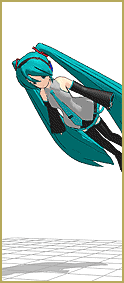
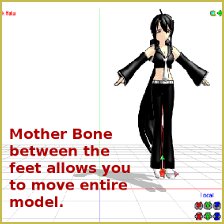
Whenever you load a model in MMD, the center bone is preselected (highlighted). At this point, if you clicked on the rotate selection in the Model Manipulation sub menu a red and blue bisected green circle and a hand popped up. Click on the circle and rotate the model. It’s rather hideous right? If you used the Box select, then the model would just rotate around the center. Please note that if the model has a Mother bone then, more often than not, it will be highlighted. All manipulations will then occur from that point and not the center. So make doubly sure that you have the correct rotation point. Now please stop abusing your model and let’s continue…You cannot use BOX-Sel to select a portion of a model. You must selectthe entire MMD model.
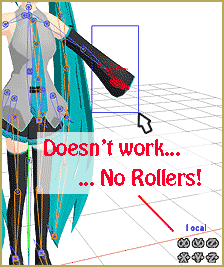
How to use the Box Select Function in MMD.

First, make sure your model’s center bone is selected. Now go to the Model Manipulation sub menu and click the BOX-sel button.

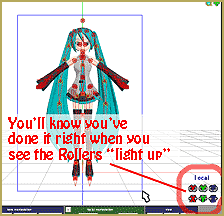
This next step is important. Click and drag a box around the ENTIRE model. If any part of the model is not within the box then it won’t work. You’ll know something’s wrong if the move and rotate buttons are greyed out.

At this point, you can now pick up, Use BOX-Sel to select an entire model in MMD. The rollers "light" when you have done it correctly.move and rotate the model and not worry about having the model’s feet and legs being pulled toward the center axis or at least not have them look like they were horribly maimed in an accident.


The biggest downside to the BOX select function is that it can only be used in concert with the center bone or Mother bone. You can’t BOX select multiple bone positions and copy/paste them to their opposite counterparts. You can’t use BOX-sel to rotate a model and their motion data to dance in a different direction. You can’t just pick up the model with preloaded motion data, place it elsewhere register the new position and have it stay there (Although it will stay, if the model has a Mother bone. Then again, just use the MB).

I’ll have to admit that I don’t use this function all that much. Although I could see that it might be handy if you’re setting up a BOX-Sel lets you select an entire MMD model so you can move her as you wish.multi-model screen shot. You could possibly use this if you’re making a skit in which your model is frozen with fear or trying to act like a statue. This could be useful for motion data involving some tumbling and gymnastic moves.  Another use would be if you want your model to fly through the air like a superhero.
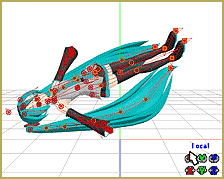
This is one of those functions that is good to know but not really used all that much. It’s kind of like knowing how to jump start a car; not a daily occurrence, but you’re glad you know how to do it when you need it.

Have fun trying this out.


– SEE BELOW for MORE MMD TUTORIALS…


— — —


– _ — –


Visit the LearnMMD.com Homepage! Plenty of Mikumikudance instruction and info!

More MMD Tutorials...

Running MikuMikuDance in Linux using Wine and DXVK

How do I run MMD on Linux? Does MikuMikuDance run on Linux? How do I ...read more

Delete Miku and Learn About the Sample Dance Stage Lights

How do I use the stage lights. Use Dummy Bones to move the stage lights. ...read more

Adding & Working the Stage Lights with Dummy Bones MMD MikuMikuDance

How do I work the Stage Lights in MikuMikuDance? LearnMMD Tutorials. How do I move ...read more

Collecting MMD Models, Music and Accessories for Beginners

How do you download MikuMikuDance models? How do you download music for MMD? How do ...read more

Looking Good with the MME Mirror Water Effect in MMD

Where do you get the MME Mirror Water effect in MMD? How do you use ...read more

How to Switch Models and Stages in MikuMikuDance

How do I switch models in the middle of a video in MMD? How do ...read more

ARIZONA, Move the Model with Box-Sel, Nuts & Bolts Tags:mikumikudance

Post navigation

Previous Post: Camera Motion Instructions 1 – MMD Basics
Next Post: Select the Center Bone if your MMD Model Doesn’t Feel the Floor

Related Posts

  • How do I use MikuMikuDance Make A Music Video with MMD Intro to MikuMikuDance
  • Haku sees things in black and white with the Manga Shader Effect
    Using The Manga Shader Effect for MikuMikuDance ARIZONA
  • Nyaa!
    Nekomimi: Getting Catty Miku Miku Style MMD Accessory Manipulation/Adjust
  • Physical Operations Tab in MikuMikuDance 7.39 Menu Options MENU Option Descriptions
  • Load Camera Motion Data VMD files using the File Menu in MMD ARIZONA
  • Audacity® 2.0 Audio Editor easily converts mp3 to WAV files for MMD Music and WAV Files

More Related Articles

Announcing The 2013 Momi Cup Celebration. ARIZONA
LearnMMD.com _ MikuMikuDance MMD Tutorials Learn MMD Basics before jumping into a big project! MMD Basics
Dummy Bones allow you to customize your accessory manipulations! Using The Dummy Bone for MikuMikuDance Accessory Manipulation/Adjust
Use MMD Memes to get Motion and WAV Files for MikuMikuDance! Downloading New Models
Updated LearnMMD Metronome Instructions for Use Metronome
Learnmmd.com hosts MMD Panel at San Japan 8 bit. ARIZONA

Comments (9) on “BOX-sel lets you select an entire model in MikuMikuDance”

  1. Rosy says:
    December 28, 2017 at 4:40 am

    For some reason, once I move the model once by selecting everything and clicking move, I can no longer move the model after I deselect everything and switch modes (clicking “to camera”). The move button is greyed out and I can no longer click it.

    Reply
    1. KillerBeer says:
      December 28, 2017 at 5:06 am

      Clarify: are you trying to move the model while in camera mode? Return in the model mode, select a group of bones (or turn on the individual select button and select am individual bone) and try to move then.

      Reply
      1. Rosy says:
        December 30, 2017 at 7:46 am

        No, I clicked back to model afterwards. If I deselect all bones, select just the center bone, then select everything again, the move button becomes available again but only for a short while before going away again.

        Reply
        1. bandages says:
          December 30, 2017 at 1:04 pm

          Would it be possible to upload a video showing what you’re doing and what the problem is? I’m trying to reproduce your problem with the following exact steps:

          1) Model selected, enable box select, draw box around model, move via transform buttons in lower right corner, register
          2) Switch to camera mode, switch back to model mode
          3) Select center bone from display panel
          4) Draw box around model
          5) Move model via transform buttons in lower right corner of screen

          Which works for me. Note that if I skip step 3, or instead select a bone that is not move-type, the transformations are grayed out, for which there’s an easy work-around: select a move bone (from the display panel), like the center bone, before box selecting all bones.

          Reply
  2. Simon says:
    February 19, 2017 at 7:00 am

    sorry, but i can’t use “box” to select or delete Bn-Bdy-J. If you have any idea about my problem, plz tell me. thanks (sorry about my English, Im Vietnamese )

    Reply
    1. KillerBeer says:
      February 19, 2017 at 11:22 pm

      Sorry, but without a detailed explaination of what your problem is, nobody can help you. First of all, are you talking about MMD or PMDE? If it’s about MMD, why would you need to select Bdy-J?

      What do you want to do with your model and why do you think that BOX-Sel is what can help you in that?

      Reply
  3. uriel says:
    November 29, 2016 at 9:16 am

    como se descarga estos modelos

    Reply
    1. KillerBeer says:
      November 29, 2016 at 10:06 pm

      Search deviantArt for “MMD model download” or maybe a character’s name if you have in mind someone specific. There are other places, but this one is big enough to find what you need most usually.

      Reply
  4. grace says:
    August 27, 2015 at 4:48 pm

    what is the thing called

    Reply

Leave a Reply Cancel reply

Your email address will not be published. Required fields are marked *

Download the latest version of MikuMikuDance!
See the MMD Step-by-Step instructions page!
Learn how to make your own MMD motions!
LearnMMD.com
  • Make successful MMD YouTube videos MMD Basics
  • MME fireintheskies effect
    MME FireintheSkiesEffect gives floating flame and embers! FireintheSkiesEffect
  • MikuMikuDance MMD Cage Stage Tutorial Downloading New Models
  • 3D For Cheapskates: Making stereo MMD videos without special equipment 3D Stereo Video MMD
  • Keyboard Shortcuts and Easy Moves Keyboard Shortcuts
  • Use M4Layer Effect to add multiple effects onto your MMD model.
    Apply Multiple Effects on an Entire MMD Model Using M4Layer Effect M4Layer Effect
  • Next Level in MMD Video Evolution
    Post-Production Editing Yields Next Step in MMD Video Quality Making Videos - Rendering to AVI
  • Once there was a war… the making of my “Paint it black” MMD video "the making of" my video

Copyright © 2022 Learn MikuMikuDance – MMD Tutorials – Free 3D Animation Software and Instructions..

Powered by PressBook Premium theme

Go to mobile version