
Skip to content
Learn MikuMikuDance – MMD Tutorials – Free 3D Animation Software

Learn MikuMikuDance – MMD Tutorials – Free 3D Animation Software

Download Free Animation Software – Let's Learn How to Do Everything!

  • Step-by-Step MMD instructions
  • DOWNLOADS
  • Troubleshoot, Fix MMD
  • Site Contents
  • Reggie Replies Q&A
  • Homework!
  • What IS MMD?
    • Download MikuMikuDance Newest Latest Version of MMD
  • “HOW TO”
    • Raycast RAY-MMD Effect Tutorials
  • BONUS PAGES
    • Why convert PMD models to PMX?
  • HALL of CHAMPIONS
  • Tutorial Categories
  • About
    • Privacy Policy
  • Toggle search form
  • Click to see Reggise Dentmore's MMD Folk Guitar images Full Size!
    Download Reggie Dentmore’s MMD Folk Guitar Accessory!! Google SketchUp and MMD
  • Beamman’s Breath Effect shows warm breath in winter Beamman's Breath Effect
  • New Getting Started with MMD Video on YouTube! Intro to MikuMikuDance
  • LearnMMD.com: The MMD Instructions you have been looking for! MMD Basics
  • Miku Short Film Featured
    Anime Shorts – Five minutes worth of animation, maybe three! Animation Shortcuts
  • Rigging Models with Appends using PMXEditor Bandages
  • Video Dojo Expo 1 Winner: Angel Dreams Video Dojo Champions
  • YouTube Audio Library supplies Free music Copyrighted Music
Get the LearnMMDMmetronome. It is a real help!

LearnMMD’s METRONOME is Ready to Download!

Posted on December 9, 2011July 2, 2024 By Reggie_Dentmore 1 Comment on LearnMMD’s METRONOME is Ready to Download!

How do I find the beat in my MikuMikuDance songs? How do I time my motions to the music in Miku Miku Dance 7.39? Is there a metronome for MMD 7.39?

LearnMMD’s METRONOME is Ready to Download!

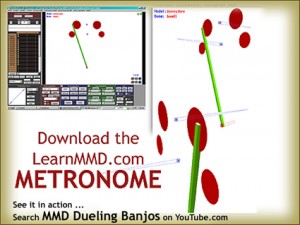
As I started my Dueling Banjos project, I knew I was in Get the LearnMMDMmetronome. It is a real help!for trouble! The tempo of that piece is constantly changing … faster and faster! I decided to make a metronome that I could tick-tock to the beat. It works!

Download your LearnMMD.com Metronome.

Read the Instructions Here!

The download includes a couple of accessory items: the dots and the baton. The wider-spaced dots are OK for slower music … and the upper dots work well when your computer can’t run MMD fast enough … when it lags … as you are trying to work.

Running this metronome would be the first step of a new project. Start NEW, load your WAV file. OPEN this LearnMMDmetronome.pmm dance file. Animate the metronome in time with your music.

You create this “dance” first … then add your models. After you have enough of your action in place, you can delete the metronome from your project. Download your free Metronome PMM dance file with accessories.
If you already have a dance that you want to refine … create the metronome dance on a NEW stage using the same WAV file … andsave it. Then copy all of the bone data to your existing dance.

The metronome uses Dummy Bones 1,2, and 3. You might have to reassign the bones to uses numbers not used in your existing dance.

OR … What I did on my Dueling Banjos project … I filmed a live action video of my grandpa clapping his hands to the ever-changing beat. I set that video as a background AVI … and then matched the metronome to the clapping while keeping an eye on the “scope” to better hit the beat.  It works. That will be a future post, here, on LearnMMD.com!

See my Dueling Banjo project on LearnMMD.com … check it out!


– SEE BELOW for MORE MMD TUTORIALS…


— — —


– _ — –


Visit the LearnMMD.com Homepage! Plenty of Mikumikudance instruction and info!

More MMD Tutorials...

Loading Background AVI Files into MMD (2021 Edition)

How do I load background AVI files into MMD?  What does it mean when MMD ...read more

Running MikuMikuDance in Linux using Wine and DXVK

How do I run MMD on Linux? Does MikuMikuDance run on Linux? How do I ...read more

How to subtitle MMD videos

How do I subtitle MMD videos? How do I make subtitles for my MMD videos? ...read more

Using the right codec when Rendering to AVI in MMD

What codecs do I use for rendering a video in MMD? What codec gives me ...read more

YouTube serves video playback quality to best suit your viewing-screen

What happens to your video after you've uploaded one to YouTube? YouTube serves video playback quality ...read more

Learn MMD Basics before jumping into a big project!

Learn MMD Basics before jumping into a big project! A reader wrote a comment... I tried to make ...read more

Animation Lag, Dummy Bones, Metronome, Nuts & Bolts Tags:make WAV files, metronome, music for MMD, rhythm, WAV files

Post navigation

Previous Post: LearnMMD’s MikuMikuDance Animated GIFs Now Collected as a Bonus Page!
Next Post: Find MMD Tempo using Metronome with AVI Video Background

Related Posts

  • PMD Editor Basics, now in English – Modify Your MMD Models! Nuts & Bolts
  • Using The Floor Light Art Effect in MMD. ARIZONA
  • Updated LearnMMD Metronome Instructions for Use Metronome
  • Delete Miku and Learn About the Sample Dance Stage Lights Dummy Bones
  • Smooth Walking Motion is getting easier! Make a Smooth Walking Motion
  • Everything is loaded and ready to "Play!" ... Happy Hands MMD Meme.
    Create an MMD Video using the “Happy Hands” Meme Making Videos - Rendering to AVI

More Related Articles

The Audacity Generate Menu lets you add silent breaks to you WAV file. WAV Files Make Your Music Play on MMD MikuMikuDance Music and WAV Files
Using the AdultShader Effect In MikuMikuDance Adult Shader effect
Delete Miku and Learn About the Sample Dance Stage Lights Dummy Bones
Keyboard Shortcuts to the Menus Functions-Copy-Paste-Expand
LearnMMD.com _ MikuMikuDance MMD Tutorials Learn MMD Basics before jumping into a big project! MMD Basics
Keep The Faith MMD Use proper MMD Etiquette when Downloading Models for MMD Intro to MikuMikuDance

Leave a Reply Cancel reply

Your email address will not be published. Required fields are marked *

Download the latest version of MikuMikuDance!
See the MMD Step-by-Step instructions page!
Learn how to make your own MMD motions!
LearnMMD.com
  • Easily Create Walk-in-Place Motion in MMD Animation Shortcuts
  • Miku wishes for a peaceful birthday!
    Happy Birthday Miku! ARIZONA
  • LearnMMD.com _ MikuMikuDance MMD Tutorials
    No need to “re-download” again and again… Random Thoughts & Visions
  • The Making of: Sleepover Gone Wrong (REMAKE) "the making of" my video
  • Hatsune Miku is 16 years old in 2023!
    2025: Hatsune Miku is 18… but she is designed to be always 16 Years old, by design and in reality! MMD Tutorials
  • MMD Elektrika Motion gets new life!
    Ancient MMD Elektrika Motion Gets NEW Life! "the making of" my video
  • Free AVIUTL Video Editing software adds animated titles to MMD Videos! Animated Titles
  • FFMPEG – Final Frontier For Video and Audio File Processing Background AVI

Copyright © 2022 Learn MikuMikuDance – MMD Tutorials – Free 3D Animation Software and Instructions..

Powered by PressBook Premium theme

Go to mobile version