

Skip to content
Learn MikuMikuDance – MMD Tutorials – Free 3D Animation Software

Learn MikuMikuDance – MMD Tutorials – Free 3D Animation Software

Download Free Animation Software – Let's Learn How to Do Everything!

  • Step-by-Step MMD instructions
  • DOWNLOADS
  • Troubleshoot, Fix MMD
  • Site Contents
  • Reggie Replies Q&A
  • Homework!
  • What IS MMD?
    • Download MikuMikuDance Newest Latest Version of MMD
  • “HOW TO”
    • Raycast RAY-MMD Effect Tutorials
  • BONUS PAGES
    • Why convert PMD models to PMX?
  • HALL of CHAMPIONS
  • Tutorial Categories
  • About
    • Privacy Policy
  • Toggle search form
  • Uploading MikuMikuDance YouTube Videos MMD Making Videos - Rendering to AVI
  • The Making of: Sleepover Gone Wrong (REMAKE) "the making of" my video
  • ZERO-GRAVITY Day on the beach in MMD!. Use Gravity Settings and Noize to make winds blow.
    Using the Gravity Settings in MikuMikuDance ARIZONA
  • LearnMMD.com: The Instruction Sheet you've been searching for!
    Use Google SketchUp to make DirectX Accessories in MMD Dummy Bones
  • Raycast Ray-MMD Toon Shader
    Ray-MMD Toon Shading Basics MMD Tutorials
  • Widescreen MMD “Kiss Me” animation too long but I wanted More! "the making of" my video
  • MikuMikuDance “Keep the Faith-MMD” MMD Tutorials
  • Use the Half-Lambert Shader effect for point-source lighting.
    MME Half-Lambert Shader Point-Source Lighting Effects Half-Lambert Shader

MMD MME Beamman Nameplate Effect

Posted on November 20, 2014February 9, 2018 By Reggie_Dentmore 4 Comments on MMD MME Beamman Nameplate Effect

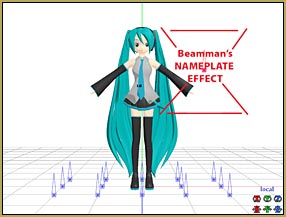
A Feature Article by Reggie Dentmore on LearnMMD.comHow do I make titles for my MMD videos? How can I float type over my MikuMikuDance animation?

Beamman’s Nameplate Effect

Let’s learn to use Beamman’s Nameplate Effect … it’s Easy!
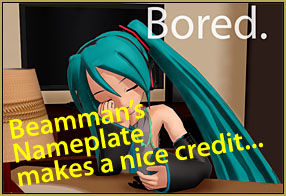
See Beamman's Nameplate Effect in action in my "Bored." video.

I first read about the Nameplate Effect on the now defunct Mikudance.info. I have used nameplate several times over the last couple of years.

In my “Bored.” animation, I used Beamman’s Nameplate for the opening and closing credits. Like many effects, Nameplate can be adjusted for size and transparency using the Si and Tr settings in the AMP … and it moves between your registered positions so that the size and transparency can change while you watch … this means that titles can appear to fade-in and fade-out. … Oddly, Nameplate cannot be rotated or moved to the front or the rear (Z-axis) … You can attach it to a dummy bone and then move it left/right/up/down … but, again, Z doesn’t work … and you cannot rotate it.

What it DOES do is stay in front, on top, and always faces the camera. You can swing your camera to change the view of your scene, zoom-in/zoom-out … while the Nameplate stays in place on your screen; unmoving, unchanged.

Download Beamman’s Nameplate Effect…

Beamman’s effect is available from http://www43.atwiki.jp/beamman/ and I have put together an English download for it on the LearnMMD Downloads page.

Make your Nameplate…
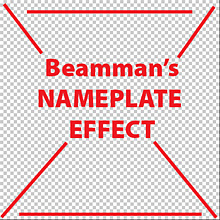
The Nameplate Effect requires a 512x512 pixel PNG file ... Transparency is OK.Create the art for your Nameplate. The image must be 512×512 pixels … and saved as a PNG. You can use transparency and transparent areas … Like set your type on a transparent layer and save as a PNG.

Nameplate uses three files: PNG, X, and FX

You create the PNG art file, yourself. You take the supplied Nameplate.x file and rename that file as the same as your PNG … and you take the .fx file and rename it the same name as your PNG … 

Let’s say you named your art file Art1.png. You’d rename your files:

  • Art1.png
  • Art1.x
  • Art1.fx

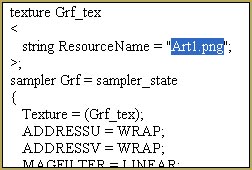
Rename the old FX file as a TXT. Edit the TXT file, save, and rename .fxYou DO have to EDIT the .fx file. To do so, change the file extension to .txt, as in our example: Art1.txt

Open that text file in Notepad or similar … and Control-F to FIND … and search for .png

Replace whatever .png file you find in that old file to your new file’s name. Close and Save. … Now change that file extension back to .fx

Let’s try it!


Open MikuMikuDance … Load a model (Miku, of course “:o) … Get into Camera mode and Load your nameplate .x … Art1.x in our example.

The effect should appear on the screen … but it MAY be UNDER your model, rather than on top.
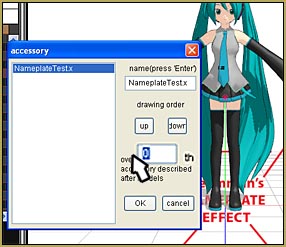
Use Accessory Edit to put your effect ON TOP of everything else on the screen.

Fix that by going to the BACKGROUND menu tab and choose the top item on the list: Accessory Edit.

Click on UP a few times to be sure it’s at the top of the list … and I set that digit to Zero, as shown in that picture.
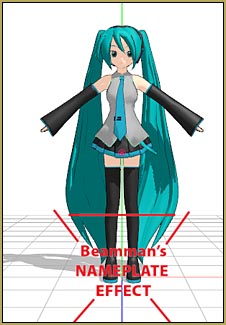
Nameplate On Top

Now we see our PNG image on top of everything on the screen.

Make the effect look bigger or smaller by adjusting the Si setting … and set the transparency using the Tr setting.

Attach the effect to a Dummy Bone … and move the bone to move the PNG into place.

Again, the effect can follow your registered commands … so set the Tr at Zero to make the effect invisible in frame 20 … and set Tr to 100% in frame 40 … press PLAY and watch as your image fades into being! … You can check/uncheck the DISPLAY box in the AMP to switch it off, completely.

Attach the effect to a Dummy Bone ... and move the bone to position your image.There you go!

You can load multiple instances of Nameplate … and create a kind of a slide-show by bringing them up, one after another … as in the closing credits of my “Bored.” video.


Enjoy Beamman’s Nameplate effect!


– SEE BELOW for MORE MMD TUTORIALS…


— — —


– _ — –


Visit the LearnMMD.com Homepage! Plenty of Mikumikudance instruction and info!

More MMD Tutorials...

Reader asks how to create MMD artwork... stuff like posing, camerawork?

A reader asks... Is there a tutorial on how to create MMD artwork, like those you ...read more

Learn MikuMikuDance in Small Steps! New LearnMMD Video Series

Learn MikuMikuDance in Small Steps. Where can I find easy-to-follow MMD instructions on YouTube? How ...read more

Apply Multiple Effects on an Entire MMD Model Using M4Layer Effect

How can I apply multiple effects to an MMD model? Can I use more than ...read more

MMD Plugin Manager... I Found a Treasure!

What sorts of MMD Plugins are there? MMD Plugin Manager? MMD Plugins. Plugin MMD. More ...read more

2023: Hatsune Miku is 16 Years Old by design and in reality!

Finally, in 2023, Hatsune Miku is 16 years old! When did Miku make her first ...read more

SEARCH LearnMMD.com... it's Easy!

Search LearnMMD.com to find your answers! With the posting of this article, LearnMMD.com has 758 tutorials ...read more

MMD Tutorials, Nameplate effect, Reggie Dentmore

Post navigation

Previous Post: MMD Credit Helper and PMMLookupper
Next Post: See my new YouTube MMD video “She’s So Hot!”

Related Posts

  • MMD Lip-sync is fun to do... just do it!
    MMD Lip-sync is fun to do… just do it! Animation Shortcuts
  • The MMD Pity Partry motion is free to download!
    MiyukiOhayashi’s Pity Party motion download includes WAV "the making of" my video
  • MME effect Kamitachi – Night breeze silhouette shader of Kama Kamitachi - Silhouette
  • Scrambled first frame of video must be Voodoo! MMD Basics
  • Painted Table Accessory Download Available Now Downloading New Models
  • Dramatically Decrease AVI File size before uploading YouTube videos MMD Tutorials

More Related Articles

Keep The Faith MMD MMD Models Rant Keep the Faith-MMD Credits/Sharing
New to MikuMikuDance? LearnMMD is The Instruction Manual for MMD! MMD Tutorials
Create models from OBJ files using Blender and PMDE .OBJ Object Files
Make Your YouTube Channel Popular with Engrossing Introductions MMD Basics
Beginner’s Guide: Using Ray-MMD ver 1.5.0 – Latest version of Raycast MMD Tutorials
MMD has an EXPAND function that lets you adjust a motion's speed. EXPAND function modifies MMD motion tempo EXPAND a motion

Comments (4) on “MMD MME Beamman Nameplate Effect”

  1. Will says:
    May 30, 2016 at 11:08 am

    Were do I find the Namplate .x file.

    Reply
    1. KillerBeer says:
      May 30, 2016 at 12:05 pm

      Either on Beamman’s homepage or in our Downloads page. Links are right here in the article. (Ours version has it renamed to NameplateTest.x, but that’s just the name)

      Reply
  2. rosechaaan says:
    November 21, 2014 at 6:13 pm

    Just a little something about the download link-if clicked it leads to learnnm.com/ blahbehdiblahbehdiblaaah, but if you change it to learnmmd.com/ blahbehdiblahbehdiblaaah, it should work.

    and blahbehdiblahbehdiblaaah is not actually in the links, i was just lazy. ^u^”

    Reply
    1. Reggie_Dentmore says:
      November 21, 2014 at 8:51 pm

      Rosechaaan – Thank you for pointing out that bad link … I just fixed it!

      Reply

Leave a Reply Cancel reply

Your email address will not be published. Required fields are marked *

Download the latest version of MikuMikuDance!
See the MMD Step-by-Step instructions page!
Learn how to make your own MMD motions!
LearnMMD.com
  • Be a responsible MMDer … “Keep the Faith!” Welcome to LearnMMD.Com!
  • Make MMD Model Hands from scratch in Blender Blender
  • Build Your Own Stage For MMD Using SketchUp Google SketchUp and MMD
  • Click to see the new Getting Started with MMD Video on YouTube!
    Getting Started with MMD Video on YouTube! MMD Basics
  • Switch Models without Physics Glitches Accessory Manipulation/Adjust
  • How to sign up and Upload to Piapro! HollyLawliet
  • Japanese MMD mod allows Automatic Breathing action in MMD models MMD Tutorials
  • How to make multi-part videos in MikuMikuDance Animation Shortcuts

Copyright © 2022 Learn MikuMikuDance – MMD Tutorials – Free 3D Animation Software and Instructions..

Powered by PressBook Premium theme

Go to mobile version