






 What’s the deal with the new PMXE 0254f? I can no longer do this and that in it! What is new in PMXE 0254f… the new PMXE in English?
 PMXE 0254f: Meet the new boss, same as the old boss
(or not completely)
Up until recently, we’ve been recommending the 0222 version of PMX Editor to our readers for editing their MMD models. Even though more advanced versions had been released since then, this one had much more comprehensible English translation (made by EosCustom3D), and therefore was more preferable, especially for beginners. Well, no longer. From now on, our Downloads page PMXE link leads to the newer English translation, courtesy of Inochi-PM. This is a 0254f version, currently matching the latest Japanese release on the PMXE homepage while the latest version 2.7 is only available in Japanese at the homepage. Remember to UNBLOCK the ZIP before you extract all.
This is the latest version of PMXE in English… but still, upgrading to the newer PMXE has its difficulties. Along with newer features (that one can simply put aside, until he really needs them), there are features that model-makers got used to, and that work differently now, causing confusion.
Morph Editing now on one panel…
First, there’s morph editing. Previously, it was performed in a two-panel Morph Edit window, with left half being the field of operation, and the right one displaying changes dynamically. Now, the newly summoned SubView window only has one panel that receives no edits no matter what you do to it. Don’t worry, it’s still simple. All changes are performed in the *main* PMXView window (that is updated with the 100% state of the morph you chose to edit while the Editing mode is on), and the SubView demonstrates changes like the former right pane. You can simply place it on the right side of PMXView, giving it semblance to the familiar two-pane look.
Batch Renaming has a new look…
Second feature that was changed is Batch Renaming. Compared to the old Name Repair panel, the newer one is much more powerful and easy to use once you get accustomed to it.
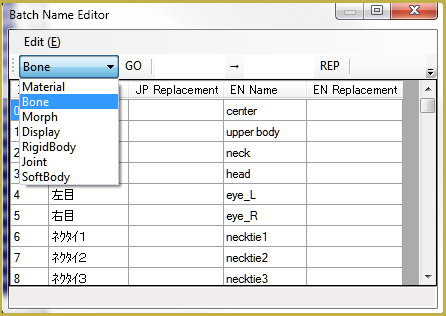
Choose the group of names you want to edit in the dropdown list to the left. “JP Name” and “EN Name” columns display the current state of all names, while you enter changes into the “EN Replacement” column (or “JP Replacement”, if there’s such need). Once you’re ready, hit “GO” button. You can also use the “Edit->Japanese Name – English Name” menu command to rename most of standard-named Japanese bones into English with a single click (you may still need other means for translating bones with non-conventional names, though).
“File->PMX info” now reports in English…
Bonus feature is “File->PMX Info” command, inspecting the model for possible errors. While present in the previously promoted version, it had its output in Japanese, thus making its usefulness not quite obvious. Now that it’s fully translated, we urgently recommend it to every MMDer who wants to make their own models.
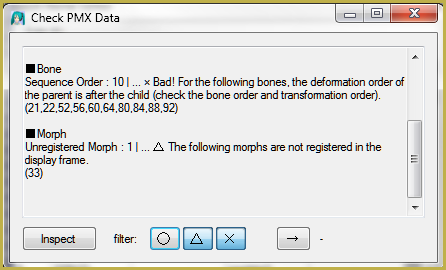
More to learn about PMXE 0254f …
… please share your discoveries!
If you notice some other features that act differently from the previous version to the point of being incomprehensible, report them in comments. The page will be updated accordingly.
The title picture uses:
Miku by Animasa.
Hiratabashi Station Stage by AkitaFanZ.
– SEE BELOW for MORE MMD TUTORIALS…
— — —
– _ — –

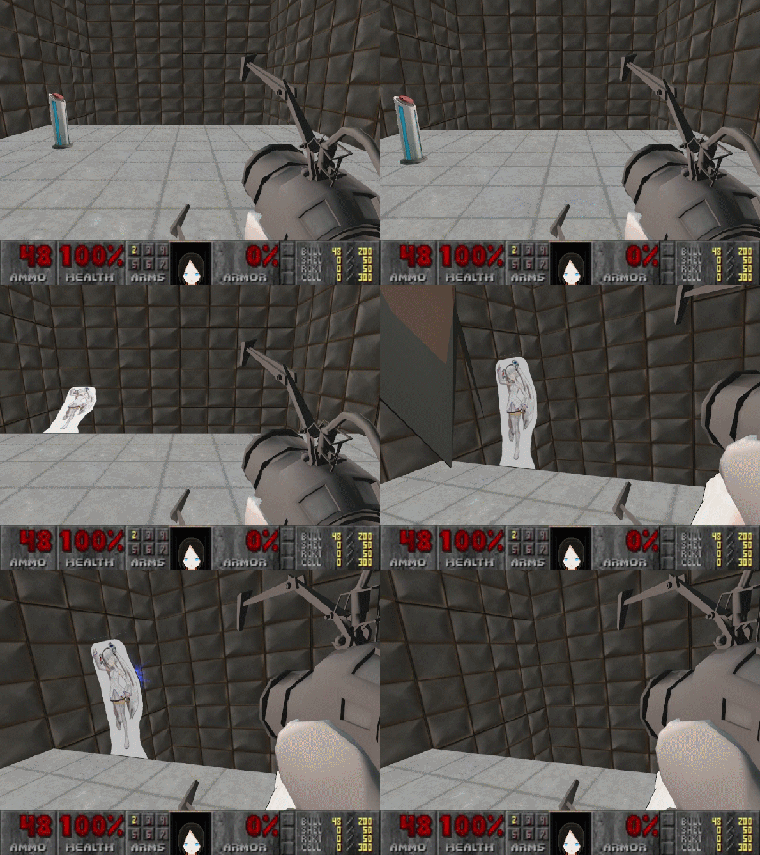
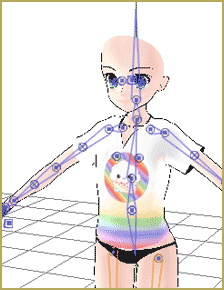


I’m having issues applying a morph and getting it to save. I go into the Transformation View, click the morph I want to apply, set it to 1.0 and it appears correctly. However, when I go to File->Save Model (S) and save the file with the “_ShapeChange” suffix added on, the new file does not have the morph applied. What am I doing wrong? It’s something super obvious I guess. I don’t get any errors, either.
Looks like only material morphs are not applying for this model. Vertex morphs work. Does PMXEditor not support it? It previews okay, but I’d like to save the model with the clothing changed so I can import it into Blender.
If you want a permanent change of clothes, why bother with a morph? Just change the color or transparency manually, save the model under a different name, and use it for Blender. Morphs are for altering a model dynamically in MMD, first and foremost.
Confused noises ;
I thought this place was inactive sksksks
I have a parameter error in pmx editor, when I put 0.1 it does not recognize 0. and it only puts 1
Make sure your Regional Settings are set correctly: dot for decimals, comma for thousands.
https://learnmmd.com/wp-content/uploads/2016/03/regional1.gif
it crashes when i try to open it
mmd works fine, but not this-
what should i do?
“Crashes”… do you get an error message? What does it say?
Hi, can someone please help me? People on discord and even Reona have been trying to help me but the my PMX Editor and faceforward plugin are not working. Please help, maybe someone her knows why. Here is a tutorial and I do this exact same process but nothing changes. https://youtu.be/wvUif8PGMhM?t=53
If you watch the part of the tutorial (0:53-2.30) about faceforwarding you will know what I am after. If any of the staff here read this and don’t have any suggestions, then please tell me in a reply here so that I don’t have to get my hopes up and check the page every day. Thank you.
As for me… I have no idea about the FaceForward plugin. … but we get about 20,000 visits a week… maybe someone, someday, will be able to help you.
— Reggie
Hello can someone please help me find the incredibly important PMX Editor plugin faceforward1.2. I need it. I searched google and no sites that mention it.
Nevermind, I found it. Here is a link for anyone interested. It is the most important plugin for beautiful face shaders. https://seiga.nicovideo.jp/seiga/im3688501
Ok so I get error messages that tell me “Direct3D initialization failed- Could not load file or assembly ‘PmxNLib.dll’ or one of its dependencies. The specified module could not be found.”
Then when opening the vmd window to model test motions it says Failed to read model file. Initializaion failed. Then brings up my model with it’s hair all pulled toward the center like magnetic filings around a magnet stick with N/S labels on it.
It doesn’t do this to my other computer. This computer is brand new so setting it up for MMD and PMX is a hassle/hazard.
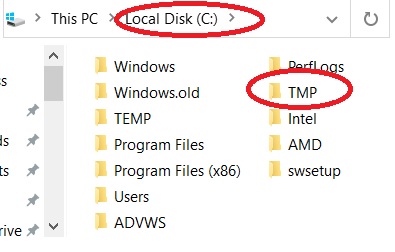
I have looked into this before… and after a Google search I find that it is not an MMD/PMXE issue… it’s a “system” issue on your end. … To be sure, Please follow the proper steps to install MMD on your computer… run the DirectX 9c runtime and the required C++. … Know that these are Microsoft files designed to cooperate/cohabitation with your modern computer… they are safe. Before you run the downloaded DirectX .EXE file, be sure to put a blank folder named TMP onto your C drive … C:>TMP … and when that DirectX software asks you where to SAVE it… That’s the place.
Got it. fixed everything by installing the 2013 one. That was the only one I was missing. Silly me ^_^
Hello, recently got into MMD but can’t seen to get Pmxeditor to work. i have installed everything according the downloads page but when i try to launch Pmxeditor_x64.exe, im met with a error massage “Direct3D initiaization failed – D3DERR_INVAILDCALL: Invaild call (-2005530516)”, followed by a “Failed to initialize plug-in”. Any help would be much appreciated :)
Hello! … I Googled “Direct3D initialization failed” and saw several links and ideas… it’s not a PMXE issue… it’s an issue with your software. Please do a bit of research on Google to see if your exact issue is mentioned in a forum someplace. …?
Anyone knows how to translate the pmxe program into English cause pmxe v.257 is already out now
THAT is a tall order… a translation doesn’t just “happen”. … 0254f IS the latest translation of a PMXE version known to work well. Updates do come along but they are not necessarily stable or solid. … my advice?… stick with 0254f. … or: work with the Japanese language version, work on your Japanese.
First, as Reggie said, v.254f is a pretty stable and well-translated version, and you better stick to it, at least for a while. Prior to it, there were several versions released in a course of few months, so it’s quite possible that v.257 as well will be not the latest one long enough for the translation of it to make sense. Once the new stable version is established, a new translation can be done.
Second, in case you’re impatient and adamant on using only state-of-the art versions (nothing wrong with that, mind you :D), here’s the gist of it. There are two ways of translating PMXE. One is to open relevant .dlls in the dnSpy editor (perhaps there are other options, but I’m not aware of that) and replace all Japanese strings by hand. This is how the current translation was done, and while it allows for very thorough work with compensating various glitches due to varying Japanese/English string lengths (and even making certain fixes to the code itself), it’s a very tedious process that probably won’t be repeated again, at least not until the aforementioned stable version is reached. The second way is how ibozo (the author of the previous “champion” translation) was using. It has some innate problems that can not be fixed (for example, two different places may have the same Japanese title, but have to be translated differently due to their context; it is quite easy for the manual method, but not possible here), but it’s automatized and only needs attention for new parts to be translated. A couple of years ago I tried to make an improved translation of v.254f (ibozo’s was mostly Google-powered) and uploaded .txt files necessary for compiling a translation using his method; they can be used for the newer version as well. You’re free to try to use that. I kinda stopped working on that translation after a while, but if the newer PMXE proved to have some significant improvements (and no newer manual translation is attempted) I may return to that.
I got a model if I only open and save it, some surfaces get deleted. Any ideas why? It does have errors
■Face
N/O Faces : 434 | … × Bad! Please correct the illegal surface.
N/O Overlapping Faces : 2 | … △ Modification of overlapping surfaces is possible.
I don’t know how to fix these.
This article should help you ^^
https://learnmmd.com/http:/learnmmd.com/pmxeditor-pmxinfo-analyzing-optimizing-mmd-models/
hey, im having a lot of problems with the font size, its rlly big and it covers everything
https://www.deviantart.com/n00b-toshi/art/Fixing-Big-PMX-Editor-Display-Icons-767888450
Hello author. Can you please tell me how to take a part of a model in pmx editor? Thankss
Please see these two articles… … they might help you.
I got MMD to work perfectly fine but whenever I click on PMX, it will had a load bar and then nothing will happen. No error message or anything. Last I checked I thought I downloaded the right material. I just know I tried different versions and it all ends the same.
Not making sense: “I just know I tried different versions and it all ends the same.” What different versions? … and tell us about your computer; maybe it doesn’t have the guts required to run PMXE.
What all do you want to know? Mine is a 64 bit Windows 10 and I run it on a Macbook. I meant to say I downloaded different 64 bit English PMXEs, even the latest ones. Am I not extracting the files correctly or my computer is just weak?
I downloaded and everything went smoothly! im happy about it BUT… it isnt translated. is there a way to fix this?
I don’t know how that can be… I just re-downloaded it… intentionally did NOT check Properties and unblock the zip… then did extract… got new folder… opened the folder and ran the 64-bit version… English. Then I did a right-click/properties on the zip and, this time, checked the Unblock box… did an Extract… opened the new folder and ran the 64-bit version… English.

Sorry… I got no idea.
What do you mean “not translated”? It’s in English.
Hello! For the last week, I have downloaded so many different versions of PMD/PMX Editor and I can not seem to get it to open. I do have a Windows 10 64-bit and was wondering is there an Editor for this particular computer and if so, how can I be able to get it to open? Thank you!
What do yo mean “cannot get it to open”? What happens? Error message??… Does your computer run MMD OK? Do you have the proper C++ and the DirectX 9c Runtime installed?
my mmd and pmd editor works fine but the english pmx editor does not work ,nothing pops up when i launch i have tried different pmx editor installer but its all the same ..
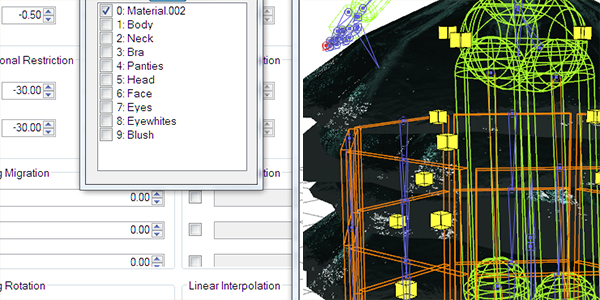
You can also hide certain bones, physics, and joints just like the material tab