
How do I use special effects in mikumikudance? Where do you go to get MME effects for MMD? LearnMMD MME Tutorials. What are MME effects and how do you use them?
Playing with MME – Using the Basic Effects for MMD
Hello fellow MMDers!! (^^)
You might be extremely fascinated with the various effects that are used in MMD videos that you see on YouTube. Here I am going to show you how to use the basic effects in MME; before we get into the more sophisticated ones. =)
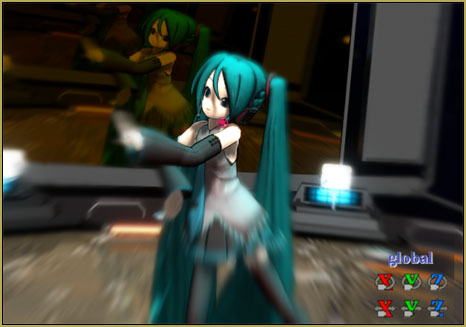
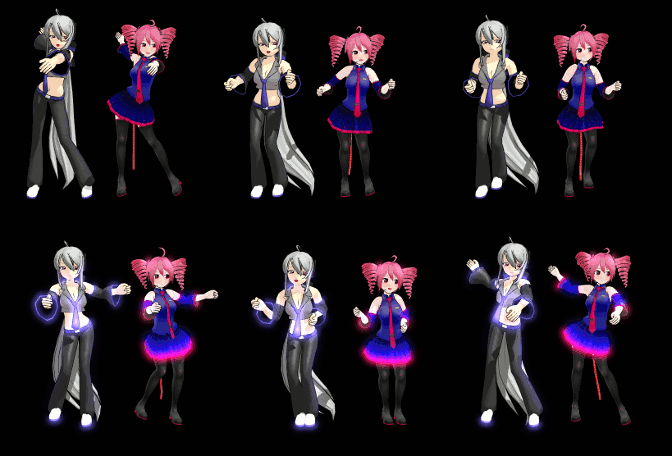
First we will start with the popular “Diffusion” effect! This effect is very gentle and is known to make the models look softer, giving the screen a bit of a soft blur.
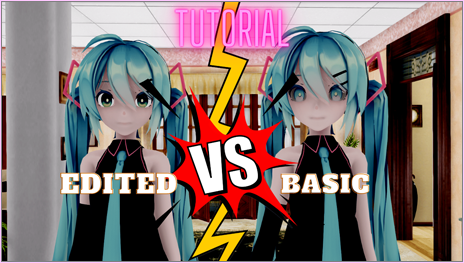
In this picture I have tried to show you the “Diffusion 7” effect. I used the version 7 as it gives a clearer view than the previous versions!
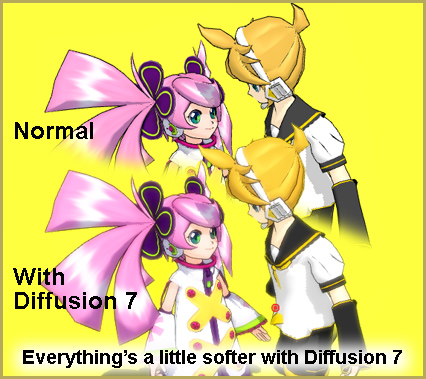
Download the effect here.
Diffusion7
(https://onedrive.live.com/?id=EF581C37A4524EDA!108&cid=EF581C37A4524EDA) You have to login on that page… it’s free. When you do login, that full page will be there. LearnMMD is now hosting Diffusion7. You can click the tiny “Download” at the top to get the entire lot of effects or you can download just the one you want.
Select Diffusion 7: [It is just below Diffusion 6]
Now to use this effect:
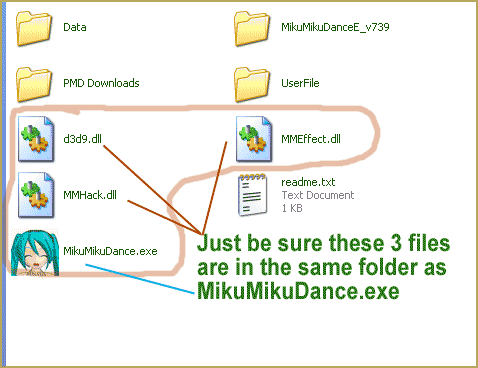
1. Open up MMD and load a model. [REMEMBER] MME effects will only work for the users who have installed MME into their computer and have interlinked it with MMD. DOWNLOAD MME Effects (MMEffects) from LearnMMD’s Downloads page!
2. Under “Accessory Manipulation” click on load; and then go over to the file in which you have saved your diffusion effect file.
3. Once you have found the file, open the file and click on the “Diffusion.x” file and the effect will be loaded!
And now you will have your model looking softer at the edges with a gently blurred look! (^^) … You can turn the effect off and on using the Display check-box. Be sure to Register when you click/unclick the Display box.
These steps can be applied to the Snow effect and the Blizzard effect.
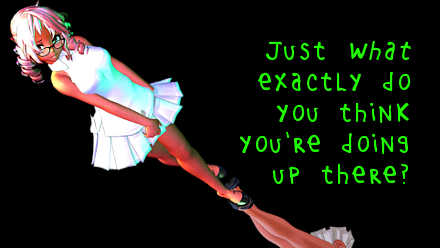
Refer to the pictures to see how the effects look!
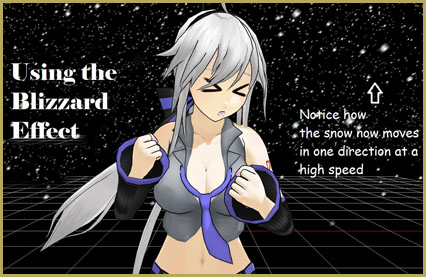
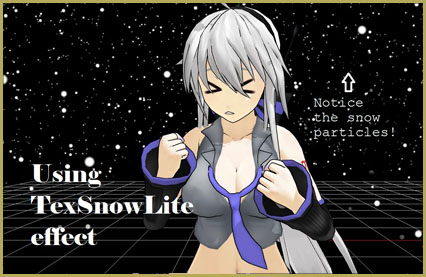
Also, below, is a lovely effect known as “Falling Hearts” where hearts replace the snow!!
This effect was made by an MMDer named RinnyKagamine!
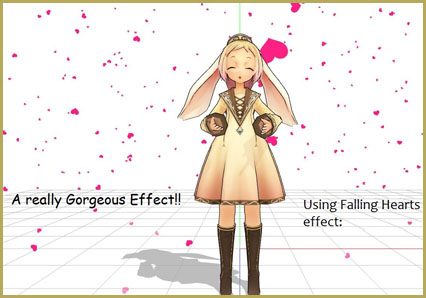
Download link for the “Falling Hearts” effect:
http://www.mediafire.com/?po8b54zlsm3l51l
Refer to her site for other effects too!
http://rinnykagamine.tumblr.com/effects
I will explain about other effects that are to be applied to the model manually in the next article of the “Playing with MME” series!
If you have any trouble with these MMD Effects, email your questions to ReggieDentmore@aol.com and I will help you with any of the effects. I’ll try to sort out any problem that you may face.
Also … don’t be afraid to experiment with new effects. That is the motto of an MMDer!! *laughs*
You will learn more about MME faster that way!
– SEE BELOW for MORE MMD TUTORIALS…
— — —
– _ — –



My effect won’t load and tells me it has failed to do so in a lengthy paragraph. How do I fix this? They used to work with my first comp for mmd but ever since then, they don’t work anymore.
https://gyazo.com/746747a0f626e77ad2819e600be54b90 something like this
Can yo use other effects, or MME is not functioning for you at all?
I can use other effects yeah. But some effects do what that picture shows.
What is the effect you’re having a problem with? The screenshot says “CDS”, but I’m not aware of such thing and Google doesn’t help much either.
It came from the CDS Stage. Reflection is the effect. But as I said: It’s not the only one that does this. Several others do. If you have a discord, I’d be more than willing to show you all of my effects that do these “I don’t want to load errors”
Well, before we get this intimate, quick check: see your Regional Settings for decimal point/digit grouping symbols. MMD expects them to be set in a particular way.
Alright, I checked that and that is all like you have it in the pics. Now, I have checked something (As I am from when 739 was the only one you could use) and 739 loads the reflection effect and the other “Failed” effects just fine. If you have *any* other answers other than what my findings have shown, I’d be grateful.
You lost me there. WTH does “I am from when 739 was the only one you could use” mean? What’s 739? Is it something related to the stage? And what the damned stage IS? I googled “MMD CDS”, “CDS STAGE”, “CDS ver 1.1”, even “CDS BottledWottle” and “checkered dome stage” (assuming it *is* one from googling results) and only got shit. I’m afraid that for comprehensive answers you’ll have to provide comprehensive information, and not dispensed by an eyedropper.
739 is a version of MMD. And CDS ver 1.1 is the stage. I have several copies of it by sheer accident. https://gyazo.com/6842fcb9c3ae8da19fcf91b8172e45ea Stage in question. I am really not sure how my information isn’t comprehensive, but here’s your proof that this stage does indeed exist. https://gyazo.com/270b8ed07a1ee4b087f4fcb483059201 this is a shot from my Miku Miku Dance v739 folder https://gyazo.com/6829eadb494364639aa9ae788e48ba56 A shot from the old Miku Miku Dance 739 where the effect and stage all work together https://1drv.ms/u/s!ApFx1TCc0lefgWv-_8IHLVlF7j63?e=6rSIPT The stage you can’t find so I found it in my back up folder on onedrive https://gyazo.com/9b894c5650eb88c235416d2c0f437d42 Me trying to load the stage in with the version of MMD called 931 (the newest version doesn’t agree with my 3 year old laptop) I hope all of this helps you out.
I have to send a number of links and the comment keeps getting deleted.
Ok, the problem seems somewhat clearer.
The error message means that in the body of the effect some entity was declared twice. In the 03_reflection.fx file you can find the following code:
technique MainTec string MMDPass = "object"; {pass DrawObject{
VertexShader = compile vs_2_0 VS_Mirror();
PixelShader = compile ps_2_0 PS_Mirror();
}
#if(UseXShadow != 0)
pass DrawXShadow{
VertexShader = compile vs_2_0 VS_Mirror();
PixelShader = compile ps_2_0 PS_XShadow();
}
#endif
}
technique MainTec string MMDPass = "object_ss"; {
pass DrawObject{
VertexShader = compile vs_2_0 VS_Mirror();
PixelShader = compile ps_2_0 PS_Mirror();
}
#if(UseXShadow != 0)
pass DrawXShadow{
VertexShader = compile vs_2_0 VS_Mirror();
PixelShader = compile ps_2_0 PS_XShadow();
}
#endif
}
As you can see, “MainTec” is declared twice, which is the problem. Not sure why, but the earlier version of MME let this slide, while current does not. By renaming any of them into something else, you can make the error message go away and the effect load. Unfortunately, I’m not an HLSL programmer and can’t deduce what the effect author *wanted* to achieve, why did he include two definitions of MainTec (the fact that they are placed next to each other rules out the assumption of mere negligence), and how can it be resolved. If what you see when applying the renaming solution satisfies you, just go with it.
I must stress that this particular issue is an error in the effect itself, not in your MMD/MME setup. So if you have problems with different effects, it must be investigated further.
When I load up diffusion, the plain white background turns black. How do I keep the white background with diffusion?
You can not “keep” it, but you can load a plain white image file as a background to override blackness.
Is there a way to bring the falling effect in front of the model instead of only in the background behind model/stage?
Select “background->accessories edit” and experiment with accessories’ drawing order and the “over Nth accessory described after models” setting in particular.
I have a question. For having the falling effects, is there anyway to make it continuous? I have this sakura petal falling effect and it only lasts for a little while. Trying to make it start again makes it look very awkward. Anyway to fix this or make it a less awkward transition? Effect being used: http://akitafanz.deviantart.com/art/MMD-Subtle-Sakura-Neighborhood-Platform-DL-323162814
The effect is indeed awkward… in fact it’s not even an effect but a model with a preset motion file. Enhancing it for a longer period of time is… not quite impossible but involves a lot of menial work. How about simply using a different effect for sakura petals? Beamman has a nice one, for example.
Hi, I am quite new to using MME… Is the OneDrive down or something? I cannot see the files there
The link has changed… now it’s
https://onedrive.live.com/?cid=EF581C37A4524EDA&id=EF581C37A4524EDA!108
… I have fixed the link in the article… Thank you for your note!
I’m asking about the snow effect. I saw this video where falling snow was falling at a slower pace than usual, the same with the falling glass effect in the video. How did they do that?
Open Falling hearts.fx file in a text editor and find a following fragment:
float Speed

 = 10;
Replace “10” with another value more suitable to you and save the file.
And if you feel adventurous, read the following article to learn how to make an universal customizable effect once and for all:
https://learnmmd.com/http:/learnmmd.com/customize-mme-effects-by-editing-fx-files/
Sorry, the engine mangled the code fragment I tried to post above. Trying again:
float Speed
= 10;
Damn. Once more:
float Speed
\ = 10;
float Speed
<
string UIName = “Speed”;
string UIWidget = “Slider”;
float UIMin = 0.0;
float UIMax = 40.0;
> = 10;
Hi! I’m actually new to MMD. Well, maybe an old pro who has shrunk down to beginner level again xc. This tutorial helped me get back into the world of MMD, so thank you~!
That’s awesome … sometimes we forget that MikuMikuDance is fun!
Hi there Julia! I have just emailed you. I hope we can solve your problem together :)
When I open Deffusion 7 as an acsessory, it comes out as a small red sqare and nothing actually happens. help please!
Actually, the Accessory Edit screen should already say “0”. Just hit “OK”. If it doesn’t say zero, do what Reggie recommended.
I have passed you question to our authors … stand by for emails! What effect has the problem for you?
Use the Accessory Edit screen in the Backgrounds tab … select your effect, there, and set that little “1” near the bottom of that panel to “0” zero … that should do it. … Yes?
Page really helped!! Just wanted to ask why do the effects go THROUGH the model…? I mean, I’ll set it in front of the model and it’ll just not show up and it looks like it’s behind the model ;-; I need help *rolls on floor*
I wasn’t able to use “Diffusion 7” because the site was down. But I did learn how to use MME on other effects. Again, thank you for making it simple to comprehend.
Scott
Thank you, Scott … Thank you for checking into it and trying out the effects. I visited all of the sites and determined that they were working before we posted the article … so go ahead and try ’em again, they should be OK. I am looking forward to posting YOUR article one of these days “:o).
Thanks so much for putting up my article! :D
I love your edited picture, it looks so cute and lovely!!
It’s a nice post. Thank you for writing it! I hope people will try out all of the effects!