


Skip to content
Learn MikuMikuDance – MMD Tutorials – Free 3D Animation Software

Learn MikuMikuDance – MMD Tutorials – Free 3D Animation Software

Download Free Animation Software – Let's Learn How to Do Everything!

  • Step-by-Step MMD instructions
  • DOWNLOADS
  • Troubleshoot, Fix MMD
  • Site Contents
  • Reggie Replies Q&A
  • Homework!
  • What IS MMD?
    • Download MikuMikuDance Newest Latest Version of MMD
  • “HOW TO”
    • Raycast RAY-MMD Effect Tutorials
  • BONUS PAGES
    • Why convert PMD models to PMX?
  • HALL of CHAMPIONS
  • Tutorial Categories
  • About
    • Privacy Policy
  • Toggle search form
  • "Departures" meme for MMD is a beauty! Memes are like KITS for MMD!
    Departures Meme Is a Beautiful MMD Project "the making of" my video
  • Convert VRoid Studio to MMD Header Image
    Convert VRoid Studio to MMD With One Click Mae Blythe
  • Visit Krystal-Sakura on Deviant Art to get "Sparkly Eyes" for MMD 7.39
    Change a Model’s Eyes Using MMD Eye Packs in MikuMikuDance NOKO2
  • MMD Project “I WANNA PARTY!” features great motion files by o Savvy o "the making of" my video
  • Be a responsible MMDer … “Keep the Faith!” Welcome to LearnMMD.Com!
  • Happy Birthday Miku (16 Again) … Miku’s Birthday Intro to MikuMikuDance
  • Using The Floor Light Art Effect in MMD. ARIZONA
  • MMD Animation Project Resource Ushimitsu Toki Animation Resource

New Interpolation Curve Video was fun to make!

Posted on September 3, 2015September 21, 2023 By Reggie_Dentmore No Comments on New Interpolation Curve Video was fun to make!

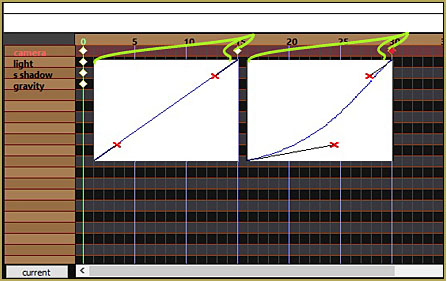
A Feature Article by Reggie Dentmore on LearnMMD.comWhat is an interpolation curve? Why would I use it? What do I do with the interpolation curve in MikuMikuDance?

I had fun animating this crazy little sequence showing the value of the interpolation curve.My new Interpolation Curve video was fun to make!

I got inspired to bang-out a quick little video tutorial to help explain the use of the interpolation curve in MMD.

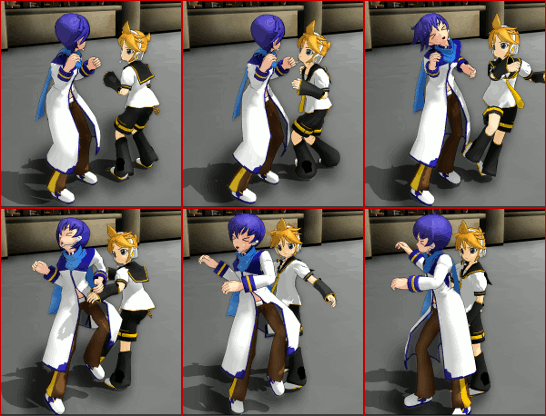
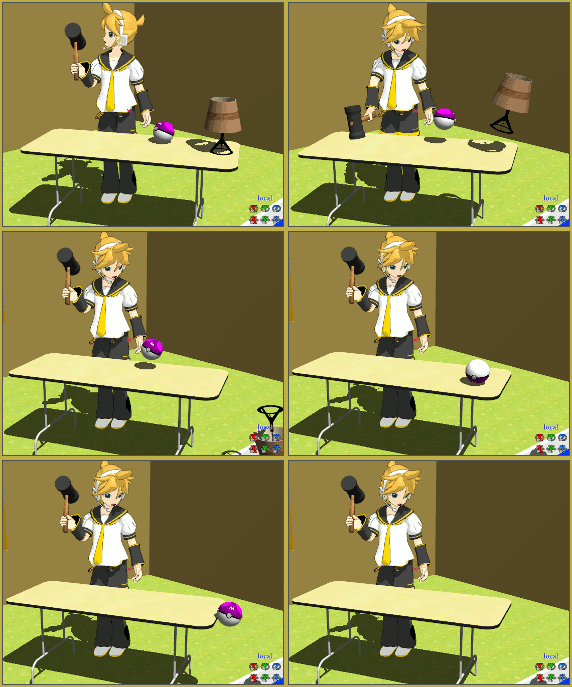
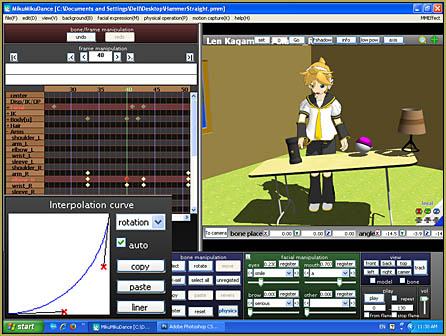
And I mean “Bang-out”… ! … I used Len swinging a big hammer to demonstrate the look of a motion without … and with… the use of the interpolation curve. The video opens with the simple motion looking robot-like as Len slams the hammer on the table… then I show the same animation with the only difference being the acceleration curve added to the right elbow motion… looks so much better!
HammerAnimation

The FUN part…

I had fun making the little video as I animated the “hammer pounding the table” motion. I intentionally put a couple of items onto the table so they could react to the impact… with all items including the table attached to dummy bones. The motion happens pretty quickly: the hammer hits the table and lingers there for three frames before lifting back up. During that impact moment, the table is pushed down a little and then “bounces” up a little and rolls a little and then sets back down onto the floor… and those items on the table I animated so as to make them bounce onto the floor. Stupid fun to animate!

The noise…

For the sound effect, I brought a bunch of junk from the garage and stacked it next to my computer’s microphone… and I whacked the junk with a hammer while recording into Audacity. I also scraped the side of a plastic coffee can for the ball-rolling noise. I had something like 10 recordings to sort through and assemble for that one little moment. Amazing how complicated that noise was… I overlapped several tracks to get the sound I wanted. Again… stupid fun.

Short and longer…

That animation is only 160 frames… twice: once with the straight curve, and once with the acceleration curve… but my finished video is over two minutes long!

When I created my finished video, I put it together in Windows Movie Maker on my old XP computer. I added title screens and repeatedly inserted my two little video clips between the titles… with no music or over-voice, I feel the little video communicates my message very well.

— Enjoy!


– SEE BELOW for MORE MMD TUTORIALS…


— — —


– _ — –


Visit the LearnMMD.com Homepage! Plenty of Mikumikudance instruction and info!

More MMD Tutorials...

Enjoy the "camera Angles WEIRD in Anime" meme...

Enjoy the "camera Angles WEIRD in Anime" meme... This image is from The Slayers - NEXT, ...read more

Reader asks how to create MMD artwork... stuff like posing, camerawork?

A reader asks... Is there a tutorial on how to create MMD artwork, like those you ...read more

Learn MikuMikuDance in Small Steps! New LearnMMD Video Series

Learn MikuMikuDance in Small Steps. Where can I find easy-to-follow MMD instructions on YouTube? How ...read more

Apply Multiple Effects on an Entire MMD Model Using M4Layer Effect

How can I apply multiple effects to an MMD model? Can I use more than ...read more

MMD Plugin Manager... I Found a Treasure!

What sorts of MMD Plugins are there? MMD Plugin Manager? MMD Plugins. Plugin MMD. More ...read more

2025: Hatsune Miku is 18... but she is designed to be always 16 Years old, by design and in reality!

Finally, in 2023, Hatsune Miku is 16 years old! but in August of 2025, she ...read more

"the making of" my video, Making Smooth Motions, Making Soundtracks, MMD Tutorials, Reggie Dentmore, Using The Interpolation Curve

Post navigation

Previous Post: The Power of Beamman’s Post Movie Effect
Next Post: How do I use MikuMikuDance Make A Music Video with MMD

Related Posts

  • Make Smooth Animation Using Interpolation Curves Making Smooth Motions
  • Translate Romaji for better English translations Navigating Japanese Pages
  • Ray-MMD Painting with light!
    Ray-MMD: The Art of painting with Light MMD Tutorials
  • Intentionally Build Dramatic Atmosphere into your MMD Animation MMD Tutorials
  • My new “Ring Around the Moon” MMD video is on YouTube "the making of" my video
  • My new MMD Action Video was fun to make! "the making of" my video

More Related Articles

MMD 8.06 Low Power button allows you to Multi-task MMD Basics
modified MMD effects can yield NEW surprises! Modified MME Effects Files yield NEW Effects for MMD! Customize MME effects
MMD Rotate object 360-degrees part 2 MMD Rotating Objects 360-degrees -Miku’s Guide to the Galaxy (Part 2) Making Smooth Motions
Use Center Position Bias to Move Models in MMD ARIZONA
Barbarians disregarding creative rights destroy MMD for all of us. Keep the Faith-MMD Credits/Sharing
Customized Skydome replace stages, enhance MMD animations MMD Tutorials

Leave a Reply Cancel reply

Your email address will not be published. Required fields are marked *

Download the latest version of MikuMikuDance!
See the MMD Step-by-Step instructions page!
Learn how to make your own MMD motions!
LearnMMD.com
  • Video Dojo Expo 1 Champion
    Video Dojo Expo 1 Winner: EmberAce216 EmberAce216
  • Customize MME Effects by Editing .fx Files Customize MME effects
  • Announcing The Momi Cup 4! ARIZONA
  • First Steps for the Beginner MMD MikuMikuDance artist Welcome to LearnMMD.Com!
  • Download MME v037 in English 32-Bit or 64-Bit from LearnMMD.com Download MME MikuMikuEffects
  • Public Domain and Ethical Release for MMD Bandages
  • MME ExcellentShadow2 effect smooths ugly Self-Shadows ExcellentShadow2
  • Making stages/accessories for MMD using Sketchup Google SketchUp and MMD

Copyright © 2022 Learn MikuMikuDance – MMD Tutorials – Free 3D Animation Software and Instructions..

Powered by PressBook Premium theme

Go to mobile version