
Skip to content
Learn MikuMikuDance – MMD Tutorials – Free 3D Animation Software

Learn MikuMikuDance – MMD Tutorials – Free 3D Animation Software

Download Free Animation Software – Let's Learn How to Do Everything!

  • Step-by-Step MMD instructions
  • DOWNLOADS
  • Troubleshoot, Fix MMD
  • Site Contents
  • Reggie Replies Q&A
  • Homework!
  • What IS MMD?
    • Download MikuMikuDance Newest Latest Version of MMD
  • “HOW TO”
    • Raycast RAY-MMD Effect Tutorials
  • BONUS PAGES
    • Why convert PMD models to PMX?
  • HALL of CHAMPIONS
  • Tutorial Categories
  • About
    • Privacy Policy
  • Toggle search form
  • MME: Less is More… Select only those that you need. Cook Torrence effect
  • You Are My Senpai MMD Meme Project Download MMD Memes
  • Inspired by MMD, Draw Miku blending 2D and 3D Art! MMD Fine Art
  • "Departures" meme for MMD is a beauty! Memes are like KITS for MMD!
    A Beginner’s Guide to Enjoying MikuMikuDance Intro to MikuMikuDance
  • Make MMD Background AVI using WAV and AviUtl
    Make MMD Background AVI Using AviUtl WMV Files "the making of" my video
  • Behind the Scenes insights into my newest video "the making of" my video
  • I added laughter and applause tracks using Audacity software.
    Add Life to your MMD soundtrack with Laughter and Applause! VDE-3! Making Soundtracks
  • Motion Reference Videos Available FREE Online Animation Resource

The Power of Beamman’s Post Movie Effect

Posted on August 26, 2015November 6, 2015 By Zazi 11 Comments on The Power of Beamman’s Post Movie Effect

See all the articles written by Zazi on LearnMMD.comWhat is the Post Movie Effect? Where can I download the PostMovie effect? How do I use Beamman’s PostMovie effect?

The Power of
Beamman’s Post Movie Effect

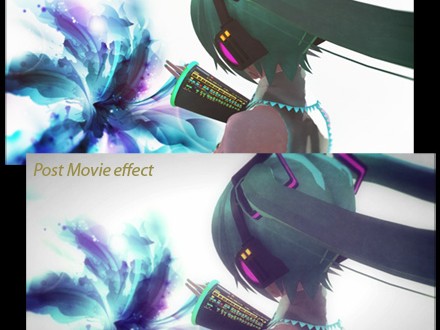
Okay… so I hope its no secret that an amazing new effect has surfaced on Beamman’s Effects page site Beamman's Post Movie effect is available from the Beamman's Effects Page.it is called PostMovie and it has the power to transform a normal animation into a masterpiece!
The effect changes the look of your animation from “something digital” to the look of a movie “shot on film”… a wonderful, almost emotional transformation.

Here are examples of what I am talking about, in picture form:
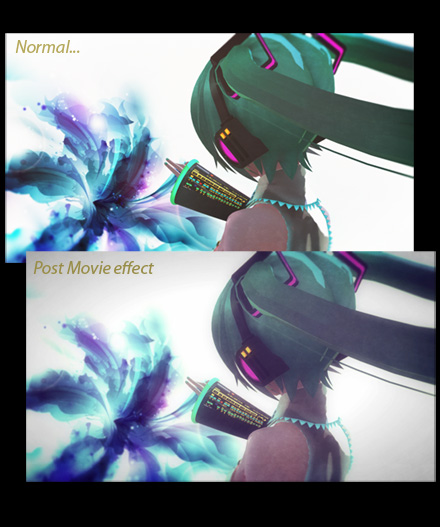
Beamman's Post Movie Effect adds a "shot on film" look to your animation.


… and here is what the animation can look like:

Several options…

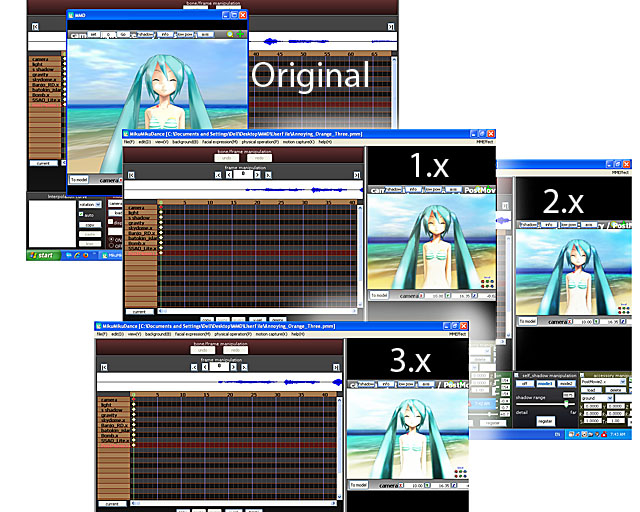
There are three .x files to work with… alone or together… offering a variety of possible visual effects…
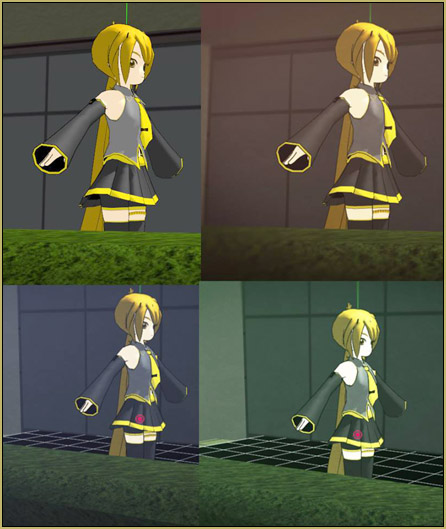
Beamman's PostMovie Effect offers a variety of "looks" for your video!

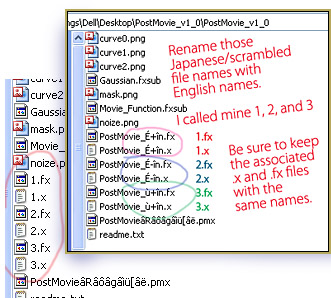
Change File Names of the .x and .fx files in Beamman's PostMovie effect... Post Movie Effect.

NOTE:  You must rename the .x and their associated .fx files with English names.

As you can see, I named mine 1, 2, and 3.

Now you can load the effect through the Accessory Manipulation Panel like any other effect. You can turn it ON and OFF by checking or unchecking the Display checkbox.

… more to discover!

This seems to be a Beta release… it easily runs on many systems and yet seems cranky on others. Those users encountering problems may have a graphics card issue or maybe even a DirectX issue.

There may be more variations possible. The ReadMe alludes to making X and Y adjustments… as well as Si and Tr adjustments…
… and a Controller? … I have not used the included .pmx model that looks to be a controller… giving variables to the Facial sliders. You will want to translate those sliders into English as you decipher the possibilities of the Controller.

The Error screen…

A black screen will envelop your stage, your entire scene, if the effect is not working properly.
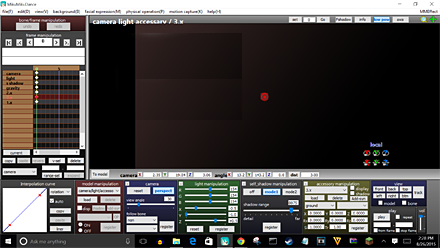
If the effect is not working properly, your scene will be all dark.

Side Note:  When rendering or making a picture render, the effect will crash afterwards. In order to rectify this you must delete and re-add the effect, once more… and use in fullscreen only, not on half screen or snap screen.

– – –
EDITOR’s NOTE: Computer Power Required
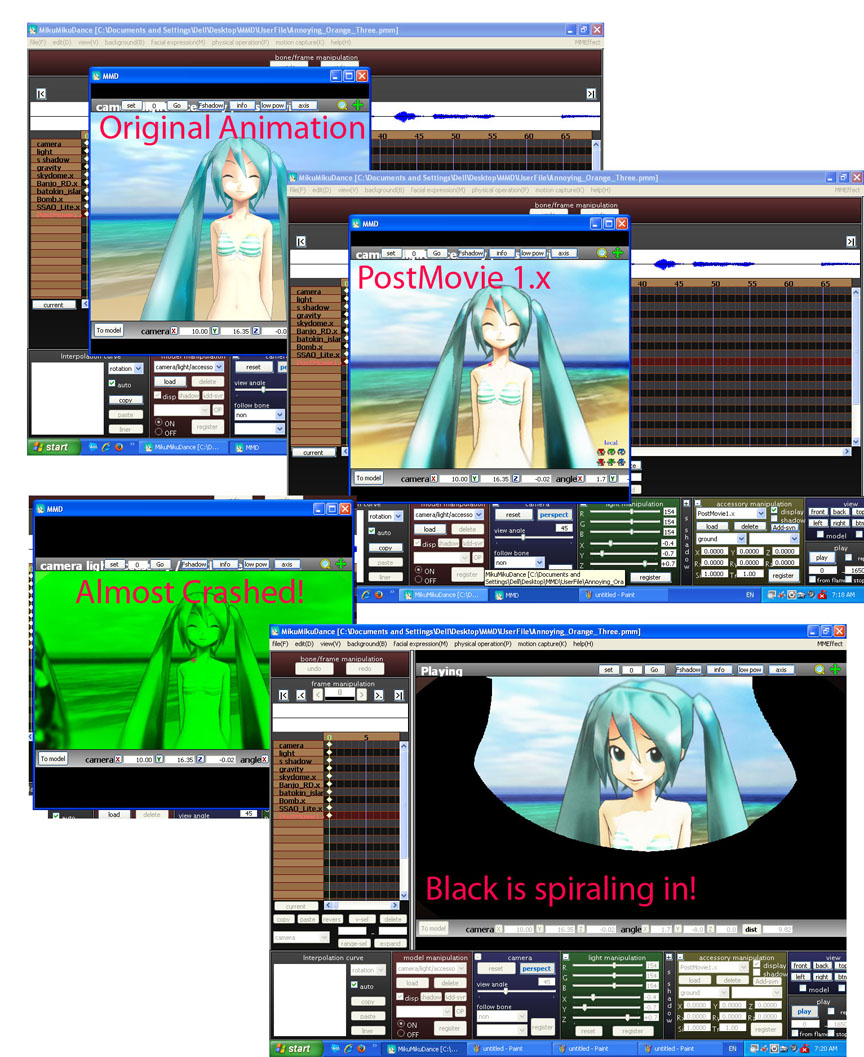
I have seen some crazy things as I attempted to use theis effect!I saw some crazy-looking things as I tried to use this effect… and it has turned out, for me, that computer power/graphics card issues have been my problems.

If I close all other programs and run only MMD… and if I make the Stage View By making the stage view small, my computer CAN run Beamman's PostMovie effect.small… the effect will work for me on my XP system. CLICK the picture to see a large view.
I found that, even with a small view, the effect would often give me the black error screen. I find I can FORCE the effect to work by dragging the view to be as large as possible (still looks black) and then quickly dragging the view to a small size, causing the image to suddenly have to recalculate to show the smaller view… and the effect to work! … Once the effect was working, I can Render to AVI and the effect works perfectly in the resulting video. … Awesome!

Let us know YOUR experiences… leave a comment!


– SEE BELOW for MORE MMD TUTORIALS…


— — —


– _ — –


Visit the LearnMMD.com Homepage! Plenty of Mikumikudance instruction and info!

More MMD Tutorials...

Enjoy the "camera Angles WEIRD in Anime" meme...

Enjoy the "camera Angles WEIRD in Anime" meme... This image is from The Slayers - NEXT, ...read more

Reader asks how to create MMD artwork... stuff like posing, camerawork?

A reader asks... Is there a tutorial on how to create MMD artwork, like those you ...read more

Learn MikuMikuDance in Small Steps! New LearnMMD Video Series

Learn MikuMikuDance in Small Steps. Where can I find easy-to-follow MMD instructions on YouTube? How ...read more

Apply Multiple Effects on an Entire MMD Model Using M4Layer Effect

How can I apply multiple effects to an MMD model? Can I use more than ...read more

MMD Plugin Manager... I Found a Treasure!

What sorts of MMD Plugins are there? MMD Plugin Manager? MMD Plugins. Plugin MMD. More ...read more

2025: Hatsune Miku is 18... but she is designed to be always 16 Years old, by design and in reality!

Finally, in 2023, Hatsune Miku is 16 years old! but in August of 2025, she ...read more

Beamman's Post Movie effect, MMD Tutorials, MME Effects Tutorials, Zazi

Post navigation

Previous Post: Making it Personal MMD
Next Post: New Interpolation Curve Video was fun to make!

Related Posts

  • Editing MMD Model Eye Textures enhances Ray-MMD Effect Eien Kiseki-P (Reika)
  • Rin With and Without the ToonDX Effect!
    Using the ToonDX Effect for MikuMikuDance. ARIZONA
  • VOCALOID 3 Tutorial – The whole interface on a basic level Kazuki Matsuoka
  • Running MikuMikuDance in Linux using Wine and DXVK Linux running MMD
  • Make a Music Video with MMD and Learn to Use MMD "the making of" my video
  • MMD MME Beamman Nameplate Effect MMD Tutorials

More Related Articles

The Making of: Sleepover Gone Wrong (REMAKE) "the making of" my video
An MMD town stage: Making Kerorin Town Great Again – Part 2 MMD Stages
How to Lip-Sync in MMD using MoggProject Face and Lips Animation Shortcuts
GaussianVariable MME Effect Blurs your entire scene! GaussianVariable
Create 450-Frame MMD Animation from scratch! Create 450-Frame MMD animation from scratch! "the making of" my video
Build your own stage for MMD using Blender 2.69 Blender

Comments (11) on “The Power of Beamman’s Post Movie Effect”

  1. Sy says:
    February 13, 2017 at 10:07 pm

    Hi, every time i use the post movie it shows up as a white leek instead of making the effect happen? help?

    Reply
    1. KillerBeer says:
      February 14, 2017 at 2:58 am

      Rename all files with Japanese characters in filenames into English. Make sure that .x and .fx pairs of files that have identical first names in Japanese should have them identical after renaming as well. Then edit all three .fx files in Notepad, find the line that looks like “#define CONTROLLER “PostMovie&#%@^$*#.pmx” and replace the filename in it with the new one.

      Reply
  2. UltimateKitty says:
    October 13, 2016 at 12:50 pm

    note;;
    never. EVER. mix this motion with any kirakira effect. unless you want a seizure, that is.

    Reply
  3. Caitlin says:
    September 25, 2016 at 10:28 am

    heyy~

    whenever I try to render a picture with the postmovie effect, they always come out with purple and green glitch spots! how can I render pictures without this happening?

    Reply
  4. Megurine0Luka on dA says:
    October 15, 2015 at 12:14 pm

    I noticed I was using this and black squares started slowly engulfing my screen.
    Nothing is wrong with my screen, it just happens if I use PostMovie.
    Other than that, beamman’s blown me away again.

    Reply
  5. Kat says:
    August 29, 2015 at 7:08 am

    It works just fine for me, but I just upgraded to Windows 10. The controller allows you to mess around with some lighting and glare effects. Moving it along the x and y axes gives some pretty neat results, and I don’t know what all of the sliders do but I know that the ones in the 3rd section change the amount of red, blue, and green light on the screen. Also the Si box in the accessories panel changes how bright it is, and the Tr box works about how you would expect and changes the intensity of the effect. I’m working on a video using this effect and it is incredible.

    I know my experience is probably unique compared to what others have been through with this effect so far, but hopefully this helps someone wanting to get some god stuff out of this effect!

    Reply
    1. huongdaoroma says:
      March 5, 2019 at 12:05 pm

      Try renaming the bones/morphs/materials of the controller in pmxe/pmde to English by using edit>batch correction of names> selecting the target as well as the method (by setting), and the library (Japanese) > click name

      So you’ll have to choose 3 things before you hit name – the target, the method, and the library. Copy and paste whatever’s in the field to google translate

      Hit English in the libraries category and then name. copy and paste the translation and then click Correction > OK > save the edited controller

      EDITOR’S NOTE: Or see this tutorial by LearnMMD’s xxBodger for a simple method.
      Thank you, huongdaoroma!

      Reply
  6. Silent Headset says:
    August 27, 2015 at 9:42 am

    So….smaller stage view = more efficiency in computing power?

    Note that down, note that down…… -_-

    Reply
    1. Reggie_Dentmore says:
      August 27, 2015 at 3:38 pm

      I don’t know if that’s true… but it seemed to be so for me “:o).

      Reply

Leave a Reply Cancel reply

Your email address will not be published. Required fields are marked *

Download the latest version of MikuMikuDance!
See the MMD Step-by-Step instructions page!
Learn how to make your own MMD motions!
LearnMMD.com
  • Staging and the 12 Principles of Animation. Accessory Manipulation/Adjust
  • Here is the plan for the ball tossing motion in MikuMikuDance 7.39
    “Bonk goes the Miku” new video using Accessories created in SketchUp Google SketchUp and MMD
  • Free Download MikuMikuDance MMD
    Download the Latest Version of MikuMikuDance: MMD 9.32 Download MikuMikuDance
  • Troubleshoot MMD models– or anything else– with four techniques! Bandages
  • Japanese Maid Cafe poster you can make!
    Making your own Japanese Maid Cafe poster Random Thoughts & Visions
  • Create Bouncing Ball using MMD Physics Engine Making Models
  • Gotta Sing... Gotta Dance! LearnMMD's Video Dojo Expo-3!
    Gotta SING… Gotta DANCE! LearnMMD’s Video Dojo Expo-3! CONTESTS
  • Ray-MMD LED widget replaces MMD screen capture widget Add Background Pictures and AVI

Copyright © 2022 Learn MikuMikuDance – MMD Tutorials – Free 3D Animation Software and Instructions..

Powered by PressBook Premium theme

Go to mobile version