
Skip to content
Learn MikuMikuDance – MMD Tutorials – Free 3D Animation Software

Learn MikuMikuDance – MMD Tutorials – Free 3D Animation Software

Download Free Animation Software – Let's Learn How to Do Everything!

  • Step-by-Step MMD instructions
  • DOWNLOADS
  • Troubleshoot, Fix MMD
  • Site Contents
  • Reggie Replies Q&A
  • Homework!
  • What IS MMD?
    • Download MikuMikuDance Newest Latest Version of MMD
  • “HOW TO”
    • Raycast RAY-MMD Effect Tutorials
  • BONUS PAGES
    • Why convert PMD models to PMX?
  • HALL of CHAMPIONS
  • Tutorial Categories
  • About
    • Privacy Policy
  • Toggle search form
  • New Reggie’s Evil Eye demo video posted to YouTube "the making of" my video
  • Follow My Learnmmd on Facebook for latest LearnMMD.com MMD tutorials! MMD Tutorials
  • Miku about to knock her head on the Mario Bros. item box we just made! Animasa Miku ver. 2 with Batokin Island and Sky Dome. SSAO_Lite MME Effect.
    Use Google Sketchup to Create .x Files for MikuMikuDance 7.39 Google SketchUp and MMD
  • Stationary Motion Creation rights and wrongs Creating Motions
  • Arrow MMD Animation Video Finished in only Six Weeks! "the making of" my video
  • Update previous MMD to MMD 9.32 with no tears … Download MikuMikuDance
  • Sketchup Orbit view on MMD: Right Click and Drag! Keyboard Shortcuts
  • The Croquis Effect.
    How to Use the Croquis Effect in MikuMikuDance ARIZONA

Making good MMD lip-syncs!

Posted on November 14, 2015November 17, 2020 By MMD-Anime-Bunny 13 Comments on Making good MMD lip-syncs!

A feature article written by LearnMMD's MMD-Anime-Bunny!How do I do lip-syncing in MMD? When I lipsync, which sliders do I use for which sounds? Are there tricks to MMD lip-syncing?

Making your MMD lip-syncs good!

Hello there! I’m MMD Anime Bunny, I’m new here!~

This is my first article on LearnMMD. I have some plans for future articles, but I’ll start simple!~

I have some tips for lip-syncing! Just some little thingies ^^
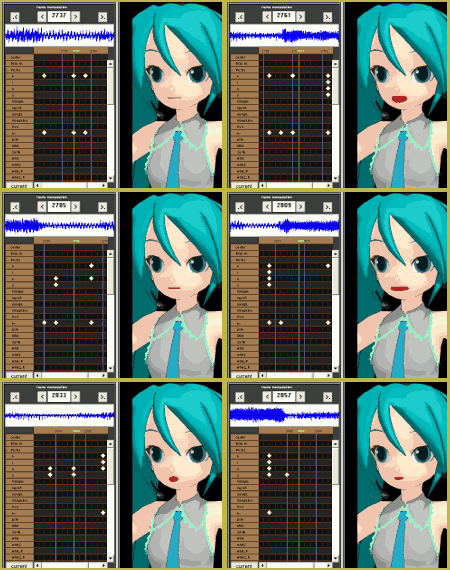
This is how I use the sliders for different letters when I do lip-syncing:

The sliders…

LipsyncBunnyThe “a” slider

Use the “a” slider for:

“a” (In happy)
“ai” (In the pronoun: i)

Optional:
“eh” (In hello)

The “i” slider

Use the “i” slider for:

“ee” (In feel, use this slider with this sound in Japanese text)
“L” (In like, use the slider halfway for this one)
“n” (In normal, use the slider halfway for this letter)
“t” (In time, use the slider 3/4)
“s” (In sight, use the slider 2/4 to 3/4)

The “u” slider

Use the “u” slider for:

“u” (In you)
“uh” (In dust)
“f” (In free, use the slider 1/4 to 2/4)
“ur” (In over)
“r” (In rust)
“w” (In world)

The “e” slider

The “e” slider is kinda a optional part, if you use it, use it for this:

“ee” (In deer)
“eh” (In everything)
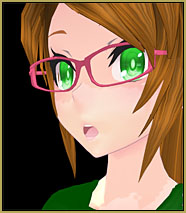
Say_O_Bunny“ea” (In deal)
etc.

The “o” slider

Use the “o” slider for:

“o” (In doll)
“ou” (In would)
“oo” (In door)

Making it good! Starting it, ending it, and making it look nice…

Start by having everything closed, and end it the same way.

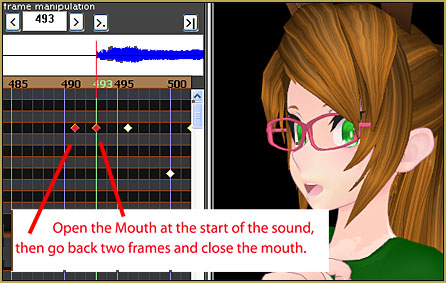
Be sure that you have loaded in your wave file, and if you did, go to File>play wave with frame, so you can hear the audio as you scroll through the frames with the Left and Right arrow keys on your keyboard.
CloseMouth

Listen carefully to the wave file and give the mouth at least two frames to change letter (slider), if you let at least two frames free, then it will look great!

http://orig02.deviantart.net/c3de/f/2015/314/2/b/a_by_mmd_anime_bunny-d9g7yks.wav

Once you hear the “a” sound coming, find where the sound starts, and open the mouth with the “a” slider on that frame. Now go two frames back, and close it. Now search up where the “a” sound ends, and close the mouth there (Using the “a” slider),  and that’s it!

—

So these were my quick tips for lip-sync, see you next time!~
~Bunny

——-


– SEE BELOW for MORE MMD TUTORIALS…


— — —


– _ — –


Visit the LearnMMD.com Homepage! Plenty of Mikumikudance instruction and info!

More MMD Tutorials...

Reader asks how to create MMD artwork... stuff like posing, camerawork?

A reader asks... Is there a tutorial on how to create MMD artwork, like those you ...read more

MikuMikuDance 15th Anniversary celebration video posted on NicoNico!

Did you know that the first version of MikuMikuDance was released in 2008? MMD is ...read more

Use YouTube Video Analytics Attract Maintain Viewers

How can I use YouTube Video Analytics to learn how to make popular MMD videos? ...read more

Create 450-Frame MMD animation from scratch!

How do I create a 450-Frame MMD animation from scratch? How do I start making ...read more

No more boring MMD Camerawork - Keep it moving!

MMD Camerawork can be so boring. How can I add life to my MMD animations? ...read more

Download Halloween Costume TDA Miku edit by dA's Shiro-NekoVocaloid

Where can I get Halloween Costume TDA Miku? Download a gang of five MMD models ...read more

Creating Motions, MMD Basics, MMD-Anime-Bunny, Music and WAV Files, Nuts & Bolts Tags:lip, lips, lipsync, sync, syncronize

Post navigation

Previous Post: YouTube Copyright Enforcement Bamboozles MMDers!
Next Post: Rendering HD 60 FPS MMD video and YouTube Upload

Related Posts

  • Enable Physics in MMD 7.96 MMD Basics
  • Next Level in MMD Video Evolution
    Post-Production Editing Yields Next Step in MMD Video Quality Making Videos - Rendering to AVI
  • Smooth Walking Motion is getting easier! Make a Smooth Walking Motion
  • Adding & Working the Stage Lights with Dummy Bones MMD MikuMikuDance Dummy Bones
  • Adding Sound Effects to existing MMD animations Making Soundtracks
  • Make Your YouTube Channel Popular with Engrossing Introductions MMD Basics

More Related Articles

Get the LearnMMDMmetronome. It is a real help! LearnMMD’s METRONOME is Ready to Download! Animation Lag
Why MMD cannot open the models in a saved PMM file Downloading New Models
Translate Japanese Models to English with Google Translate and PMDE Bones
Add Shadows to MMD .X Accessories Tutorial MMD Basics
Use Stage Changes in MMD to Make an Interesting Video Koneko the MMD Fairy
The SSAO effect adds depth of color and shadows for greater realism! MME MMD 7.39 Playing with MME – Using MORE cool MikuMikuEffects! Nuts & Bolts

Comments (13) on “Making good MMD lip-syncs!”

  1. Finland says:
    April 14, 2026 at 3:03 pm

    i try annd do mah lip syncing and it always does unwanted stuff like idk how to explain itt when I hit register i thought it was going to be the same like it does for the motion but noooo ;-;; so like If i wanted the models mouth to be closed for a frame i do that and hit register and whenever i changed stuff after it DOES NOT LISTEN TO WHAT I REGISTER Idk how to fix this halpppp ;-;

    Reply
    1. Reggie_Dentmore says:
      April 14, 2026 at 9:32 pm

      Mouth motions can be tricky!
      Can you save a motion file of your attempt and email it to me at reggiedentmore@aol.com, as a dot VMD file?
      that way I may be able to see what is going on.

      — Reggie

      Reply
  2. Kawaii Potato says:
    March 25, 2017 at 7:04 am

    i still don’t understand how to lip sync, can you give me a few recommendations of what i should do? Thanks if you do :)

    Reply
    1. Reggie_Dentmore says:
      March 25, 2017 at 7:13 pm

      Practice, practice… mouth the words to yourself and try to visualize the shapes required… and then work with your model to recreate those shapes. … In the FILE menu, turn on Play WAV with Frame(f) … that way you can hear the sound as you scroll through the animation.
      Feel free to email me if you have particular questions. reggiedentmore@aol.com

      Reply
      1. Kawaii Potato says:
        March 30, 2017 at 1:26 pm

        thanks, i’ll try that. (sorry for late reply, i’ve been doing some crap)

        Reply
  3. Nicole X2 says:
    December 8, 2015 at 6:13 am

    Finally! A tutorial for lip-syncing!
    Thank you MMD-Anime-Bunny! This will be REALLY useful!

    Reply
    1. MMD-Anime-Bunny says:
      December 17, 2015 at 1:33 pm

      You’re welcome! ^^

      ~Bunny

      Reply
  4. parkeerwacht says:
    November 15, 2015 at 5:01 am

    Nice article, I allways hated lip-sync (not just in MMD, but in any animation software I used), Because it looks very confusing. Not anymore, thanks to this article.

    PS:
    Nice Bunny Model you have made. It looks great :D

    Reply
    1. MMD-Anime-Bunny says:
      November 16, 2015 at 11:38 am

      Thank you!~
      And you’re very welcome! ^^

      ~Bunny

      Reply
  5. Slender says:
    November 15, 2015 at 12:55 am

    I have found a new way to lip sync. you can actually lip sync with MikuMikuMoving, with a lip sync plugin. load audio and run the plugin, then it automatically syncs the sliders. then you can export the motion to MikuMikuDance.

    Reply
    1. MMD-Anime-Bunny says:
      November 15, 2015 at 4:36 am

      I know about that plug-in, but. So far i know, it only uses the “a” slider and it’s not perfectly synced. And because of the constant use of the “a” slider, it may get glitchy, and it doesn’t fit either with the sounds. I mean, you don’t make the “a” mouthshape when you say “u” “o” or “ee”

      You can use it, but i’d like if you would edit the pre-made lipsync.

      ~Bunny

      Reply
      1. KillerBeer says:
        November 16, 2015 at 4:48 am

        I’m not sure if we’re talking about the same thing or not, but Mogg’s FaceAndLips is a standalone program rather than MMM’s integral part and it supports all sliders that the model has. (It’s not a sound analyzer, though, just a more convenient tool for mapping morphs)

        https://sites.google.com/site/moggproject/enghome/faceandlips

        Reply
        1. MMD-Anime-Bunny says:
          November 16, 2015 at 11:38 am

          Than it’s updated

          Reply

Leave a Reply Cancel reply

Your email address will not be published. Required fields are marked *

Download the latest version of MikuMikuDance!
See the MMD Step-by-Step instructions page!
Learn how to make your own MMD motions!
LearnMMD.com
  • RAY-MMD: Haku’s crazy light show [PART 2] MME Effects Tutorials
  • Using Texture Transparency hides MMD model problem areas MMD Tutorials
  • Making stages/accessories for MMD using Sketchup Google SketchUp and MMD
  • YouTube Audio Library supplies Free music Copyrighted Music
  • Re-size PMD Models and Keep the Bones and Physics! Adjust PMD Model Size
  • MikuDance.info has a constantly updated list of new MMD models and accesssories.
    MikuDance.info – A Very Useful Site for MMDers! Downloading New Models
  • Get started with MMM – The Basics Kazuki Matsuoka
  • MMD animation made-from-scratch
    MMD animation made-from-scratch Forgotten Vocaloid Mew Rags on Reggie’s MMD Videos "the making of" my video

Copyright © 2022 Learn MikuMikuDance – MMD Tutorials – Free 3D Animation Software and Instructions..

Powered by PressBook Premium theme

Go to mobile version