
Skip to content
Learn MikuMikuDance – MMD Tutorials – Free 3D Animation Software

Learn MikuMikuDance – MMD Tutorials – Free 3D Animation Software

Download Free Animation Software – Let's Learn How to Do Everything!

  • Step-by-Step MMD instructions
  • DOWNLOADS
  • Troubleshoot, Fix MMD
  • Site Contents
  • Reggie Replies Q&A
  • Homework!
  • What IS MMD?
    • Download MikuMikuDance Newest Latest Version of MMD
  • “HOW TO”
    • Raycast RAY-MMD Effect Tutorials
  • BONUS PAGES
    • Why convert PMD models to PMX?
  • HALL of CHAMPIONS
  • Tutorial Categories
  • About
    • Privacy Policy
  • Toggle search form
  • Make a Music Video with MMD and Learn to Use MMD "the making of" my video
  • Ghost Effect for MME
    How to Use the Ghost Effect for MME! ARIZONA
  • How to make multi-part videos in MikuMikuDance Animation Shortcuts
  • Kaito and the SpotLight Effect.
    Using the SpotLight Effect in MikuMikuEffects ARIZONA
  • An MMD town stage: Making Kerorin Town Great Again – Part 3 MMD Stages
  • Attach an item or accessory to a Bone in PMDEditor - Weighting for a weighted model in MMD.
    Attach an item or accessory to a Bone in PMDEditor – Weighting in MMD Accessory Manipulation/Adjust
  • RAY-MMD: Haku’s crazy light show [PART 1] MME Effects Tutorials
  • Introduction to Vocaloid: a short tutorial NOKO2

GaussianVariable MME Effect Blurs your entire scene!

Posted on August 25, 2016July 4, 2024 By Reggie_Dentmore 2 Comments on GaussianVariable MME Effect Blurs your entire scene!

A Feature Article by Reggie Dentmore on LearnMMD.comHow do I use the GaussianVariable effect? What does the MME GaussianVariable effect do? Where can I download the GaussianVariable effect?

GaussianVariable MME Effect Blurs your entire scene!

A reader sent me an email asking me how to use the GaussianVariable effect. I had no idea! … so I did a quick search and found it on one of the OneDrive effects pages. You have to login on that page… it’s free. When you do login, that full page will be there. You can click the tiny “Download” at the top to get the entire lot of effects or you can download just the one you want.

Easy to use…

It is an MME effect. It looked like it’d be easy… but, I figured that, because the reader had asked me how to use it, there must be a “trick”. So, the first thing I did was to open, translate and read the included ReadMe.txt file:

Variable blur filter for MikuMikuEffect

Modifications: minced
Original: Mai force intervention P

By manipulating the Tr (transparency) of GaussianVariable.x than MMD
This modification was blur filter to be varied the blurring range


● normal usage
• The GaussianVariable.x read in the MMD, please set to the beginning of the drawing order.

● Notes
• Since the post-effects, always, please set before the drawing order than usual object.

What I learned was that the Tr transparency setting was the control of the effect.

Let’s get Blurry!

I opened an old, saved dance… and loaded GaussianVariable…
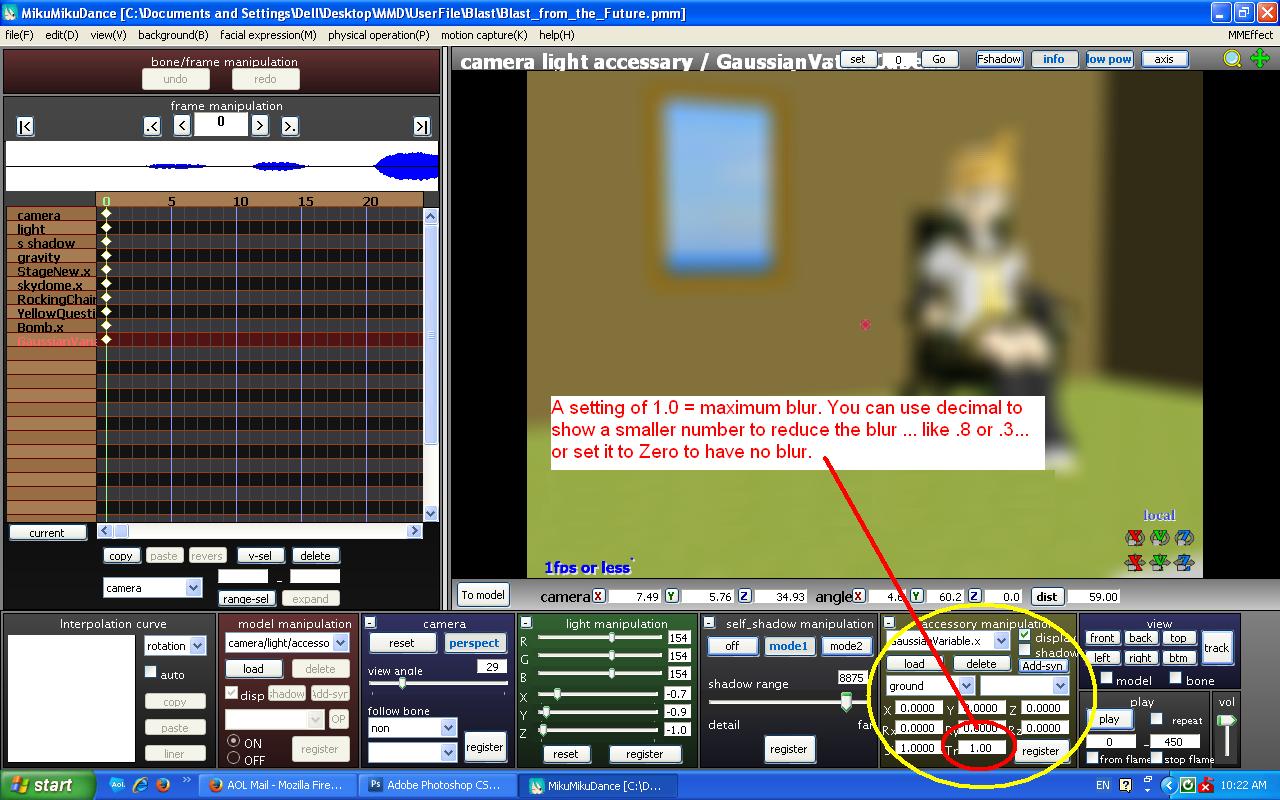
The MME GaussianVariable effect blurs the whole scene!
Click for larger image.

Yup… at the default Tr value of 1.0, it’s blurry, alright. … I entered a Tr value of .3… and the image cleared up, pretty much… and then I entered a value of “zero”… and the effect was effectively switched “off”; no blur at all. … I Set a Tr value of zero in Frame Zero… and I went out to frame 200 and set a value of .8 … Then I pressed PLAY and watched as the image went from crystal clear to very blurry over those 200 frames.

Easy to use… and a really nice blur!

Have fun with MikuMikuDance! 


– SEE BELOW for MORE MMD TUTORIALS…


— — —


– _ — –


Visit the LearnMMD.com Homepage! Plenty of Mikumikudance instruction and info!

More MMD Tutorials...

Enjoy the "camera Angles WEIRD in Anime" meme...

Enjoy the "camera Angles WEIRD in Anime" meme... This image is from The Slayers - NEXT, ...read more

Reader asks how to create MMD artwork... stuff like posing, camerawork?

A reader asks... Is there a tutorial on how to create MMD artwork, like those you ...read more

Learn MikuMikuDance in Small Steps! New LearnMMD Video Series

Learn MikuMikuDance in Small Steps. Where can I find easy-to-follow MMD instructions on YouTube? How ...read more

Apply Multiple Effects on an Entire MMD Model Using M4Layer Effect

How can I apply multiple effects to an MMD model? Can I use more than ...read more

MMD Plugin Manager... I Found a Treasure!

What sorts of MMD Plugins are there? MMD Plugin Manager? MMD Plugins. Plugin MMD. More ...read more

2025: Hatsune Miku is 18... but she is designed to be always 16 Years old, by design and in reality!

Finally, in 2023, Hatsune Miku is 16 years old! but in August of 2025, she ...read more

GaussianVariable, MMD Tutorials, Reggie Dentmore

Post navigation

Previous Post: Using Beamman’s SoftSmoke Effect
Next Post: PMXE weight painting tools and deformation types for new MMD models

Related Posts

  • MMD EVERGLOW – Adios【Motion by Ureshiiiiii】- Free Download Motion and WAV "the making of" my video
  • See LearnMMD’s New Crop-Transition Panel Video Google SketchUp and MMD
  • MME fireintheskies effect
    MME FireintheSkiesEffect gives floating flame and embers! FireintheSkiesEffect
  • Optimise computer assets by culling unseen MMD model parts Chestnutscoop
  • Reader asks how to create MMD artwork… stuff like posing, camerawork? MMD Basics
  • You can download new rio carnival models by shiro nekovocaloid
    Download new Rio Carnival models by shiro-nekovocaloid, Miku, Haku and Luka! "the making of" my video

More Related Articles

Yukari's Gap Portal Style. The In’s and Out’s of Yukari’s Gap for MikuMikuDance. ARIZONA
mikumati NXDE G-IDLE models dance "No Thanks" by Hyolyn - Download Links mikumati NXDE G-IDLE models dance “No Thanks” by Hyolyn – Download Links "the making of" my video
Make an MMD Music Video Bo Beep Bo Beep! "the making of" my video
Rendering HD 60 FPS MMD video and YouTube Upload HD Videos in MMD
Tips for how to create complicated MMD dance motions. Making more complicated MMD dance motions – Some new notes… Making Smooth Motions
Editing MMD Model Eye Textures enhances Ray-MMD Effect Eien Kiseki-P (Reika)

Comments (2) on “GaussianVariable MME Effect Blurs your entire scene!”

  1. icbs says:
    July 5, 2017 at 8:37 am

    Hi
    I’ve seen many MMD pictures where a “Gaussian” effect has been used but only the background has been blurred. I figured it might have been done by changing the drawing order of the effect file… but how can I change the drawing order of a .x file? It doesn’t appear in the list of objects under “background”.
    It would be nice if I could keep the models in the foreground in focus…

    Reply
    1. bandages says:
      July 5, 2017 at 10:53 am

      You can edit the draw order of accessories with background->accessories edit. Check out http://trackdancer.deviantart.com/art/MMD-Understanding-MMD-Draw-Order-494465598 for a tutorial.

      You can also use a .pmx file instead of an .x file; just import the .x filed into PMXE and save as a .pmx. The name of the file has to be exactly the same. This can be handy sometimes.

      But the effects that you’re seeing are less likely to be manipulations of draw order than use of depth of field or DOF effect. There are a variety of these to choose from– try Googling “MMD DOF effect”.

      Reply

Leave a Reply Cancel reply

Your email address will not be published. Required fields are marked *

Download the latest version of MikuMikuDance!
See the MMD Step-by-Step instructions page!
Learn how to make your own MMD motions!
LearnMMD.com
  • MMD Rotate object 360-degrees part 2
    MMD Rotating Objects 360-degrees -Miku’s Guide to the Galaxy (Part 2) Making Smooth Motions
  • Download instant fight scene motion by Mahlazer Animation Shortcuts
  • MMD Download links – Some of my favorite MikuMikuDance Sites Download MikuMikuDance
  • Make your own READ ME files so you can track your Sources Keep the Faith-MMD Credits/Sharing
  • YouTube thumbnail image is so important!
    Create your Most Attractive YouTube Thumbnail image "the making of" my video
  • With some practice, Rin can dance the sample dance as well as Miku!
    There Can Be Frame Data Ghosts remaining after Deletion Making Smooth Motions
  • The Champions are Chosen! Video Dojo Expo 3 is Complete. CONTESTS
  • VDE-FIVE Honorable Mention: Jonah Snyder Video Dojo Champions

Copyright © 2022 Learn MikuMikuDance – MMD Tutorials – Free 3D Animation Software and Instructions..

Powered by PressBook Premium theme

Go to mobile version