

Skip to content
Learn MikuMikuDance – MMD Tutorials – Free 3D Animation Software

Learn MikuMikuDance – MMD Tutorials – Free 3D Animation Software

Download Free Animation Software – Let's Learn How to Do Everything!

  • Step-by-Step MMD instructions
  • DOWNLOADS
  • Troubleshoot, Fix MMD
  • Site Contents
  • Reggie Replies Q&A
  • Homework!
  • What IS MMD?
    • Download MikuMikuDance Newest Latest Version of MMD
  • “HOW TO”
    • Raycast RAY-MMD Effect Tutorials
  • BONUS PAGES
    • Why convert PMD models to PMX?
  • HALL of CHAMPIONS
  • Tutorial Categories
  • About
    • Privacy Policy
  • Toggle search form
  • MMD Animation Project Where My Demons Hide "the making of" my video
  • RAY-MMD: Creating your own custom sky box MMD Tutorials
  • Using Raycast MMD like a pro! "the making of" my video
  • Rendering in 4K video at 60FPS with MMD 4k video
  • MMD Rotate object 360-degrees part 2
    MMD Rotating Objects 360-degrees -Miku’s Guide to the Galaxy (Part 2) Making Smooth Motions
  • MMPlus has many safeguards that will save you time as you work with MMD.
    MMPlus, a New MMD Plugin! Animation Resource
  • Hitogata Brings Face Tracking to MMD Animation Resource
  • Kasane Teto with Beamman's Simple Magic Explosion2 positioned behind her
    Beamman’s SimpleMagic creates Explosions, Fire-Balls and Swirling Flames! Beamman's SimpleMagic
Background AVI Files require a Baseleine AVI setting.

MMD Background AVI Files converted using CloudConvert

Posted on January 17, 2022December 2, 2022 By Reggie_Dentmore 10 Comments on MMD Background AVI Files converted using CloudConvert

A Feature Article by Reggie Dentmore on LearnMMD.comHow can I convert my video into an MMD background AVI file? MMD will not open my AVI file as a background video. Why won’t MMD let me load my AVI file as a background video?

Making any video file into MMD background AVI files is easy using CloudConvert.com

See an easy way to convert your video into one that MMD can use as background AVI video.


See how to create MMD Background AVI using Movie Maker and AviUtl.

FFMPEG is the most powerful video converter available... Check out NordGeit's tutorial on LearnMMD.com

–

EDITOR’S NOTE 9/1/2022: THIS CloudConvert METHOD no longer wotrks for me. … maybe the following tutorial will work for you, but I am no longer sure…

One of the most asked questions that have come-in over the years is…
“How do I make an AVI video that MMD can use as a background video?”

The short answer is that MMD is an older program and so requires an older AVI file format for use as a background AVI. CloudConvert.com allows you to convert almost any video format into that “baseline” AVI format that MMD requires.

It’s easy and fast!

Visit CloudConvert.com.
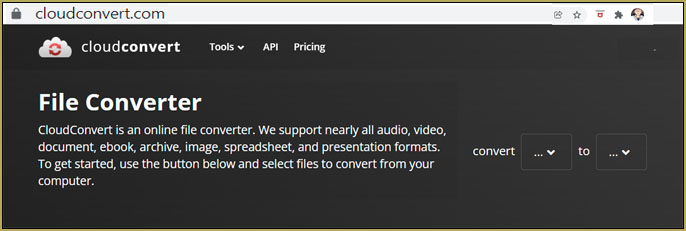
Making background AVI files is easy when you use CloudConvert.com


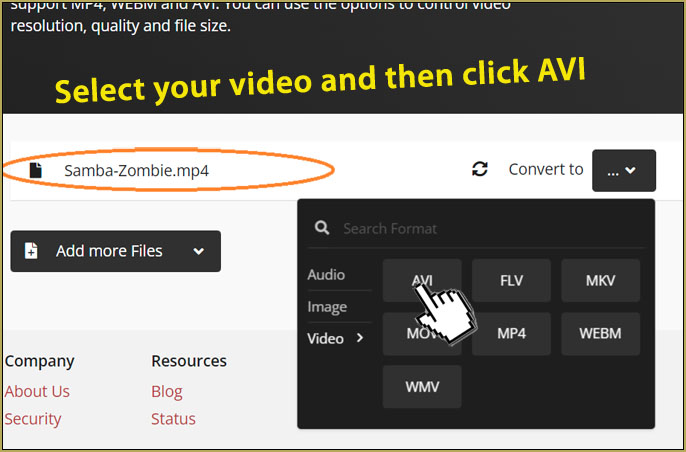
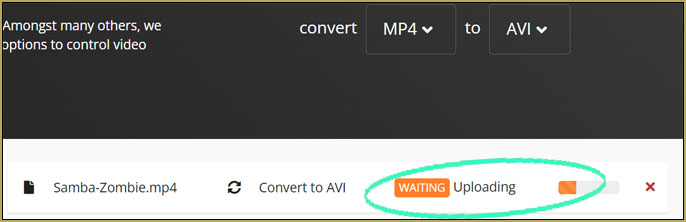
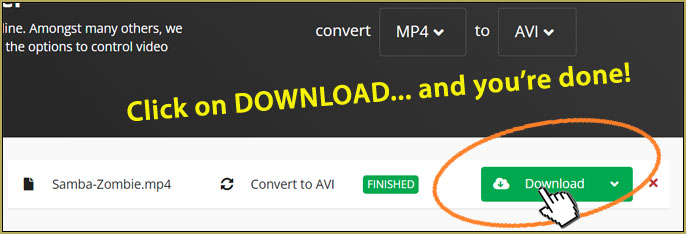
Everything, here, is so intuitive that I will simply show you what to do using pictures…
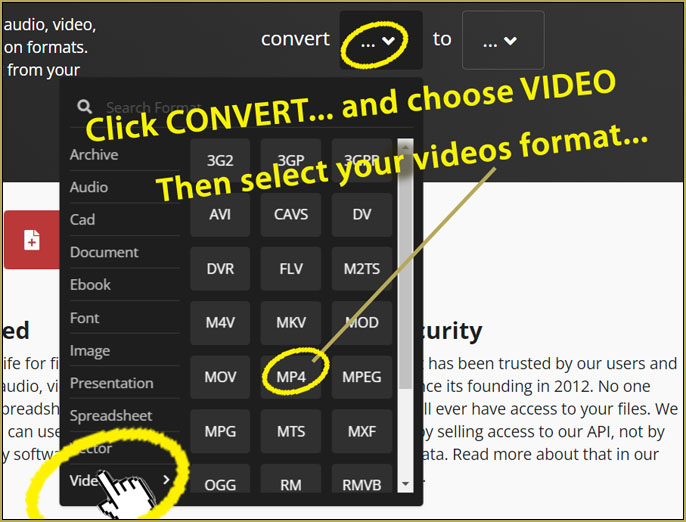
Simply choose your original video's file format...

Select the video that you wish to use for your background AVI files.


Really?… That easy?

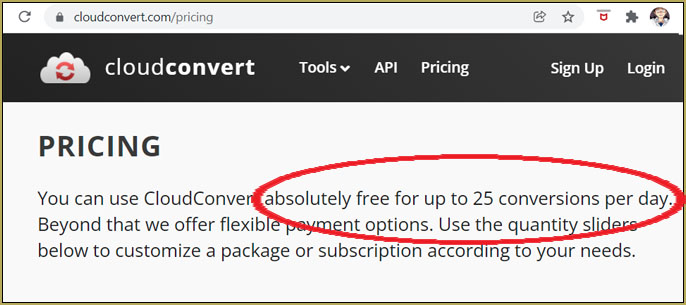
Yes. … There is no charge and the conversion is ready in a minute… depending upon your file sizes.

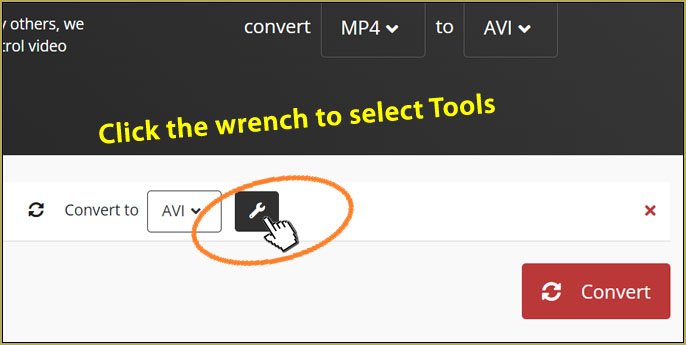
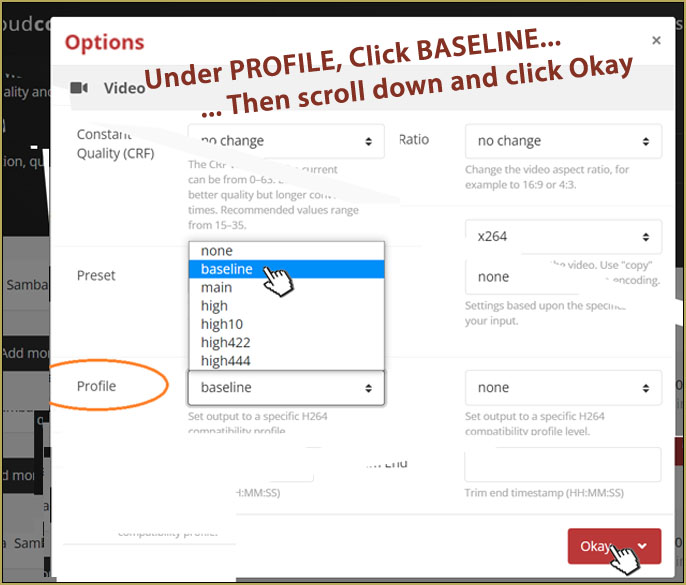
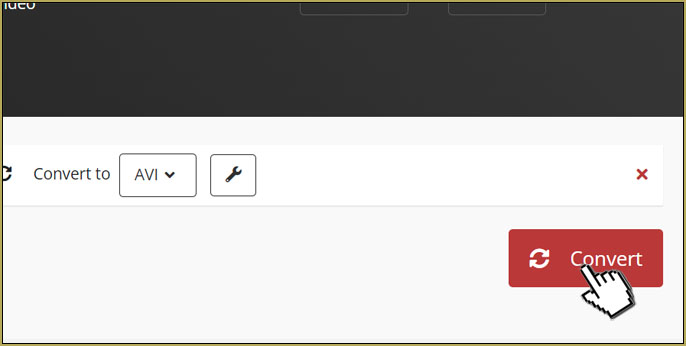
The most important step is to choose the tools icon and set your out-put video’s PROFILE to “Baseline”. That ensures that your output video will fit MMD’s requirements.

CloudConvert is FREE for small-time users like us…
Is CloudConvert.com safe?

I did a bit of Googling to see if there were security complaints and as of this writing, I saw no complaints.
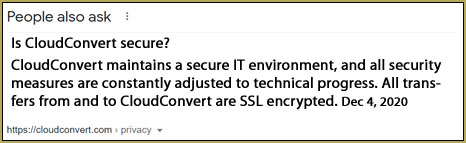
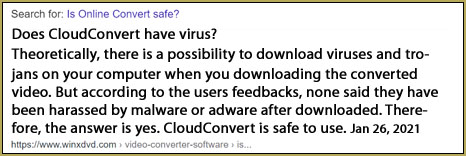
Create your MMD Background AVI Files using CloudConvert… easy and safe.

Have fun with MikuMikuDance!


– SEE BELOW for MORE MMD TUTORIALS…


— — —


– _ — –


Visit the LearnMMD.com Homepage! Plenty of Mikumikudance instruction and info!

More MMD Tutorials...

Reader asks how to create MMD artwork... stuff like posing, camerawork?

A reader asks... Is there a tutorial on how to create MMD artwork, like those you ...read more

Introducing MMD model 1052C China Qipao Miku

Where can I download MMD model 1052C dancers? I want the 1052C China Qipao Miku ...read more

Download Jomomonogm's Snow Miku 2019 for MMD, a most unusual model!

Where can I download Jomomonogm's Snow Miku 2019? What is so unusual about this Snow ...read more

MMD animation made-from-scratch Forgotten Vocaloid Mew Rags on Reggie's MMD Videos

How do I make my own MMD animation from scratch? How do I start my ...read more

Rediscover your old MMD Animations: Love them again!

Rediscover your old MMD Animations: Love them again! https://youtu.be/P4b3todZMUI A labor of love... Remember how it was when ...read more

MMD Boobs too Big yields Too Funny Really Bad Boy video!

Can MMD boobs too big get in the way of a downloaded motion file? What ...read more

Background AVI, MMD Basics, Reggie Dentmore

Post navigation

Previous Post: Create/Export .x files in Blender 3 using PMXE (Blender 2.8+)
Next Post: askY Dramatic Anime Style Sky Domes for MMD created by Meme

Related Posts

  • Cry Baby Motion DL featured image
    Free MMD Cry Baby Motion DL from DA’s Smol-Hooman "the making of" my video
  • Download MMD Pokeball Accessory and Learn Accessory Manipulation Accessory Manipulation/Adjust
  • Creating MMD Diva Performance Animations – An Overview "the making of" my video
  • LearnMMD.com _ MikuMikuDance MMD Tutorials
    MMD Quits after a few minutes? You are not alone! Reggie Dentmore
  • Make a “Dream Fighter” MMD Music Video "the making of" my video
  • Dummy Bones allow you to customize your accessory manipulations!
    Using The Dummy Bone for MikuMikuDance Accessory Manipulation/Adjust

More Related Articles

Arrow MMD Animation Video Finished in only Six Weeks! "the making of" my video
My new MMD Action Video was fun to make! "the making of" my video
Different MMD models react differently to pose and motion data MMD Basics
Download Reggie’s MMD DeckPanel when you just need a place to sit or stand! Make your own Accessories
Learn How to Dress the LearnMMD Stage – Instructions Dummy Bones
Fix MMD Missing Model Options using PMDE Fixing Broken Models

Comments (10) on “MMD Background AVI Files converted using CloudConvert”

  1. crochetpatternmaker says:
    September 18, 2026 at 11:59 am

    Setting the output profile to “Baseline” is the key detail here—MMD being an older program explains why so many standard AVI files refuse to load as background videos. Did the 2022 editor’s note about the method no longer working ever get a confirmed replacement?

    Reply
    1. Reggie_Dentmore says:
      September 20, 2026 at 12:04 am

      Thanks, you are correct.

      — Reggie

      Reply
  2. webp to jpg converter online says:
    July 8, 2026 at 3:13 am

    Nice post! For those dealing with image format conversions, webp to jpg converter online supports adjustable output quality too.

    Reply
  3. straystaynotfound says:
    November 28, 2022 at 1:07 pm

    OMG I can’t thank you enough!! I was finally able to import the video successfully! TT I really appreciate your help! <3

    Reply
  4. straystaynotfound says:
    November 25, 2022 at 5:43 pm

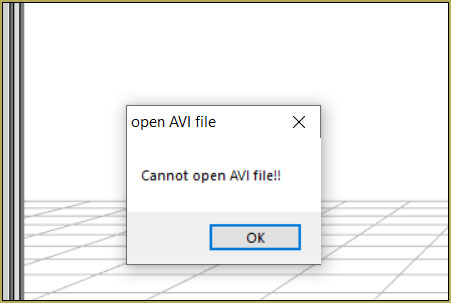
    why can’t I open the avi file in mmd??? I’ve tried this billions of times with different files and apps to convert it from mp4 to avi to no avail. each time i attempt to upload it to mmd the message “cannot open AVI file” keeps popping up. what am I supposed to do??

    Reply
    1. Reggie_Dentmore says:
      November 25, 2022 at 9:18 pm

      I feel your pain. MMD is particular about the AVI file type it can use. Basically, it needs to be converted using RAW. I did find an eay way to make that conversion… I want to know if it works for you… please let me know.
      — Reggie

      Reply
      1. straystaynotfound says:
        November 28, 2022 at 2:25 pm

        Thanks a bunch!!! It actually worked and i could successfully import my video! I really appreciate your help! <3

        Reply
    2. Reggie_Dentmore says:
      November 28, 2022 at 9:04 pm

      Check out this new tutorial… you can make your own conversions using FFMPEG. Scroll down a bit to find the link to the Quick Start Guide.

      Reply
  5. NordGeit says:
    February 20, 2022 at 11:14 am

    I have attempted this thrice with different files.
    Both attempts has failed.
    …
    We’ve really got to truly figure this issue out.

    Reply
    1. Reggie_Dentmore says:
      February 20, 2022 at 12:15 pm

      I felt that this process was all too easy… What are you experiencing?

      Reply

Leave a Reply Cancel reply

Your email address will not be published. Required fields are marked *

Download the latest version of MikuMikuDance!
See the MMD Step-by-Step instructions page!
Learn how to make your own MMD motions!
LearnMMD.com
  • MMD Theme Video “Let’s Dance NOW!” Describes Why We Love MMD Intro to MikuMikuDance
  • ShapeMosaic effect distorts naughty bits and faces.
    MME ShapeMosaic effect counters Wardrobe-malfunctions and more! MMD Tutorials
  • Lexasio&apos;s Steampunk Teto & Miku star in "Kiss me" MMD video!
    Lexasio’s Steampunk Teto & Miku star in MMD “Kiss Me” animation "the making of" my video
  • Select the Center Bone if your MMD Model Doesn’t Feel the Floor Bones
  • Download MMD 9.32 MikuMikuDance latest version Download MikuMikuDance
  • My VDE-3 Entry has Music, Camera, Dancers… Now for the HARD part. "the making of" my video
  • Here is the plan for the ball tossing motion in MikuMikuDance 7.39
    “Bonk goes the Miku” new video using Accessories created in SketchUp Google SketchUp and MMD
  • Make WAV files for MikuMikuDance Using Your Music Files Music and WAV Files

Copyright © 2022 Learn MikuMikuDance – MMD Tutorials – Free 3D Animation Software and Instructions..

Powered by PressBook Premium theme

Go to mobile version