
Skip to content
Learn MikuMikuDance – MMD Tutorials – Free 3D Animation Software

Learn MikuMikuDance – MMD Tutorials – Free 3D Animation Software

Download Free Animation Software – Let's Learn How to Do Everything!

  • Step-by-Step MMD instructions
  • DOWNLOADS
  • Troubleshoot, Fix MMD
  • Site Contents
  • Reggie Replies Q&A
  • Homework!
  • What IS MMD?
    • Download MikuMikuDance Newest Latest Version of MMD
  • “HOW TO”
    • Raycast RAY-MMD Effect Tutorials
  • BONUS PAGES
    • Why convert PMD models to PMX?
  • HALL of CHAMPIONS
  • Tutorial Categories
  • About
    • Privacy Policy
  • Toggle search form
  • Animation Fade helps MMD scene transitions Animation Shortcuts
  • Understanding MME Render Targets for Miku Miku Dance Effects Adult Shader effect
  • Making amazing complicated MMD video requires circle of learning Animation Shortcuts
  • Use Professional Tricks to Make MMD Animating Faster and Easier Random Thoughts & Visions
  • Kaitensora effect gives moving clouds background in your MMD scene Kaitensora Moving Clouds
  • The Champions are Chosen! Video Dojo Expo 3 is Complete. CONTESTS
  • A Discussion of unloved Vocaloids Downloading New Models
  • MMD First Steps Make your own motions from scratch Making Smooth Motions

Position stage near MMD coordinate axis center-line

Posted on November 8, 2017July 2, 2024 By Reggie_Dentmore No Comments on Position stage near MMD coordinate axis center-line

A Feature Article by Reggie Dentmore on LearnMMD.comHow can I move the coordinate axis center-line into the part of the stage where I want to shoot my scene? How can I make it easy on myself as I create an MMD animation? Why is the camera motion so messed-up as I create my MMD animation?

I have some very large stages… like “MMD Batokin Island” or “MMD Inside of School” and “Yokohama Rural Stage“(a 45MB download!)… and I always move that stage so that the action area is centered on the coordinate axis center-line so as to make the camerawork easier!

Position the stage
near the MMD coordinate axis center-line!

When I load the MMD Inside of School stage, the coordinate axis center-line is, by default, in the center of the courtyard… but I want to shoot a scene in the hallway!
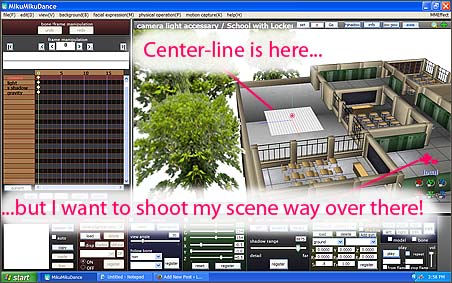
The coordinate axis center-line is far from my action... making it hard to place models and move camera.

Many MMDers make the mistake of leaving the stage where it is while they load their models and drag them way over there… to where they want to create their scene. Then they have to drag the camera way over there, too…
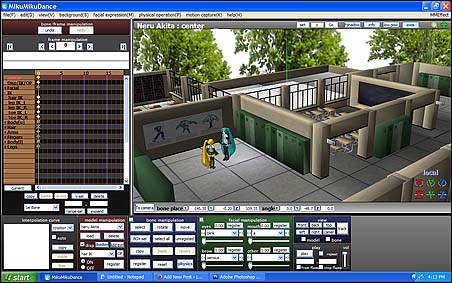
I have placed the models but they are far from center-stage!
That’s the Harner “MMD inside of School” stage at an Si size setting of .6

… and then, when they start to move the camera, they find that the camera controls seem to be way out of whack! It takes real effort to make a simple camera  move… things just aren’t working right!

The solution:

Move the stage so that your area of interest is positioned under the coordinate axis center-line!
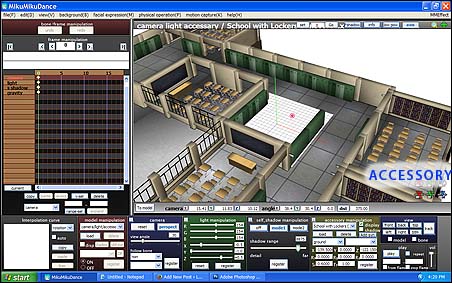
Now, with the coordinate axis center-line centered on my shooting area, my camera moves and model adjustment is much easier!

Click to get into Accessory mode and use the XYZ rollers to position the stage. With the center-line now in center-stage… when you load models, they will be center-stage… and as you swing the camera, it will move easily around center-stage.
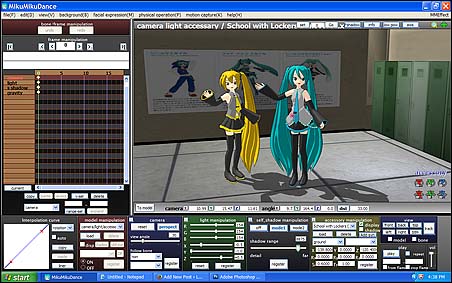
Camerawork and model movement is much easier when the Coordinate axis center-line is centered on your stage!

Success!

Have fun with MikuMikuDance!


– SEE BELOW for MORE MMD TUTORIALS…


— — —


– _ — –


Visit the LearnMMD.com Homepage! Plenty of Mikumikudance instruction and info!

More MMD Tutorials...

Reader asks how to create MMD artwork... stuff like posing, camerawork?

A reader asks... Is there a tutorial on how to create MMD artwork, like those you ...read more

Introducing MMD model 1052C China Qipao Miku

Where can I download MMD model 1052C dancers? I want the 1052C China Qipao Miku ...read more

Download Jomomonogm's Snow Miku 2019 for MMD, a most unusual model!

Where can I download Jomomonogm's Snow Miku 2019? What is so unusual about this Snow ...read more

MMD animation made-from-scratch Forgotten Vocaloid Mew Rags on Reggie's MMD Videos

How do I make my own MMD animation from scratch? How do I start my ...read more

Rediscover your old MMD Animations: Love them again!

Rediscover your old MMD Animations: Love them again! https://youtu.be/P4b3todZMUI A labor of love... Remember how it was when ...read more

MMD Boobs too Big yields Too Funny Really Bad Boy video!

Can MMD boobs too big get in the way of a downloaded motion file? What ...read more

Accessory Manipulation/Adjust, Camera Motion, MMD Basics, Reggie Dentmore

Post navigation

Previous Post: Trouble Keeping MMD Faith When Those Around You Don’t
Next Post: Intersecting Physics Bodies Cause Glitchy MMD Models

Related Posts

  • Download Reggie Dentmore's "Hand Pose Collection" on LearnMMD.com
    MMD Hand Poses make Animation Easier Animation Shortcuts
  • MMD "Kiss Me" free download motion and WAV files.
    Ten year old MMD “Kiss Me” animation LOOKS like NEW! "the making of" my video
  • Easily Transfer an Accessory to a Dummy Bone from Model’s Hand in MMD Accessory Manipulation/Adjust
  • Update previous MMD to MMD 9.32 with no tears … Download MikuMikuDance
  • MMD Animating SAVE AS multiple versions as you go! MMD Basics
  • "Say cheese!" Setting up the camera moves in MMD 7.39 takes some thought. Credits: MMD Little Town by Harner Productions, Chibi Miku Yamato Style 1.35 by Koshitsuki, Chibi NC DT SeeU by HousekineMinto, Video Camera by Dark Konata
    Camera Motion Instructions 1 – MMD Basics ARIZONA

More Related Articles

Have FUN with MikuMikuDance! Random Thoughts & Visions
Download Reggie Dentmore's "Hand Pose Collection" on LearnMMD.com MMD Hand Poses make Animation Easier Animation Shortcuts
Make successful MMD YouTube videos MMD Basics
ObjectLuminous Haku and Teto Using The ObjectLuminous Effect in MikuMikuDance Accessory Manipulation/Adjust
Optimise computer assets by culling unseen MMD model parts Chestnutscoop
A Discussion of unloved Vocaloids Downloading New Models

Leave a Reply Cancel reply

Your email address will not be published. Required fields are marked *

Download the latest version of MikuMikuDance!
See the MMD Step-by-Step instructions page!
Learn how to make your own MMD motions!
LearnMMD.com
  • Japanese Mode Opens Hidden Model Features in MMD 8.06 Japanese Mode
  • Creating and Editing UV Morphs for MMD Models Bandages
  • LearnMMD.com _ MikuMikuDance MMD Tutorials
    Convert SFM/GMOD Models Into MMD Flawlessly! Haztract
  • Keyboard Shortcuts Aplenty in MikuMikuDance 7.39 by ClintImTired Accessory Manipulation/Adjust
  • ZERO-GRAVITY Day on the beach in MMD!. Use Gravity Settings and Noize to make winds blow.
    Using the Gravity Settings in MikuMikuDance ARIZONA
  • Search LearnMMD.com
    SEARCH LearnMMD.com… it’s Easy! MMD Tutorials
  • Download the latest version of MikuMikuDance - MMD 9.32
    NEW MMD 9.32 and 9.32×64… Latest version of MMD! Download MikuMikuDance
  • Written Credits aid YouTube MMDer search results Keep the Faith-MMD Credits/Sharing

Copyright © 2022 Learn MikuMikuDance – MMD Tutorials – Free 3D Animation Software and Instructions..

Powered by PressBook Premium theme

Go to mobile version