
Skip to content
Learn MikuMikuDance – MMD Tutorials – Free 3D Animation Software

Learn MikuMikuDance – MMD Tutorials – Free 3D Animation Software

Download Free Animation Software – Let's Learn How to Do Everything!

  • Step-by-Step MMD instructions
  • DOWNLOADS
  • Troubleshoot, Fix MMD
  • Site Contents
  • Reggie Replies Q&A
  • Homework!
  • What IS MMD?
    • Download MikuMikuDance Newest Latest Version of MMD
  • “HOW TO”
    • Raycast RAY-MMD Effect Tutorials
  • BONUS PAGES
    • Why convert PMD models to PMX?
  • HALL of CHAMPIONS
  • Tutorial Categories
  • About
    • Privacy Policy
  • Toggle search form
  • Background AVI Files require a Baseleine AVI setting.
    MMD Background AVI Files converted using CloudConvert Background AVI
  • Using Subset-Extract to Customize Your Models. ARIZONA
  • MMD Camerawork makes your video exciting!
    No more boring MMD Camerawork – Keep it moving! Camera Motion
  • Chibi Miku and Baby Teto Love Dancing with the KeyScreen!
    Using the KeyScreen Effect in MikuMikuEffects (MME) ARIZONA
  • Different MMD models react differently to pose and motion data MMD Basics
  • MMD Stages Source Featured
    Great MMD Stages Source: Deviant Art MMD Basics
  • Crazy Animation Creation yields fun video and good practice! "the making of" my video
  • Use PMDE to Switch On the MME AutoLuminous effect in MMD AutoLuminous MME / PMDE
MME Lighting Effect, PanelLight by Soboro, is easy to use!

Add MME Lighting Effect illuminates model against dark stages

Posted on December 28, 2022December 28, 2022 By Reggie_Dentmore No Comments on Add MME Lighting Effect illuminates model against dark stages

A Feature Article by Reggie Dentmore on LearnMMD.comHow can I add an MME lighting effect to my MMD animation? How can I add more lights to my MikuMikuDance stage? Where can I download the PanelLight effect by Soboro? How can I add dramatic lighting to my MMD scene?

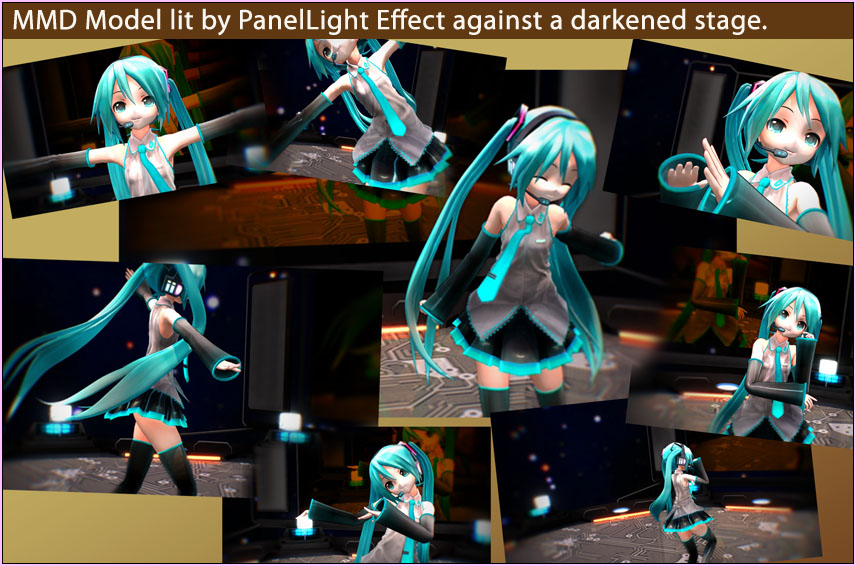
Add an MME Lighting Effect to illuminate your model against a darkened stage!

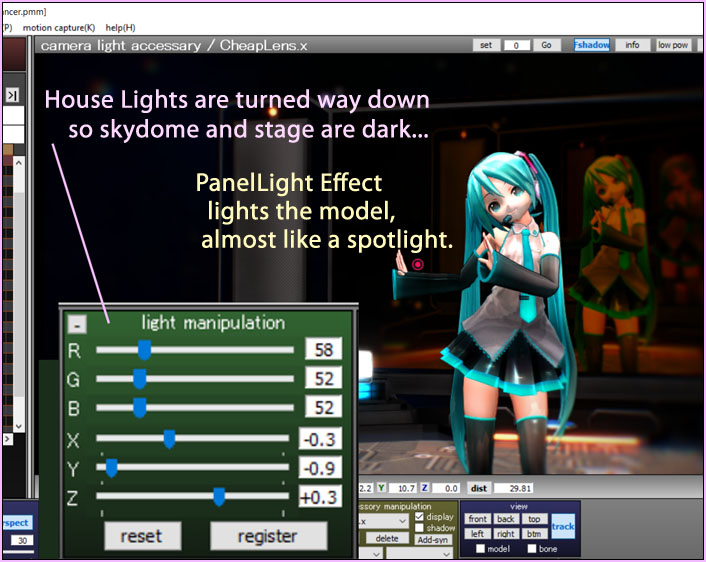
The PanelLight effect by Soboro lights-up a rectangular area, a panel of light, on your MMD stage!

The effect is easy to use, with two options: Load the .x accessory file and try to make adjustments using the Accessory Manipulation Panel.
… Or my favorite method: Do not load the .x file and, instead, load the.PMX controller model.

The Controller gives you full control over size of the light panel as well as direction of the light and the color of the light.

Turn down your house-lights and turn on this MMD lighting effect: PanelLight!
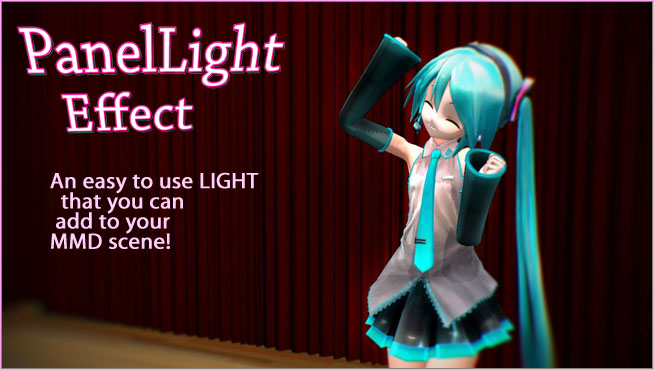
With an MME Lighting Effect, you can control the light to get just the look you like!

The README is in Japanese but I have translated it for you…

Area light effect
PanelLight Ver.1.4

Produced by Soboro

————————————————– ————–

A post effect that adds an area light source.

Self-shadowing by concealment does not occur,
I don’t think it will be too unnatural because it expresses light from a wide range.

Multiple loading is possible.
Since it supports HDR, it can coexist with AutoLuminous effects without worrying about the drawing order.

How to use ———————————————— —–

Load PanelLight.x (PanelLight.fx in MMM).

When the effect is turned off, a white plate appears. This will be the range of the light source.
Adjust the position and size, and turn on the effect again.

The emission intensity can be lowered with Tr.

Light color and emission intensity can be changed by opening his PanelLight.fx and editing parameters.
Direct manipulation is also possible in MMM.

If you want to make more detailed adjustments, also in PanelLightObject.fxsub
It has parameters.

In LIGHTMAP_TEXTURE of PanelLightObject.fxsub,
You can colorize the light using a lightmap texture,
Because I’m doing a sloppy calculation that I want to simplify considerably
Don’t expect too much.

We have included a PMX version of PanelLight Controller that makes it easier to operate with MMD.
Load PanelLight.pmx (do not load the .x file) and reset the morph with PanelLightReset.vmd.
After that, you can operate on MMD with bones and morphs.

The PMX version cannot be used with MMM.

Terms of use ———————————————– —-

Any use including commercial use, modification, and redistribution is free.
Also, the author’s permission is not required.
However, any damage caused by using this effect
cannot be held responsible. Please use at your own risk.

mylist: http://www.nicovideo.jp/mylist/17392230
twitter: sovoro_mmd

DOWNLOAD Soboro’s PanelLight Effect from LearnMMD.com

In that download, I have translated that PMX controller for you. The original was in Japanese, and now, in English.

The included controller model MUST be named PanelLight.pmx
… if you decided to use the original controller file, be sure to give it this name. If the controller has another name, you see the rectangle, not the light.

Think of this effect like it’s a large rectangular panel, lighted only on one side. You enlarge or reduce its size and its brightness and its color to suit your liking.
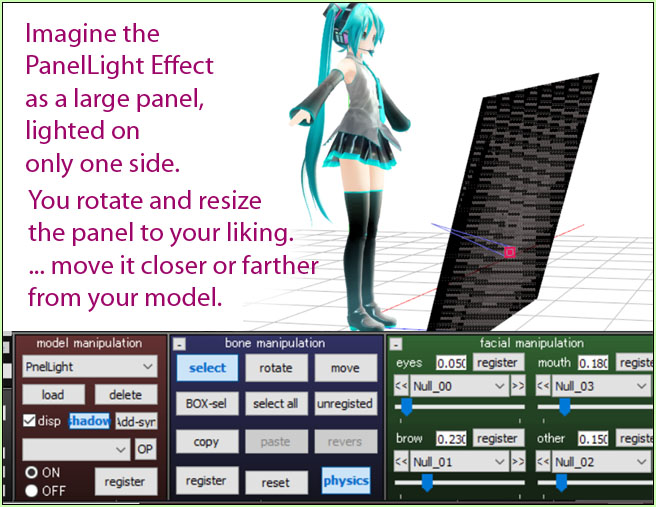
An MME lighting effect, PanelLight lights your scene as if it were a large rectangular light panel.

Adjust the settings to see the light! 

When you first load the controller. Nothing happens. Unclick the SELECT button. Go to the VIEW menu and click “Camera Light Tracking(C)“… so that you can see what your lighting looks like.

Now go to the Controller model and add some light… You need to add some of the RGB and some Power.
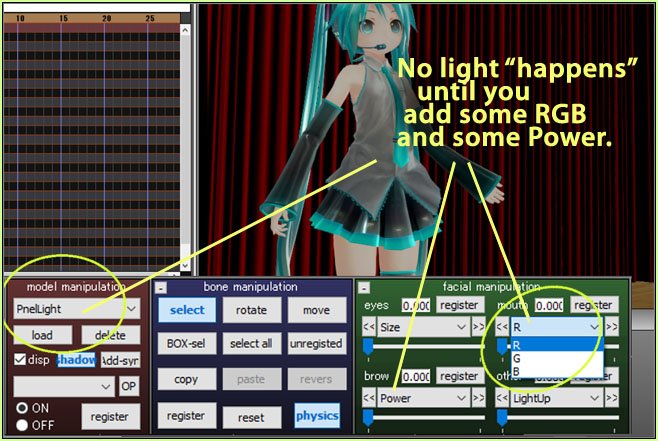
PanelLight is an MME Lighting Effect. With some practice it becomes easy to use.

Use the bone, there, to position the light… get farther away and raise it up and rotate it to get just the effect that you like. Adjust the RGB to get the color values “just right”.
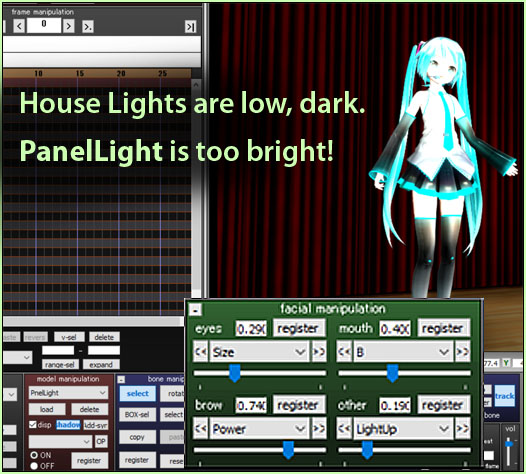
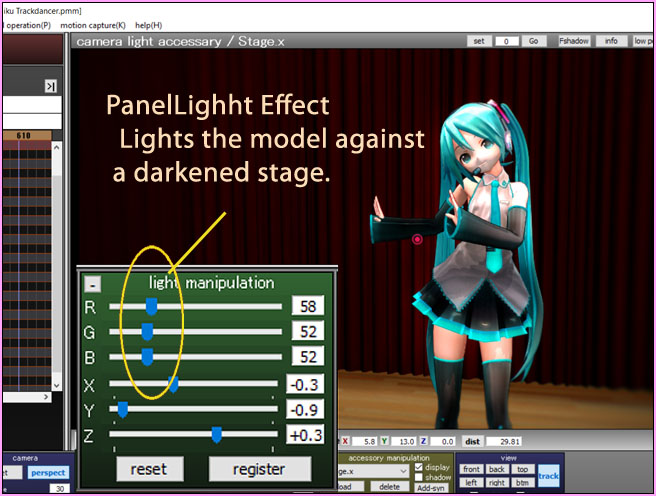
Have fun with the PanelLight MME Lighting Effect effect!

DOWNLOAD the PanelLight effect from LearnMMD.com.

Download Appearance Miku from her homepage.
Have fun with MikuMikuDance!


– SEE BELOW for MORE MMD TUTORIALS…


— — —


– _ — –


Visit the LearnMMD.com Homepage! Plenty of Mikumikudance instruction and info!

More MMD Tutorials...

Reader asks how to create MMD artwork... stuff like posing, camerawork?

A reader asks... Is there a tutorial on how to create MMD artwork, like those you ...read more

Learn MikuMikuDance in Small Steps! New LearnMMD Video Series

Learn MikuMikuDance in Small Steps. Where can I find easy-to-follow MMD instructions on YouTube? How ...read more

Apply Multiple Effects on an Entire MMD Model Using M4Layer Effect

How can I apply multiple effects to an MMD model? Can I use more than ...read more

MMD Plugin Manager... I Found a Treasure!

What sorts of MMD Plugins are there? MMD Plugin Manager? MMD Plugins. Plugin MMD. More ...read more

2025: Hatsune Miku is 18... but she is designed to be always 16 Years. Old by design and in reality!

Finally, in 2023, Hatsune Miku is 16 years old! but in August of 2025, she ...read more

SEARCH LearnMMD.com... it's Easy!

Search LearnMMD.com to find your answers! With the posting of this article, LearnMMD.com has 758 tutorials ...read more

MMD Tutorials, PanelLight, Reggie Dentmore

Post navigation

Previous Post: Create 450-Frame MMD animation from scratch!
Next Post: Download MMD Model NOODLE by vasilnatalie

Related Posts

  • MME DiscoLightEX v003 effect now hosted by LearnMMD.com! Disco Lighting Effect
  • Download Jomomonogm's Snow Miku 2019
    Download Jomomonogm’s Snow Miku 2019 for MMD, a most unusual model! "the making of" my video
  • Close Up of Sph File with Text
    Create Sph Files in Blender Without Drawing Anything! Blender
  • mikumati NXDE G-IDLE models dance "No Thanks" by Hyolyn - Download Links
    mikumati NXDE G-IDLE models dance “No Thanks” by Hyolyn – Download Links "the making of" my video
  • The MMD Circles Halloween animation is fun to make! Free Download
    MMD Circles haunts Halloween Visions download links "the making of" my video
  • Animation Fade helps MMD scene transitions Animation Shortcuts

More Related Articles

How To Make Global Lighting Work with Game-Rips Fixing Broken Models
Value of saved poses. Saved Poses get your MMD Animation Started! Animation Shortcuts
Oomary’s guide to mastering MMD Hair Physics Fixing Broken Models
The Zombie Song download for MMD is a lot of fun! Zombie Song download easily makes spooky MMD videos! "the making of" my video
MMD PostAnalogTV effect gives easy scene transitions and more! MME Effects Tutorials
Study MMD Motion Files to SEE and LEARN about creating animations Study MMD Motion Files to SEE and LEARN about creating animations Making Smooth Motions

Leave a Reply Cancel reply

Your email address will not be published. Required fields are marked *

Download the latest version of MikuMikuDance!
See the MMD Step-by-Step instructions page!
Learn how to make your own MMD motions!
LearnMMD.com
  • Making my new “Rin Needs a Hug” Zero-to-450 Challenge Video "the making of" my video
  • See LearnMMD’s New Crop-Transition Panel Video Google SketchUp and MMD
  • Add Shadows to MMD .X Accessories Tutorial MMD Basics
  • Using Texture Transparency hides MMD model problem areas MMD Tutorials
  • mikumati NXDE G-IDLE models dance "No Thanks" by Hyolyn - Download Links
    mikumati NXDE G-IDLE models dance “No Thanks” by Hyolyn – Download Links "the making of" my video
  • Here is the plan for the ball tossing motion in MikuMikuDance 7.39
    Ball Toss Motion Hits Miku: MikuMikuDance! Dummy Bones
  • Introduction to Vocaloid: a short tutorial NOKO2
  • Introducing MikuMikuMoving … MMM! Kazuki Matsuoka

Copyright © 2022 Learn MikuMikuDance – MMD Tutorials – Free 3D Animation Software and Instructions..

Powered by PressBook Premium theme

Go to mobile version