


 Are there blood effects for MikuMikuDance? How can I splash some blood in MMD? What can I use for blood in my Halloween video?
Halloween is just around the corner…
Using blood “effects” in MMD
Well, Halloween is just around the corner folks. So no doubt we’ll start seeing the annual influx of Miku in seasonal-themed witch outfits (not that it’s a bad thing mind). But for some users, they may want to skip the “cute-witch” theme and instead focus on the horror aspect for their MMD Halloween. And MMD, being the all-powerful deity we know and love, can easily cater to our horror needs. Well, almost. Back in my days of searching DeviantArt for MMD art (which were dark and horror-filled days. I’ll save that for another article though) one thing I kept noticing was that most users did not know how to add blood into MMD. Some users used Microsoft Paint, more advanced users used their fancy photoshops or whatever new photo-manipulation software kids are using nowadays. But it seemed that there was no blood accessory or effect for MMD… decent blood accessory/effect I should say.
Guess people just didn’t know where to look. Thanks in part to the user Mio-nee, we now have ourselves the perfect blood effect. Or spilled jam effect if you’re squeamish. So grab your haunted house, your zombie hoard, and let’s get started!
Download the Blood Effect here!
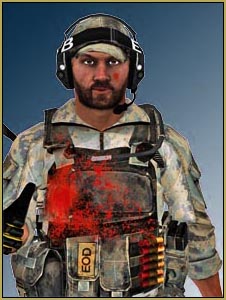
This blood “effect” (actually it’s an accessory, but effect sounds cooler) comes in a pack of eight or so different “types” of splatters. All are .X file-based, but thanks to accessory manipulation adjusting the size and position of the blood is a piece of cake… errr, spilled jam. Now, getting the blood to stick onto a wall or floor is easy but how about that zombie hoard I mentioned not a mere three sentences ago? Well, that can be as easy and or as hard as you make it.
If you’re planning on just making a simple picture (like the one pictured) then this should be a snap. Simply select the version of blood you want and then “add” it to your model/set. Well I say “add”, but for objects that are not flat surfaces you’ll have to use the magic of perspective! Take my avatar (yes that is my MMD avatar. Looks nothing like me) for example. The blood seen on him was “added” in MMD. All I did was simple place the blood in front of the model and then adjusted the size and position to make it look like its attached to my model. Clever, but I’m assuming most users know about manipulation of perspective.
This being said, if you want the blood to “wrap” around the model for your videos or GIFs, you’ll need to manually attach the blood texture to your models texture using .PMDE or .PMDX. I myself haven’t worked with such usage, so I can’t really be your guide. All I can say is that if you know how to work Photoshop and spend a little time on the positioning you’ll be fine. Just make sure you are allowed to edit the model’s texture beforehand.
So we got the basics down. The blood is an accessory file and with a little perspective manipulation we can add a splash of color to our MMD works. But there seems to be a problem. At times, the blood has this weird white background to it which of course ruins it. Can it be fixed?
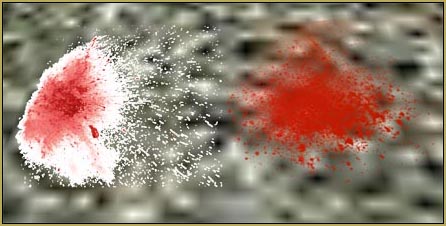
Of course it can, hypothetical reader! For some odd reason, I’ve noticed that the blood is quite finicky on where it wants to be placed. On some .X stages it works fine, on others it doesn’t. And what’s more this blood seems to hate any .PMD/.PMX stages. Well, the first blood seems to act this way. Upon loading up the first blood accessory I noticed that if you upload a second, third, forth, or any number after one the rest of the blood will have the normal transparency while the first blood will have the odd non-transparency. So as a rule of thumb, when I use blood in any of my works I always “install” the first blood out of sight before loading up any more. Insuring I get my blood accessories and that they have proper transparency.
Now a word of warning. Some model creators/stage producers don’t like violence. And that’s understandable. And blood splatters are kinda.. well are violent (unless we’re pretending its jam). So always keep the faith and read those readmes to see if you are allowed to add the blood and or use the blood with said models. I’m sure most modelers won’t want to see their hard work being turned into a smear of jelly.
So there you have it. Finally a blood accessory that can add the perfect “zest” to any MMD project you are working on. Be it a haunted house, a haunted castle, or a clumsy baker. I hope you enjoy and remember to keep the faith!
Download the Blood Effect here!
– SEE BELOW for MORE MMD TUTORIALS…
— — —
– _ — –




The effect was working fine for me the first two times I tried it, but after that it consistently has a thick black border around the splatters that makes it really ugly, and it seems to obscure more of the model than usual.
I did recolor the texture files, but I had already done this the first two times and it worked fine. Any idea what might be causing this?
Fixed it, but apparently I have to have Shader Hyper on for it to work. Other shaders or no shader make it look weird. Should that be happening?
Sorry for the spam, but it’s doing the thing again. So I guess my original question still applies ^^;
Hi Gracie,
I’m not sure, but this sounds a lot like a draw order issue to me. When MMD draws transparent models (like blood splatters), it has to be instructed to draw them after any models that might be behind the transparency. To edit the draw order of .x files, use background->accessories edit. For a lot more information, see http://trackdancer.deviantart.com/art/MMD-Understanding-MMD-Draw-Order-494465598 .
I wonder where did you get the effect. The link at the end of the article tells me that the page was deleted, and browsing Mio-nee’s site I couldn’t find anything related to blood (well, I searched through Google Translate, so my results may be unreliable). Without looking at the effect in action, it’s hard to advise anything. Until then… maybe an alternative will work better for you? Beamman has “Blood_and_Ink” effect as well.