

Skip to content
Learn MikuMikuDance – MMD Tutorials – Free 3D Animation Software

Learn MikuMikuDance – MMD Tutorials – Free 3D Animation Software

Download Free Animation Software – Let's Learn How to Do Everything!

  • Step-by-Step MMD instructions
  • DOWNLOADS
  • Troubleshoot, Fix MMD
  • Site Contents
  • Reggie Replies Q&A
  • Homework!
  • What IS MMD?
    • Download MikuMikuDance Newest Latest Version of MMD
  • “HOW TO”
    • Raycast RAY-MMD Effect Tutorials
  • BONUS PAGES
    • Why convert PMD models to PMX?
  • HALL of CHAMPIONS
  • Tutorial Categories
  • About
    • Privacy Policy
  • Toggle search form
  • The TrueCamera Effect enhances the 3D look of your MMD animation.
    MME TrueCamera Effect enhances 3D appearance Reggie Dentmore
  • PMXEditor Quickly Edits MMD Model using Downloaded Parts BigPerryman
  • Download MMD 9.32 MikuMikuDance latest version Download MikuMikuDance
  • Creating an animation using MMD, MikuMikuDance! "the making of" my video
  • Easily Transfer an Accessory to a Dummy Bone from Model’s Hand in MMD Accessory Manipulation/Adjust
  • Use Stage Changes in MMD to Make an Interesting Video Koneko the MMD Fairy
  • VPVP MMD Training video offers MMD instructions videos.
    VPVP page offers basic MMD instructions videos MMD Basics
  • How to sign up and Upload to Piapro! HollyLawliet

MMD Starry Winds Effect Makes Amazing Night Time Scenes!

Posted on December 29, 2018July 8, 2024 By ToxicXender 15 Comments on MMD Starry Winds Effect Makes Amazing Night Time Scenes!

A featured post by our Toxic-Xender. Click to see all his articles!What is the MMD Starry Winds effect? Where can I download the Starry Winds effect? How do I use the StarryWindsMMD effect? How can I make a night sky scene in MMD?

The MMD Starry Winds effect gives you a beautiful night sky! StarryWindsMMD

How To Use Starry Winds Effect!

Hey Toxic Here! And today we’re going to learn how to use the “Starry Winds” effect!

Now You Might be wondering “What does this effect do?” This effect allows you to make realistic night-time videos or pictures with moving stars and realistic lighting! It’s also a Planetarium Engine.

Let’s head To the Celestial-Spells.com site!
www.celestial-spells.com/en/logs/2012/06/song-of-the-star-tour–planetarium-for-mikumikudance-.php

[Editor’s note:] The author’s site was taken down for some reason; the effect still can be downloaded here, though.

Before we hit that button we’re going to need a software that can open a .Zip file!

The default Win-Zip on your computer cannot translate Japanese unicode file names. We at LearnMMD recommend using Bandizip, it keeps Japanese unicode without scrambling those file names. Don’t Have Bandizip? Download it  Here! (I ensure you its 100% Safe!)… unzip it with your Win-zip, and then install Bandzip.

After you have installed Bandizip, let’s extract the file!

Drag the effect Zip folder onto your Desktop. Double click the ZIP folder and hit the “Extract” button… follow the defaults and you will have the effect folder on your desktop.
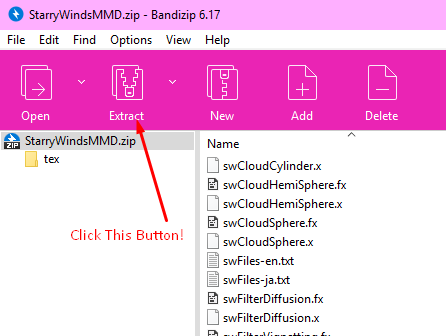
Click to Extract or EXTRACT ALL to find the new folder on your desktop.

Now that we extracted it, you should have a folder with these files.
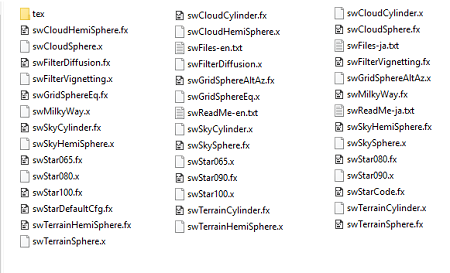
The extracted folder will have these files in it.

Open MMD.

Click the LOAD button in the Accessory Manipulation Panel, navigate your way to the StarryWindsMMD folder and choose swSkySphere.x which gives you a dark sky… and then load the swTerrainSphere.x… it will look like this:
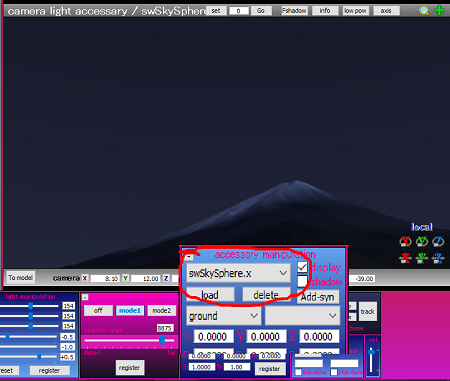
Move the camera to get the mountain in view.

OK! Now that we see darkness, we can add The MilkyWay and Some Stars!

Just add the swMilkyWay.x  to see the Milky Way in your sky. Roll the camera around to see the stars.
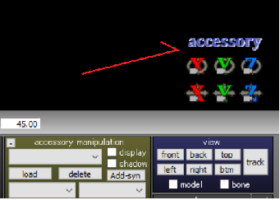
In accessory mode, you can maneuver the stars into a position that pleases you.You will want to click into Accessory mode so you can use the XYZ rollers to position the stars. If you can’t find the stars, you might want to go to Accessory Edit under the Background menu and change the order of the accessories until you can see you stars.

Go ahead and choose any of those .x effect files that has “Star” and you get: more stars!
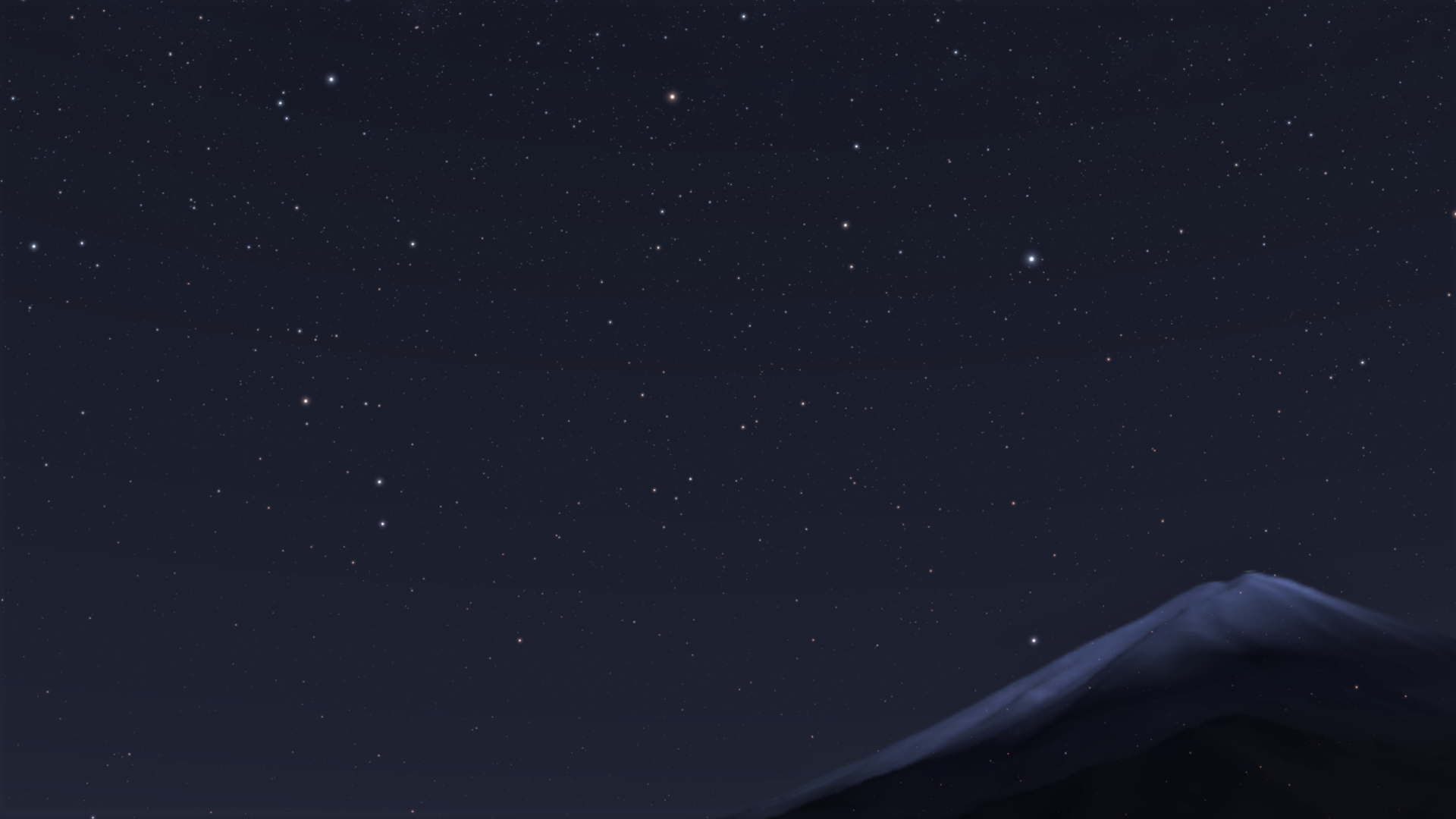
CLICK the image for the full-size Night Sky!

Amazing, isn’t it? Now you can make wonderful Night-Time Scenes Right in MMD!

Have fun with MikuMikuDance!


– SEE BELOW for MORE MMD TUTORIALS…


— — —


– _ — –


Visit the LearnMMD.com Homepage! Plenty of Mikumikudance instruction and info!

More MMD Tutorials...

Enjoy the "camera Angles WEIRD in Anime" meme...

Enjoy the "camera Angles WEIRD in Anime" meme... This image is from The Slayers - NEXT, ...read more

Reader asks how to create MMD artwork... stuff like posing, camerawork?

A reader asks... Is there a tutorial on how to create MMD artwork, like those you ...read more

Learn MikuMikuDance in Small Steps! New LearnMMD Video Series

Learn MikuMikuDance in Small Steps. Where can I find easy-to-follow MMD instructions on YouTube? How ...read more

Apply Multiple Effects on an Entire MMD Model Using M4Layer Effect

How can I apply multiple effects to an MMD model? Can I use more than ...read more

MMD Plugin Manager... I Found a Treasure!

What sorts of MMD Plugins are there? MMD Plugin Manager? MMD Plugins. Plugin MMD. More ...read more

2025: Hatsune Miku is 18... but she is designed to be always 16 Years old, by design and in reality!

Finally, in 2023, Hatsune Miku is 16 years old! but in August of 2025, she ...read more

MMD Tutorials, MME Effects Tutorials, Starry Winds, ToxicXender

Post navigation

Previous Post: Using the OP function in an animation
Next Post: Ray-MMD Localized Fog Effects for stunning MMD scenes

Related Posts

  • Ray-MMD Painting with light!
    Ray-MMD: The Art of painting with Light MMD Tutorials
  • Yukari's Gap Portal Style.
    The In’s and Out’s of Yukari’s Gap for MikuMikuDance. ARIZONA
  • MMD smoke clouds are easy to make with Beamman's Breath effect.
    MMD Smoke Clouds and a Smoke Filled Room… Beamman's Breath Effect
  • Multiply of Bone Frame Position-Angle Resizes Motions to fit your Model CommanderZoey
  • My new “Ring Around the Moon” MMD video is on YouTube "the making of" my video
  • Kaitensora effect gives moving clouds background in your MMD scene Kaitensora Moving Clouds

More Related Articles

The Making of: Sleepover Gone Wrong (REMAKE) "the making of" my video
MMD Camera Work makes motions fit the song. MMD Camera Work made the motion fit the song! "the making of" my video
MMD Elektrika Motion gets new life! Ancient MMD Elektrika Motion Gets NEW Life! "the making of" my video
Adjust downloaded motions to fit your MMD models Animation Shortcuts
Easily Make Realistic Hair Texture for MMD Models Mae Blythe
MMD Outside Parent Setting Enables Bone Connecting Animation Shortcuts

Comments (15) on “MMD Starry Winds Effect Makes Amazing Night Time Scenes!”

  1. ashley dunaway says:
    October 28, 2020 at 10:37 am

    the link doesnt work

    Reply
    1. KillerBeer says:
      October 29, 2020 at 3:21 am

      The site is apparently taken down (dunno if it is by author himself, or by some authority). Fortunately, I have downloaded the effect while it was available.

      https://learnmmd.com/wp-content/uploads/2020/10/StarryWindsMMD_v06c.zip

      Reply
      1. Reggie_Dentmore says:
        October 30, 2020 at 7:29 am

        KB… do you want to add that link to that article?

        Reply
        1. KillerBeer says:
          October 30, 2020 at 11:11 am

          OK

          Reply
  2. Dave says:
    July 28, 2019 at 11:42 am

    Is there a way to adjust the swStar*** effect(s) so that stars can appear below the horizon?

    Reply
    1. Reggie_Dentmore says:
      July 28, 2019 at 3:31 pm

      swStar? … Don’t know that one… Have you tried it? … What methods did you try so as to get the stars to appear below the horizon?

      Reply
      1. Dave says:
        July 29, 2019 at 9:25 am

        I meant “swStar***” to refer to how there are different swStar’s, like 65, 80, 90, and 100. There are .x files and effect files for each, plus those “swStarCode” and “swStarDefaultCfg” effect files.

        Anyway, I tried configuring the effect files by opening them with NotePad. Nothing I tried could make the stars appear below the horizon, though.

        Reply
        1. KillerBeer says:
          July 29, 2019 at 11:16 am

          Unfortunately, I won’t be able to provide any details in next two weeks, but it definitely *is* possible.

          Reply
          1. Dave says:
            July 29, 2019 at 11:45 am

            Two weeks? Meeehh….

            ….well, until then, I’ll try to figure things out for myself.

            Thank you, in advance, for your help. (:

            Reply
            1. KillerBeer says:
              July 29, 2019 at 11:52 am

              Ok, I checked some files. Try to change the ATMOS_EXT parameter. If I remember correctly, that should be it.

              Reply
              1. Dave says:
                July 29, 2019 at 12:25 pm

                You know what’s funny? I just found that out. ^^;

                The ATMOS_EXT parameter exists also for the swStarCode and swStarDefaultCfg; yesterday, I tried setting them to 0 but nothing changed. Turns out I should’ve just went into the swStar90** file.

                I appreciate your help, though I apologize if I wasted anybody’s time here. I hate it when the answer is right before my eyes and I don’t notice it.

                Thanks again. (:

                ** = I’m using this number for my video.

                Reply
                1. Reggie_Dentmore says:
                  July 29, 2019 at 2:29 pm

                  No problema! .. This is all about learning and sharing… Thanks for your info!

                  Reply
  3. huongdaoroma says:
    March 1, 2019 at 3:13 pm

    Can you use this with raycast mme? If yes, how?

    Reply
    1. Reggie_Dentmore says:
      March 1, 2019 at 8:50 pm

      … use this with raycast mme? If yes, how? … I have no answer for you. You will just have to try it out on your system. … Did it work? No?… get an error message or anything… No?… Sorry! … it’s all experimental. … You will just have to see what you can use… see what you CAN use with Raycast.
      … (One thing about Raycast: it’s designed to run with 64-bit Windows 10… if you are not using 64-bit Win 10, your Raycast will not work well for you. … and if you ARE, you will need to work with Raycast and LEARN it to get a handle on it… it’s complicated!)

      Reply
      1. huongdaoroma says:
        March 5, 2019 at 11:56 am

        Thank you! Sorry for late reply. I was really expecting an email notification that someone replied to my comment….

        Reply

Leave a Reply Cancel reply

Your email address will not be published. Required fields are marked *

Download the latest version of MikuMikuDance!
See the MMD Step-by-Step instructions page!
Learn how to make your own MMD motions!
LearnMMD.com
  • Translate Japanese Model Names into English File Management / Organization
  • Model eye-mesh texture VS Photographic eye-mesh in Blender.Blender
    Photos make realistic eye textures for your MMD models Blender
  • Professionally made models FOUND! Downloading New Models
  • Different Eye Textures in one model using PMXE JuneTarzan
  • How To Make MMD Pictures and Videos Like a Pro Advanced Shader Technique
  • Beamman’s MME SelfBurning Effect Sets your MMD models Ablaze! MME Effects Tutorials
  • Why MMD cannot open the models in a saved PMM file Downloading New Models
  • Ghost Effect for MME
    How to Use the Ghost Effect for MME! ARIZONA

Copyright © 2022 Learn MikuMikuDance – MMD Tutorials – Free 3D Animation Software and Instructions..

Powered by PressBook Premium theme

Go to mobile version