





 Where can I download the ikUnderwater effect? How do I use the ikUnderwater effect? How can I make my MMD animation look like I filmed it underwater?
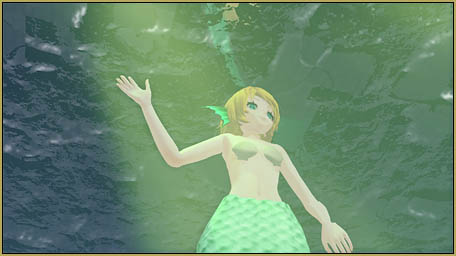
ikUnderwater Effect submerges your MMD animation!
The ikUnderwater effect is easy to use and has MANY adjustments and options! The effect downloads from the same page as the Rhinestone Effect:
https://ux.getuploader.com/ikeno/index/1/date/3
You will go through the same screens as you see in that Rhinestone tutorial.
The ikUnderwater effect has a PMX Controller model. Load that first… and see that it needs to be translated into English before you can use it. I DID translate the Controller model and I have it here in a ZIP folder for you to download. Also in that ZIP is a translation of the README file… that README has the author’s instructions.
The Demo…
For the demo video, I created that big flat floor in Sketchup and used the 3D-Rad plugin to save it as a .x Accessory for MMD. I tried using a couple of my different stages and found that the “God Ray” in this effect was blocked by walls, and such, in my stage setting… so I went with a simple flat floor as the way to best show the effect.

So… Load your model, and Load the Controller… and then load the ikUnderwater.x file as an accessory. … see the background go black, and be ready to WAIT for awhile as that .x processes. … and then see that you now have water everywhere! (If you do NOT see the water, try moving your stage-floor down a little bit… the water may be right there, below the surface of the floor.)
 The Controller has two bones… a Center and a Mother (All Parent)… and they arrive stacked one-on-top-of-the-other. The Center bone doesn’t seem to do anything, so move it aside and click on that hidden Motherbone. Use the Y roller to move that bone up… increases the depth of the “water”. Adjust that bone using any of the XYZ rollers to shine the God Rays where you want them. Adjust the sliders to get your rays (the R, G and B sliders in the Eyes section).
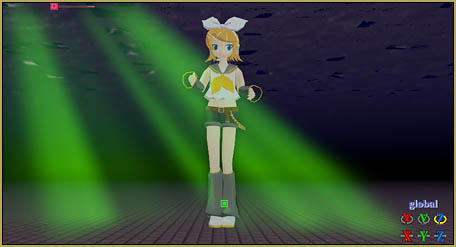
The effect Controller has many sliders… go for it! … try them out. See the author’s instructions in that README file. He tells us how to modify the effect by editing the .fx file.
Squiggles on the floor?
In reading that README, I believe that we should see “squiggles” on the floor, but I was not able to make that happen. If YOU figure that out, please leave a comment after the end of this tutorial. I look forward to adding your info to this tutorial!
The mermaid…
My demo needed a mermaid… and I found one on galaktika537’s dA page:
https://galaktika537.deviantart.com/art/Rin-mermaid-DL-526008522
I loaded the same motion file (from our Mahlazer’s “Feel the Sound” download) onto both the Animasa Rin and the galaktika537 Rin Mermaid models.
The mermaid looks great… but, being a “family show”, I had to turn off MMD’s physics in order to keep the mermaids clam-shells in place! With physics “on”, they tend to fly all over the place, uncovering, well, what they cover. She DOES have a series of adjustable bones in her body and tail, allowing for a detailed fish-like animation… but I did nothing with them for this tutorial demo.
The soundtrack…
I twisted Miku’s Ievan Polkka in Audacity, using parts of it playing backwards with some portions alternately louder or quieter, to enhance the underwater sensation.
There you go … more to learn!
This just gets your feet wet with the ikUnderwater Effect. There’s plenty more to discover. … and when you DO discover something, please leave a comment. Thank you!
Enjoy MikuMikuDance!
– SEE BELOW for MORE MMD TUTORIALS…
— — —
– _ — –





Sooo, I found a way to do the “floor squiggles”. Set “Wave density” (under “Mouth”) to 1 and that should do it. Also, if anyone wants to know my preferred settings for this effect, here you go…
“Eyes” Section
Light angle: 1
Light G: 0.170
Light B: 0.210
Fog G: 0.160
Fog B: 0.310
Fog Lightness: 0.530
“Mouth” Section
Wave density: 1
“Brow” Section
Godrey Strength: 0.130
Also, I found that ElviraMoa’s Underwater Stage works well with this effect. Here’s a link: https://www.deviantart.com/elviramoa/art/MMD-Stage-under-water-DL-378346977
If anyone wants it, I have a zip file with a MMD project file that uses the stage and the ikUnderwater effect. It also has a pose data file for the ikUnderwater controller. Here you go: https://drive.google.com/file/d/1OiZVZZgYG-orsWMCwou814odFu_uPJmQ/view?usp=sharing
So uh, the pose data doesn’t work… welp…
THANK YOU for all of your assistance with this effect… too bad the Pose file didn’t work, I thought that was a great idea! I hope the future readers of these comments enjoy your data.
You have a great website. Glad I could help!
i can’t understand how you did lightning… With godray effect!?
Hello! If you still need help, you can do that using the sliders in the controller (in the “Eyes” section). Use the “Light R” “Light G” and “Light B” sliders. I would recommend having “Light B” at about 0.210 and “Light G” at about 0.170.
Then use the “Light Angle” slider and set it to the highest it can go. Then, what I did to make it less bright was set “Godrey Strength” (under “Brow”) to 0.130. Then, if you want squiggles on the floor, set “Wave density” (under “Mouth”) to the highest it can go.
Hope I helped!
Hi. I tried using the original ikUnderwater.pmx and the translated one you provide but it’s not loading it properly. When I load the .pmx and .x is changes nothing. The bone is there for me to move the water level up and down but there isn’t any actual water or water level.
I just downloaded that controller and replaced my old one with it… it worked. I did stumble, a bit, as I got that effect to work.
– Load a stage with a floor… Load a model.
-Load the Controller model.
-Load the .x file as an accessory and wait for a bit as it kicks-in… background goes black.
– Go to the Controller and see the bones on screen. The top bone is the Center Bone that makes no difference. Use Y to slide that bone up so you can access the motherbone that’s hidden under it.
-Select that motherbone on-screen and now use Y to move it upwards… You should see the water-level moving with that bone. When I register that bone, I don’t see a diamond… but the motion is recorded and you can advance frames and create animation of the water-level changing.
Yes? — Reggie