Skip to content
Learn MikuMikuDance – MMD Tutorials – Free 3D Animation Software

Learn MikuMikuDance – MMD Tutorials – Free 3D Animation Software

Download Free Animation Software – Let's Learn How to Do Everything!

  • Step-by-Step MMD instructions
  • DOWNLOADS
  • Troubleshoot, Fix MMD
  • Site Contents
  • Reggie Replies Q&A
  • Homework!
  • What IS MMD?
    • Download MikuMikuDance Newest Latest Version of MMD
  • “HOW TO”
    • Raycast RAY-MMD Effect Tutorials
  • BONUS PAGES
    • Why convert PMD models to PMX?
  • HALL of CHAMPIONS
  • Tutorial Categories
  • About
    • Privacy Policy
  • Toggle search form
  • Learn to resize PMD models
    How to resize PMD models (and what to do when they don’t) KillerBeer
  • Background AVI Files require a Baseleine AVI setting.
    MMD Background AVI Files converted using CloudConvert Background AVI
  • The Making of “Hell To Your Doorstep” MMD Animation and Video "the making of" my video
  • Older MME Shaders rival Ray-MMD Raycast results and are easy to use! Material Shader
  • PMDE Q&A – Making clothes follow model motions Fixing Broken Models
  • VDE-4 Champion: YamiMori Video Dojo Champions
  • Here is the plan for the ball tossing motion in MikuMikuDance 7.39
    “Bonk goes the Miku” new video using Accessories created in SketchUp Google SketchUp and MMD
  • Ray-MMD Godrays… argggh!!! MMD Tutorials

Position stage near MMD coordinate axis center-line

Posted on November 8, 2017July 2, 2024 By Reggie_Dentmore No Comments on Position stage near MMD coordinate axis center-line

A Feature Article by Reggie Dentmore on LearnMMD.comHow can I move the coordinate axis center-line into the part of the stage where I want to shoot my scene? How can I make it easy on myself as I create an MMD animation? Why is the camera motion so messed-up as I create my MMD animation?

I have some very large stages… like “MMD Batokin Island” or “MMD Inside of School” and “Yokohama Rural Stage“(a 45MB download!)… and I always move that stage so that the action area is centered on the coordinate axis center-line so as to make the camerawork easier!

Position the stage
near the MMD coordinate axis center-line!

When I load the MMD Inside of School stage, the coordinate axis center-line is, by default, in the center of the courtyard… but I want to shoot a scene in the hallway!
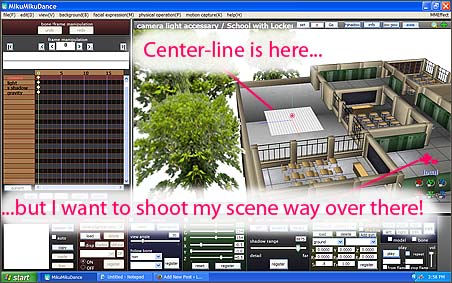
The coordinate axis center-line is far from my action... making it hard to place models and move camera.

Many MMDers make the mistake of leaving the stage where it is while they load their models and drag them way over there… to where they want to create their scene. Then they have to drag the camera way over there, too…
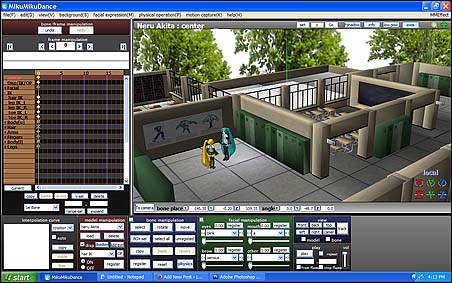
I have placed the models but they are far from center-stage!
That’s the Harner “MMD inside of School” stage at an Si size setting of .6

… and then, when they start to move the camera, they find that the camera controls seem to be way out of whack! It takes real effort to make a simple camera  move… things just aren’t working right!

The solution:

Move the stage so that your area of interest is positioned under the coordinate axis center-line!
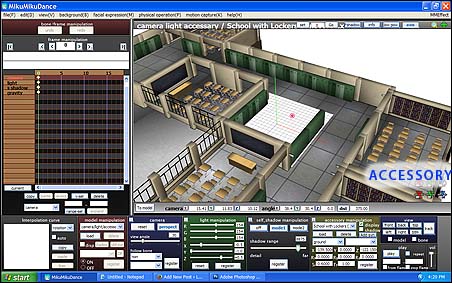
Now, with the coordinate axis center-line centered on my shooting area, my camera moves and model adjustment is much easier!

Click to get into Accessory mode and use the XYZ rollers to position the stage. With the center-line now in center-stage… when you load models, they will be center-stage… and as you swing the camera, it will move easily around center-stage.
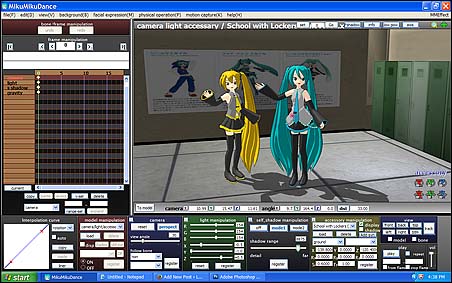
Camerawork and model movement is much easier when the Coordinate axis center-line is centered on your stage!

Success!

Have fun with MikuMikuDance!


– SEE BELOW for MORE MMD TUTORIALS…


— — —


– _ — –


Visit the LearnMMD.com Homepage! Plenty of Mikumikudance instruction and info!

More MMD Tutorials...

Reader asks how to create MMD artwork... stuff like posing, camerawork?

A reader asks... Is there a tutorial on how to create MMD artwork, like those you ...read more

Introducing MMD model 1052C China Qipao Miku

Where can I download MMD model 1052C dancers? I want the 1052C China Qipao Miku ...read more

Download Jomomonogm's Snow Miku 2019 for MMD, a most unusual model!

Where can I download Jomomonogm's Snow Miku 2019? What is so unusual about this Snow ...read more

MMD animation made-from-scratch Forgotten Vocaloid Mew Rags on Reggie's MMD Videos

How do I make my own MMD animation from scratch? How do I start my ...read more

Rediscover your old MMD Animations: Love them again!

Rediscover your old MMD Animations: Love them again! https://youtu.be/P4b3todZMUI A labor of love... Remember how it was when ...read more

MMD Boobs too Big yields Too Funny Really Bad Boy video!

Can MMD boobs too big get in the way of a downloaded motion file? What ...read more

Accessory Manipulation/Adjust, Camera Motion, MMD Basics, Reggie Dentmore

Post navigation

Previous Post: Trouble Keeping MMD Faith When Those Around You Don’t
Next Post: Intersecting Physics Bodies Cause Glitchy MMD Models

Related Posts

  • Open MikuMikuDance and enjoy it for the fun of it!
    Open MikuMikuDance… just for the fun of it! MMD Basics
  • askY Dramatic Anime Style Sky Domes for MMD created by Meme "the making of" my video
  • Create 450-Frame MMD Animation from scratch!
    Create 450-Frame MMD animation from scratch! "the making of" my video
  • YouTube thumbnail image is so important!
    Create your Most Attractive YouTube Thumbnail image "the making of" my video
  • KiraKira-sparkleV2 beautiful colored sparkles.
    KiraKira-sparkleV2 MME Effect adds COLOR to KiraKira! KiraKira-SparkleV2
  • Different MMD models react differently to pose and motion data MMD Basics

More Related Articles

Storyboards organize your MMD animation Intro to MikuMikuDance
Making MMD Models Complicated Task with much to know! Making Models
MMD Boobs too Big gives us a funny Really Really Bad Boys video! MMD Boobs too Big yields Too Funny Really Bad Boy video! "the making of" my video
The UT Video Codec Suite works well with Render to AVI in MMD. UT Video Codec Suite v22.2.0 creates simple AVI video for MMD background AVI Reggie Dentmore
Blackout Effect offers Fade-to-Black and fade-to-white! MME Blackout Effect offers Fade-to-Black and Fade-to-White Blackout Effect
Gakupo sings "Trick Bag" - VDE-3 Entry! Step 1: VDE-3 “Gotta Sing… Gotta Dance!” Entry Creation… YouTube Music Approval CONTESTS

Leave a Reply Cancel reply

Your email address will not be published. Required fields are marked *

Download the latest version of MikuMikuDance!
See the MMD Step-by-Step instructions page!
Learn how to make your own MMD motions!
LearnMMD.com
  • My Top 6 Favorite Miku Models! GloriaTheAnimator
  • Blackout Effect offers Fade-to-Black and fade-to-white!
    MME Blackout Effect offers Fade-to-Black and Fade-to-White Blackout Effect
  • Intentionally Build Dramatic Atmosphere into your MMD Animation MMD Tutorials
  • Fireworks Kai effect
    Using the Fireworks Kai effect for MikuMikuDance. ARIZONA
  • VDE-4 Champion: Reona Video Dojo Champions
  • The SSAO effect adds depth of color and shadows for greater realism! MME MMD 7.39
    Playing with MME – Using MORE cool MikuMikuEffects! Nuts & Bolts
  • Use the Silhouette Effect to create White Silhouettes!
    Creating White Silhouette Models in MikuMikuEffects ARIZONA
  • ColorShift Effect Dances using VMDSpectrum Analyzer ColorShift 3D Effect

Copyright © 2022 Learn MikuMikuDance – MMD Tutorials – Free 3D Animation Software and Instructions..

Powered by PressBook Premium theme

Go to mobile version