Skip to content
Learn MikuMikuDance – MMD Tutorials – Free 3D Animation Software

Learn MikuMikuDance – MMD Tutorials – Free 3D Animation Software

Download Free Animation Software – Let's Learn How to Do Everything!

  • Step-by-Step MMD instructions
  • DOWNLOADS
  • Troubleshoot, Fix MMD
  • Site Contents
  • Reggie Replies Q&A
  • Homework!
  • What IS MMD?
    • Download MikuMikuDance Newest Latest Version of MMD
  • “HOW TO”
    • Raycast RAY-MMD Effect Tutorials
  • BONUS PAGES
    • Why convert PMD models to PMX?
  • HALL of CHAMPIONS
  • Tutorial Categories
  • About
    • Privacy Policy
  • Toggle search form
  • IrfanView captures single-frame images from Video AVI files! Irfanview Media Viewer
  • Use M4Layer Effect to add multiple effects onto your MMD model.
    Apply Multiple Effects on an Entire MMD Model Using M4Layer Effect M4Layer Effect
  • Keep The Faith MMD
    Use proper MMD Etiquette when Downloading Models for MMD Intro to MikuMikuDance
  • Posing MMD Models: Anatomy Matters! BigPerryman
  • An MMD town stage: Making Kerorin Town Great Again – Part1 MMD Stages
  • Getting Re-Excited about MikuMikuDance … Happy Birthday Miku! Intro to MikuMikuDance
  • Staging and the 12 Principles of Animation. Accessory Manipulation/Adjust
  • My Top 6 Favorite Shader Effects for MikuMikuDance GloriaTheAnimator

Enable Physics in MMD 7.96

Posted on July 13, 2013July 30, 2015 By NicoleNakanoMMD No Comments on Enable Physics in MMD 7.96

How do I turn the Physics on and off in MMD 7.96? See all of the articles by LearnMMD's NicoleNakanoMMD!Can I set the Physics to be on all the time in MikuMikuDance? Why is my model’s hair and dress so stiff looking?

How To Enable Physics in MMD

Hi Everyone! This Is NicoleNakanoMMD!

Ok, so … I Want To Teach You How To Enable The Physics in MMD (MikuMikuDance)

1.Load MikuMikuDance
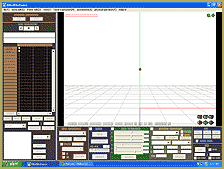
MMDempty-Stage

2.Load A Model (I Choose Neru Akita)
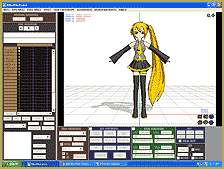
MMD_NeruScreen

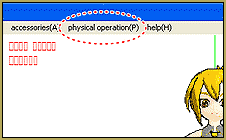
3.Click the Physical Operation Tab

Physics-Tab

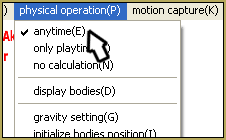
4.Click Anytime (E)

MMDPhysics-Tab

5.And You Can See Your Model MMD_Physics ONwith His/Her Physics Are On!


Remember To Keep The Faith MMD!

Model By: Smith Hioka and Animasa

Thank You For Making This Model :D

~NicoleNakanoMMD~

<


– SEE BELOW for MORE MMD TUTORIALS…


— — —


– _ — –


Visit the LearnMMD.com Homepage! Plenty of Mikumikudance instruction and info!

More MMD Tutorials...

Reader asks how to create MMD artwork... stuff like posing, camerawork?

A reader asks... Is there a tutorial on how to create MMD artwork, like those you ...read more

MikuMikuDance 15th Anniversary celebration video posted on NicoNico!

Did you know that the first version of MikuMikuDance was released in 2008? MMD is ...read more

Use YouTube Video Analytics Attract Maintain Viewers

How can I use YouTube Video Analytics to learn how to make popular MMD videos? ...read more

Create 450-Frame MMD animation from scratch!

How do I create a 450-Frame MMD animation from scratch? How do I start making ...read more

No more boring MMD Camerawork - Keep it moving!

MMD Camerawork can be so boring. How can I add life to my MMD animations? ...read more

Download Halloween Costume TDA Miku edit by dA's Shiro-NekoVocaloid

Where can I get Halloween Costume TDA Miku? Download a gang of five MMD models ...read more

MMD Basics, NicoleNakanoMMD

Post navigation

Previous Post: Making MikuMikuDance Pictures Render to Picture File Tutorial
Next Post: MMD Keyboard Shortcuts Make MikuMikuDance Easier

Related Posts

  • MMD has an EXPAND function that lets you adjust a motion's speed.
    EXPAND function modifies MMD motion tempo EXPAND a motion
  • Bandizip® keeps Japanese file names intact when Extracting ZIP folders Bandizip
  • askY Dramatic Anime Style Sky Domes for MMD created by Meme "the making of" my video
  • Easily Transfer an Accessory to a Dummy Bone from Model’s Hand in MMD Accessory Manipulation/Adjust
  • Different MMD models react differently to pose and motion data MMD Basics
  • Switch Models without Physics Glitches Accessory Manipulation/Adjust

More Related Articles

Post Effect cannot be specified Fix the “Post Effect cannot be specified” error Chris no Akumu
Physical Operations Tab in MikuMikuDance 7.39 Menu Options MENU Option Descriptions
MMD First Steps Make your own motions from scratch Making Smooth Motions
Adjust the Shadows in MikuMikuDance KillerBeer
Bandizip® keeps Japanese file names intact when Extracting ZIP folders Bandizip
Make Smooth Motions using Multiple Keyframes Animation Shortcuts

Leave a Reply Cancel reply

Your email address will not be published. Required fields are marked *

Download the latest version of MikuMikuDance!
See the MMD Step-by-Step instructions page!
Learn how to make your own MMD motions!
LearnMMD.com
  • The SSAO effect adds depth of color and shadows for greater realism! MME MMD 7.39
    Playing with MME – Using MORE cool MikuMikuEffects! Nuts & Bolts
  • Adding & Working the Stage Lights with Dummy Bones MMD MikuMikuDance Dummy Bones
  • MMD Camerawork sets the mood, enhances the animation, and showcases your models!
    MMD Camerawork sets mood enhances animation showcases models "the making of" my video
  • How to use Raycast MMD MME Shader Effect Advanced Shader Technique
  • San Japan bow
    LearnMMD Hosts a Panel at San Japan! ARIZONA
  • Ray-MMD: Lost in the Fog
    Ray-MMD Localized Fog Effects for stunning MMD scenes MMD Tutorials
  • Rin is excited about the MomiCup
    How to enter The MomiCup and other YouTube MMD Contests and Parties. ARIZONA
  • Download MME v037 in English install MikuMikuEffects special effects Download MME MikuMikuEffects

Copyright © 2022 Learn MikuMikuDance – MMD Tutorials – Free 3D Animation Software and Instructions..

Powered by PressBook Premium theme

Go to mobile version