

Skip to content
Learn MikuMikuDance – MMD Tutorials – Free 3D Animation Software

Learn MikuMikuDance – MMD Tutorials – Free 3D Animation Software

Download Free Animation Software – Let's Learn How to Do Everything!

  • Step-by-Step MMD instructions
  • DOWNLOADS
  • Troubleshoot, Fix MMD
  • Site Contents
  • Reggie Replies Q&A
  • Homework!
  • What IS MMD?
    • Download MikuMikuDance Newest Latest Version of MMD
  • “HOW TO”
    • Raycast RAY-MMD Effect Tutorials
  • BONUS PAGES
    • Why convert PMD models to PMX?
  • HALL of CHAMPIONS
  • Tutorial Categories
  • About
    • Privacy Policy
  • Toggle search form
  • How to Switch Models and Stages in MikuMikuDance Accessory Manipulation/Adjust
  • Using BeamMan’s fluid2D Creates Fabulous MMD Under Water Scenes BeamMan's fluid2D
  • MMD AnimationSmoother Tool does just that! AnimationSmoother Tool
  • Nico Nico MMD Videos, Models, Motions, and Music! Downloading New Models
  • Let your MMD model breathe and move while standing still! Creating Motions
  • Old-Time VOCALOID MMD… a New TAKE and a Look Back! "the making of" my video
  • Delete Miku and Learn About the Sample Dance Stage Lights Dummy Bones
  • Different Eye Textures in one model using PMXE JuneTarzan

Top Two (and a fraction) Probable Reasons Your MMD Doesn’t Run

Posted on December 23, 2014July 17, 2022 By KillerBeer 2 Comments on Top Two (and a fraction) Probable Reasons Your MMD Doesn’t Run

A feature article by KillerBeer ... an Author on LearnMMD.com!mmd does not work on me i did everything and it just does not work please halp
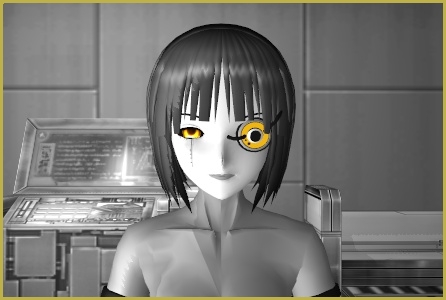

Good day. Welcome to Miku Hatsune Automatic Express Diagnostic Health Center. Please stand behind the thick yellow line. You will hear a buzzer. When you hear a buzzer, please step forward, raise your hand, and proceed for taking blood, urine, and brain tissue samples… [garbled noise]

Ahem.

First, make sure that your computer has an actual video card, either NVidia or Radeon, not an Intel HD integrated chipset. Some models of the latter occasionally manage to run MMD, but as a rule, these are intended for office solutions and are not eligible for graphic intensive applications like MikuMikuDance. Also, make sure your card’s drivers are updated to the latest version.

Also , if your MMD folder is residing in Documents, Downloads, Program Files, or other Windows-related folder, try to move it to the root of your C:\ drive. Some systems’ UAC settings prevent uncertified programs from having full control in those folders.

And now, proceed for real tests.
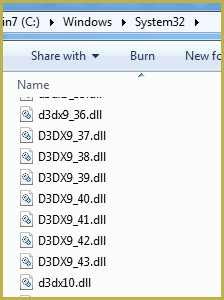
Picture: what should be in of C:\Windows\System32One: open your C:\Windows\System32 folder and scroll down to .dll files that start with d3dx9_. There have to be 20 of them, numbered from 24 to 43. If there are less (or none), install DirectX 9.0c. Do *not* assume that if you have a higher version installed, it should be enough, just do it.
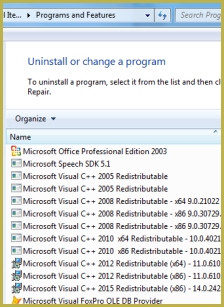
Picture: what should be in Programs and FeaturesTwo: open your Control Panel’s Programs and Features window and scroll down to Microsoft Visual C++ Redistributable libraries. There have to be 2005 (x86) and 2008 (x86) versions if you have 32-bit MMD, or 2008 (x64) and 2010 (x64) versions otherwise. There might be higher versions as well, but regardless of whether there are, these two are necessary for MMD and MME proper functioning; if they are not there, install them.

These are routine tests that sift out 95% of all problems that people write us about. There’s no point in investigating other possible sources of a problem until these two points are clarified.

Good day. You will hear a buzzer in three… two… one. [bzzzt]

Your specimen has been processed


The picture uses:

GLaDOS model by TehPuroisen
Lab Stage (recolored)
Half-Lambert shader effect
More MMD Tutorials...

Windows 11 S Mode: The app you’re trying to install isn’t a Microsoft verified app.

Windows 11 S Mode. Why won't my Windows 11 computer let me install the C++ ...read more

Solved? White screen covers MMD stage Intel Gen 12 Processor blocks MMD stage

I just got a new computer with an Intel Gen 12 Processor and it will ...read more

PMXE 0254f a Newer PMXE in English - More Complete Translation - Tools Reconfigured

What's the deal with the new PMXE 0254f? I can no longer do this and ...read more

The making of: "Bang Bang" Portal video

What did I just see, who are these people, and why should I care? (Oh, ...read more

Troubleshoot MMD models-- or anything else-- with four techniques!

How to fix MMD models?  How can I troubleshoot MMD models?  How can get help ...read more

3D For Cheapskates: Making stereo MMD videos without special equipment

Can I make 3D videos in MMD? Do I absolutely have to have a special ...read more

KillerBeer, Troubleshooting MMD

Post navigation

Previous Post: How to Use the Ghost Effect for MME!
Next Post: Advanced subtitles for MMD: Using MikuTelopE

Related Posts

  • Customize MME Effects by Editing .fx Files Customize MME effects
  • Pose characters in PMX Editor and export as OBJs for Poser .OBJ Object Files
  • Troubleshooting MMD errors and setting up d3dx9_32.dll error
  • Let the model itself help you to align its bones!
    Rig a Model: Adding and weighting bones with PMDE Bones
  • 3D For Cheapskates: Making stereo MMD videos without special equipment 3D Stereo Video MMD
  • Download MMDxShow.dll Fix the Cannot Read MMDxShow.dll Error MMDxShow.dll Error

More Related Articles

Advanced subtitles for MMD: Using MikuTelopE KillerBeer
Learn to translate models from Japanese with LearnMMD.com! Translate Japanese Models to English in PMDE… with Excel! Fixing Broken Models
Pose characters in PMX Editor and export as OBJs for Poser .OBJ Object Files
Windows 11 S Mode can be swicthed off. Windows 11 S Mode: The app you’re trying to install isn’t a Microsoft verified app. Troubleshooting MMD
Assemble your stages from .x type components Accessory Manipulation/Adjust
Import models from Source engine based games (HL2, Portal, TF2 etc.) Blender

Comments (2) on “Top Two (and a fraction) Probable Reasons Your MMD Doesn’t Run”

  1. Nikki J says:
    September 19, 2020 at 10:44 am

    Hello! I have an issue where I can’t open mmd if mme is installed. I have all the necessary distributables, direct x, but mmd still won’t open. My mmd and mme are both 64 bit

    Reply
    1. KillerBeer says:
      September 19, 2020 at 2:23 pm

      Try the 32bit version and see if it works.

      Also check this comment: https://learnmmd.com/http:/learnmmd.com/two-pmxe-common-problems/comment-page-3/#comment-308810 . It’s a single case and probably a wild shot but who knows. Thing is, none of LearnMMD’s regular staff *has* this sort of problem to investigate properly, and people who come here to report their problems somehow never bother with feedback, so a solution is still… somewhere.

      Reply

Leave a Reply Cancel reply

Your email address will not be published. Required fields are marked *

Download the latest version of MikuMikuDance!
See the MMD Step-by-Step instructions page!
Learn how to make your own MMD motions!
LearnMMD.com
  • Miku about to knock her head on the Mario Bros. item box we just made! Animasa Miku ver. 2 with Batokin Island and Sky Dome. SSAO_Lite MME Effect.
    Use Google Sketchup to Create .x Files for MikuMikuDance 7.39 Google SketchUp and MMD
  • Make WAV files for MikuMikuDance Using Your Music Files Music and WAV Files
  • Reset Your Computer to Japanese Locale for perfect Japanese Stella The Alchemist
  • Customize the MMD interface: Change the colors of the GUI Fia Phoenix
  • Intersecting Physics Bodies Cause Glitchy MMD Models Mae Blythe
  • Making amazing complicated MMD video requires circle of learning Animation Shortcuts
  • VDE-FIVE Honorable Mention: Jonah Snyder Video Dojo Champions
  • Download Reggie's pose collection ... includes his and pose collection!
    .vpd Pose Files help you demo new MMD Models VPD Files

Copyright © 2022 Learn MikuMikuDance – MMD Tutorials – Free 3D Animation Software and Instructions..

Powered by PressBook Premium theme

Go to mobile version