



Can you set the music to play on certain frames in mmd? How to delete music in mikumikudance? How to edit the music in mmd? How to get your music on to a wav file? My music wont play on miku miku dance. Audacity 1.3: How to save as wav? How to play wav format songs on audacity software? How to put a wav file onto mikumikudance?
MikuMikuDance has a very simple music feature: it requires a WAV file … and it always starts playing the WAV file at Frame Zero.
Understanding the sentence, above, is almost all you need to know about the use of music in MikuMikuDance!
Make & Manage your WAV File:
Those simple rules mean that you must control your WAV file before you load it into MMD. If you want the music to wait a few seconds before it starts, you have to add a few seconds of silence to the front of your music track. Can you set the music to play in certain frames? No … you have to edit your music file; inserting seconds of silence in the places where you want no music. The WAV file starts playing from Frame Zero: that’s the law.
“So … How do I put my music into MMD 7.39 …
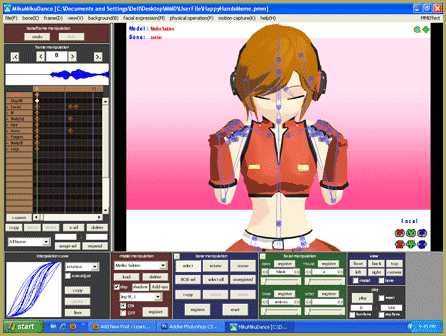
… and how do I edit a WAV file,” you ask? With your WAV file saved on your computer, Open MMD, open your dance file and, under the FILE menu choose LOAD WAV FILE. How do you edit the WAV file? That, too, is simple … well … the mechanics of the process are simple. Getting the timing to be exactly what you want may take a bit of doing … but …that’s the FUN part!
MikuMikuDance will not play Mp3 files. It won’t play music from your CD’s. You will need an audio editing software that will open your music files and convert them to WAV files.
I use AUDACITY® 2.0
… a free download … it’s fun and easy to use.
Most simply: open Audacity, IMPORT your Mp3 or other music file … and EXPORT as a WAV file. That’s it … almost no other keystrokes required.
There’s a lot to learn about Audacity … it is both easy to use and very powerful.
Use IMPORT to bring your music file into Audacity. Choose EXPORT to make your WAV file. You’re done! … … or use Audactity’s power to create the soundtrack you really wished for!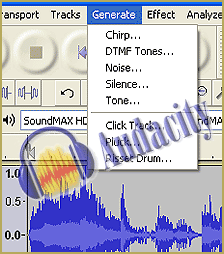
The GENERATE menu has the “Silence” tool that let’s you insert silence, very precisely.
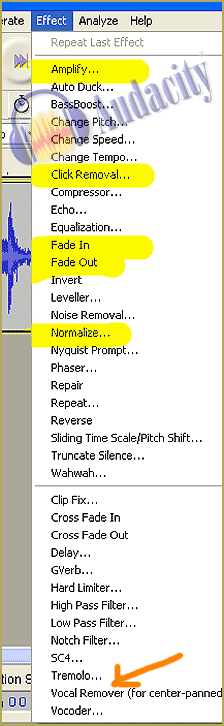
The EFFECTS menu has most of what you will use. I highlighted the tools I have used … and put in an orange arrow to point at the Voice Remover … that could be fun to play with!
Use Control A to “select all” of your music file … or click and drag to select portions of the music.
NORMALIZE is used to set your entire music piece to a CD-Normal volume.
AMPLIFY allows you to “turn up” or “turn down” the volume for any selected area (or the whole piece) of your file.
FADE-IN: Select a portion of the beginning of your music and select Fade-In. Audacity reshapes the wave to achieve the fade-in effect. FADE-OUT work s the same for the end of your piece … or you can use these effects in the middle of your music to have the music fade-out for a few moments and then make it fade back in.
 CLICK-REMOVAL is for those of you recording from vinyl LP records. Audacity identifies and removes clicks and pops from your music. There’s also “NOISE REMOVAL” that removes turntable rumble and the like.
You can layer multiple recordings to add applause tracks or mix-in more than one piece of music … or to add voice-overs. Open/import your various recordings/sound files as separate projects in Audacity. Add new tracks to your main project and then copy/paste your other music/sounds into the new tracks. You can copy/paste to move bits back and forth along the time line. You can push PLAY at anytime to hear how you are doing.
When you are happy with your Audacity project, EXPORT to WAV file.
Manage the WAV file in MikuMikuDance 7.39
MMD has a few quirks for you to remember:
— Use LOAD WAVE FILE to connect your dance project to the WAV file. If you later make changes to that WAV file, MMD will play your  latest version with the changes. MMD plays your WAV file, it doesn’t “store” it.
— To change to a new WAV file, just use LOAD WAV FILE and select the new file.
— To not hear the WAV file, click NOT PLAY WAVE FILE. To actually remove the WAV from your dance project, just change the name of the WAV file so MMD can’t find it. When you, then, load that dance, you get a message saying “MMD can’t find the WAV file.” “OK”
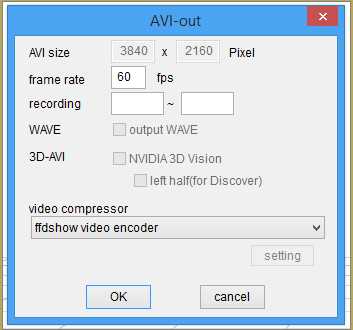
— TO RECORD A VIDEO, you must start recording from Frame Zero or else the music will not be part of your video. I have panicked a couple of times when making a test video from the middle of my project: “Where’s the music? It was there a minute ago!” … Just start the Render to AVI from Frame Zero.
I think that’s it!
– SEE BELOW for MORE MMD TUTORIALS…
— — —
– _ — –





No adjustment of Wav starting frame inside MMD? Pretty dumb software design, I must say, as a software developer myself.. law? more like bullshit. I guess people who use this software are inherently dumb anyway ._.
Hey… Thank you for that. If you cannot start from frame zero, you will have to edit-in your soundtrack after the fact. Why are you so vicious?… MMD is just a fun little program that does what it does.
Hello how are you, thanks for the explanation, but I have an issue, when I play the motion for some reason the wav doesn’t work.
what I mean is that I upload a compatible wav file to MMD the software seems to load it with no issue even the sound wave chart appears, but whe I start the motion the music doesn’t play even when I have the “play with wav” option checked, can it be an issue with my drivers? however I have no similar issue with anything else.
That’s a NEW one… How about if you Render to AVI… does the resulting video have the sound?
— Reggie