




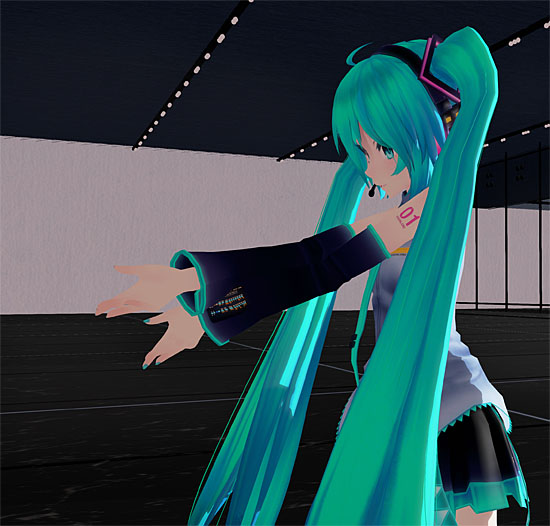


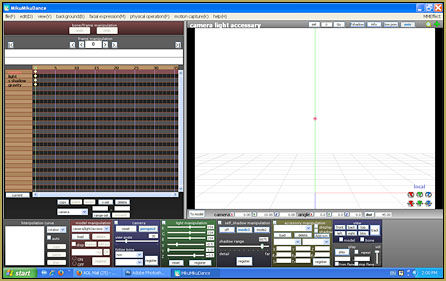
How do I download MikuMikuDance 9.32? Where can I download MikuMikuDance 9.32? Can I still download MMD 7.39? I want the latest DirectX version of Miku Miku Dance. Get the latest version of MMD, MikuMikuDance.
Download MikuMikuDance 9.32 it’s Quick and Easy!
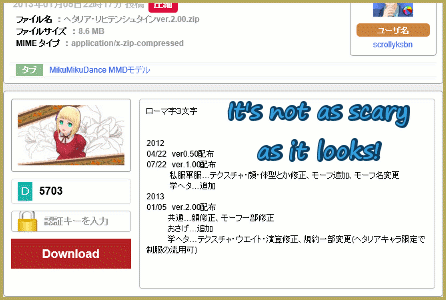
I first downloaded MMD 7.39 in August 2011. I used this link ( www.geocities.jp/higuchuu4/pict/MikuMikuDanceE_v739.zip ) to download my copy, but as of 9/28/11 it does not seem to work. So I have added my own downloaded Zip file to my site for you to download:
https://learnmmd.com/MikuMikuDanceE_v739.zip
GET THE NEW DirectX Version MMD 9.32!

MMD 9.32
Designed for newer computers, MMD 9.32 is the latest version of MikuMikuDance:
https://learnmmd.com/MikuMikuDanceE_v932.zip
… and the 64-bit MMD is available, as well:
https://learnmmd.com/MikuMikuDanceE_v932x64.zip
It is a 6.4mb download ZIP file. I SAVEd it to my Desktop. When you have it, open that zip folder and click the command “Extract All”. I just agreed to the defaults and found a new folder on my desktop containing MikuMikuDance … ready to run. I dropped the ZIP folder into the MMD folder just to keep it. There is no “installing” MMD. It sits in its folder on your desktop, ready to use. If you decide you don’t want to keep it, just drag the folder into the Recycle Bin … there is no “uninstall”.
MMD Tutorials on LearnMMD.com
Hurry back to LearnMMD.com for MMD Tutorials! We have hundreds of MikuMikuDance tutorials written by our team of MMD enthusiasts! See the list on the Homepage of LearnMMD.com
——- Getting Error Statements? You are not alone!
| Editors Note 10/26/2015: The VPVP page recommends that you download and install:Regular MikuMikuDance (32-Bit) If cannot move, please install following runtime package. ・Microsoft Visual C++ 2005 Redistributable Package ・Microsoft Visual C++ 2008 Redistributable Package ・DirectX End-User Runtime 64-Bit MikuMikuDance If cannot move, please install following runtime package. ・Microsoft Visual C++ 2008 Redistributable Package (x64) ・Microsoft Visual C++ 2010 Redistributable Package (x64) ・DirectX End-User Runtime |
| Editor’s Note, 1/18/16: Troubleshooting MMDOur Parkeerwacht has written a single article describing the common errors and the latest solutions to those errors. See that post to find the answers you need as you fix / troubleshoot MikuMikuDance. Still need help? Leave a comment or send Reggie an email. |
The “Configuration Error” is most popular – Try installing Microsoft C++ 2008 … See Below!!
When I started MMD 7.99 on my XP computer …
I get an error message saying that the program is not configured properly for my system:
“failed to start because the application configuration is incorrect.”
I tried it on my Windows VISTA laptop …
and got an error message saying
“… failed to start because its side-by-side configuration is incorrect”:
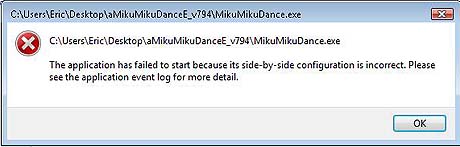
I did a Google search for “side-by-side configuration is incorrect” … and
The Solution I used on MMD 9.32 May Work for You … Install C++ 2008!
I needed to download and install Microsoft C++ 2008 to get the files my system was lacking .
For a 32-bit version, or 64-bit version, (depending on which version of MMD you have; keep in mind that 32-bir MMD *can* run on 64-bit Windows, but not vice versa) get your download here:
https://www.microsoft.com/en-us/download/details.aspx?id=26368
I downloaded the 32-bit install … installed it using the defaults … did a computer Restart … double clicked MMD 7.94 … and the program opened! I now have MikuMikuDance 7.94 on both my XP and Vista systems.
The “Missing DLL Error” has Two Versions!
Sometimes a user needs to update his/her DirectX files.
- The first, basic DirectX error states that MMD cannot find DxOpenNI.dll. You need to run the DirectX 9c Updater from the LearnMMD Downloads page.
- The other common DLL error is the “d3dx9_32-dll was not found“. This is more complicated because that file is simply not in your system32 folder. Read all about fixing this MMD missing DLL error here: https://learnmmd.com/http:/learnmmd.com/mmd-error-d3dx9_32-dll-was-not-found/
Click the Gold Button, way up above, to get your MikuMikuDanceE_v926.zip … a 6.5mb download.
I expect the new version, Miku Miku Dance 9.32, will run well and be able to use the mountains of accessories, models, and effects created for MMD 7.39. I am looking forward to learning about “what’s new” in MMD 9.32.
– SEE BELOW for MORE MMD TUTORIALS…
— — —
– _ — –






umm…i downloaded mmd 7.94 but when i added the mme files, the mmeffect button does not show up at all in this version of mmd for me….
It DOES work for me … I wonder why not for you. Did you have an earlier version of MMD … and MME was working?
“Lag” is normal on some systems. It means you are asking more from your computer than it can give! One thing to try is … under VIEW … at the bottom of the list is Limit to 30 frames per second VS Limit to 60 frames per second. Choose 30 frames per second … that’s a reasonable maximum and is the YouTube standard. You may find that your computer CAN render at 30-frames per second. When you Render to AVI … your video will come out fine … any lag will not be apparent in your finished video.
Okay, when the model is dancing(only for a few models) it’s lagging. What to do?
Please help me, Its shows that ” CreateDevice Failed! ”
Please help me, please please please
Create Device Failed is a common Gamers problem. A Google search shows it might be a graphics card problem … maybe need to update the graphics card driver. (Some report that after multiple restarts, the problem fixed itself … maybe the driver got scanned and fixed during one of those restarts?)
Fix the d3dx9_32.dll problem … https://learnmmd.com/http:/learnmmd.com/mmd-error-d3dx9_32-dll-was-not-found/
I just wrote this yesterday for another reader who had the same problem. I made a zip available that includes instructions.
— Reggie D
Okay, I fixed the other problem ,but where do I download the latest version of that thing (I think DirectX or something like that) that fixes the d3dx9_32.dll is not found problem? Sorry for all the questions!
Yeaa … do not right click on the ZIP folder … Just double click it and Winzip, or something on your machine, will open the folder and there will be a place to click to Extract All.
If it’s a .dll I don’t think that’s possible… But if it’s a .zip or .rar try using winzip or winrar, or what I use, 7zip.
Okay, I did what you said but when I right click on the file it doesn’t have the option Extract all……. I tried running it through The Extractor and it didn’t extract…. what to do?
I have that missing DLL file and instructions for where to put it so that MMD (and other games) can find it. EMAIL me and I will send the info to you. reggiedentmore@aol.com
What file are you missing … what was the wording of the error message?
I downloaded MMd, and it said I was missing a file. I checked and it said I was missing the DLL file… I downloaded DirectX_9 and it still says I’m missing the file. What do I do?
I don’t believe MMD runs on a Mac. To run MMD 7.39, you need a DirectX environment on a PC. Am I wrong?
Can you please post a download link for Mac?
Ah, a classic problem. That, my friend, is lag. It’s usually caused by extra physics. Most of them come from parts that haven’t been cleaned properly. I did a tutorial on this a while back, you can find it here: http://stellathealchemist.deviantart.com/art/PMDE-Tut-Deleting-physics-260074954
Hope that helps! :3