
Skip to content
Learn MikuMikuDance – MMD Tutorials – Free 3D Animation Software

Learn MikuMikuDance – MMD Tutorials – Free 3D Animation Software

Download Free Animation Software – Let's Learn How to Do Everything!

  • Step-by-Step MMD instructions
  • DOWNLOADS
  • Troubleshoot, Fix MMD
  • Site Contents
  • Reggie Replies Q&A
  • Homework!
  • What IS MMD?
    • Download MikuMikuDance Newest Latest Version of MMD
  • “HOW TO”
    • Raycast RAY-MMD Effect Tutorials
  • BONUS PAGES
    • Why convert PMD models to PMX?
  • HALL of CHAMPIONS
  • Tutorial Categories
  • About
    • Privacy Policy
  • Toggle search form
  • Reset Your Computer to Japanese Locale for perfect Japanese Stella The Alchemist
  • The MME files just need to be in the same folder as your MikuMikuDance.exe file. Download MMEffects v028 from LearnMMD.com and enjoy!
    Download MMEffects v037 on LearnMMD’s Downloads Page! MME Download MME MikuMikuEffects
  • 7 Reasons Why We Don’t Do These Things Fia Phoenix
  • Use Proper MMD Etiquette When Using New Models and Accessories Downloading New Models
  • Skirt in the process of being rigged in PMX Editor
    PMXE Skirt Plugin Presets and Other Tips for Awesome Skirts Mae Blythe
  • ikUnderwater Effect submerges your MMD animation! ikUnderwater Effect
  • Good MMD videos require Inspiration, Vision, Planning: The Lament of Okada’s Ghost MMD Basics
  • Making stages/accessories for MMD using Sketchup Google SketchUp and MMD

How to make multi-part videos in MikuMikuDance

Posted on February 13, 2014November 22, 2015 By KillerBeer 2 Comments on How to make multi-part videos in MikuMikuDance

A feature article by KillerBeer ... a New Author on LearnMMD.com!

How do I make complex multi-part videos using MMD? Do I really need heavy artillery for that? My animation is too complicated to make in one long piece, what can I do? How can I hook video clips together to make a long video; and what about the soundtrack?


How to make multi-part videos …

Sometimes you just can’t fit everything into a single MMD file. It’s not an issue when you do a simple meme or use ready-made components to stamp quick and easy MMDs, but if you want to create something elaborate, one stage may be not enough. You may try to build stages one next to another, or turn them on and off, struggling to fit everything you need into a single monster MMD file that will take hours just to load (not to mention terribly slow rendering) — or you may just cut your project into smaller parts, processing them one at a time.
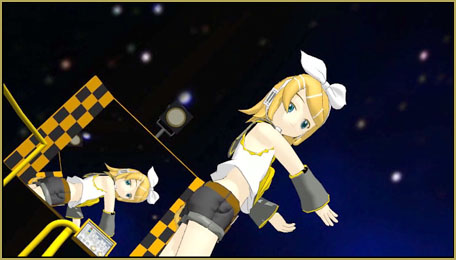
Can you fit all that into a single file? No need! Multi-part videos are easy with Avidemux video software! LearnMMD.com
Can you fit all that into a single file? No need!

First thing you have to know, you must plan your timing ahead. Once you decide how long in terms of frames each part must take, it’s difficult to re-schedule them again. Although MMD has Edit->Insert/Delete Frame Line commands, allowing you to shift your models in time, their functionality is severely limited; besides, you’d have to do each model, accessory, and effect separately. So far, MMD doesn’t have a “Insert a frame to everything at once” sort of command — maybe it will one day. But for now, we have to deal with the hand we’re dealt.

Now, once you completed a piece of your video up to, say frame #472, save it under a new name, like “My something – 0000-0472” so that you always remember each part’s boundaries. Next part, obviously, will be named “My something – 0473-XXXX” until you figure its exact numbers. Assign it the same audio file that you used for the first one, load all models and accessories you will be needing in this part, but do not touch them until the frame #473. You will start manipulating them from there. That will allow you to keep the track of your music as if you still had everything in a single project.

Finally, you have all parts ready. Render them all, using start and stop frames you prudently have memorized in parts’ names, and identical Screen Size settings. If you plan to do some post-processing on your video, you will, of course, want to save as “AVI Raw”, using Movie Maker or some other sophisticated video editor for that. If, on the other hand, all you want is to sew your pieces together, just use your favorite codec as if you were making a single file. After the first part, none of others will have the audio track attached to them — don’t be alarmed, it’s not about you having done something wrong. You’ll just have to attach it separately.

Settings to pay attention to

So, you’ve got your video parts. And simply merging them feels to be a task too trivial to use heavy-handed tool-sets like Movie Maker for that. And fact is, you don’t have to! The tool you need is called Avidemux® (follow this link and select their Downloads tab … and choose your operating system … a free download).

Install and launch Avidemux. Load the first video part and Use Avidemux to create multi-part videosappend the others using “File->Open” and “File->Append” commands accordingly. Make sure that Audio and Video settings are set to Copy — so that the resulting file’s size *and* quality will be the same as those of its components… and it will take about the same time as simply copying files on disk — no re-coding involved! After that, you’ll just need to attach the audio track. Select “Audio->Select Track…”, enable a track in a panel that pops up, and load the file you used in your video in the next field. Other fields allow you to recode the audio with different settings, but you don’t have to bother with them unless you know you need to. Hit “Save Video”.
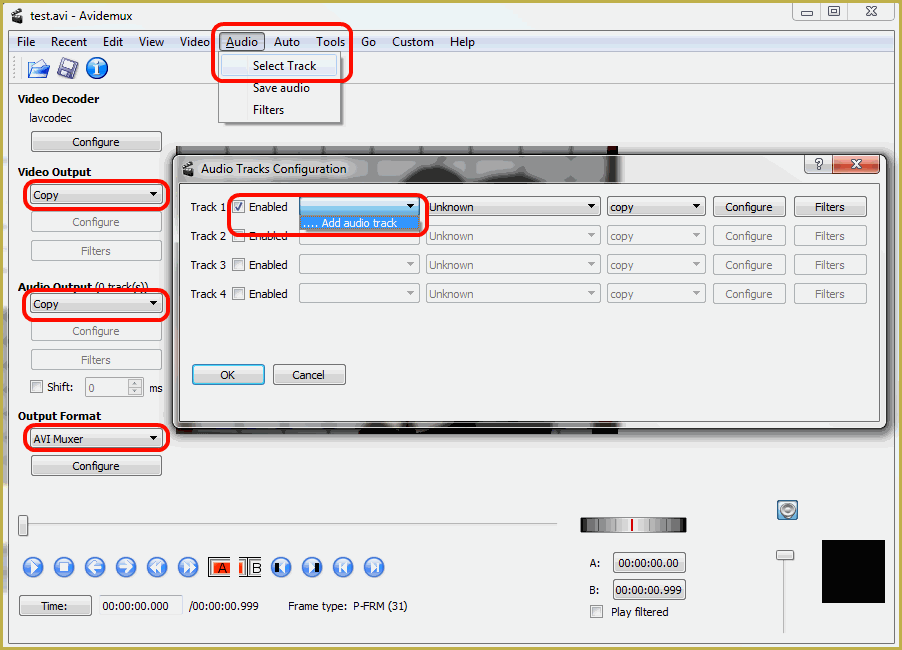
And that’s all you really needed to tie your multiple parts together. Off to YouTube with you!


– SEE BELOW for MORE MMD TUTORIALS…


— — —


– _ — –


Visit the LearnMMD.com Homepage! Plenty of Mikumikudance instruction and info!

More MMD Tutorials...

Enjoy the "camera Angles WEIRD in Anime" meme...

Enjoy the "camera Angles WEIRD in Anime" meme... This image is from The Slayers - NEXT, ...read more

The K-Lite Codec Pack: How To Install, and Current Problems

What codec should I use for 32-bit MMD? What is the K-Lite codec pack? What ...read more

MMAccel - Accelerate your MMD creation!

What is MMAccel? How can I make my own MMD Keyboard shortcuts? Where can I ...read more

MiyukiOhayashi's Pity Party motion download includes WAV

Where can I download the Pity Party motion? How can I use the Pity Party ...read more

Download MMD Ballet Poses created by ctrlaltdelete999

. Where can I download MMD ballet poses? How can I get ballet poses for my ...read more

MMD Camera Work made the motion fit the song!

Can I use MMD camera work to make my motion file look better? How can ...read more

Animation Shortcuts, Avidemux video software, KillerBeer, Making Videos - Rendering to AVI, Rendering to AVI Video

Post navigation

Previous Post: Translate PMX models to English using a PMX editor
Next Post: Making POV Camera Shots in MikuMikuDance 8.03+

Related Posts

  • Uploading MikuMikuDance YouTube Videos MMD Making Videos - Rendering to AVI
  • See my new YouTube MMD video “She’s So Hot!” Making Soundtracks
  • Haruka Nana is a wonderful MMD model ... with fun options!
    New LearnMMD Video Features Haruka Nana Dancing Modified Sample Dance "the making of" my video
  • PMXE Plugin adds Arm IK bone
    PMXE Plugin adds Arm IK bones allowing automatic MMD model interaction Animation Shortcuts
  • How to Lip-Sync in MMD using MoggProject Face and Lips Animation Shortcuts
  • Strong Soundtrack Offers 3-D Animation Shortcuts! "the making of" my video

More Related Articles

Take full control of MME Effects by editing .fx files Beamman's Burner effect
When MMD 7.39 crashes you lose any unsaved changes. Save Often! MMD Crashes when Rendering to AVI Making Videos - Rendering to AVI
Learn to translate models from Japanese with LearnMMD.com! Translate Japanese Models to English in PMDE… with Excel! Fixing Broken Models
The story of Portal Turret "Bang Bang" video The making of: “Bang Bang” Portal video "the making of" my video
Make a Music Video with MMD and Learn to Use MMD "the making of" my video
LearnMMD.com _ MikuMikuDance MMD Tutorials DO NOT reduce AVI file sizes that go up to YouTube HD Videos in MMD

Comments (2) on “How to make multi-part videos in MikuMikuDance”

  1. Azumi says:
    November 21, 2015 at 9:00 pm

    When I select “Audio”, there isn’t “Main Track” menu. Is this due to the new version? I don’t know how to setting the audio into External WAV format with the new version. I can’t save my video file too because it’s always not responding. What should I do? Please help :(

    Reply
    1. Reggie_Dentmore says:
      November 22, 2015 at 8:06 pm

      I am sending you an email… let’s figure it out.

      Reply

Leave a Reply Cancel reply

Your email address will not be published. Required fields are marked *

Download the latest version of MikuMikuDance!
See the MMD Step-by-Step instructions page!
Learn how to make your own MMD motions!
LearnMMD.com
  • Take full control of MME Effects by editing .fx files Beamman's Burner effect
  • Dummy Bones allow you to customize your accessory manipulations!
    Using The Dummy Bone for MikuMikuDance Accessory Manipulation/Adjust
  • VOCALOID 3 Tutorial – The whole interface on a basic level Kazuki Matsuoka
  • PMXE 0254f a Newer PMXE in English – More Complete Translation – Tools Reconfigured KillerBeer
  • MMD Stages Source Featured
    Great MMD Stages Source: Deviant Art MMD Basics
  • Magician Miku pulls a magic trick and reverses her motion data!
    How to Reverse Motion Data in MikuMikuDance ARIZONA
  • Search LearnMMD.com
    SEARCH LearnMMD.com… it’s Easy! MMD Tutorials
  • Weight Painting MMD models in Blender with MMD Tools Bandages

Copyright © 2022 Learn MikuMikuDance – MMD Tutorials – Free 3D Animation Software and Instructions..

Powered by PressBook Premium theme

Go to mobile version