

Skip to content
Learn MikuMikuDance – MMD Tutorials – Free 3D Animation Software

Learn MikuMikuDance – MMD Tutorials – Free 3D Animation Software

Download Free Animation Software – Let's Learn How to Do Everything!

  • Step-by-Step MMD instructions
  • DOWNLOADS
  • Troubleshoot, Fix MMD
  • Site Contents
  • Reggie Replies Q&A
  • Homework!
  • What IS MMD?
    • Download MikuMikuDance Newest Latest Version of MMD
  • “HOW TO”
    • Raycast RAY-MMD Effect Tutorials
  • BONUS PAGES
    • Why convert PMD models to PMX?
  • HALL of CHAMPIONS
  • Tutorial Categories
  • About
    • Privacy Policy
  • Toggle search form
  • MME FunyaFunya Effect adds wavy psychedelia to your MMD scene! FunyaFunya Effect
  • YouTube thumbnail image is so important!
    Create your Most Attractive YouTube Thumbnail image "the making of" my video
  • dull-VS-alive-animation-environment
    MMD animation environment… MORE than just a model on a stage! "the making of" my video
  • Add interest to you choreography by moving/rotating models with Mother Bones.
    Add Interest: Place Multiple Models Onstage Using Mother Bones ARIZONA
  • Stationary Motion Creation rights and wrongs Creating Motions
  • Graphic Design Skills enhance MMD Pictures MMD Basics
  • MMD 8.06 Low Power button allows you to Multi-task MMD Basics
  • New LearnMMD Stage Download is Ready! New Stage Accessory

Metronome successfully marks the beat in Dueling Banjos MMD

Posted on December 9, 2011July 2, 2024 By Reggie_Dentmore No Comments on Metronome successfully marks the beat in Dueling Banjos MMD

How do I mark the tempo in Mikumikudance 7.39? Find the beat in Miku Miku Dance 7.39.  MMD metronome.

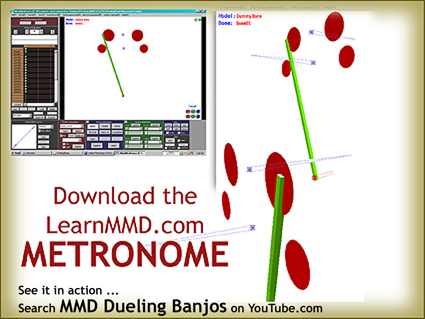
My metronome successfully tracks the beat in my “Dueling Banjos” project.

My “Dueling Banjos” MikuMikuDance 7.39 project presents an extra challenge because the tempo of the piece is constantly changing! The “scope” shows the music file but the Guitar/banjo chatter is so violent that the beat is hidden most of the time.

So, I filmed my ol’ grampa clapping to the beat and then animated the LearnMMD Metronome over the top of it in MikuMikuDance.

After I removed the AVI background, I was delighted to see that the new metronome stayed in time with the WAV file music! This video shows my successful result:

GET YOUR METRONOME and

See my Dueling Banjo project on LearnMMD.com … check it out!


– SEE BELOW for MORE MMD TUTORIALS…


— — —


– _ — –


Visit the LearnMMD.com Homepage! Plenty of Mikumikudance instruction and info!

More MMD Tutorials...

Loading Background AVI Files into MMD (2021 Edition)

How do I load background AVI files into MMD?  What does it mean when MMD ...read more

Running MikuMikuDance in Linux using Wine and DXVK

How do I run MMD on Linux? Does MikuMikuDance run on Linux? How do I ...read more

How to subtitle MMD videos

How do I subtitle MMD videos? How do I make subtitles for my MMD videos? ...read more

Using the right codec when Rendering to AVI in MMD

What codecs do I use for rendering a video in MMD? What codec gives me ...read more

YouTube serves video playback quality to best suit your viewing-screen

What happens to your video after you've uploaded one to YouTube? YouTube serves video playback quality ...read more

Learn MMD Basics before jumping into a big project!

Learn MMD Basics before jumping into a big project! A reader wrote a comment... I tried to make ...read more

Metronome, Nuts & Bolts

Post navigation

Previous Post: Dueling Banjos w Metronome MMD Inspiration Video on YouTube
Next Post: LearnMMD Auditorium Stage Announced Ready for Download

Related Posts

  • The Falling Heart Effect is just a wonderful effect ... gorgeous!
    Playing with MME Effects – Using MikuMikuEffects for MMD Blizzard Effect
  • The new Getting Started with MMD video spends some time on the Sample Dances.
    Use Tricks to Study the MikuMikudance Sample Dance Functions-Copy-Paste-Expand
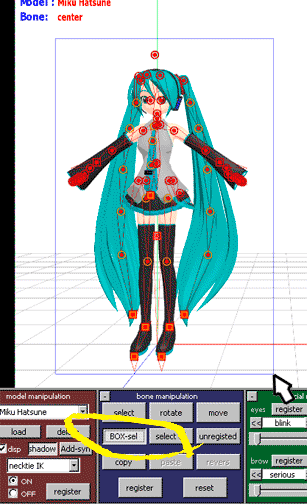
  • You cannot use Box-Sel to select a portion of a model. You must selectthe entire MMD model.
    BOX-sel lets you select an entire model in MikuMikuDance ARIZONA
  • Sketchup Orbit view on MMD: Right Click and Drag! Keyboard Shortcuts
  • Use Center Position Bias to duplicate a motion Functions-Copy-Paste-Expand
  • Running MikuMikuDance in Linux using Wine and DXVK Linux running MMD

More Related Articles

You cannot use Box-Sel to select a portion of a model. You must selectthe entire MMD model. BOX-sel lets you select an entire model in MikuMikuDance ARIZONA
How to Switch Models and Stages in MikuMikuDance Accessory Manipulation/Adjust
Move the whole Model with Box-Sel in MikuMikuDance Functions-Copy-Paste-Expand
MMD Dance Motions start with making your own motions. How to make smooth motions in MikuMikuDance animations Animation Shortcuts
The Falling Heart Effect is just a wonderful effect ... gorgeous! Playing with MME Effects – Using MikuMikuEffects for MMD Blizzard Effect
Using The Floor Light Art Effect in MMD. ARIZONA

Leave a Reply Cancel reply

Your email address will not be published. Required fields are marked *

Download the latest version of MikuMikuDance!
See the MMD Step-by-Step instructions page!
Learn how to make your own MMD motions!
LearnMMD.com
  • “The making of ” any of my videos starts with these considerations… "the making of" my video
  • MMD Bone Reference Charts make MMD Model-making Easier! Mae Blythe
  • Best Way to Run MMD on a Mac Kazumi
  • Japanese Maid Cafe poster you can make!
    Making your own Japanese Maid Cafe poster Random Thoughts & Visions
  • RAY-MMD demonstration featuring texture and environmental lighting MME Effects Tutorials
  • Add Shadows to MMD .X Accessories Tutorial MMD Basics
  • Tips for how to create complicated MMD dance motions.
    Making more complicated MMD dance motions – Some new notes… Making Smooth Motions
  • Storyboards organize your MMD animation Intro to MikuMikuDance

Copyright © 2022 Learn MikuMikuDance – MMD Tutorials – Free 3D Animation Software and Instructions..

Powered by PressBook Premium theme

Go to mobile version