Skip to content
Learn MikuMikuDance – MMD Tutorials – Free 3D Animation Software

Learn MikuMikuDance – MMD Tutorials – Free 3D Animation Software

Download Free Animation Software – Let's Learn How to Do Everything!

  • Step-by-Step MMD instructions
  • DOWNLOADS
  • Troubleshoot, Fix MMD
  • Site Contents
  • Reggie Replies Q&A
  • Homework!
  • What IS MMD?
    • Download MikuMikuDance Newest Latest Version of MMD
  • “HOW TO”
    • Raycast RAY-MMD Effect Tutorials
  • BONUS PAGES
    • Why convert PMD models to PMX?
  • HALL of CHAMPIONS
  • Tutorial Categories
  • About
    • Privacy Policy
  • Toggle search form
  • Editing Model Materials in PMDE for MikuMikuDance PMD and PMX Models Fixing Broken Models
  • Go to my DOWNLOADS PAGE to get your free Cropping/Transition Panel!
    New Cropping-Transition Panel Ready to Download! Transition Panel (it's not an effect)
  • Keep The Faith MMD
    Growing Concerns Amongst Japanese MMDers Downloading New Models
  • MMD Dummy Bones may be your most important models! Dummy Bones
  • Formatting Captions With MMM MikuMikuMoving Bullwood
  • PMD Editor Basics, now in English – Modify Your MMD Models! Nuts & Bolts
  • Keyboard Shortcuts to the Menus Functions-Copy-Paste-Expand
  • Removing Double Vertices to Create Continuous UV Maps Mae Blythe

MME DiscoLightEX v003 effect now hosted by LearnMMD.com!

Posted on March 2, 2018February 24, 2025 By Reggie_Dentmore 3 Comments on MME DiscoLightEX v003 effect now hosted by LearnMMD.com!

A Feature Article by Reggie Dentmore on LearnMMD.comHow do I use the DiscoLightEX v003 MME effect in my MMD animation? What’s new in the DiscoLightEX v003 effect?

MME DiscoLightEX v003 Effect…
…easily adds life to your scene!

THIS tutorial shows you how to use the newer DiscoLightEX v003 Effect

MME DiscoLightEX v003 Effect, now hosted on LearnMMD.com

Download the effect: Now hosted by LearnMMD.com…

https://learnmmd.com/wp-content/uploads/2025/02/DiscoLightEx_v003.zip
I have translated the README file into English and also included the original Japanese script, as well. Please see the README file for instructions and a note that says it is OK for us to host and redistribute that effect’s ZIP.
(– Reggie 2/24/2025)

I always use Bandizip to unzip my downloads; it keeps the Japanese characters intact.

DiscoLightEX v003 Effect is super easy to set-up…

Load your model and a stage… and go to the View menu and turn off the Ground Shadow. This effect casts its own shadows!

And then, like any dance model, use LOAD in the MMP to load the controller: DiscoLightEx.pmx. MMD may take up to a minute to “come back” after you OK to load that controller. When it does, you will see the basic “light” shining on your model and set.

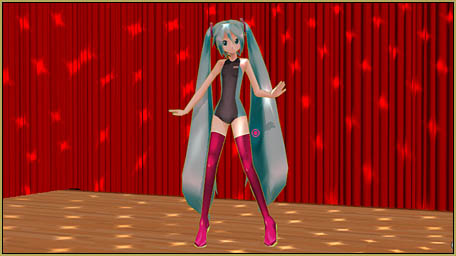
When you load the DiscoLightEX v003 Effect controller, the lights come on!

Now go into Camera mode and load the effect file DiscoLightBall.x… and see the HUGE disco ball on your stage floor! Use the Si size adjustment to bring the ball down to size: 0.3?, your choice.
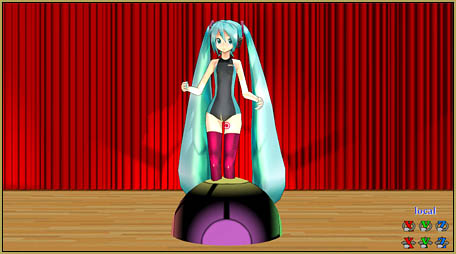
When you load the DiscoLightBall.x file, the ball is huge!

You cannot position that ball as an Accessory… you need to go back to the Controller and then use the XYZ rollers to position the ball… and register your new position. NOTE that the light shining from the ball acts “like real”: moving it closer or farther from your model and stage changes the size and intensity of the light image… the light really does “shine”!

I moved the ball forward (towards the audience) and a little up and left of my dancer.
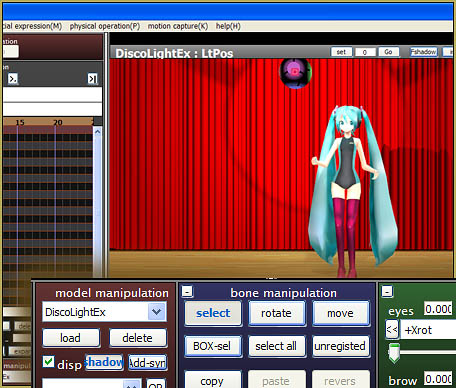
Use the DiscoLightEx controller to move the disco ball into place.

Now take a look at the controllers sliders!
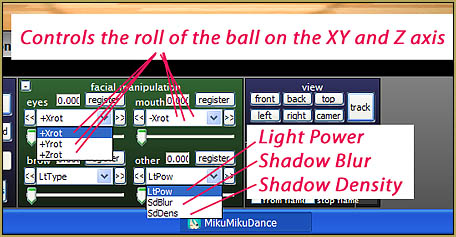
DiscoLightEX v003 Effect controls are in the sliders.

The “Eyes” and “Mouth” sliders control the spin of the ball. Play with it, a little, and you will understand. The + and – roll the ball left or right/up or down.

The LtType slider is how you control the various lighting effects… spots/sparkles/flowers, etc. I tried setting-up a gradual morph from one into another, like frame 30 is position 1 and frame 80 is position 2, but that didn’t work; it just sort of clicked from one morph into the next. You CAN change that setting during the animation, as I did in my demo video.

LtPow is Light Power… default is full brightness! As you slide the slider, the light effect grows more dim… which enhances the color of some of the versions.

SdBlur and SdDens control the shadow in the effect. As you would think, one makes the shadows blurry/softer while the other makes the shadows less intense.

Add this effect last!

As you try to animate while this effect is running, you will see how distracting it is and how unevenly it moves; how jerky the motion appears to be. Almost no way can you do good work with all that action going on! So, add this effect after your animation is complete. When you Render to AVI, the action in the actual final video will be smooth as silk.

Adjust the stage lights…
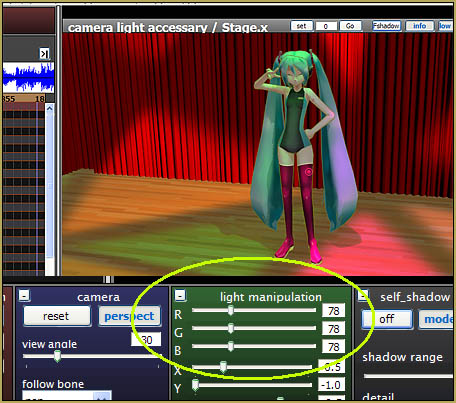
Lower the house lights so that you can see the effect more clearly!

To get the best color out of the effect, I increased (lowered) LtPow, a little, and then lowered the house lights to darken the stage… allowing the colors in the effect to shine through.

That’s all there is to it! … not!

Yes… and no… for what most of us want, we know what we need to know! But if you translate the ReadMe, you will see that more is available. You might edit the .FX files to modify the effect… and if you are running MMM (MikuMikuMoving), you will need to do a bit more work as outlined in that ReadMe.

Please add a comment to this tutorial if you find out more to share with us about this effect.

CREDITS:

  • Model: 初音ミク-1052C-Re BスーツEHs2.pmd
    (Hatsune Miku – 1052 C – Re B Suit EHs 2. Pmd)
  • Stage: LearnMMD.com Auditorium Stage (on our Downloads page)
  • Motion: Mahlazer’s “Feel the Sound” … see the write-up for that motion
  • Music: included in Mahlazer’s motion download
  • Effects: Blackout3 and DiscoLightEx_v003

Enjoy MikuMikuDance!


– SEE BELOW for MORE MMD TUTORIALS…


— — —


– _ — –


Visit the LearnMMD.com Homepage! Plenty of Mikumikudance instruction and info!

More MMD Tutorials...

Enjoy the "camera Angles WEIRD in Anime" meme...

Enjoy the "camera Angles WEIRD in Anime" meme... This image is from The Slayers - NEXT, ...read more

Reader asks how to create MMD artwork... stuff like posing, camerawork?

A reader asks... Is there a tutorial on how to create MMD artwork, like those you ...read more

Learn MikuMikuDance in Small Steps! New LearnMMD Video Series

Learn MikuMikuDance in Small Steps. Where can I find easy-to-follow MMD instructions on YouTube? How ...read more

Apply Multiple Effects on an Entire MMD Model Using M4Layer Effect

How can I apply multiple effects to an MMD model? Can I use more than ...read more

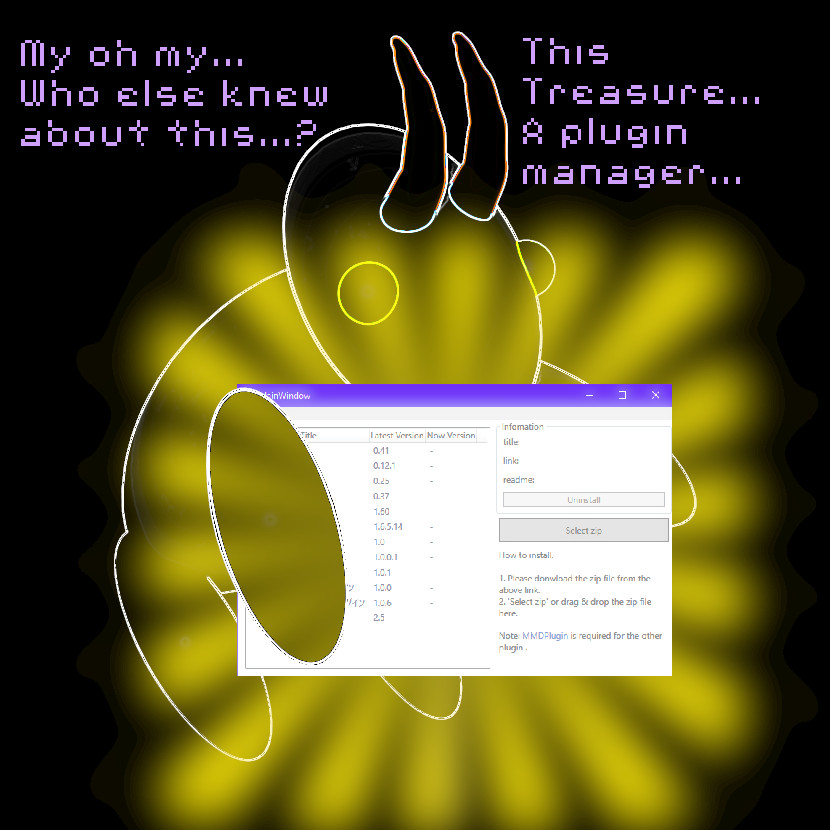
MMD Plugin Manager... I Found a Treasure!

What sorts of MMD Plugins are there? MMD Plugin Manager? MMD Plugins. Plugin MMD. More ...read more

2025: Hatsune Miku is 18... but she is designed to be always 16 Years. Old by design and in reality!

Finally, in 2023, Hatsune Miku is 16 years old! but in August of 2025, she ...read more

Disco Lighting Effect, MMD Tutorials, Reggie Dentmore

Post navigation

Previous Post: MMD animation from Scratch “The Wind-up and the Pitch!”
Next Post: MME ik_Paper Effect flattens MMD models paper-thin!

Related Posts

  • Get the K-Lite Codec for MMD
    The K-Lite Codec Pack: How To Install, and Current Problems K Lite Mega Codec Pack 995
  • MME Lighting Effect, PanelLight by Soboro, is easy to use!
    Add MME Lighting Effect illuminates model against dark stages MMD Tutorials
  • Adjusting the Physical Operation Tab settings in MMD 9.10 Functions-Copy-Paste-Expand
  • Intentionally Build Dramatic Atmosphere into your MMD Animation MMD Tutorials
  • How to Use The VelocityMap Effect for MikuMikuDance. ARIZONA
  • UV Unwrapping MMD Models in Blender with MMD Tools Bandages

More Related Articles

MMD animation from Scratch “The Wind-up and the Pitch!” "the making of" my video
MMD Camera Work makes motions fit the song. MMD Camera Work made the motion fit the song! "the making of" my video
Staging and the 12 Principles of Animation. Accessory Manipulation/Adjust
Multiply of Bone Frame Position-Angle Resizes Motions to fit your Model CommanderZoey
Make LearnMMD Masthead Art for the world to see! Reggie Dentmore
Applause for Miku! MikuMikuDance turns Six. ARIZONA

Comments (3) on “MME DiscoLightEX v003 effect now hosted by LearnMMD.com!”

  1. ME Davis9719 says:
    February 21, 2025 at 8:37 pm

    Can to create a new link for the discolightex-v003 effect? http://harigane.at.webry.info/201209/article_1.html no longer works.

    Reply
    1. Reggie_Dentmore says:
      February 24, 2025 at 10:08 am

      YES … I see that the link is broken. Reviewing the README file, it says I may freely redistribute… so I have added it for download from LearnMMD.com…
      https://learnmmd.com/wp-content/uploads/2025/02/DiscoLightEx_v003.zip

      … I have also added this link to the tutorial.

      — Reggie

      Reply
  2. ME Davis9719 says:
    February 21, 2025 at 8:28 pm

    Can to make a new DL link for this version of the effect? The link up there is no more.

    Reply

Leave a Reply Cancel reply

Your email address will not be published. Required fields are marked *

Download the latest version of MikuMikuDance!
See the MMD Step-by-Step instructions page!
Learn how to make your own MMD motions!
LearnMMD.com
  • Optimise computer assets by culling unseen MMD model parts Chestnutscoop
  • NCHLShader2 adds realistic depth to MMD models Advanced Shader Technique
  • Haruka Nana is a wonderful MMD model ... with fun options!
    New LearnMMD Video Features Haruka Nana Dancing Modified Sample Dance "the making of" my video
  • Rin is excited about the MomiCup
    How to enter The MomiCup and other YouTube MMD Contests and Parties. ARIZONA
  • Scrambled first frame of video must be Voodoo! MMD Basics
  • Making MikuMikuDance Original Animation Videos "the making of" my video
  • Physical Operations Tab in MikuMikuDance 7.39 Menu Options MENU Option Descriptions
  • Recommended Software Library for MMDers Animation Shortcuts

Copyright © 2022 Learn MikuMikuDance – MMD Tutorials – Free 3D Animation Software and Instructions..

Powered by PressBook Premium theme

Go to mobile version