

Skip to content
Learn MikuMikuDance – MMD Tutorials – Free 3D Animation Software

Learn MikuMikuDance – MMD Tutorials – Free 3D Animation Software

Download Free Animation Software – Let's Learn How to Do Everything!

  • Step-by-Step MMD instructions
  • DOWNLOADS
  • Troubleshoot, Fix MMD
  • Site Contents
  • Reggie Replies Q&A
  • Homework!
  • What IS MMD?
    • Download MikuMikuDance Newest Latest Version of MMD
  • “HOW TO”
    • Raycast RAY-MMD Effect Tutorials
  • BONUS PAGES
    • Why convert PMD models to PMX?
  • HALL of CHAMPIONS
  • Tutorial Categories
  • About
    • Privacy Policy
  • Toggle search form
  • Making amazing complicated MMD video requires circle of learning Animation Shortcuts
  • LearnMMD.com: The Instruction Sheet you've been searching for!
    Use Google SketchUp to make DirectX Accessories in MMD Dummy Bones
  • Professionally made models FOUND! Downloading New Models
  • askY Dramatic Anime Style Sky Domes for MMD created by Meme "the making of" my video
  • With some practice, Rin can dance the sample dance as well as Miku!
    There Can Be Frame Data Ghosts remaining after Deletion Making Smooth Motions
  • VDE-3 Champion: CyanKuriboh Video Dojo Champions
  • How to Switch Models and Stages in MikuMikuDance Accessory Manipulation/Adjust
  • I don't have an Alice model... but at least Neru seems to like it!"
    Create Simple Accessories Using PMD Editor KyokiDoesMMD

Build Your Own Stage For MMD Using SketchUp

Posted on December 28, 2015May 9, 2026 By Trackdancer 3 Comments on Build Your Own Stage For MMD Using SketchUp

A feature article on LearnMMD by Trackdancer2015!Build Your Own Stage For MMD Using SketchUp!

Making stages for MMD
is really easy using Trimble’s SketchUp…

… and we fine-tune it in PMDE!

When I first started getting involved in MMD, like most people I downloaded all sorts of models to use with the program. I quickly learnt that it was possible to make your own models for MMD and how easy it really is to do. Also I downloaded the old LearnMMD Auditorium stage and learnt that it was created with SketchUp. Honestly, that stage was a little too plain for my tastes and I wanted to build an improved version. So I started reading up on how to build models for MMD using SketchUp. It was primarily an article on LearnMMD.com that pointed me in the right direction. I also learnt about SketchUp on YouTube. I downloaded the program and within a short period of time, I had my Animasa model of Miku dancing on her own stage…
it was a real thrill!
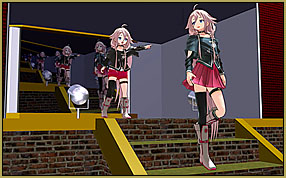
When you make your own stage it's fun to see your models performing on it!There really isn’t anything in the world that is quite as pleasurable as being able to watch your favorite MMD models per-
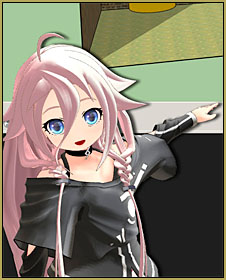
forming on a stage that you built yourself. Plus, with software like SketchUp, it is really easy to do and this is what I will have Chibi IA teach you in the rest of this article.

If you go through the steps outlined in this tutorial, you should be able to end up with a model like the stage illustrated below and honestly, the design is a tribute to the stage that first got me started building stages for MMD: the original LearnMMD Auditorium Stage.
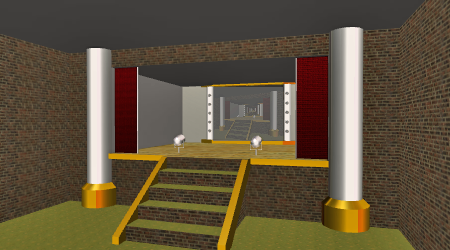
Follow the included instructions and you can build your own stage that looks similar to this one!

And if you’ve got this far, do ‘play’ with your own creation. I do that all the time with the stages I make; partly to test them, but just as much, it is a lot of fun to use your own ‘stuff’. So whilst building the model for this article and writing the accompanying tutorial I ended up taking a detour and wound-up with one of my favorite MMD models, the rare Super Sonico model by Eto reprising one of my favorite songs on this stage.
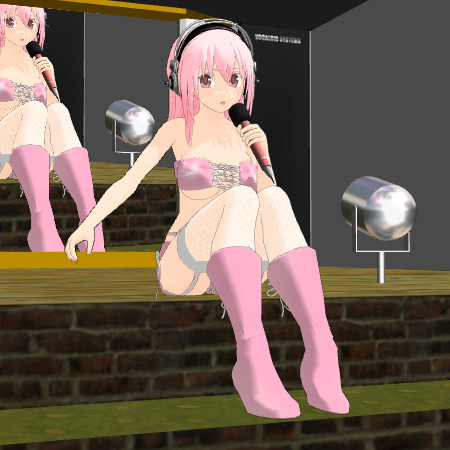
I loved watching my Super Sonico model by Eto performing on my own stage.If you are first starting off with SketchUp you should read this excellent introductory article on using SketchUp to make models for MMD by parkeerwacht:

Making stages/accessories for MMD using Sketchup

If you are a complete beginner to 3D modeling, a good start is to also watch the video Trackdancer2015's favorite little Chibi-IA shows you how to build your own stage using Sketchup.tutorials by the SketchUp Team that shows you how to use SketchUp tools efficiently. It only takes about an hour to watch them all and I highly advise that you do so to get the most out of the software, but like I’ve already stated, its easy enough to get started with SketchUp just by playing with it for awhile.
Goole Sketchup is no longer available as a free download. Google it and see the new route you will need to take to get it.

I just searched Google for: download Google Sketchup… and I got results showing the new links.

The SketchUp video tutorials are here: SketchUp Channel (YouTube)

It’s time to Build your own Stage…

The tutorial itself is in four comic style parts and can be accessed by clicking on the images below:


Trackdancer's Build your own Stage using Skecthup, Part 1 Trackdancer's Build your own Stage using Skecthup, Part 2 Trackdancer's Build your own Stage using Skecthup, Part 3 Trackdancer's Build your own Stage using Skecthup, Part 4

Thanks for reading! To round off, we will simply leave Super Sonico with the last words:


– SEE BELOW for MORE MMD TUTORIALS…


— — —


– _ — –


Visit the LearnMMD.com Homepage! Plenty of Mikumikudance instruction and info!

More MMD Tutorials...

Enjoy the "camera Angles WEIRD in Anime" meme...

Enjoy the "camera Angles WEIRD in Anime" meme... This image is from The Slayers - NEXT, ...read more

Reader asks how to create MMD artwork... stuff like posing, camerawork?

A reader asks... Is there a tutorial on how to create MMD artwork, like those you ...read more

Learn MikuMikuDance in Small Steps! New LearnMMD Video Series

Learn MikuMikuDance in Small Steps. Where can I find easy-to-follow MMD instructions on YouTube? How ...read more

Apply Multiple Effects on an Entire MMD Model Using M4Layer Effect

How can I apply multiple effects to an MMD model? Can I use more than ...read more

MMD Plugin Manager... I Found a Treasure!

What sorts of MMD Plugins are there? MMD Plugin Manager? MMD Plugins. Plugin MMD. More ...read more

2025: Hatsune Miku is 18... but she is designed to be always 16 Years old, by design and in reality!

Finally, in 2023, Hatsune Miku is 16 years old! but in August of 2025, she ...read more

Google SketchUp and MMD, Make your own Accessories, MMD Stages, MMD Tutorials, Trackdancer2015

Post navigation

Previous Post: Making stages/accessories for MMD using Sketchup
Next Post: How To Make MMD Pictures and Videos Like a Pro

Related Posts

  • Hand Clap free download MMD motion file
    ureshiiiiii “HAND CLAP” Free Motion & WAV Download – Awesome! "the making of" my video
  • MME FunyaFunya Effect adds wavy psychedelia to your MMD scene! FunyaFunya Effect
  • Recommended Software Library for MMDers Animation Shortcuts
  • MMD Camera Work makes motions fit the song.
    MMD Camera Work made the motion fit the song! "the making of" my video
  • Kasane Teto with Beamman's Simple Magic Explosion2 positioned behind her
    Beamman’s SimpleMagic creates Explosions, Fire-Balls and Swirling Flames! Beamman's SimpleMagic
  • Different MMD models react differently to pose and motion data MMD Basics

More Related Articles

Beautiful CyberMiku Black ver1.5 has wings! Download MMD CyberMiku Black ver1.5 with Glowing Wings and an attitude! "the making of" my video
Click to see Reggise Dentmore's MMD Folk Guitar images Full Size! Download Reggie Dentmore’s MMD Folk Guitar Accessory!! Google SketchUp and MMD
INKSCAPE makes creating MMD Comics Easy Inkscape MMD Comics
Make your own MMD Accessory Objects in Google Sketchup Google SketchUp and MMD
An MMD town stage: Making Kerorin Town Great Again – Part1 MMD Stages
Multiply of Facial Expression command in MMD Animation Shortcuts

Comments (3) on “Build Your Own Stage For MMD Using SketchUp”

  1. Darketernal says:
    May 5, 2019 at 12:03 am

    This was very hard to do, I had no experience with either sketchup or PMX editor, but i learned so much, thank you very much Trackdancer.

    Reply
  2. Robert Johnson says:
    August 25, 2017 at 11:25 pm

    SketchUp is not free. $695 USD!

    Reply
    1. KillerBeer says:
      August 26, 2017 at 8:36 am

      SketchUpPro costs $695 USD. SketchUp Make is free.

      Reply

Leave a Reply Cancel reply

Your email address will not be published. Required fields are marked *

Download the latest version of MikuMikuDance!
See the MMD Step-by-Step instructions page!
Learn how to make your own MMD motions!
LearnMMD.com
  • Rigging Models with Appends using PMXEditor Bandages
  • Background AVI Files require a Baseleine AVI setting.
    MMD Background AVI Files converted using CloudConvert Background AVI
  • Value of saved poses.
    Saved Poses get your MMD Animation Started! Animation Shortcuts
  • Raycast / Ray-MMD First Steps MMD Tutorials
  • Download and Install MikuMikuEffect (MME) To Use Special Effects Nameplate effect
  • Use YouTube Video Analytics to Attract and maintain viewers!
    Use YouTube Video Analytics Attract Maintain Viewers "the making of" my video
  • Learn How to Make Transparent Parts Work: Visit YouTube to watch this video. LearnMMD MMD 7.39
    Make Window Glass and Transparent Parts Work Correctly MMD 7.39 Accessory Manipulation/Adjust
  • MMD "Kiss Me" free download motion and WAV files.
    Ten year old MMD “Kiss Me” animation LOOKS like NEW! "the making of" my video

Copyright © 2022 Learn MikuMikuDance – MMD Tutorials – Free 3D Animation Software and Instructions..

Powered by PressBook Premium theme

Go to mobile version