





 I ordered a “gamers” 64-bit Windows 10 PC from a refurbisher on eBay. It arrived on Friday afternoon (yesterday); I plugged it in and started to learn about Windows 10. I had only ever run Windows XP and Vista (Vista on an inexpensive ACER laptop with too little RAM). XP has been my mainstay for well over a decade. Trying to figure out Win 10, after XP, was like trying to learn a new language! All of the elements were there but in new places using, perhaps, different names and different menus to find them.
Update 8/12/19: A few new MMD users report that 64-Bit MMD does not run with 64-bit MME on Windows 10 machines. It may be that a recent Microsoft Windows 10 update has caused this issue. So, if 64-bit MMD isn’t running with MME on your Windows 10 computer, please try to run the 32-bit MMD… with the appropriate 32-bit C++ Redistributables… and use the matching 32-bit MME download. Please leave a comment to let me know if that works for you!
I had Total Success Running MMD on Win 10 64-bit!
FIVE Downloads in my Downloads folder!
Then, this morning, I started to add MikuMikuDance to my new Win 10 PC. I went to the LearnMMD.com Downloads page and downloaded MMD 9.31×64 … and then I downloaded MME v037x64 “in English” (It’s important that both MMD and MME “match”: both must be 32-bit or both must be 64-bit.)
Then I took a look at that orange chart, there, on the downloads page that shows you what OTHER software MMD needs to have installed. I downloaded the DirectX 9c Runtime, C++ 2008 Redistributable for 64-bit, and the C++ 2010 Redistributable for 64-bit.
First and only Hiccup… DirectX Runtime installation
I ran the DirectX executable that I had downloaded… and it asked me “Where” to place the 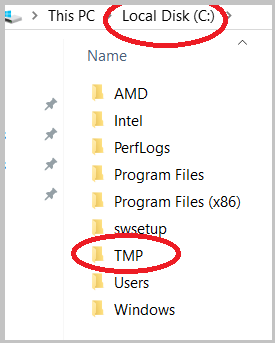 files it was about to download. I had no idea. So, I went back to LearnMMD.com and the main Troubleshooting article… and it told me to place a new folder named TMP onto my C drive. I did so… and then returned to that question, clicked BROWSE… and navigated my way to that TMP folder.
That DirectX Runtime then finished its installation without another incident.
I then unzipped the C++ 2008 Redistributable and installed that software.
Next: the C++ 2010 software.
 Then I dragged the MMD zip folder to my Desktop and unzipped it… “Extract All”… and found my new MMD folder on the Desktop. … I did the same with the MME zip folder. I opened that new MME folder and did a drag-and-drop to put the three DLLs into the same folder as the MikuMikuDance.exe file.
Finally: MikuMikuDance!
I opened that new MMD folder… and tried to open MikuMikuDance.
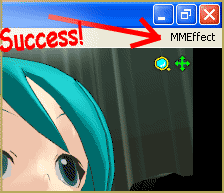 SUCCESS! … MMD opened and looked great and that little MMEffect was where it belonged: in the upper right corner of my screen.
FAST Computer!
Knowing I had a whiz-bang new computer, I tried loading the Sample(All Stars).pmm sample dance. In just a couple of blinks, it was loaded and on-screen. I was ALREADY further-along than what my old XP computer could usually accomplish! Almost every time, it used to “lock-up” when I tried to open that dance. My new Windows 10 “gamers” computer was able to play that dance at between 56- and 58-frames per second! (When my old XP DID play this dance, it was at, maybe, 2- or 3-fps!)

For my next trick, I dragged the new Mikumikudance.exe file and it’s DATA folder into my old, existing MMD folder. I then did a drag-and-drop to move those three new DLLS into that old folder to replace the old 32-bit DLLs.
I opened MMD… It worked perfectly. … I was JAZZED!
Next, I opened my most MME effect-heavy saved dance… and… it opened quickly and ran just fine at 60-fps.
SOLD!
I had total success running MMD on Win 10 64-bit!
Have fun with MikuMikuDance!
– SEE BELOW for MORE MMD TUTORIALS…
— — —
– _ — –








hello, i need help with installing mmd!
i have windows 11 home, x64
i’ve installed both visual c++ redists, but the problem i’m having is with the directx redist. even though it says it’s installed, it really isn’t because mmd runs as a background process rather than an actual app. i’ve tried it with 32 bit mmd too, and it just wouldn’t work! i tried putting the directx folder in C:\TMP rather than C:\Users\name here\Downloads, running in admin mode, and running in compatibility mode for windows vista.
beforehand, i was using a different version, 7.39. i’m trying to install the latest one: 9.32
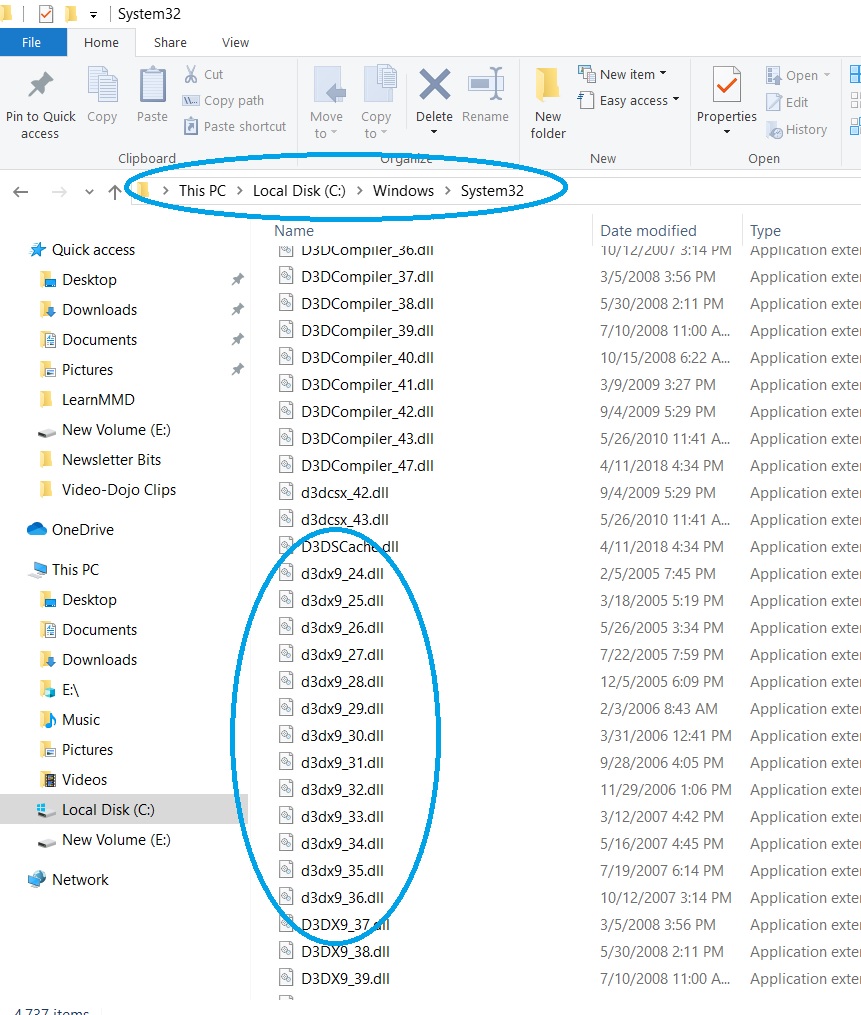
Check to see if DirectX 9 is really installed. Yu should see that these DLLs are in place:
— Reggie
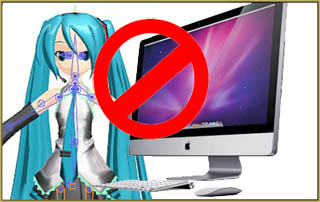
hello I’m just wondering how I could get MikuMikuDance on Chromebook, I mean I know its meant for Window Computers but I don’t want to miss out on the fun.
You need a DirectX09 environment… not available on a Chromebook
— Reggie
Hi am Dairantōu Smash Bros player 64 and i form Peru and Ecuador
How can I help you?
I have a problem. I downloaded all needed stuff and mmd still doesn’t working. Configuration is wrong, it is says. I have windows 10, 64
Hello! Have you checked to see if you actually HAVE got that software installed? Here is my list of the C++ on MY system. you don’t need all of these but this is what it looks like.
— Reggie
for some reason it says this everytime i try to open MMD?
! Cannot execute “C:\Users\Hayde\AppData\Local\Temp\Rar$EXa11828.41038\MikuMikuDanceE_v932\MikuMikuDance.exe”
i dont know why i have a hp computer idk if thats the problem
The reason is you open an archived download as if it was a folder and try to launch the executable straight from there. What you must do is unpack the archive first and work with the unpacked copy.
Does this mean I can’t use mmd or is there some other way?
Hello… Is your computer not a 64-bit machine? … maybe you must run the 32-bit version of MikuMikuDance… not an issue, really… Give that a try.
— Reggie
I hazard to guess that when you went to download the C++ redistributable, the Microsoft downloads site offered you three different versions of it, and you either chose the wrong one or tried to install all three. In fact, only one of those is necessary, either 64-bit or 32-bit, depending on MMD version you use. “IA64” version is for a discontinued architecture of a processor you probably don’t have.
If I download it, it downloads as a zip file. It refuses to go past 60% for the mmd part and 44%for the read me part. Pressing extract all does nothing. Either time, it mentions a side to side configuration error.