
Skip to content
Learn MikuMikuDance – MMD Tutorials – Free 3D Animation Software

Learn MikuMikuDance – MMD Tutorials – Free 3D Animation Software

Download Free Animation Software – Let's Learn How to Do Everything!

  • Step-by-Step MMD instructions
  • DOWNLOADS
  • Troubleshoot, Fix MMD
  • Site Contents
  • Reggie Replies Q&A
  • Homework!
  • What IS MMD?
    • Download MikuMikuDance Newest Latest Version of MMD
  • “HOW TO”
    • Raycast RAY-MMD Effect Tutorials
  • BONUS PAGES
    • Why convert PMD models to PMX?
  • HALL of CHAMPIONS
  • Tutorial Categories
  • About
    • Privacy Policy
  • Toggle search form
  • Switch Models without Physics Glitches Accessory Manipulation/Adjust
  • Import models from Source engine based games (HL2, Portal, TF2 etc.) Blender
  • MikuMikuDance Tutorials MMD Tutorials on LearnMMD.com MMD Tutorials
  • 7 Reasons Why We Don’t Do These Things Fia Phoenix
  • Assemble your stages from .x type components Accessory Manipulation/Adjust
  • Creating Hand IK Bones with the IKMakerX PMXE plugin Bones
  • Chrysanthemums are lovely with the Fireworks effect!
    Using the Fireworks Effect In MikuMikuDance ARIZONA
  • Move the whole Model with Box-Sel in MikuMikuDance Functions-Copy-Paste-Expand

Use Center Position Bias to duplicate a motion

Posted on September 14, 2011November 21, 2016 By Reggie_Dentmore 1 Comment on Use Center Position Bias to duplicate a motion

How can I paste a motion in a new place on the stage? How can I copy and paste a motion sequence? LearnMMD Tutorials. How do I use The Center Position Bias? What is the Center Position Bias in MikuMikuDance MMD?Visit LearnMMD's Video Channel on YouTube: Videos by Reggie Dentmore.

Use Center Position Bias to duplicate a motion

I wanted to create a single full stride and then Copy and Paste it into my animation to make my model walk off of the screen in a continuous repetition of that stride. I found that, when you do that Copy and Paste, the Center and IK Bones “remember” their old floor-position and the Paste command slaps your model back into the old position. I have learned that if you Copy and Paste the motion data and use the  Apply Center Position Bias to the newly pasted Diamonds, while they are still red, you can over-write that old position memory.
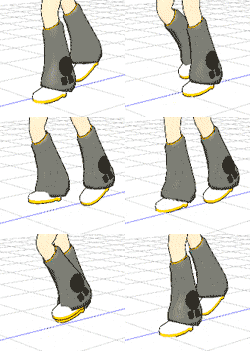
Here’s a simple demonstration that you can use to learn this trick. Open a NEW dance. Load the model of your choice. Register that Zero Frame position. Move the frame counter to 20. Select the Center and both IK-Leg bones and slide the model straight forward a couple of squares using the Blue Z roller. Register that position. Now go to the EDIT Menu and select Numeric Input and make a note of the Z position … let’s say it says -9.95 …Close that menu.
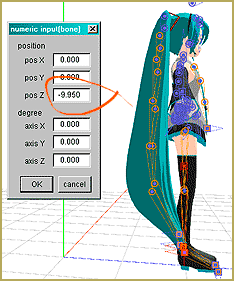
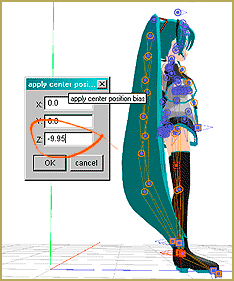
Now use Range Select, All Frame, with a range of 0 – 20, Range Select, Copy, Paste … and now, while the diamonds are still red, click COPY to put the data on the clipboard, go to the EDIT menu and select the bottom option: Apply Center Position Bias. In that window, enter that number   -9.95  and OK. On the screen you will see the model jump forward to the new position. Push Play and watch the model glide forward for the whole motion.
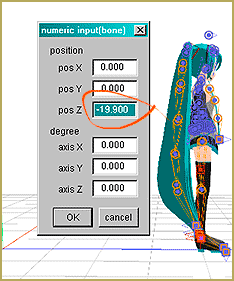
Let’s do it again … Go to frame 40, where the last diamonds are located, and go up to the EDIT menu, Numeric Input, and make a note of the new Z position …  -19.9  ? …  Know that the motion data we put into memory is still there, ready to paste again, so … Go ahead and click PASTE on that Frame 40. You will see your model fly back to the old position. Now … while the diamonds are still red, click COPY,  go to the EDIT menu and select the bottom option: Apply Center Position Bias. In that window, enter that number   -19.9  and OK. On the screen you will see the model jump forward to the new position. Push Play and watch the model glide forward for the whole motion.
You can copy and move complicated motions in that same way. I find that I often need to tweak the animation after doing this trick … but it can make a moving, repetitive motion easier to do.


– SEE BELOW for MORE MMD TUTORIALS…


— — —


– _ — –


Visit the LearnMMD.com Homepage! Plenty of Mikumikudance instruction and info!

More MMD Tutorials...

Loading Background AVI Files into MMD (2021 Edition)

How do I load background AVI files into MMD?  What does it mean when MMD ...read more

Running MikuMikuDance in Linux using Wine and DXVK

How do I run MMD on Linux? Does MikuMikuDance run on Linux? How do I ...read more

How to subtitle MMD videos

How do I subtitle MMD videos? How do I make subtitles for my MMD videos? ...read more

Using the right codec when Rendering to AVI in MMD

What codecs do I use for rendering a video in MMD? What codec gives me ...read more

YouTube serves video playback quality to best suit your viewing-screen

What happens to your video after you've uploaded one to YouTube? YouTube serves video playback quality ...read more

Learn MMD Basics before jumping into a big project!

Learn MMD Basics before jumping into a big project! A reader wrote a comment... I tried to make ...read more

Functions-Copy-Paste-Expand, MENU Option Descriptions, Nuts & Bolts, Use CENTER POSITION BIAS Tags:center position bias, mikumikudance

Post navigation

Previous Post: The MMD 7.39 VIEW MENU Options
Next Post: Copy and Paste for Repetitive Motion in MikuMikuDance

Related Posts

  • You cannot use Box-Sel to select a portion of a model. You must selectthe entire MMD model.
    BOX-sel lets you select an entire model in MikuMikuDance ARIZONA
  • Get the LearnMMDMmetronome. It is a real help!
    LearnMMD’s METRONOME is Ready to Download! Animation Lag
  • Magician Miku pulls a magic trick and reverses her motion data!
    How to Reverse Motion Data in MikuMikuDance ARIZONA
  • MikuMikuDance Home Page VPVP is worth a visit! Intro to MikuMikuDance
  • MikuMikuDance Keyboard Shortcuts MMD Beginners Guide Intro to MikuMikuDance
  • How to subtitle MMD videos MMD Tutorials

More Related Articles

Haku and Fireworks 02 Add Background Pictures and AVI’s to MikuMikudance MMD Add Background Pictures and AVI
Switch Models without Physics Glitches Accessory Manipulation/Adjust
Use Center Position Bias to Move Models in MMD ARIZONA
The MMD 7.39 BONE MENU Options MENU Option Descriptions
Making Smooth Motions with MMD Making Smooth Motions
Create and save a sexy, natural pose for your MikuMikuDance 7.39 models. Create, Save a Natural, Sexy Pose you can load in MikuMikuDance Functions-Copy-Paste-Expand

Comment (1) on “Use Center Position Bias to duplicate a motion”

  1. ashley greene says:
    November 14, 2011 at 1:27 am

    Thanks for that awesome posting. It saved MUCH time :-)

    Reply

Leave a Reply Cancel reply

Your email address will not be published. Required fields are marked *

Download the latest version of MikuMikuDance!
See the MMD Step-by-Step instructions page!
Learn how to make your own MMD motions!
LearnMMD.com
  • Get the K-Lite Codec for MMD
    The K-Lite Codec Pack: How To Install, and Current Problems K Lite Mega Codec Pack 995
  • The Falling Heart Effect is just a wonderful effect ... gorgeous!
    Playing with MME Effects – Using MikuMikuEffects for MMD Blizzard Effect
  • The Disappearance of Akita Neru Random Thoughts & Visions
  • "Gothic Teto" by Nigamon and "Mouse Cursor" by SachiShirakawa
    Collecting MMD Models, Music and Accessories for Beginners ARIZONA
  • Print a hard copy! Art is fleeting… especially NOW! MMD Tutorials
  • MMD Boobs too Big gives us a funny Really Really Bad Boys video!
    MMD Boobs too Big yields Too Funny Really Bad Boy video! "the making of" my video
  • Getting Started with MMD MikuMikuDance Intro to MikuMikuDance
  • RAY-MMD: Using the Time of Night skybox MMD Tutorials

Copyright © 2022 Learn MikuMikuDance – MMD Tutorials – Free 3D Animation Software and Instructions..

Powered by PressBook Premium theme

Go to mobile version