Skip to content
Learn MikuMikuDance – MMD Tutorials – Free 3D Animation Software

Learn MikuMikuDance – MMD Tutorials – Free 3D Animation Software

Download Free Animation Software – Let's Learn How to Do Everything!

  • Step-by-Step MMD instructions
  • DOWNLOADS
  • Troubleshoot, Fix MMD
  • Site Contents
  • Reggie Replies Q&A
  • Homework!
  • What IS MMD?
    • Download MikuMikuDance Newest Latest Version of MMD
  • “HOW TO”
    • Raycast RAY-MMD Effect Tutorials
  • BONUS PAGES
    • Why convert PMD models to PMX?
  • HALL of CHAMPIONS
  • Tutorial Categories
  • About
    • Privacy Policy
  • Toggle search form
  • Top-10 Best “motion-maker” MMDers on YouTube Intro to MikuMikuDance
  • Using Beamman’s SoftSmoke Effect Beamman's Soft Smoke
  • Workin’ on my VDE-4 Animation: The Easy Part is Complete! "the making of" my video
  • Give the Animasa Teto Chimera a wing flapping motion in MMD 7.39
    Create Wing Flapping Motion for Teto Chimera MMD 7.39 Creating Motions
  • MMD Augmented Reality AR on Android Devices Random Thoughts & Visions
  • Minimize both windows so you can reach the RECORD in Audacity and then the PLAY in you video player. Make Sound Effects in your MMD video soundtrack.
    MMD Soundtrack Make Sound Effects on your Desktop using Audacity® "the making of" my video
  • VDE-4 Champion: Beemz Video Dojo Champions
  • Cry Baby Motion DL featured image
    Free MMD Cry Baby Motion DL from DA’s Smol-Hooman "the making of" my video

Dummy Bones Hold Accessories in MikuMikuDance

Posted on March 12, 2012November 21, 2016 By Reggie_Dentmore No Comments on Dummy Bones Hold Accessories in MikuMikuDance

What is the proper use of accessories in MikuMikuDance? How do you use accessories in MMD? How do I move accessories? How do I animate accessories in Miku Miku Dance?By Reggie Dentmore, LearnMMD.com

Use Dummy Bones to Move Accessories on your stage.

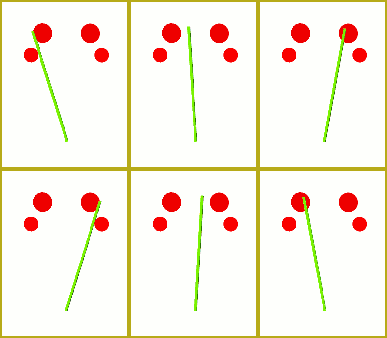
Checking the Keywords readers use to find LearnMMD.com, this week it seems that “the proper use of Accessories” was the most popular question. For the short answer, see page 2 of the Start Here / Step-by-Step pages . There you see an example of how to use the laser light accessory in MMD.Mount laser lights and other accessories to Dummy Bones.
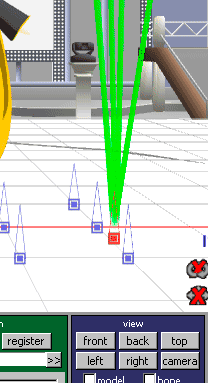
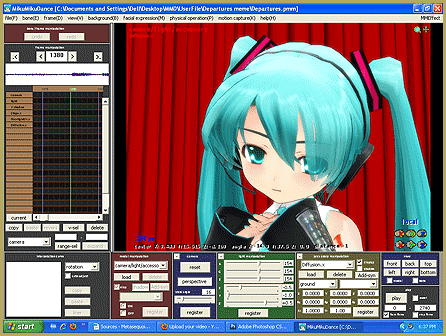
Take a look at the structure of the Sample.pmm dance included with MMD. You will see that, in the brown Model Manipulation panel, they have loaded the Dummy Bone (Dammy Bone “:o) TWICE because they are using so many accessories. Each laser beam and floodlight is attached to its own Dummy Bone. You can add the Negi (the famous green onion “leek”) and, by default, it is attached to the Ground … but you can attach it to any point on your dance model or you can attach it to a dummy bone. Whatever your choice, be sure to Click REGISTER in that same area of the panel.

See the check boxes next to the LOAD button in the Olive Green “Accessory Manipulation” panel. “Display” and “Shadow”.   “Shadow” toggles the item’s ability to cast a shadow. “Display” makes your accessory visible or invisible. THAT is a powerful tool. You can load an accessory whenever you like … attach it to a dummy bone … and then hide it from view until you are ready to use it. Register  your choice to lock it in. When you get to the frame where you want to see that item, Click DISPLAY and REGISTER … and that action will happen in that frame.

Even huge items, like an entire stage set, can be attached to a Dummy Bone. I recommend you do so when you download the LearnMMD Auditorium Stage. That stage is great … but the floor level may be a hair above ZERO on the Y axis. If you mount the stage to a dummy bone, use the “numeric input” window in the EDIT menu to make Y be -.2 (minus point two) and you will find that the floor will be at zero altitude … perfect!


– SEE BELOW for MORE MMD TUTORIALS…


— — —


– _ — –


Visit the LearnMMD.com Homepage! Plenty of Mikumikudance instruction and info!

More MMD Tutorials...

Loading Background AVI Files into MMD (2021 Edition)

How do I load background AVI files into MMD?  What does it mean when MMD ...read more

Running MikuMikuDance in Linux using Wine and DXVK

How do I run MMD on Linux? Does MikuMikuDance run on Linux? How do I ...read more

How to subtitle MMD videos

How do I subtitle MMD videos? How do I make subtitles for my MMD videos? ...read more

Using the right codec when Rendering to AVI in MMD

What codecs do I use for rendering a video in MMD? What codec gives me ...read more

YouTube serves video playback quality to best suit your viewing-screen

What happens to your video after you've uploaded one to YouTube? YouTube serves video playback quality ...read more

Learn MMD Basics before jumping into a big project!

Learn MMD Basics before jumping into a big project! A reader wrote a comment... I tried to make ...read more

Dummy Bones, Nuts & Bolts Tags:beginner, dummy bone, learnmmd, mikumikudance, new to MMD

Post navigation

Previous Post: Create and Post 1 or 2 videos a day? VocaloidAnime1924 does!
Next Post: LearnMMD Auditorium Stage now includes 19 Colors of Drapes!

Related Posts

  • Sketchup Orbit view on MMD: Right Click and Drag! Keyboard Shortcuts
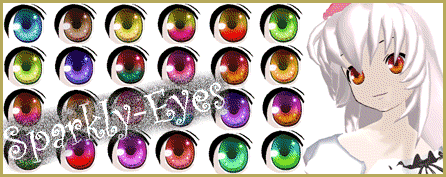
  • Visit Krystal-Sakura on Deviant Art to get "Sparkly Eyes" for MMD 7.39
    Change a Model’s Eyes Using MMD Eye Packs in MikuMikuDance NOKO2
  • Create and save a sexy, natural pose for your MikuMikuDance 7.39 models.
    Create, Save a Natural, Sexy Pose you can load in MikuMikuDance Functions-Copy-Paste-Expand
  • Rin is excited about the MomiCup
    How to enter The MomiCup and other YouTube MMD Contests and Parties. ARIZONA
  • Learn How to Dress the LearnMMD Stage – Instructions Dummy Bones
  • The New LearnMMD Stage "in action"!
    LearnMMD Auditorium Stage Announced Ready for Download Downloading New Models

More Related Articles

PMD Editor Basics, now in English – Modify Your MMD Models! Nuts & Bolts
The MMD 7.39 BONE MENU Options MENU Option Descriptions
Rin is excited about the MomiCup How to enter The MomiCup and other YouTube MMD Contests and Parties. ARIZONA
Keyboard Shortcuts and Easy Moves Keyboard Shortcuts
LearnMMD.com: The Instruction Sheet you've been searching for! Use Google SketchUp to make DirectX Accessories in MMD Dummy Bones
Switch Models without Physics Glitches Accessory Manipulation/Adjust

Leave a Reply Cancel reply

Your email address will not be published. Required fields are marked *

Download the latest version of MikuMikuDance!
See the MMD Step-by-Step instructions page!
Learn how to make your own MMD motions!
LearnMMD.com
  • Win 7 Virtual Machine Runs MMD on MAC and Linux Kazuki Matsuoka
  • Cookiefun Channel Camera Crew Model Free Download Downloading New Models
  • MMD smoke clouds are easy to make with Beamman's Breath effect.
    MMD Smoke Clouds and a Smoke Filled Room… Beamman's Breath Effect
  • Show the Love: Melanie’s “Ring Around the Moon” CONTESTS
  • Next Level in MMD Video Evolution
    Post-Production Editing Yields Next Step in MMD Video Quality Making Videos - Rendering to AVI
  • LearnMMD.com _ MikuMikuDance MMD Tutorials
    Trouble Keeping MMD Faith When Those Around You Don’t Keep the Faith-MMD Credits/Sharing
  • A better MMD followcam in PMXE with physics and IK bones Animation Shortcuts
  • The New LearnMMD Theater Seats .x accessory looks Great when you place it on your stage. MMD 7.39 accessory.
    New MMD Theater Seats Accessory Download on LearnMMD.com Google SketchUp and MMD

Copyright © 2022 Learn MikuMikuDance – MMD Tutorials – Free 3D Animation Software and Instructions..

Powered by PressBook Premium theme

Go to mobile version