Skip to content
Learn MikuMikuDance – MMD Tutorials – Free 3D Animation Software

Learn MikuMikuDance – MMD Tutorials – Free 3D Animation Software

Download Free Animation Software – Let's Learn How to Do Everything!

  • Step-by-Step MMD instructions
  • DOWNLOADS
  • Troubleshoot, Fix MMD
  • Site Contents
  • Reggie Replies Q&A
  • Homework!
  • What IS MMD?
    • Download MikuMikuDance Newest Latest Version of MMD
  • “HOW TO”
    • Raycast RAY-MMD Effect Tutorials
  • BONUS PAGES
    • Why convert PMD models to PMX?
  • HALL of CHAMPIONS
  • Tutorial Categories
  • About
    • Privacy Policy
  • Toggle search form
  • Getting Re-Excited about MikuMikuDance … Happy Birthday Miku! Intro to MikuMikuDance
  • Download and Configure the OldTV MME Effect for MikuMikuDance Customize MME effects
  • Making Smooth Motions with MMD Making Smooth Motions
  • Step-By-Step Instructions for MikuMikuDance on LearnMMD.com Welcome to LearnMMD.Com!
  • Shading China Dresses
    Shading China Dresses Using Advanced Shader Techniques Advanced Shader Technique
  • Who knew Ash was so short?? Get Ash Ketchum - Click this picture!
    Ripped Models in MMD: An Explanation NOKO2
  • Make Smooth Motions using Multiple Keyframes Animation Shortcuts
  • Free Download MikuMikuDance MMD
    Reader writes: i don’t know how to do mmd :( MMD Tutorials

Dummy Bones Hold Accessories in MikuMikuDance

Posted on March 12, 2012November 21, 2016 By Reggie_Dentmore No Comments on Dummy Bones Hold Accessories in MikuMikuDance

What is the proper use of accessories in MikuMikuDance? How do you use accessories in MMD? How do I move accessories? How do I animate accessories in Miku Miku Dance?By Reggie Dentmore, LearnMMD.com

Use Dummy Bones to Move Accessories on your stage.

Checking the Keywords readers use to find LearnMMD.com, this week it seems that “the proper use of Accessories” was the most popular question. For the short answer, see page 2 of the Start Here / Step-by-Step pages . There you see an example of how to use the laser light accessory in MMD.Mount laser lights and other accessories to Dummy Bones.
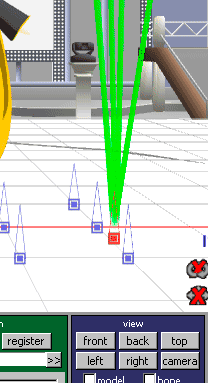
Take a look at the structure of the Sample.pmm dance included with MMD. You will see that, in the brown Model Manipulation panel, they have loaded the Dummy Bone (Dammy Bone “:o) TWICE because they are using so many accessories. Each laser beam and floodlight is attached to its own Dummy Bone. You can add the Negi (the famous green onion “leek”) and, by default, it is attached to the Ground … but you can attach it to any point on your dance model or you can attach it to a dummy bone. Whatever your choice, be sure to Click REGISTER in that same area of the panel.

See the check boxes next to the LOAD button in the Olive Green “Accessory Manipulation” panel. “Display” and “Shadow”.   “Shadow” toggles the item’s ability to cast a shadow. “Display” makes your accessory visible or invisible. THAT is a powerful tool. You can load an accessory whenever you like … attach it to a dummy bone … and then hide it from view until you are ready to use it. Register  your choice to lock it in. When you get to the frame where you want to see that item, Click DISPLAY and REGISTER … and that action will happen in that frame.

Even huge items, like an entire stage set, can be attached to a Dummy Bone. I recommend you do so when you download the LearnMMD Auditorium Stage. That stage is great … but the floor level may be a hair above ZERO on the Y axis. If you mount the stage to a dummy bone, use the “numeric input” window in the EDIT menu to make Y be -.2 (minus point two) and you will find that the floor will be at zero altitude … perfect!


– SEE BELOW for MORE MMD TUTORIALS…


— — —


– _ — –


Visit the LearnMMD.com Homepage! Plenty of Mikumikudance instruction and info!

More MMD Tutorials...

Loading Background AVI Files into MMD (2021 Edition)

How do I load background AVI files into MMD?  What does it mean when MMD ...read more

Running MikuMikuDance in Linux using Wine and DXVK

How do I run MMD on Linux? Does MikuMikuDance run on Linux? How do I ...read more

How to subtitle MMD videos

How do I subtitle MMD videos? How do I make subtitles for my MMD videos? ...read more

Using the right codec when Rendering to AVI in MMD

What codecs do I use for rendering a video in MMD? What codec gives me ...read more

YouTube serves video playback quality to best suit your viewing-screen

What happens to your video after you've uploaded one to YouTube? YouTube serves video playback quality ...read more

Learn MMD Basics before jumping into a big project!

Learn MMD Basics before jumping into a big project! A reader wrote a comment... I tried to make ...read more

Dummy Bones, Nuts & Bolts Tags:beginner, dummy bone, learnmmd, mikumikudance, new to MMD

Post navigation

Previous Post: Create and Post 1 or 2 videos a day? VocaloidAnime1924 does!
Next Post: LearnMMD Auditorium Stage now includes 19 Colors of Drapes!

Related Posts

  • Next Level in MMD Video Evolution
    Post-Production Editing Yields Next Step in MMD Video Quality Making Videos - Rendering to AVI
  • The MMD 7.39 BONE MENU Options MENU Option Descriptions
  • Visit Krystal-Sakura on Deviant Art to get "Sparkly Eyes" for MMD 7.39
    Change a Model’s Eyes Using MMD Eye Packs in MikuMikuDance NOKO2
  • Keyboard Shortcuts to the Menus Functions-Copy-Paste-Expand
  • Smooth Walking Motion is getting easier! Make a Smooth Walking Motion
  • Select the Center Bone if your MMD Model Doesn’t Feel the Floor Bones

More Related Articles

You cannot use Box-Sel to select a portion of a model. You must selectthe entire MMD model. BOX-sel lets you select an entire model in MikuMikuDance ARIZONA
Physical Operations Tab in MikuMikuDance 7.39 Menu Options MENU Option Descriptions
Meiko showing her "Bones" Add Songs to MikuMikuDance: All you need is a WAV file! Music and WAV Files
Visit Krystal-Sakura on Deviant Art to get "Sparkly Eyes" for MMD 7.39 Change a Model’s Eyes Using MMD Eye Packs in MikuMikuDance NOKO2
Audacity® 2.0 Audio Editor easily converts mp3 to WAV files for MMD Music and WAV Files
Here is the plan for the ball tossing motion in MikuMikuDance 7.39 “Bonk goes the Miku” new video using Accessories created in SketchUp Google SketchUp and MMD

Leave a Reply Cancel reply

Your email address will not be published. Required fields are marked *

Download the latest version of MikuMikuDance!
See the MMD Step-by-Step instructions page!
Learn how to make your own MMD motions!
LearnMMD.com
  • Rigging Models with Appends using PMXEditor Bandages
  • Japanese Mode Opens Hidden Model Features in MMD 8.06 Japanese Mode
  • Proper Computer DPI Scaling Setup Stops Text Cut Off in PMXE Mae Blythe
  • My new MMD Action Video was fun to make! "the making of" my video
  • MMD rotating 3D objects 360-degrees
    MMD Rotating objects 360-degrees -Miku’s Guide to the Galaxy (Part One) Making Smooth Motions
  • PMXE weight painting tools and deformation types for new MMD models Bandages
  • About changing models skirts using PMD Editor PMXE KillerBeer
  • Take full control of MME Effects by editing .fx files Beamman's Burner effect

Copyright © 2022 Learn MikuMikuDance – MMD Tutorials – Free 3D Animation Software and Instructions..

Powered by PressBook Premium theme

Go to mobile version