
Skip to content
Learn MikuMikuDance – MMD Tutorials – Free 3D Animation Software

Learn MikuMikuDance – MMD Tutorials – Free 3D Animation Software

Download Free Animation Software – Let's Learn How to Do Everything!

  • Step-by-Step MMD instructions
  • DOWNLOADS
  • Troubleshoot, Fix MMD
  • Site Contents
  • Reggie Replies Q&A
  • Homework!
  • What IS MMD?
    • Download MikuMikuDance Newest Latest Version of MMD
  • “HOW TO”
    • Raycast RAY-MMD Effect Tutorials
  • BONUS PAGES
    • Why convert PMD models to PMX?
  • HALL of CHAMPIONS
  • Tutorial Categories
  • About
    • Privacy Policy
  • Toggle search form
  • Download and Configure the OldTV MME Effect for MikuMikuDance Customize MME effects
  • Beamman’s Breath Effect shows warm breath in winter Beamman's Breath Effect
  • Customize MME Effects by Editing .fx Files Customize MME effects
  • Learn How to Navigate Japanese MikuMikuDance Pages Downloading New Models
  • The K Lite Mega Codec Pack 995 – The Ultimate HD Video compressor! HD Videos in MMD
  • Post Effect cannot be specified
    Fix the “Post Effect cannot be specified” error Chris no Akumu
  • MMD "Kiss Me" free download motion and WAV files.
    Ten year old MMD “Kiss Me” animation LOOKS like NEW! "the making of" my video
  • LearnMMD’s Video Dojo Expo 4: Entries are CLOSED CONTESTS

pmothair Effect Makes Hair Actually Look like hair

Posted on April 12, 2015May 24, 2016 By Zazi 4 Comments on pmothair Effect Makes Hair Actually Look like hair

See all the articles written by Zazi on LearnMMD.comWhere can I get the pmothair effect? How can I make my MMD model’s hair look more realistic? How can I make softer looking hair in MikuMikuDance? How do I use the pmothair effect?

The pmothair Effect
Makes Hair Actually Look like hair!

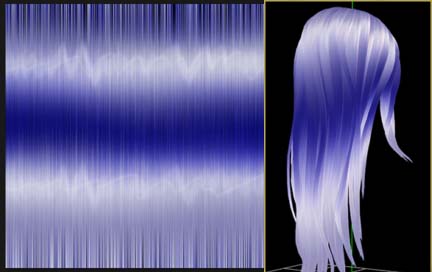
Okay so you ever wanted your model to actually have realistic feeling hair? Well now you can… by using the pmothair effect… an effect which if used properly can give an interesting hair-like effect  as seen here.
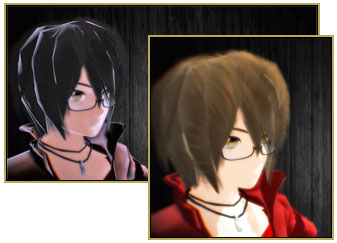
The pmothair Effect gives your MMD model softer, fluffier hair!

Download the effect here: https://bowlroll.net/file/17049

To achieve fluffier hair simply follow these steps:

  1. Open a model in MMDGo to the MMEffect Button in the upper right corner of the MMD screen.
  2. Go to MME effects and look at your model
  3. Go to edit
  4. Go to subset extract and click it
  5. Locate your hair subsets
  6. Load set effect on that subset
  7. Adjust lighting and background to match your models fluff

Have fun trying out different settings in the AMP window.

— Enjoy!


– SEE BELOW for MORE MMD TUTORIALS…


— — —


– _ — –


Visit the LearnMMD.com Homepage! Plenty of Mikumikudance instruction and info!

More MMD Tutorials...

Enjoy the "camera Angles WEIRD in Anime" meme...

Enjoy the "camera Angles WEIRD in Anime" meme... This image is from The Slayers - NEXT, ...read more

Reader asks how to create MMD artwork... stuff like posing, camerawork?

A reader asks... Is there a tutorial on how to create MMD artwork, like those you ...read more

Learn MikuMikuDance in Small Steps! New LearnMMD Video Series

Learn MikuMikuDance in Small Steps. Where can I find easy-to-follow MMD instructions on YouTube? How ...read more

Apply Multiple Effects on an Entire MMD Model Using M4Layer Effect

How can I apply multiple effects to an MMD model? Can I use more than ...read more

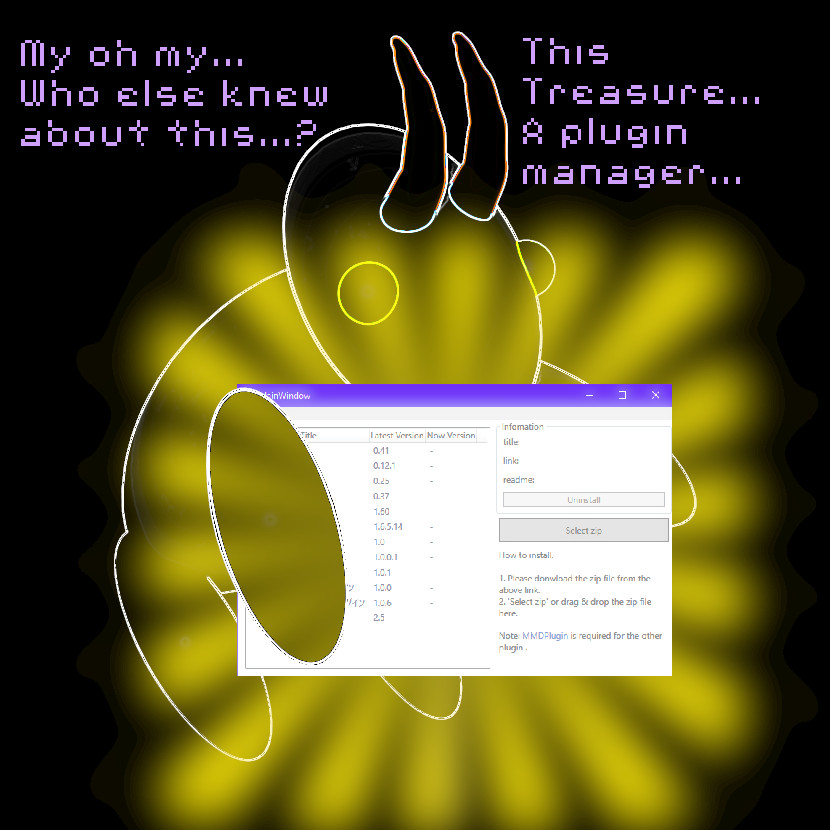
MMD Plugin Manager... I Found a Treasure!

What sorts of MMD Plugins are there? MMD Plugin Manager? MMD Plugins. Plugin MMD. More ...read more

2025: Hatsune Miku is 18... but she is designed to be always 16 Years old, by design and in reality!

Finally, in 2023, Hatsune Miku is 16 years old! but in August of 2025, she ...read more

MMD Tutorials, MME Effects Tutorials, pmothair Effect, Zazi

Post navigation

Previous Post: Stationary Motion Creation rights and wrongs
Next Post: MME Balloon Effect (And what I found out)

Related Posts

  • Fixed version of the PluginManager featured image. Well, slightly fixed.
    MMD Plugin Manager… I Found a Treasure! MMD Tutorials
  • Posing MMD Models: Anatomy Matters! BigPerryman
  • MMD Animation Project Where My Demons Hide "the making of" my video
  • Speech Synthesizer gives MMD Models a voice! Making Soundtracks
  • Staging and the 12 Principles of Animation. Accessory Manipulation/Adjust
  • Adjust downloaded motions to fit your MMD models Animation Shortcuts

More Related Articles

Different MMEffects for different feelings Give MMD Pictures Different MMEffects For Different Feelings BigPerryman
VOCALOID 3 Tutorial – The whole interface on a basic level Kazuki Matsuoka
How to subtitle MMD videos MMD Tutorials
Professionally made models FOUND! Downloading New Models
MMD Model Hair Textures Made With . . . IMVU Tutorials?! Mae Blythe
MME Plastic Effect Featured MME Plastic Effect adds plastic realism to MMD model parts MMD Tutorials

Comments (4) on “pmothair Effect Makes Hair Actually Look like hair”

  1. ミク センス says:
    March 3, 2018 at 1:47 am

    It comes up with an error message whenever i try to load it.

    Reply
    1. KillerBeer says:
      March 3, 2018 at 6:11 am

      What error?

      Reply
  2. NTA65bz says:
    June 29, 2015 at 3:32 pm

    I can’t find “edit” there :\

    Reply
    1. Zazi says:
      July 26, 2015 at 10:36 am

      in miku miku efects it’s the second tab over to the left of file

      Reply

Leave a Reply Cancel reply

Your email address will not be published. Required fields are marked *

Download the latest version of MikuMikuDance!
See the MMD Step-by-Step instructions page!
Learn how to make your own MMD motions!
LearnMMD.com
  • The MMD 7.39 VIEW MENU Options MENU Option Descriptions
  • MMD Fill Lights Part 1 (Half-Lambert Shader) Half-Lambert Shader
  • Physical Operations Tab in MikuMikuDance 7.39 Menu Options MENU Option Descriptions
  • dull-VS-alive-animation-environment
    MMD animation environment… MORE than just a model on a stage! "the making of" my video
  • Keyboard Shortcuts to the Menus Functions-Copy-Paste-Expand
  • Rotate stage to allow ground shadows MMD MikuMikuDance Accessory Manipulation/Adjust
  • UV Unwrapping MMD Models in Blender with MMD Tools Bandages
  • The UT Video Codec Suite works well with Render to AVI in MMD.
    UT Video Codec Suite v22.2.0 creates simple AVI video for MMD background AVI Reggie Dentmore

Copyright © 2022 Learn MikuMikuDance – MMD Tutorials – Free 3D Animation Software and Instructions..

Powered by PressBook Premium theme

Go to mobile version