


Skip to content
Learn MikuMikuDance – MMD Tutorials – Free 3D Animation Software

Learn MikuMikuDance – MMD Tutorials – Free 3D Animation Software

Download Free Animation Software – Let's Learn How to Do Everything!

  • Step-by-Step MMD instructions
  • DOWNLOADS
  • Troubleshoot, Fix MMD
  • Site Contents
  • Reggie Replies Q&A
  • Homework!
  • What IS MMD?
    • Download MikuMikuDance Newest Latest Version of MMD
  • “HOW TO”
    • Raycast RAY-MMD Effect Tutorials
  • BONUS PAGES
    • Why convert PMD models to PMX?
  • HALL of CHAMPIONS
  • Tutorial Categories
  • About
    • Privacy Policy
  • Toggle search form
  • Download MMD Pokeball Accessory and Learn Accessory Manipulation Accessory Manipulation/Adjust
  • ikUnderwater Effect submerges your MMD animation! ikUnderwater Effect
  • MMD uses your computer to the max! Intro to MikuMikuDance
  • MMD The Zombie Song meme
    I’d never eat your brain – The Zombie Song download links "the making of" my video
  • Beamman’s Breath Effect shows warm breath in winter Beamman's Breath Effect
  • When you add background AVI files, you can motion trace!
    Loading Background AVI Files into MMD (2021 Edition) Add Background Pictures and AVI
  • The Making Of my “I Know Those Eyes / This Man Is Dead MMD” video "the making of" my video
  • dull-VS-alive-animation-environment
    MMD animation environment… MORE than just a model on a stage! "the making of" my video

The MMD 7.39 BONE MENU Options

Posted on September 12, 2011November 21, 2016 By Reggie_Dentmore No Comments on The MMD 7.39 BONE MENU Options

The MMD 7.39 BONE MENU Options

This article is OBSOLETE. It was written in the era of MMD 7.39 and no longer applies to the newer versions of MikuMikuDance.
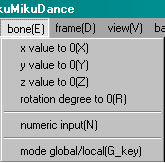
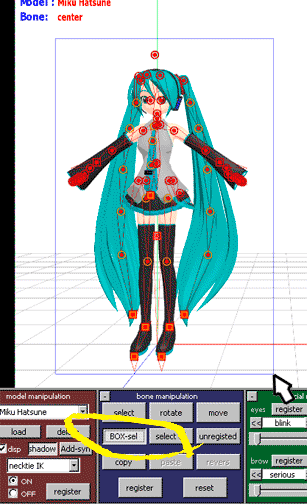
MikuMikuDance Bone Menu optionsX, Y, Z VALUE TO 0: Moves the selected bone to the Zero Position.

ROTATION DEGREE TO 0: Rotates the selected bone to the Zero Position.

NUMERIC INPUT: Allows you to move the selected bone to specific coordinates. X and Z Values: a setting of 5 moves the bone one grid-line on the coordinate grid.

MODE: GLOBAL/LOCAL: The G key on the keyboard toggles the Global/Local function. You can see which mode you are in as displayed above the XYZ Rollers on the right of the Stage. As of this writing, I do not see any value to this function. Please email me with the info if you understand the Global/Local modes.

Click aa1 MENU Option Descriptions in the Contents section to see all of my Menu Option write-ups.

Please email me, Reggie Dentmore, if you have questions. I learn more as I research the answers to your questions.


– SEE BELOW for MORE MMD TUTORIALS…


— — —


– _ — –


Visit the LearnMMD.com Homepage! Plenty of Mikumikudance instruction and info!

More MMD Tutorials...

Physical Operations Tab in MikuMikuDance 7.39 Menu Options

What's the physical operation tab for in MMD 7.39? What is the difference between Anytime ...read more

Local and Global Mode Bone Movement MMD: Miku's Mode Swings

What do local and global mode mean in MMD? What’s the difference between local and ...read more

Using the Gravity Settings in MikuMikuDance

What are the gravity settings in MMD? How do you use the gravity settings in ...read more

Copy and Paste for Repetitive Motion in MikuMikuDance

How do I copy a motion? How do I make a smooth motion in MMD? ...read more

Use Center Position Bias to duplicate a motion

How can I paste a motion in a new place on the stage? How can ...read more

The FILE Menu Options

How do I add music to my MMD animation? Describe the File Menu options choices. ...read more

MENU Option Descriptions, Nuts & Bolts Tags:menu options, mikumikudance

Post navigation

Previous Post: The FILE Menu Options
Next Post: The MMD 7.39 FRAME MENU Options

Related Posts

  • Leonardo meets Higuchi in a culture clash!
    Yu Higuchi’s Anatomy: A Lesson on MMD Bones ARIZONA
  • Download your free Metronome PMM dance file with accessories.
    Find MMD Tempo using Metronome with AVI Video Background Metronome
  • Getting Started with MMD MikuMikuDance Intro to MikuMikuDance
  • Create and save a sexy, natural pose for your MikuMikuDance 7.39 models.
    Create, Save a Natural, Sexy Pose you can load in MikuMikuDance Functions-Copy-Paste-Expand
  • Running MikuMikuDance in Linux using Wine and DXVK Linux running MMD
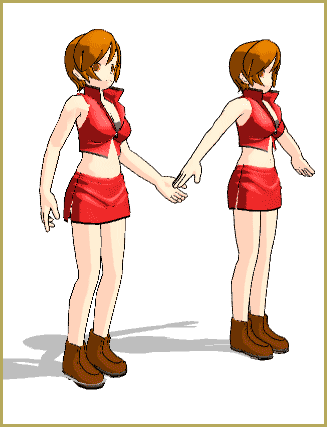
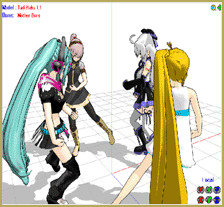
  • Motion is LOCAL, per the Model's orientation, or GOBAL, per the Program's Grid. (Meiko Sakine from MMD 7.39)
    Local and Global Mode Bone Movement MMD: Miku’s Mode Swings ARIZONA

More Related Articles

ZERO-GRAVITY Day on the beach in MMD!. Use Gravity Settings and Noize to make winds blow. Using the Gravity Settings in MikuMikuDance ARIZONA
Why MMD cannot open the models in a saved PMM file Downloading New Models
MikuMikuDance Keyboard Shortcuts MMD Beginners Guide Intro to MikuMikuDance
Switch Models without Physics Glitches Accessory Manipulation/Adjust
LearnMMD.com _ MikuMikuDance MMD Tutorials Learn MMD Basics before jumping into a big project! MMD Basics
Physical Operations Tab in MikuMikuDance 7.39 Menu Options MENU Option Descriptions

Leave a Reply Cancel reply

Your email address will not be published. Required fields are marked *

Download the latest version of MikuMikuDance!
See the MMD Step-by-Step instructions page!
Learn how to make your own MMD motions!
LearnMMD.com
  • Quick-Start Basics of MMD to get you started! GloriaTheAnimator
  • A MikuMikuDance Beginner’s Easy First Dance Intro to MikuMikuDance
  • Reggie Dentmore's hand motion animation.
    Introduction to MikuMikuDance Intro to MikuMikuDance
  • Customized Skydome replace stages, enhance MMD animations MMD Tutorials
  • NCHLShader2 adds realistic depth to MMD models Advanced Shader Technique
  • The Fourth Momi Cup is Set to Begin! ARIZONA
  • Professionally made models FOUND! Downloading New Models
  • Widescreen MMD “Kiss Me” animation too long but I wanted More! "the making of" my video

Copyright © 2022 Learn MikuMikuDance – MMD Tutorials – Free 3D Animation Software and Instructions..

Powered by PressBook Premium theme

Go to mobile version