
Skip to content
Learn MikuMikuDance – MMD Tutorials – Free 3D Animation Software

Learn MikuMikuDance – MMD Tutorials – Free 3D Animation Software

Download Free Animation Software – Let's Learn How to Do Everything!

  • Step-by-Step MMD instructions
  • DOWNLOADS
  • Troubleshoot, Fix MMD
  • Site Contents
  • Reggie Replies Q&A
  • Homework!
  • What IS MMD?
    • Download MikuMikuDance Newest Latest Version of MMD
  • “HOW TO”
    • Raycast RAY-MMD Effect Tutorials
  • BONUS PAGES
    • Why convert PMD models to PMX?
  • HALL of CHAMPIONS
  • Tutorial Categories
  • About
    • Privacy Policy
  • Toggle search form
  • .spa VS .sph sphere texture file types in PMDE / MikuMikuDance MMD.
    PMD Editor Basics: .SPH and .SPA Files Add Sparkle! PMDE/PMXE tutorials
  • MME ExcellentShadow2 effect smooths ugly Self-Shadows ExcellentShadow2
  • Keep the Center-Bone when adding Mother-Bone to an older model MMD Tutorials
  • Keyboard Shortcuts to the Menus Functions-Copy-Paste-Expand
  • Fixed version of the PluginManager featured image. Well, slightly fixed.
    MMD Plugin Manager… I Found a Treasure! MMD Tutorials
  • Scrambled first frame of video must be Voodoo! MMD Basics
  • Codec Problems!
    Updating the Codecs for MikuMikuDance’s Latest Versions ARIZONA
  • Intentionally Build Dramatic Atmosphere into your MMD Animation MMD Tutorials

Inspired by MMD, Draw Miku blending 2D and 3D Art!

Posted on June 27, 2016July 16, 2016 By TaiGaO No Comments on Inspired by MMD, Draw Miku blending 2D and 3D Art!

See all of the articles by LearnMMD's TaiGaO!

Before we begin…I will be honest, even I don’t really know what this post is about… this article is just about my “unrelated-personal-experience”.

Hello again, everyone. This is TaiGaO.

Draw Miku blending 2D and 3D art!

One day, I was bored. So, I decided to take my “trusty” mechanical-pencil and a plain paper, and draw some random anime character. And (because I can ONLY draw moe girls for some reason) I was lead to draw Miku! In order for me draw Miku, however, I needed some kind of reference. Thus, I referred to the Miku I decided to draw Miku combining styles of both LAT and Appearance model versions...models I have…which…eventually, got me thinking: “Why not make my own Miku “model”?” So, I “combined” some of the features from various models and this is the result.
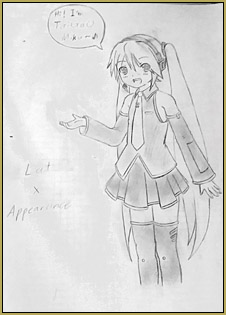
 

DISCLAIMER: This Miku “model” is a 2D art. So, naturally, I did not edit both LAT and Appearance Miku. I only “borrow” some of the elements as an inspiration.
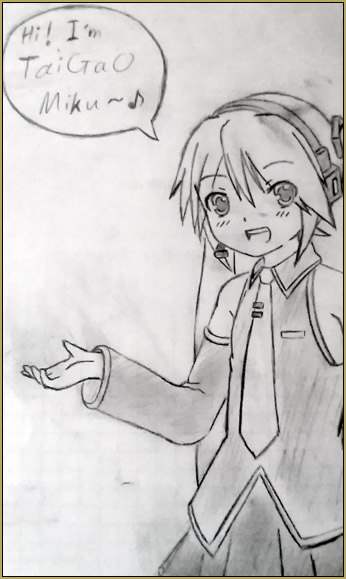
AdjusTaigaoMiku2

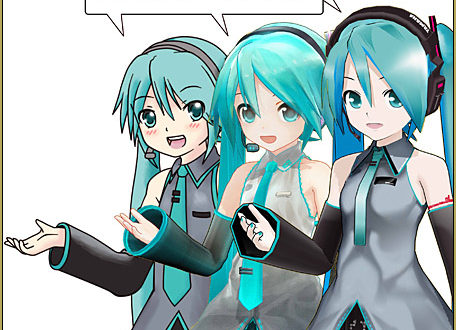
After I finished the drawing…I suddenly realized: “How am I supposed to let people know that I combined both of those models (other than writing it down on the piece of paper)?” I am not a PMDE artist…so making my character into a 3D model is definitely out of the question. After some deep-thought, I asked myself: “Hey, why not combine both 2D and 3D together into one single art?”

To make it work for the my 2D character, I had to re-draw some of the parts so the “pose” would make better sense and be more attractive. After that, I used Paint Tool Sai to color the picture. Whereas, for the 3D models (LAT and Appearance Miku), I just had to make the same pose as my character… and then render them to picture with transparent backgrounds… and then put the whole piece together….
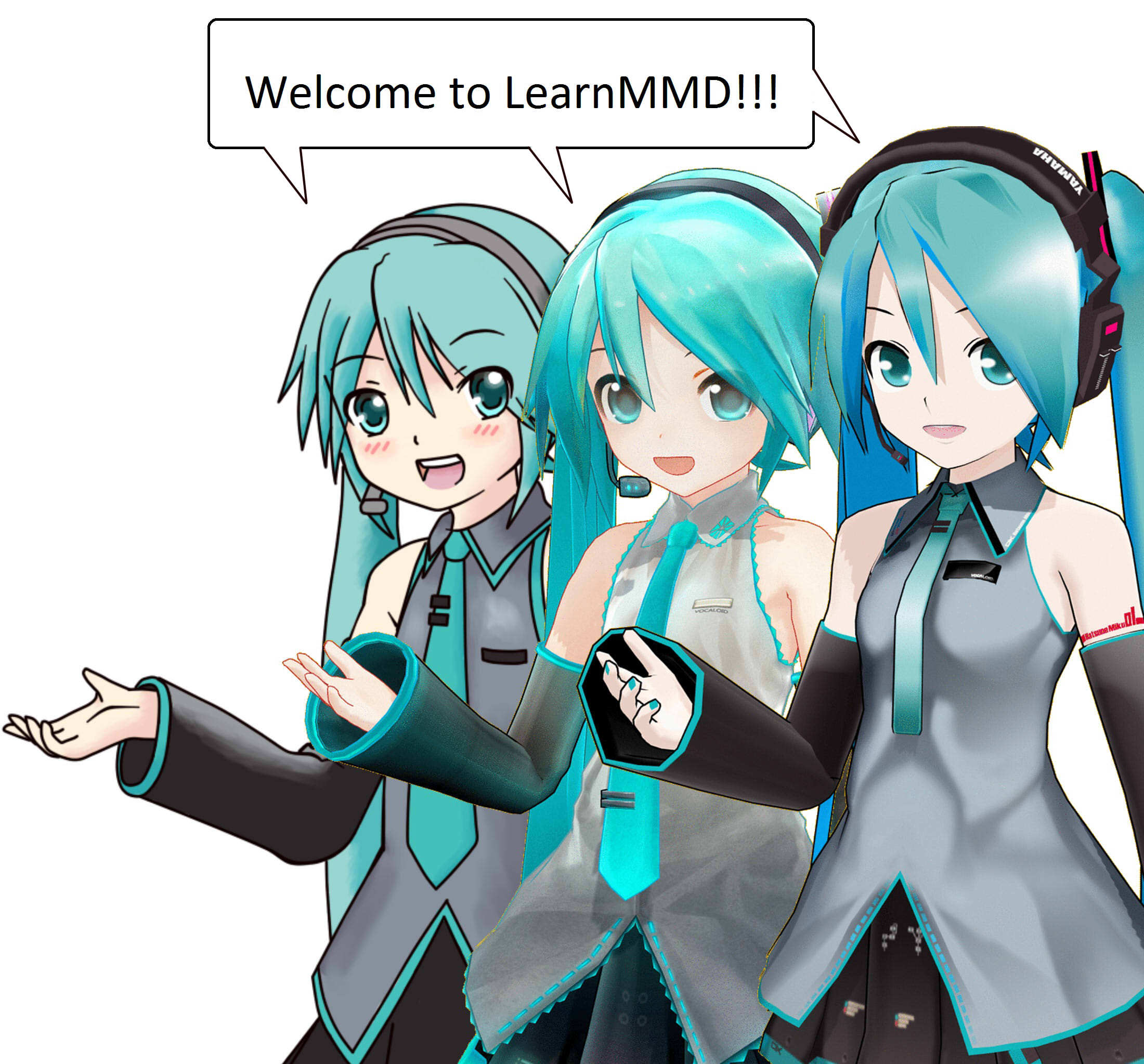
2D and 3D art... CLICK to see the full size image!
Click to see my full size image!

Have fun drawing your favorite models!

Credits:

  • LAT Miku by LAT
  • Appearance Miku by Mamama
  • TaiGaO Miku by TaiGaO…wait, why am I crediting myself?

– SEE BELOW for MORE MMD TUTORIALS…


— — —


– _ — –


Visit the LearnMMD.com Homepage! Plenty of Mikumikudance instruction and info!

More MMD Tutorials...

Reader asks how to create MMD artwork... stuff like posing, camerawork?

A reader asks... Is there a tutorial on how to create MMD artwork, like those you ...read more

Rediscover your old MMD Animations: Love them again!

Rediscover your old MMD Animations: Love them again! https://youtu.be/P4b3todZMUI A labor of love... Remember how it was when ...read more

Create MMD Abstract Art from Low-Res Videos!

This is an idea I have been playing with for the last few months... Create MMD ...read more

Recoloring MMD's Control Panel GUI Interface

Hi and welcome to your personal MMD care and color service, where I give you ...read more

Culling unseen MMD model parts optimises computer assets (PART 2)

How can I make my MMD run faster? What if removing parts using Subset-Extract isn’t ...read more

Optimise computer assets by culling unseen MMD model parts

How can I make my MMD run faster? How can I optimise computer assets as ...read more

MMD Fine Art, Random Thoughts & Visions, TaiGaO

Post navigation

Previous Post: Rigging Models with Appends using PMXEditor
Next Post: Everything you never wanted to know about textures

Related Posts

  • Use Proper MMD Etiquette When Using New Models and Accessories Downloading New Models
  • Making MMD Pictures: JPG vs PNG – which is better? MMD Tutorials
  • MikuMikuDance FREE Animation Software & Instructions MMD Tutorials
  • YouTube Copyright Enforcement Bamboozles MMDers! Copyrighted Music
  • Create 450-Frame MMD Animation from scratch!
    Zero-to-450.com: REALLY Learn MikuMikuDance! "the making of" my video
  • Finding Inspiration for your Animation MMD Basics

More Related Articles

Miku Short Film Featured Anime Shorts – Five minutes worth of animation, maybe three! Animation Shortcuts
Make Smooth Animation Using Interpolation Curves Making Smooth Motions
Why MMD Does not run on Apple Computers Kazuki Matsuoka
Delete Miku and Learn About the Sample Dance Stage Lights Dummy Bones
Creating an animation using MMD, MikuMikuDance! "the making of" my video
How To Make MMD Pictures and Videos Like a Pro Advanced Shader Technique

Leave a Reply Cancel reply

Your email address will not be published. Required fields are marked *

Download the latest version of MikuMikuDance!
See the MMD Step-by-Step instructions page!
Learn how to make your own MMD motions!
LearnMMD.com
  • Continuation of previous article's dispute!
    Beamman GSW Gauge for Game-like HP Health Points Display Beamman's GSW Gauge
  • “Behind the Scenes” of My Miku Likes Cheese Video! "the making of" my video
  • Give the Animasa Teto Chimera a wing flapping motion in MMD 7.39
    Create Wing Flapping Motion for Teto Chimera MMD 7.39 Creating Motions
  • Modifying model texture color compensates Raycast color desaturation MMD Tutorials
  • Soboro's MotionBlur3 effect tutorial
    MotionBlur3 Effect adds visual reality to your MMD videos and stills! Reggie Dentmore
  • MMD 8.06 Low Power button allows you to Multi-task MMD Basics
  • The Making of: Sleepover Gone Wrong (REMAKE) "the making of" my video
  • Download and Install MikuMikuEffect (MME) To Use Special Effects Nameplate effect

Copyright © 2022 Learn MikuMikuDance – MMD Tutorials – Free 3D Animation Software and Instructions..

Powered by PressBook Premium theme

Go to mobile version