
Skip to content
Learn MikuMikuDance – MMD Tutorials – Free 3D Animation Software

Learn MikuMikuDance – MMD Tutorials – Free 3D Animation Software

Download Free Animation Software – Let's Learn How to Do Everything!

  • Step-by-Step MMD instructions
  • DOWNLOADS
  • Troubleshoot, Fix MMD
  • Site Contents
  • Reggie Replies Q&A
  • Homework!
  • What IS MMD?
    • Download MikuMikuDance Newest Latest Version of MMD
  • “HOW TO”
    • Raycast RAY-MMD Effect Tutorials
  • BONUS PAGES
    • Why convert PMD models to PMX?
  • HALL of CHAMPIONS
  • Tutorial Categories
  • About
    • Privacy Policy
  • Toggle search form
  • Translate PMX models to English using a PMX editor Fixing Broken Models
  • Play games within MMD using MMD as a Game Engine! Creating Motions
  • Keep The Faith MMD
    MMD Models Rant Keep the Faith-MMD Credits/Sharing
  • MikuMikuDance MMD Cage Stage Tutorial Downloading New Models
  • Video Dojo Expo 4 CHAMPIONS are CHOSEN! Video Dojo Competition
  • Fix MikuMikuDance Missing DLL and Side-by-Side Configuration Errors d3dx9_32.dll error
  • Add interest to you choreography by moving/rotating models with Mother Bones.
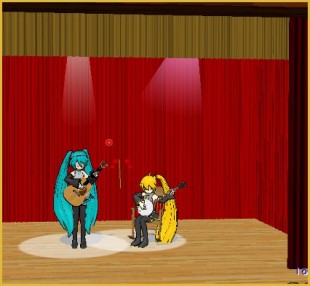
    Add Interest: Place Multiple Models Onstage Using Mother Bones ARIZONA
  • Use PMDE to make a Model for MMD almost from Scratch MMD Tutorials
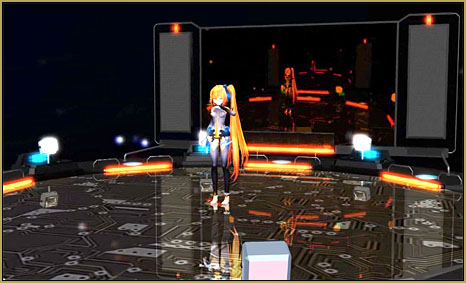
After lowering the stage -.2 on the Y axis, the floorlights.x work great!

Easy Fix for the Auditorium Stage Accessory: Use a Dummy Bone

Posted on March 3, 2012November 21, 2016 By Reggie_Dentmore No Comments on Easy Fix for the Auditorium Stage Accessory: Use a Dummy Bone

Why don’t the MikuMikuDance 7.39 floorlights work on the LearnMMD Auditorium stage? Is the floor of the MMD LearnMMD Auditorium Stage mounted too high? How do I lower the floor of the LearnMMD Stage?

Easy Fix for the LearnMMD Stage Accessory: Use a Dummy Bone

The LearnMMD Stage, downloaded by over 120 MikuMikuDance enthusiasts as of Read the article and get the link to the LearnMMD Stage.this date, has been a great success! I look forward  to seeing the LearnMMD Stage in videos on YouTube.
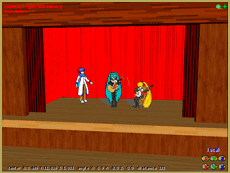
After playing with it for a while, I have found a flaw! The home position of the stage floor may be slightly above Zero on the Y axis … so an accessory like the “floorlights.x, that requires that zero position, will not be visible!

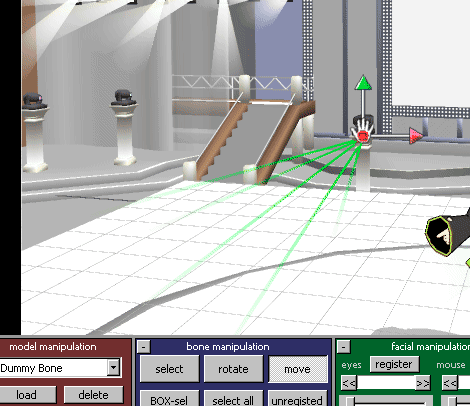
You can raise the accessory … or lower the stage. To lower the stage, attach the LearnMMD Auditorium Stage to a dummy bone. In Frame Zero, select that dummy bone and …

In the Numeric Input window inside the EDIT Menu, enter a Y axis value of -.2 (minus point two)

… and register that position. Now the stage floor is at true” zero” altitude and the dancer’s shoes and the floorlights accessory will be sitting right on the floor.
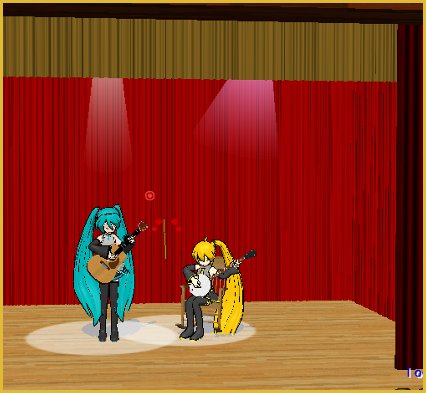
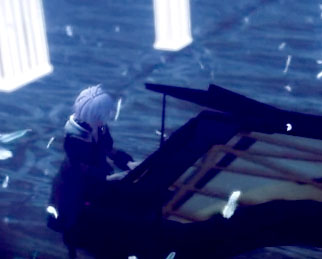
After lowering the stage -.2 on the Y axis, the floorlights.x work great!

Any other notes to share? Please leave a comment.


– SEE BELOW for MORE MMD TUTORIALS…


— — —


– _ — –


Visit the LearnMMD.com Homepage! Plenty of Mikumikudance instruction and info!

More MMD Tutorials...

Download Reggie's Cafeteria Table and Chair accessory!

My school scene needs a cafeteria table and chair accessory. Where can I download an ...read more

Download Reggie's MMD DeckPanel when you just need a place to sit or stand!

How can I use Reggie's MMD Deckpanel accessory for my MikuMikudance animation? My motion starts ...read more

MMD Project Source YouTube's Baster037 provides links!

What's a good MMD project source for motions, models and stages? Where can I download ...read more

A better MMD followcam in PMXE with physics and IK bones

How can I control the camera in MMD? How can I make an MMD followcam?  ...read more

Delete Miku and Learn About the Sample Dance Stage Lights

How do I use the stage lights. Use Dummy Bones to move the stage lights. ...read more

LearnMMD Stage Lit with AutoLuminous Lights

How do I light the Lights on the LearnMMD Stage? Where can I download the ...read more

Dummy Bones, New Stage Accessory Tags:mikumikudance, stage accessory, stage lights

Post navigation

Previous Post: Source for New MMD Models: MMD Newcomers on YouTube
Next Post: MikuMikuDance Keyboard Shortcuts MMD Beginners Guide

Related Posts

  • MMD Batokin Island stage is MORE than a beach MMD Basics
  • Dummy Bones Hold Accessories in MikuMikuDance Dummy Bones
  • Download Reggie’s Cafeteria Table and Chair accessory! New Stage Accessory
  • Assemble your stages from .x type components Accessory Manipulation/Adjust
  • Use Accessory Manipulation Panel Settings to Position Props Accessory Manipulation/Adjust
  • New LearnMMD Stage Instructions just posted! MMD Tutorials

More Related Articles

Adding & Working the Stage Lights with Dummy Bones MMD MikuMikuDance Dummy Bones
The New LearnMMD Stage "in action"! LearnMMD Auditorium Stage Announced Ready for Download Downloading New Models
MMD Dummy Bones may be your most important models! Dummy Bones
LearnMMD Stage Lit with AutoLuminous Lights MMD Tutorials
Dummy Bones Hold Accessories in MikuMikuDance Dummy Bones
Dummy Bones allow you to customize your accessory manipulations! Using The Dummy Bone for MikuMikuDance Accessory Manipulation/Adjust

Leave a Reply Cancel reply

Your email address will not be published. Required fields are marked *

Download the latest version of MikuMikuDance!
See the MMD Step-by-Step instructions page!
Learn how to make your own MMD motions!
LearnMMD.com
  • Older MME Shaders rival Ray-MMD Raycast results and are easy to use! Material Shader
  • Best Way to Run MMD on a Mac Kazumi
  • Video Dojo Expo 4 CHAMPIONS are CHOSEN! Video Dojo Competition
  • Oomary’s guide to mastering MMD Hair Physics Fixing Broken Models
  • Using Texture Transparency hides MMD model problem areas MMD Tutorials
  • MME ExcellentShadow2 effect smooths ugly Self-Shadows ExcellentShadow2
  • dull-VS-alive-animation-environment
    MMD animation environment… MORE than just a model on a stage! "the making of" my video
  • A Discussion of unloved Vocaloids Downloading New Models

Copyright © 2022 Learn MikuMikuDance – MMD Tutorials – Free 3D Animation Software and Instructions..

Powered by PressBook Premium theme

Go to mobile version