Skip to content
Learn MikuMikuDance – MMD Tutorials – Free 3D Animation Software

Learn MikuMikuDance – MMD Tutorials – Free 3D Animation Software

Download Free Animation Software – Let's Learn How to Do Everything!

  • Step-by-Step MMD instructions
  • DOWNLOADS
  • Troubleshoot, Fix MMD
  • Site Contents
  • Reggie Replies Q&A
  • Homework!
  • What IS MMD?
    • Download MikuMikuDance Newest Latest Version of MMD
  • “HOW TO”
    • Raycast RAY-MMD Effect Tutorials
  • BONUS PAGES
    • Why convert PMD models to PMX?
  • HALL of CHAMPIONS
  • Tutorial Categories
  • About
    • Privacy Policy
  • Toggle search form
  • Make Custom MMD Models using Downloaded Parts BigPerryman
  • How to use Raycast MMD MME Shader Effect Advanced Shader Technique
  • Beamman Effects Page MMD Newbies Guide MMD Tutorials
  • Haku sees things in black and white with the Manga Shader Effect
    Using The Manga Shader Effect for MikuMikuDance ARIZONA
  • MikuMikuDance Keyboard Shortcuts MMD Beginners Guide Intro to MikuMikuDance
  • Miku Expo 2014 New York – learnmmd.com coverage NeKo MANiac aMMDy
  • Free AVIUTL Video Editing software adds animated titles to MMD Videos! Animated Titles
  • Adult Shader on a LAT model – it’s possible! Adult Shader effect

Knock-out the Background as you Render to Picture in MMD

Posted on November 6, 2013July 30, 2015 By KibaSan 18 Comments on Knock-out the Background as you Render to Picture in MMD

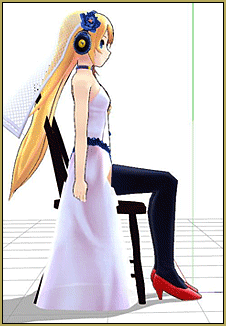
An MMD Feature Article by KibaSan on LearnMMD.com! (Model in image by mqdl)How do you knock-out the background when you Render to Picture in  MMD?  Can pictures be transparent? How do I save pictures in MMD? How can I do like a Green Screen effect in MMD?


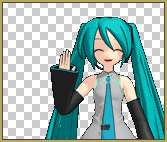
Render to Picture with transparent backgrounds when you use the Black background and save as a PNG. MMD LearnMMD.comKnock-out the Background
from behind your models when you
Render to Picture as a PNG

You may have wondered how people make so many transparent pictures of MMD so easily. This is useful for multiple purposes and gags. You can even replace the background with anything you want!
So How do you do it?Turn on the Black Background.
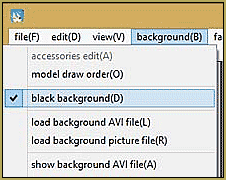
Step 1- Changing to Black Background

First, you want to change your current background to black. This is a step that is easily forgotten.  To do this go to Background(B), and click on “Black Background(D)” After clicking this you should see a check by it and you will also see, that of course, the background has changed to black! This black background “disappears” when you save the file as a PNG.

Step 2- Turn off Display Coordinate Axis

The next step is too get rid of that pesky green line that shows you where your model is on the map. To do this, go to Turn off the Display Coordinate Grid ... and turn off the shadows, unless you want them in your final picture.View(V) and click “Display Coordinate Axis(G)”. This should UNcheck the box, and you should not see a green line running down the middle, or any boxes on the ground. It is extremely hard to remove this from your picture with editing and you will most probably want to restart the picture.
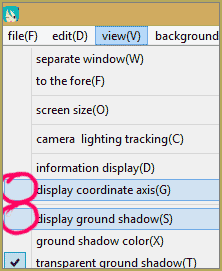
Step 3-  Ground Shadows

This is an optional step, it depends on what you want in your photos. Ground shadows are essentially just the shadow of the model that would occur in real life if lighting was reflected off of a person. However, if you do not want this in your photo you should take it off before continuing. To do this go to View(V) and click on “Display Ground Shadows(S)” to uncheck it. You should not see a shadow on the ground and the box should be unchecked.Save as a PNG file when you Render to Picture so you can KNock-out the background.
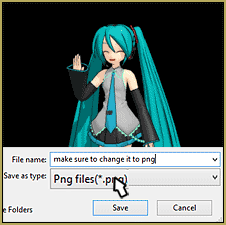
Step 4- Rendering your Picture in PNG form

This is a very important step. If you forget and save it as a bmp file, the background will be black. Firstly, go to File(F) and than “Render to Picture File(B)” Before saving the file it is important that you change the format to .png . You can do so by clicking on the bottom box under what you are naming the picture.


– SEE BELOW for MORE MMD TUTORIALS…


— — —


– _ — –


Visit the LearnMMD.com Homepage! Plenty of Mikumikudance instruction and info!

More MMD Tutorials...

Reader asks how to create MMD artwork... stuff like posing, camerawork?

A reader asks... Is there a tutorial on how to create MMD artwork, like those you ...read more

MikuMikuDance 15th Anniversary celebration video posted on NicoNico!

Did you know that the first version of MikuMikuDance was released in 2008? MMD is ...read more

Use YouTube Video Analytics Attract Maintain Viewers

How can I use YouTube Video Analytics to learn how to make popular MMD videos? ...read more

Create 450-Frame MMD animation from scratch!

How do I create a 450-Frame MMD animation from scratch? How do I start making ...read more

No more boring MMD Camerawork - Keep it moving!

MMD Camerawork can be so boring. How can I add life to my MMD animations? ...read more

Download Halloween Costume TDA Miku edit by dA's Shiro-NekoVocaloid

Where can I get Halloween Costume TDA Miku? Download a gang of five MMD models ...read more

Add Background Pictures and AVI, KibaSan, MMD Basics, MMD Comics

Post navigation

Previous Post: MikuMikuDance Tutorials MMD Tutorials on LearnMMD.com
Next Post: Adult Shader on a LAT model – it’s possible!

Related Posts

  • Making JRPG style scenes using MMD MMD Comics
  • Easy Fun MMD Music Video Mahlazer Motion Download “Feel the Sound” MMD Basics
  • Use Stage Changes in MMD to Make an Interesting Video Koneko the MMD Fairy
  • Creating MMD Diva Performance Animations – An Overview "the making of" my video
  • Update previous MMD to MMD 9.32 with no tears … Download MikuMikuDance
  • MMD has an EXPAND function that lets you adjust a motion's speed.
    EXPAND function modifies MMD motion tempo EXPAND a motion

More Related Articles

Move the whole Model with Box-Sel in MikuMikuDance Functions-Copy-Paste-Expand
Make successful MMD YouTube videos MMD Basics
Creating MMD Diva Performance Animations – An Overview "the making of" my video
Dummy Bones allow you to customize your accessory manipulations! Using The Dummy Bone for MikuMikuDance Accessory Manipulation/Adjust
Download MMD Pokeball Accessory and Learn Accessory Manipulation Accessory Manipulation/Adjust
Switch Models without Physics Glitches Accessory Manipulation/Adjust

Comments (18) on “Knock-out the Background as you Render to Picture in MMD”

  1. Sapphire Bright says:
    December 19, 2020 at 4:17 am

    If I use effects it doesn’t work, how can I do it with HgSAO and AbSSAO on?

    Reply
    1. KillerBeer says:
      December 19, 2020 at 7:41 am

      Do you have DirectX 9.0c installed?

      Reply
  2. Yori says:
    January 11, 2019 at 5:12 am

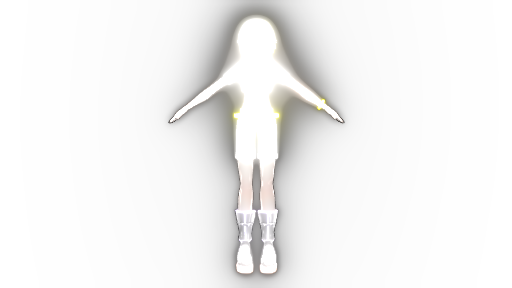
    Can I do this with an AutoLuminous on? Like, is there a way to have a transperent background with AL effect? Cuz I’ve tried, but it renders with a white background..

    Reply
    1. KillerBeer says:
      January 11, 2019 at 5:45 am

      I just did it and it rendered it with AL and the transparent background. Did you forget to turn the background into black, per chance? Did you use other effects too?
      Reply
  3. eowyn najwa says:
    July 15, 2017 at 11:14 pm

    why can’t it be transparent if the screen size too big??

    Reply
    1. KillerBeer says:
      July 16, 2017 at 2:13 am

      What do you mean? I just created a test picture with the size of 3280×1720, and it has transparent background. Are you sure you followed all steps correctly? (Remember, .png, not .jpg)

      Reply
      1. eowyn najwa says:
        August 26, 2017 at 10:17 am

        Yes i followed the steps correctly, and i put png format on. But whenever i render on size more than 1000 px.. It just has a white background

        Reply
  4. Trackdancer says:
    October 17, 2015 at 2:10 pm

    Actually, the background could be either black or white. It’s the PNG graphic format that causes the background to be transparent.

    Reply
  5. Ivani Solechii says:
    December 17, 2013 at 8:06 am

    In MMD 7.39 you can’t remove the axis for some reason! And that wouldn’t irritate me so much if it didn’t mess up my backgrounds so much, but I can’t use the mmd 8.03 because it won’t open… =-= *needs help*

    Reply
    1. Reggie_Dentmore says:
      December 18, 2013 at 6:50 am

      To close the axis grid, just uncheck it under the View Menu. Maybe we can help you get MMD 8.03 running. What happens when you open MMD 8.03 … get an error message? What’s it say? Send me an email if you need help ReggieDentmore@aol.com

      Reply
  6. KibaSan says:
    November 12, 2013 at 10:29 am

    Most sites such as Youtube automatically have a black background in their player, so if you upload it will be transparent but it will look like it has a black background.

    I’m not really sure how it will go on videos, but I encourage you to try it :D
    -KibaSan

    Reply
    1. alexaanyme says:
      February 27, 2016 at 12:42 pm

      well…how can you have a transparent background in videos???that will be weird!

      Reply
      1. parkeerwacht says:
        February 27, 2016 at 1:20 pm

        lol yes, thats true… You can`t actually… all video codecs and containers don`t allow that. (At least the ones I know off)

        Reply
        1. WaiseHell says:
          June 5, 2018 at 7:23 am

          The Raw Avi IS transparent if you have the white background on. so yeah videos can have a transparent background. It’s just that when uploaded anywhere it won’t show. But if you’re like me and then convert the avi to picture sequence in premiere then all the frames from the video have transparent background. That’s how you;d make animated sprites for 2D games.

          Reply
          1. Reggie_Dentmore says:
            June 5, 2018 at 5:55 pm

            Awesome info… Thanks!

            Reply
      2. KillerBeer says:
        February 27, 2016 at 11:47 pm

        You may try to use skydomes instead of static backgrounds… they are in essence accessories, so their transparency can be adjusted with Tr setting of AMP panel.

        Reply
  7. Gamedude03 says:
    November 11, 2013 at 6:42 pm

    Is there a way to use this for videos?

    Reply
    1. Reggie_Dentmore says:
      November 11, 2013 at 7:00 pm

      That’s what it’s all about! Search YouTube for MMD … tens of thousands of them!

      Reply

Leave a Reply Cancel reply

Your email address will not be published. Required fields are marked *

Download the latest version of MikuMikuDance!
See the MMD Step-by-Step instructions page!
Learn how to make your own MMD motions!
LearnMMD.com
  • Download ARROW Lip-Sync Soundtrack Zip Folder "the making of" my video
  • Using Texture Transparency hides MMD model problem areas MMD Tutorials
  • LearnMMD.com _ MikuMikuDance MMD Tutorials
    DO NOT reduce AVI file sizes that go up to YouTube HD Videos in MMD
  • How to use Raycast MMD MME Shader Effect Advanced Shader Technique
  • Making POV Camera Shots in MikuMikuDance 8.03+ Camera Motion
  • MMD First Steps Make your own motions from scratch Making Smooth Motions
  • YouTube thumbnail image is so important!
    Create your Most Attractive YouTube Thumbnail image "the making of" my video
  • MMD ballet Poses Download on LearnMMD
    Download MMD Ballet Poses created by ctrlaltdelete999 "the making of" my video

Copyright © 2022 Learn MikuMikuDance – MMD Tutorials – Free 3D Animation Software and Instructions..

Powered by PressBook Premium theme

Go to mobile version