
Skip to content
Learn MikuMikuDance – MMD Tutorials – Free 3D Animation Software

Learn MikuMikuDance – MMD Tutorials – Free 3D Animation Software

Download Free Animation Software – Let's Learn How to Do Everything!

  • Step-by-Step MMD instructions
  • DOWNLOADS
  • Troubleshoot, Fix MMD
  • Site Contents
  • Reggie Replies Q&A
  • Homework!
  • What IS MMD?
    • Download MikuMikuDance Newest Latest Version of MMD
  • “HOW TO”
    • Raycast RAY-MMD Effect Tutorials
  • BONUS PAGES
    • Why convert PMD models to PMX?
  • HALL of CHAMPIONS
  • Tutorial Categories
  • About
    • Privacy Policy
  • Toggle search form
  • Customize the MMD interface: Change the colors of the GUI Fia Phoenix
  • VDE-FIVE Honorable Mention: Jonah Snyder Video Dojo Champions
  • Raycast Ray-MMD Toon Shader
    Ray-MMD Toon Shading Basics MMD Tutorials
  • Download the latest version of MikuMikuDance - MMD 9.32
    Download the latest version of MikuMikuDance! Download MikuMikuDance
  • INKSCAPE makes creating MMD Comics Easy Inkscape MMD Comics
  • Haku sees things in black and white with the Manga Shader Effect
    Using The Manga Shader Effect for MikuMikuDance ARIZONA
  • Set up Kinect 360 motion capture for MMD! Kazuki Matsuoka
  • Let your new MIKU do the Sample Dance!
    Downloading Japanese Models Can Scramble File Names Downloading New Models

The MMD Physics Engine keeps Skirts from going through legs!

Posted on November 12, 2013July 24, 2015 By Winky 10 Comments on The MMD Physics Engine keeps Skirts from going through legs!

An MMD Feature Article by Winky on LearnMMD.com!Why does my model look so stiff? Can I adjust the MMD Physics Engine to automatically take care of my model’s fabrics and hair? Do I always have to adjust every bone in the model in order to get a natural pose?


How to keep Skirts from going through legs …
Adjust Gravity & Wind Effects …

Adjust The MMD Physics Engine!

Set the Physics Settings for a Natural Pose

Have you ever opened up MMD and decided, With the Physics turned off ... almost nothing on your model will look natural.“Hey, I’m going to pose  a model with a skirt, sitting on a chair!” and have this happen.
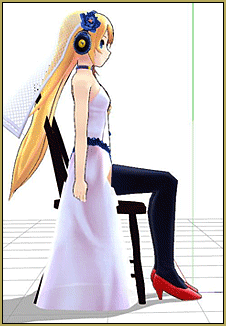
 

Oh noes! Now we have to take each skirt bone and individually adjust it! That will take forever!

Actually, there’s a fancy trick to fixing this.
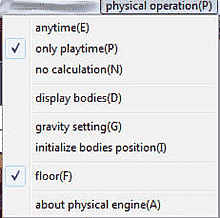


Open the Physical Operations Tab to make adjustments to your physics settings.

First, before you sit the model down, turn the Physics settings on. Don’t know how? Let’s adjust the MMD Physics Engine.  Click the “Physical Operation (P)” tab, and then click anytime (To turn it back off, just select “Only Playtime” or “No Calculation”).
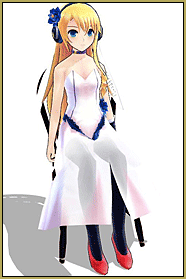


With the Physics switched "on", your model will look more natural with little effort!


Now gently sit your model back down again and…voila! No tedious work!
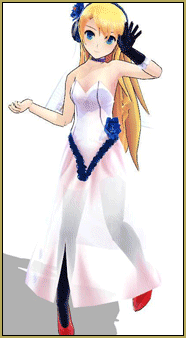


Sometimes your beautiful pose needs a little something to make it more dramatic ...


While I’m still on the subject of the Physics Engine, why not talk about wind? Say I pose a model in a nice little pose, like this…

…But I want to make it more dramatic, so I decide to add some wind, but how?
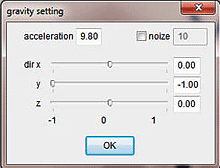


You can create "wind" by adjusting the directions of the Gravity settings.

Easy. Go back to the Physical Operation tab and click gravity settings. After you do, something like this should come up.
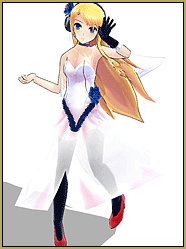


Wow! ... The "wind" adds so much life to your model's appearance.


Now, it’s time to adjust the wind.
-slide along the X axis for the wind to go LEFT and RIGHT
-slide along the Y axis for the wind to go UP and DOWN
-slide aling the Z axis for the wind to go FORWARD and BACKWARD

This was the final outcome.
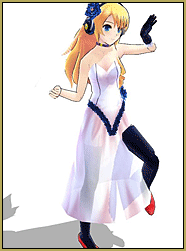


Careful ... your model will look bad if you turn off the physics!


On a final note, if you use a PMD model, don’t turn the physics off unless you want to start over with them because this will happen.

If you turn the physics engine off with a PMX model, the bones will not reset.


Also, in case any of you are curious, this is what the tabs on “Physical Operation” mean.
-Anytime: The physics are on at all times.
-Only Playtime: The physics are on only when you play an animation.
-No Calculation: The physics are off at all times.
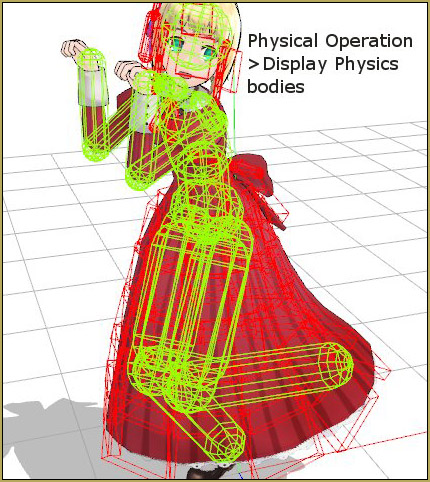
-Display Bodies: Allows you to see the “physical physics”.
-Initialize Bodies Position: Not quite sure. If you know tell me.
-Floor: Click to make the floor not be affected by gravity. For example, if you sit a model down on the floor his/her dress will fall through instead of spread out.

Model Credits:
— Sweet Ann: Saboten (さぼてん)
— Chair: 3D-Custom Girl, ripped by 9844.deviantart.com


– SEE BELOW for MORE MMD TUTORIALS…


— — —


– _ — –


Visit the LearnMMD.com Homepage! Plenty of Mikumikudance instruction and info!

More MMD Tutorials...

Reader asks how to create MMD artwork... stuff like posing, camerawork?

A reader asks... Is there a tutorial on how to create MMD artwork, like those you ...read more

MikuMikuDance 15th Anniversary celebration video posted on NicoNico!

Did you know that the first version of MikuMikuDance was released in 2008? MMD is ...read more

Use YouTube Video Analytics Attract Maintain Viewers

How can I use YouTube Video Analytics to learn how to make popular MMD videos? ...read more

Create 450-Frame MMD animation from scratch!

How do I create a 450-Frame MMD animation from scratch? How do I start making ...read more

No more boring MMD Camerawork - Keep it moving!

MMD Camerawork can be so boring. How can I add life to my MMD animations? ...read more

Download Halloween Costume TDA Miku edit by dA's Shiro-NekoVocaloid

Where can I get Halloween Costume TDA Miku? Download a gang of five MMD models ...read more

MMD Basics, Nuts & Bolts, Poses, Winky

Post navigation

Previous Post: Adult Shader on a LAT model – it’s possible!
Next Post: Download MME v037 in English 32-Bit or 64-Bit from LearnMMD.com

Related Posts

  • Add Shadows to MMD .X Accessories Tutorial MMD Basics
  • Keep The Faith MMD
    MMD Models Rant Keep the Faith-MMD Credits/Sharing
  • How to Add Multiple Effects on a Model. Adult Shader effect
  • New MMD ACCESSORY MODE allows Easy Object Positioning Accessory Manipulation/Adjust
  • Why does MMD HAVE to be EXCRUCIATINGLY CONFUSING? MMD Basics
  • When you add background AVI files, you can motion trace!
    Loading Background AVI Files into MMD (2021 Edition) Add Background Pictures and AVI

More Related Articles

Extreme S Curve 02. Using the Interpolation Curve in MikuMikuDance. ARIZONA
Updated LearnMMD Metronome Instructions for Use Metronome
Starting-out Using MMD starts you on a learning path. Starting-out Using MMD Reader discovers missing elements. MMD Basics
The New LearnMMD Stage "in action"! LearnMMD Auditorium Stage Announced Ready for Download Downloading New Models
Fia Phoenix’s Deviantart Spotlight Downloading New Models
Easy Fun MMD Music Video Mahlazer Motion Download “Feel the Sound” MMD Basics

Comments (10) on “The MMD Physics Engine keeps Skirts from going through legs!”

  1. Sapphire says:
    November 7, 2016 at 9:43 pm

    hiz! so, i have tried everything, and the ones u said in the comments section but my model’s legs keep going thru plz help!!

    Reply
    1. bandages says:
      November 10, 2016 at 8:55 am

      Hi Sapphire,

      Functional skirts depend not just on MMD physics, but on the particular model. http://k-channnn.deviantart.com/art/MMD-Tutorial-Fixing-Clipping-Issues-527464119 describes how to use PMXE to adjust model physics for this purpose.

      Reply
      1. Sapphire says:
        November 16, 2016 at 8:22 pm

        thank u!
        I think i got it!

        Reply
  2. Justcommenting says:
    August 10, 2016 at 10:01 am

    Initialize Bones mean if you want to reset the physics to their original placement, like if you would put on no calculation then anytime.

    Reply
    1. Jasper says:
      April 1, 2017 at 9:04 am

      You mean Initialize physics right? not bones. Initialize physics also Resets physics when they get tangled while running the motion, yet it is absolutely useless because hitting the shortcut ‘I’ to initialize while rendering to video, does nothing. (a bug ignored with every update) So you wind up having to do countless renders until your video might randomly come out OK without the skirt physics screwing up on that particular dance motion not friendly to even, the most advanced skirts.

      Reply
  3. Nico nico nii says:
    May 23, 2016 at 2:52 pm

    Hi! I downloaded a really nice motion but everytime i try to use it (the motion has the model sitting down) the legs glitch right through the skirt or dress. It also happens with all other sitting down motions or poses that I downloaded. How can i fix this?

    Reply
    1. KillerBeer says:
      May 23, 2016 at 10:22 pm

      Does this happen because the skirt doesn’t move at all along with legs (in which case this article is the answer), or it does but small patches of skin still protrude through fabric? If so, you’d have to edit the model in PMDE. Single out the material that contains legs, select the part that you’re not supposed to see because of the dress, and shrink it somewhat (no need to erase it completely). Save the model under a different name, so that if something goes wrong, you can revert to the original.

      Reply
  4. aquarin02 says:
    May 28, 2014 at 5:32 pm

    I really need help with the physics. When I try to add physics to my model’s clothes, then load it into MMD to test it, my model would just… fall down. How do you add physics so things like that won’t happen?

    Reply
  5. Priya says:
    January 31, 2014 at 7:36 pm

    I have a problem. Please help as soon as possible. I have been working on a model all day long and I used a base. But now I just removed the top and it takes the body part underneath with it. If I don’t remove the top, I can’t let het wear what I want, like swimsuits and low cut dresses. The breasts above the top also have holes; you can look right through it. Is it possible for me to remove that darn top and replace the chest and the belly it takes down along with it? I would like to know how I can give her “new” breasts and a new belly once it’s gone and how to attach it to the rest of the body to make it move along smoothly. I am a beginner so I don’t know how. Please help me?

    Reply
    1. Reggie_Dentmore says:
      February 1, 2014 at 7:37 am

      Help is on the way … I have emailed our 15 writers … someone will be back to you shortly “:o).

      Reply

Leave a Reply Cancel reply

Your email address will not be published. Required fields are marked *

Download the latest version of MikuMikuDance!
See the MMD Step-by-Step instructions page!
Learn how to make your own MMD motions!
LearnMMD.com
  • Cookiefun Channel Camera Crew Model Free Download Downloading New Models
  • THIS IS TARGET Meme by Zazi on LearnMMD.com MMD Memes
  • Reader asks how to create MMD artwork… stuff like posing, camerawork? MMD Basics
  • MMD NyaReimu dances to Miku’s “The World is Mine” "the making of" my video
  • New Interpolation Curve Video was fun to make! "the making of" my video
  • Editing Effect Textures Creates Brand New Effects! Chestnutscoop
  • How To Add Depth and Emotion in an MMD Picture Advanced Shader Technique
  • How to make AutoLuminous work on a PMX Model AutoLuminous MME / PMDE

Copyright © 2022 Learn MikuMikuDance – MMD Tutorials – Free 3D Animation Software and Instructions..

Powered by PressBook Premium theme

Go to mobile version