
Skip to content
Learn MikuMikuDance – MMD Tutorials – Free 3D Animation Software

Learn MikuMikuDance – MMD Tutorials – Free 3D Animation Software

Download Free Animation Software – Let's Learn How to Do Everything!

  • Step-by-Step MMD instructions
  • DOWNLOADS
  • Troubleshoot, Fix MMD
  • Site Contents
  • Reggie Replies Q&A
  • Homework!
  • What IS MMD?
    • Download MikuMikuDance Newest Latest Version of MMD
  • “HOW TO”
    • Raycast RAY-MMD Effect Tutorials
  • BONUS PAGES
    • Why convert PMD models to PMX?
  • HALL of CHAMPIONS
  • Tutorial Categories
  • About
    • Privacy Policy
  • Toggle search form
  • MME DiscoLightEX v003 effect now hosted by LearnMMD.com! Disco Lighting Effect
  • Take full control of MME Effects by editing .fx files Beamman's Burner effect
  • Get started with MMM – The Basics Kazuki Matsuoka
  • "Departures" meme for MMD is a beauty! Memes are like KITS for MMD!
    Departures Meme Is a Beautiful MMD Project "the making of" my video
  • Bandizip® keeps Japanese file names intact when Extracting ZIP folders Bandizip
  • MMD vs MMM Bullwood
  • Barbarians disregarding creative rights destroy MMD for all of us. Keep the Faith-MMD Credits/Sharing
  • Set MMD Widescreen Screen Size balance Size VS Quality MMD Basics
Create 450-Frame MMD Animation from scratch!

Create 450-Frame MMD animation from scratch!

Posted on December 16, 2022May 4, 2024 By Reggie_Dentmore No Comments on Create 450-Frame MMD animation from scratch!

A Feature Article by Reggie Dentmore on LearnMMD.comHow do I create a 450-Frame MMD animation from scratch? How do I start making motions with MMD? Can I make my own MMD video from scratch?

Create 450-Frame MMD animation from scratch!

Inspiration will come… just get started!

Actually “getting started” is the hard part. I have found that “inspiration” will come when you open MMD, load the characters, and move them around a little.

Download fun props from Zero-to-450.com!

I started Zero-to-450.com a few years ago. The goal, there, is to coax you into creating your own 450-frame MMD animation. That is only 15-seconds of finished work… you can knock one out in a single afternoon!
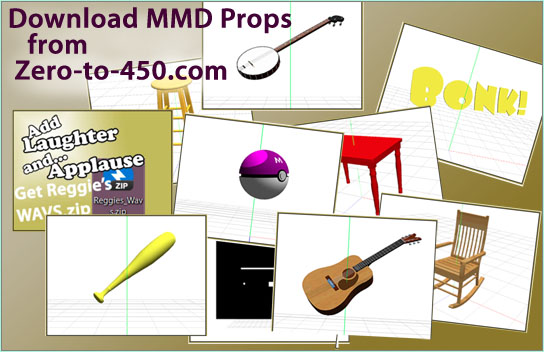
To help your 450-frame MMD animation, download some prop accessories from Zero-to-450.com!

The Zero-to-450 Downloads Page has a few great props to give you inspiration and get you started. There’s a plastic bat, a Pokeball, a guitar, and more!

Try the “Bonk!” challenge…

Load a model: Neru. Put that dumb plastic bat in her hand. “Work it” to make the fingers fit the bat. … spend a couple of minutes to wrap the hand around the handle of the bat… “feel” the bat. Imagine the nice “Bonk!” you’ll get when you hit someone with that bat. … … Kaito ALWAYS deserves to be smacked… so
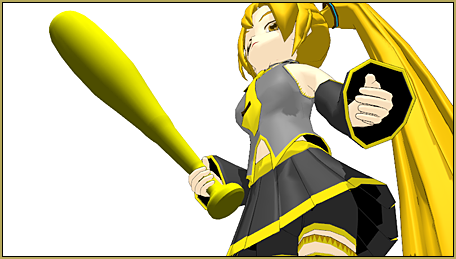
Make your own 450-frame MMD animation from scratch!

Load Kaito within easy striking distance. …
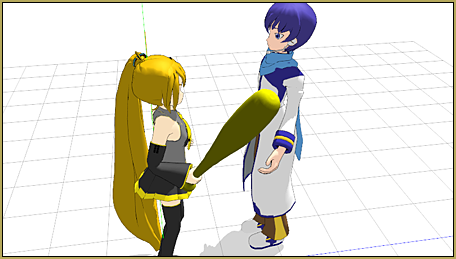
As you create your 450-frame MMD animation, one step inspires you to the next step... you will create something new!

What happens next?

Obviously… naturally… it will come to you. Soon you will have Neru bonking Kaito with the bat… it’s just what happens!

Keep it going!

As I imagine the scene, I envision Neru’s stance as she puts her whole body behind that bonk… not just a flex of the elbow, but a whole full-body twist with her momentum behind it. Lucky for Kaito it’s only a hollow plastic bat, or he’d be dead!

As you imagine that “Bonk!”, you will decide you need a little plot to go with it… maybe have Kaito walk up and say something. … maybe we don’t need to hear it… we just need to see him open his big mouth. THAT will be enough to deserve the smack! … so we make the decision to make our soundtrack be just music, no dialog… and a sound-effect “Bonk!”.

450 Frames… 15-Seconds…

450 frames go by so quickly… to make Kaito walk up and say something… and have Neru be offended… and have her wind-up and smack Kaito… and have Kaito suffer from the follow-through after the hit… and, maybe, have Neru look into the camera for a final wink… all in only 15-seconds… … it will be a tight fit! … I almost feel the need for a storyboard.

Mental Storyboard…

At first, I thought I’d just wing-it on the fly… but I DID make a “mental storyboard” as I performed a little pantomime while I watched the second-hand on the clock. I imagined the little pause when the camera is on the move as the video opens… we see Neru standing there and we see Kaito walk up, speaking as he approaches. We see Neru turn to him, we see him speak some more. We see the burn on Neru’s face as she turns. Kaito mouths a couple of more words, and Neru smacks him. He stumbles… and Neru smiles to the camera. A comfortable fit within the 15 seconds.

There’s more…

You will want to supply a stage for the scene… and make a soundtrack. We’ve decided we need just some music… and some way to make that sound-effect Bonk! … Open Audacity, convert your music to a WAV file… and record you Bonk! sound… maybe whacking a plastic bottle near the microphone?

The rest will be History!

So… “DO it!”… “just get started!” and inspiration will come… the project will take shape in your brain and, like a stack of domino’s: the rest of the project will fall into place.

I got so excited writing this that I made one, myself!

Everyone likes to smack Kaito… and Neru gets angry easily! You’d think Kaito would have stayed away when he saw that bat!

This little animation took me all of FIVE hours to make! I had the basic start on it well under way at about an hour and forty minutes… but then came the fine tuning. I worked on the motions, the camera work, the bat movements while Kaito does all of his talking… and I worked on Kaito while he does all his talking. THAT section went for so long that I barely got the Bonk! and the final “smile” in there before my 450 frames was up! … Neru’s big swing of that bat is really nice… too bad it goes by so quickly! Kaito crashes to the floor pretty well, too. I left that mid-part with Kaito talking as a long segment because I really like Neru’s gently waving that bat as she gets madder and madder! … The “Bonk!” sound kind of let me down. I recorded several “Bonks” using plastic jugs and bottles… and, in the end, had to go with the one I have, there. One of the bright spots is that personal POV shot as Kaito walks to Neru… that worked well and I didn’t have to animate “walking” motions.

A 450-frame MMD animation is fun to make!

Knowing that you only need 450 frames puts a target in sight. Give it a try! Comment me a link to show me your finished videos. The Comment section is below this article…

Have fun with MikuMikuDance!


– SEE BELOW for MORE MMD TUTORIALS…


— — —


– _ — –


Visit the LearnMMD.com Homepage! Plenty of Mikumikudance instruction and info!

More MMD Tutorials...

Enjoy the "camera Angles WEIRD in Anime" meme...

Enjoy the "camera Angles WEIRD in Anime" meme... This image is from The Slayers - NEXT, ...read more

Reader asks how to create MMD artwork... stuff like posing, camerawork?

A reader asks... Is there a tutorial on how to create MMD artwork, like those you ...read more

Learn MikuMikuDance in Small Steps! New LearnMMD Video Series

Learn MikuMikuDance in Small Steps. Where can I find easy-to-follow MMD instructions on YouTube? How ...read more

Apply Multiple Effects on an Entire MMD Model Using M4Layer Effect

How can I apply multiple effects to an MMD model? Can I use more than ...read more

MMD Plugin Manager... I Found a Treasure!

What sorts of MMD Plugins are there? MMD Plugin Manager? MMD Plugins. Plugin MMD. More ...read more

2025: Hatsune Miku is 18... but she is designed to be always 16 Years. Old by design and in reality!

Finally, in 2023, Hatsune Miku is 16 years old! but in August of 2025, she ...read more

"the making of" my video, Creating Motions, MMD Basics, MMD Tutorials, Reggie Dentmore

Post navigation

Previous Post: No more boring MMD Camerawork – Keep it moving!
Next Post: Add MME Lighting Effect illuminates model against dark stages

Related Posts

  • Beginner’s Guide: Using Ray-MMD ver 1.5.0 – Latest version of Raycast MMD Tutorials
  • Everything is loaded and ready to "Play!" ... Happy Hands MMD Meme.
    Create an MMD Video using the “Happy Hands” Meme Making Videos - Rendering to AVI
  • Sweet MMD Meme “Hello_How Are You” MMD Memes
  • "Departures" meme for MMD is a beauty! Memes are like KITS for MMD!
    Departures Meme Is a Beautiful MMD Project "the making of" my video
  • Strong Soundtrack Offers 3-D Animation Shortcuts! "the making of" my video
  • MMD Rotate object 360-degrees part 2
    MMD Rotating Objects 360-degrees -Miku’s Guide to the Galaxy (Part 2) Making Smooth Motions

More Related Articles

More Motion Interpolation Curve Instruction for MMDers Creating Motions
MMD Rotate object 360-degrees part 2 MMD Rotating Objects 360-degrees -Miku’s Guide to the Galaxy (Part 2) Making Smooth Motions
LearnMMD.com _ MikuMikuDance MMD Tutorials Convert SFM/GMOD Models Into MMD Flawlessly! Haztract
Download Jomomonogm's Snow Miku 2019 Download Jomomonogm’s Snow Miku 2019 for MMD, a most unusual model! "the making of" my video
Knock-out the Background as you Render to Picture in MMD Add Background Pictures and AVI
MME: Less is More… Select only those that you need. Cook Torrence effect

Leave a Reply Cancel reply

Your email address will not be published. Required fields are marked *

Download the latest version of MikuMikuDance!
See the MMD Step-by-Step instructions page!
Learn how to make your own MMD motions!
LearnMMD.com
  • Knock-out the Background as you Render to Picture in MMD Add Background Pictures and AVI
  • After lowering the stage -.2 on the Y axis, the floorlights.x work great!
    Easy Fix for the Auditorium Stage Accessory: Use a Dummy Bone Dummy Bones
  • The Making of “Viva La Vida MMD” by Zazi The Angel "the making of" my video
  • Save to the Desktop with ALL FILES selected.
    Opening Japanese Models in MikuMikuDance – Sometimes they don’t work! Applocale / 7-Zip
  • Making my new “Rin Needs a Hug” Zero-to-450 Challenge Video "the making of" my video
  • Making good MMD lip-syncs! Creating Motions
  • Ray-MMD: Lost in the Fog
    Ray-MMD Localized Fog Effects for stunning MMD scenes MMD Tutorials
  • New MMD ACCESSORY MODE allows Easy Object Positioning Accessory Manipulation/Adjust

Copyright © 2022 Learn MikuMikuDance – MMD Tutorials – Free 3D Animation Software and Instructions..

Powered by PressBook Premium theme

Go to mobile version