

Skip to content
Learn MikuMikuDance – MMD Tutorials – Free 3D Animation Software

Learn MikuMikuDance – MMD Tutorials – Free 3D Animation Software

Download Free Animation Software – Let's Learn How to Do Everything!

  • Step-by-Step MMD instructions
  • DOWNLOADS
  • Troubleshoot, Fix MMD
  • Site Contents
  • Reggie Replies Q&A
  • Homework!
  • What IS MMD?
    • Download MikuMikuDance Newest Latest Version of MMD
  • “HOW TO”
    • Raycast RAY-MMD Effect Tutorials
  • BONUS PAGES
    • Why convert PMD models to PMX?
  • HALL of CHAMPIONS
  • Tutorial Categories
  • About
    • Privacy Policy
  • Toggle search form
  • Posing MMD Models Using Reference Images Animation Shortcuts
  • ObjectLuminous Haku and Teto
    Using The ObjectLuminous Effect in MikuMikuDance Accessory Manipulation/Adjust
  • Download/Install DirectX 9 Update to fix the Missing DLL Error Dealing with the Missing DLL Error
  • Animation Inspiration: Motion Trace but Do your own thing! MMD Tutorials
  • No MikuMikuDance MMD in India… can it be? Random Thoughts & Visions
  • MMD Dummy Bones may be your most important models! Dummy Bones
  • With some practice, Rin can dance the sample dance as well as Miku!
    There Can Be Frame Data Ghosts remaining after Deletion Making Smooth Motions
  • My personal Jopurney through the many MMD memes.
    Personal Journey MMD Leekspin, Nyan Cat, Levan Polkka, more! Random Thoughts & Visions

Fixed the MMD 8.05 Configuration Error Failed to Start MikuMikudance

Posted on July 13, 2013July 2, 2024 By Reggie_Dentmore 70 Comments on Fixed the MMD 8.05 Configuration Error Failed to Start MikuMikudance

I can finally run the new MikuMikuDance 8.05 …LearnMMD.com has discovered the fix for the MMD 8.05 Configuration Error!

I fixed the MMD 8.05 Configuration Error
… the Failed to Start Error!

Editor’s Note, 5/5/21:
This article is out of date. The world has moved on.
Our Parkeerwacht has written
a single article describing the common errors and the latest solutions to those errors. See that post to find the answers you need as you
fix / troubleshoot MikuMikuDance.
Still need help? Leave a comment or send Reggie an email.


I have been searching Google, off and on, for days, trying to solve my MikuMikuDance 8.05 Configuration Error … and, today, I finally found it! Another video game’s forum had the answer: http://na.leagueoflegends.com/board/showthread.php?t=1084961

The writer indicated that what was missing was the C++ 2005 redistributables and its 2005 SP1.

Following previous leads, I had already installed Microsoft  C++ 2008 and 2010 redistributables … without solving my “configuration error” problem. I “removed” the 2010 version after I saw no effect. NOW I downloaded and installed the C++ 2005 and the 2005 SP1 versions and … MMD 8.05 opened right up! Woo-Hoo!

I must point out that I am running Windows XP, SP3 … so, I can only hope this FIX will work on newer systems!


Windows 8 … 64-bit? … This article recommends C++ 2005 … but, these days, the VPVP page recommends C++ 2008 AND C++ 2010.

Here’s the link to the VPVP page …
http://www.geocities.jp/higuchuu4/index_e.htm

Look under section 1.4 … there are links to the 64-bit 2008 and 2010 C++ downloads. … Other new MMDers say that this worked has for them!


DOWNLOAD the SP1 version and install it.

Microsoft Visual C++ 2005 SP1 Redistributable Package (x86):
https://www.microsoft.com/en-us/download/details.aspx?id=26347

That’s it … MikuMikuDance 8.05 now runs on my machine.

Please let us know via comments or email if it works for you!


– SEE BELOW for MORE MMD TUTORIALS…


— — —


– _ — –


Visit the LearnMMD.com Homepage! Plenty of Mikumikudance instruction and info!

More MMD Tutorials...

Windows 11 S Mode: The app you’re trying to install isn’t a Microsoft verified app.

Windows 11 S Mode. Why won't my Windows 11 computer let me install the C++ ...read more

Introducing MMD model 1052C China Qipao Miku

Where can I download MMD model 1052C dancers? I want the 1052C China Qipao Miku ...read more

Download Jomomonogm's Snow Miku 2019 for MMD, a most unusual model!

Where can I download Jomomonogm's Snow Miku 2019? What is so unusual about this Snow ...read more

MMD animation made-from-scratch Forgotten Vocaloid Mew Rags on Reggie's MMD Videos

How do I make my own MMD animation from scratch? How do I start my ...read more

Rediscover your old MMD Animations: Love them again!

Rediscover your old MMD Animations: Love them again! https://youtu.be/P4b3todZMUI A labor of love... Remember how it was when ...read more

MMD Boobs too Big yields Too Funny Really Bad Boy video!

Can MMD boobs too big get in the way of a downloaded motion file? What ...read more

Reggie Dentmore, Side-by-Side Config Error, Troubleshooting MMD

Post navigation

Previous Post: Download MMD 9.32 MikuMikuDance latest version
Next Post: Making MikuMikuDance Pictures Render to Picture File Tutorial

Related Posts

  • Most important MikuMikuDance instruction: Track your sources! Keep the Faith-MMD Credits/Sharing
  • Making my new “Rin Needs a Hug” Zero-to-450 Challenge Video "the making of" my video
  • Free Download MikuMikuDance MMD
    Download MikuMikuDance Easily make YouTube MMD Music Videos MMD Basics
  • Miku Love Featured image
    Making of my new Looked at Love – Both Sides Now animation "the making of" my video
  • MME Lighting Effect, PanelLight by Soboro, is easy to use!
    Add MME Lighting Effect illuminates model against dark stages MMD Tutorials
  • KiraKira-sparkleV2 beautiful colored sparkles.
    KiraKira-sparkleV2 MME Effect adds COLOR to KiraKira! KiraKira-SparkleV2

More Related Articles

MMD Banjo_RD by Reggie Dentmore for MikuMikuDance 7.39 LearnMMD’s Dueling Banjos Banjo is avilable for Download! Google SketchUp and MMD
MMD model 1052C China Qipao Miku download Introducing MMD model 1052C China Qipao Miku "the making of" my video
Written Credits aid YouTube MMDer search results Keep the Faith-MMD Credits/Sharing
Strong Soundtrack Offers 3-D Animation Shortcuts! "the making of" my video
Multiply of Facial Expression command in MMD Animation Shortcuts
MMD Camerawork makes your video exciting! No more boring MMD Camerawork – Keep it moving! Camera Motion

Comments (70) on “Fixed the MMD 8.05 Configuration Error Failed to Start MikuMikudance”

Comments navigation

Older comments
  1. Marz says:
    April 21, 2022 at 3:42 pm

    I followed the advice, but it’s still not working!

    Reply
    1. KillerBeer says:
      April 23, 2022 at 1:41 am

      Apparently, you *thought* you were following the advice, but something went wrong.

      Reply
  2. here buddy says:
    March 4, 2022 at 2:57 pm

    Mine was the SxS one. Help plz!

    Reply
    1. Reggie_Dentmore says:
      March 5, 2022 at 8:09 pm

      That’s the Side-by-Side error… Please be sure that you have the proper C++ downloaded and installed. … and then check to be sure that they are actually installed…
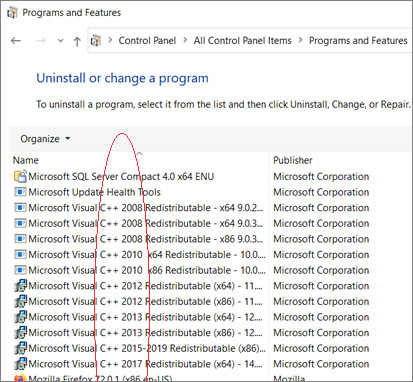
      My list of C++ programs

      Reply
  3. Izumi_Plays says:
    March 27, 2021 at 10:22 am

    OML i keep getting this thing that says sxstrace.exe!! what the heck do i do?!?!?

    Help Meh!!

    Reply
    1. Reggie_Dentmore says:
      March 27, 2021 at 3:17 pm

      A quick GOOGLE shows that that error may be related to the side-by-side configuration error… you need to install the appropriate C++ redistributables. If that does not help, the error may have something to do with your system/set-up… that is NOT an MMD error.

      Reply
  4. Luke Seaton says:
    February 6, 2021 at 1:46 pm

    i need help

    Reply
    1. Reggie_Dentmore says:
      February 7, 2021 at 7:04 am

      Okay… how can I help?

      Reply
  5. Samantha says:
    June 3, 2020 at 10:54 am

    I downloaded MMD and the only issue i didn’t find a solution to is “cannot execute”.

    Reply
    1. Reggie_Dentmore says:
      June 3, 2020 at 2:19 pm

      Please elaborate… what happens, what, exactly, is the error message?

      Reply
  6. Ayaxoz says:
    October 10, 2016 at 6:57 pm

    when i try to open MMD this message always comes up:
    “the application was unable to start correctly (0xc000007b). Click ok to close the application”…
    what do I do?

    Reply
    1. KillerBeer says:
      October 10, 2016 at 9:28 pm

      Install (or uninstall and reinstall again, if they’re there already) MS Visual C++ redistributables.
      https://learnmmd.com/downloads/#C++

      Reply
  7. ace says:
    September 18, 2016 at 1:55 pm

    “the application has failed to start because its side-by-side configuration is incorrect.please see the application event log or use the command line sxstrace.exe tool for more detail” help??

    Reply
    1. KillerBeer says:
      September 18, 2016 at 3:00 pm

      See the Troubleshooting page about installing C++ redistributables.

      Reply
      1. ace says:
        September 19, 2016 at 1:20 pm

        i did,nothing:((

        Reply
        1. KillerBeer says:
          September 19, 2016 at 9:51 pm

          What version of MMD you’re using, 64 or 32-bit? Open Programs&Features in Control Panel and check what C++ related items you have installed. There must be some sort of mismatch there.

          Reply
          1. ace says:
            September 21, 2016 at 7:17 am

            i tried using both versions ,my brother whos pretty computer savvy said the the program is buggy ,i dont know if thats true but ill try what u suggested,and if that dsnt work shall i assume hes right?

            Reply
          2. ace says:
            September 21, 2016 at 9:00 am

            k i tried it,still nohing:(

            Reply
            1. KillerBeer says:
              September 21, 2016 at 9:24 am

              I’d still like to know anyway.

              Reply
  8. confused one says:
    May 13, 2016 at 8:12 am

    odd..the MMD suddently not working. I click and nothing happen (it was working for no problem before) I tried to re-install and it work once then not again.

    Reply
    1. KillerBeer says:
      May 13, 2016 at 10:09 am

      Have you tried to reinstall MS Visual C++ libraries relevant to your version of MMD?

      Reply
      1. confused one says:
        May 13, 2016 at 9:36 pm

        how to see if my ms visual c is relevant to mmd version?

        Reply
        1. KillerBeer says:
          May 13, 2016 at 11:38 pm

          Check the Download or Troubleshooting pages for links. AFAIR, 32-bit MMD requires 2005 and 2008 32-bit libraries, and 64-bit MMD needs 2008 and 2010 64-bit versions accordingly.

          Reply

Comments navigation

Older comments

Leave a Reply Cancel reply

Your email address will not be published. Required fields are marked *

Download the latest version of MikuMikuDance!
See the MMD Step-by-Step instructions page!
Learn how to make your own MMD motions!
LearnMMD.com
  • Use PMXEditor INFOfile to optimize MMD models
    PMXEditor PMXInfo Analyzing Optimizing MMD Models Fixing Broken Models
  • MMD Model Adoration Slideshow features your model!
    MMD Model Adoration Slideshow video, a new type of MMD video! "the making of" my video
  • MMD Starry Winds Effect Makes Amazing Night Time Scenes! MMD Tutorials
  • Click to see Reggise Dentmore's MMD Folk Guitar images Full Size!
    Download Reggie Dentmore’s MMD Folk Guitar Accessory!! Google SketchUp and MMD
  • PocketMQO(with MMD) MikuMikuDance in an Android environment! MMD Tutorials
  • The Making of: Sleepover Gone Wrong (REMAKE) "the making of" my video
  • MMD Animating SAVE AS multiple versions as you go! MMD Basics
  • Blackout Effect offers Fade-to-Black and fade-to-white!
    MME Blackout Effect offers Fade-to-Black and Fade-to-White Blackout Effect

Copyright © 2022 Learn MikuMikuDance – MMD Tutorials – Free 3D Animation Software and Instructions..

Powered by PressBook Premium theme

Go to mobile version