
Skip to content
Learn MikuMikuDance – MMD Tutorials – Free 3D Animation Software

Learn MikuMikuDance – MMD Tutorials – Free 3D Animation Software

Download Free Animation Software – Let's Learn How to Do Everything!

  • Step-by-Step MMD instructions
  • DOWNLOADS
  • Troubleshoot, Fix MMD
  • Site Contents
  • Reggie Replies Q&A
  • Homework!
  • What IS MMD?
    • Download MikuMikuDance Newest Latest Version of MMD
  • “HOW TO”
    • Raycast RAY-MMD Effect Tutorials
  • BONUS PAGES
    • Why convert PMD models to PMX?
  • HALL of CHAMPIONS
  • Tutorial Categories
  • About
    • Privacy Policy
  • Toggle search form
  • Translate Japanese Models to English with Google Translate and PMDE Bones
  • LearnMMD Stage Lit with AutoLuminous Lights MMD Tutorials
  • My new MMD Action Video was fun to make! "the making of" my video
  • Hitogata Brings Face Tracking to MMD Animation Resource
  • Adjust the Shadows in MikuMikuDance KillerBeer
  • VDE-4 Champion: Pajamaje135 Video Dojo Champions
  • Ray-MMD Godrays… argggh!!! MMD Tutorials
  • Use The Background AVI to Make Realistic Animations in MMD ARIZONA

Make an effect start at a certain frame

Posted on September 19, 2015November 6, 2015 By Kazuki Matsuoka 2 Comments on Make an effect start at a certain frame

See all of the articles by LearnMMD's Kurea Urusuta!How do I make an effect start in a certain frame? How can I turn an effect on and off?

How to
Make an Effect Start at a Certain Frame
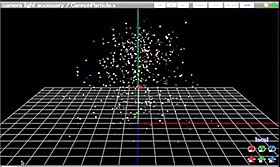
The Cave Cannon Effcte... see how to turn it on and off!You have effects like cave cannon and many different kinds of effects that are running during MMD all the time, you can either turn them off and on at certain times but they always appear as if they’re already there.
For example, the cave cannon effect shoots and twirls lots of light in the air and it continues to shoot it, when you either turn them on and off, it appears suddenly as if it’s already running.
What if, you wanted to start and end an effect at a certain frame and not have it running all the time? And so your effect will start running at a certain frame nicely and not having lots of light popping up all over the place all of a sudden.

Let’s investigate this trick I have discovered.

Load in your effect and register it, now, copy the effect register at frame 0 and paste it at a frame when you want it to start. Then, you go to a frame when you want the effect to completely run and register it there.

What that will do is that the effect won’t start until that frame that you have registered it to starts. Somehow, when you load an effect in, that registered effect on frame 0 tells MMD to start the effect up at that frame so if you were to copy and paste it somewhere else, it’ll start it at the frame you want it to be rather than frame 0.
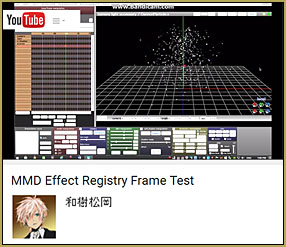
See my little Tutorial Video showing how I turn the effect on and off.Now the progress of making it finish properly at a certain frame is the same way, you register the effect again and then you copy the same “frame 0” register at the frame you want it to finish at.

Here is a video explanation: https://youtu.be/I_4cetL-Muk

This also could be used in other effects as well! Like fades in and out! I wonder… this trick could be very useful!


– SEE BELOW for MORE MMD TUTORIALS…


— — —


– _ — –


Visit the LearnMMD.com Homepage! Plenty of Mikumikudance instruction and info!

More MMD Tutorials...

966_ Otogibanashi Toon "Fairy Tale" shader effect recolors your models

What is the 966_ Otogibanashi Toon shader? How can I recolor my models without using ...read more

ALMorphMaker Adds AutoLuminous Morphs to your Model!

What is the ALMorphMaker plugin? How can I put AutoLuminous morphs on a model? How can ...read more

DropShadow_dual Creates Two DropShadow Effects at Once!

Why can I only load one DropShadow effect at the same time? How does the ...read more

Editing Effect Textures Creates Brand New Effects!

Can editing effect textures change the look of my MME effects? What is an effect ...read more

LAT Model Shaders Create Stunning Scenes in MMD

Are there any LAT model shaders? How can I use shaders with LAT models? Do ...read more

MME PowerShader effect rivals Ray-MMD Raycast image enhancements

There is a MME shader available that can do some of the things that Ray-MMD ...read more

Kazuki Matsuoka, MME Effects Tutorials

Post navigation

Previous Post: Behind the Scenes insights into my newest video
Next Post: Render your MMD Video in 1080p HD Using Windows Live Movie Maker

Related Posts

  • Download MME v037 in English 32-Bit or 64-Bit from LearnMMD.com Download MME MikuMikuEffects
  • MME ik_Paper Effect flattens MMD models paper-thin! ik_Paper Effect
  • MME ExcellentShadow2 effect smooths ugly Self-Shadows ExcellentShadow2
  • Creating Black Model Silhouettes in MikuMikuDance ARIZONA
  • Download and Configure the OldTV MME Effect for MikuMikuDance Customize MME effects
  • Beamman’s Water v5 Effect needs Editing before you can use it! Beamman's Water v5

More Related Articles

Beamman’s Breath Effect shows warm breath in winter Beamman's Breath Effect
RAY-MMD: Haku’s crazy light show [PART 3] MME Effects Tutorials
Why MMD Does not run on Apple Computers Kazuki Matsuoka
Otome, CannonParticle, and Heaven Effects in all their glory! Using Some Cool Effects in MikuMikuDance. CannonParticle
LearnMMD.com _ MikuMikuDance MMD Tutorials Almost Photo-realistic renders in MMD using Shaders and Effects Advanced Shader Technique
Win 7 Virtual Machine Runs MMD on MAC and Linux Kazuki Matsuoka

Comments (2) on “Make an effect start at a certain frame”

  1. crycaos says:
    January 3, 2022 at 11:19 am

    If someones ever sees this post and is also very confused, here’s what I did:

    -Load the effect and make the adjustments for it and then register it on the accessory tab (like you would any effect)
    -then you register it on the camera tab (i saw that they did that on the video and did it too, dont know if there’s a purpose to this)
    -On the frame manipulation, select frame 0 of your effect and copy it
    -Go the frame you want the effect to begin and paste it there
    -Do the same thing for the last frame you want the effect to appear
    -Return to frame 0 and on the accessory tab uncheck the display box and register it.

    Done! It should work, at least it did for me lol

    Reply
    1. Reggie_Dentmore says:
      January 3, 2022 at 2:03 pm

      Yes… What I ususally do is load the effect in Frame Zero and unclick the Display box. … Click it back “on” when I want it to show. The author was saying that doing it MY way leaves the effect “running” and when you click “Display” to show it, you catch the effect that is already running… like if it was supposed to start to spray light-sparks…. in MY method, you catch the sparks already flying… in HER method (and YOUR method, too) the spray would be just starting in that frame with the copy of the Frame Zero diamond pasted into it.
      Thanks!
      — Reggie

      Reply

Leave a Reply Cancel reply

Your email address will not be published. Required fields are marked *

Download the latest version of MikuMikuDance!
See the MMD Step-by-Step instructions page!
Learn how to make your own MMD motions!
LearnMMD.com
  • FFMPEG – Final Frontier For Video and Audio File Processing Background AVI
  • 3D printing MMD models on a desktop 3D printer! 3D Printing MMD Models
  • ReSize SketchUp Models for MikuMikuDance Google SketchUp and MMD
  • The Making of “Boum Boum Boum”: Everything is More Sophisticated in French "the making of" my video
  • Position stage near MMD coordinate axis center-line Accessory Manipulation/Adjust
  • Understanding PMXE Materials: Ambient, Diffuse, Specular, Reflect and More! Bandages
  • Use the Half-Lambert Shader effect for point-source lighting.
    MME Half-Lambert Shader Point-Source Lighting Effects Half-Lambert Shader
  • MME Quartz Effect Refracts Reflections All Around! MMD Tutorials

Copyright © 2022 Learn MikuMikuDance – MMD Tutorials – Free 3D Animation Software and Instructions..

Powered by PressBook Premium theme

Go to mobile version