Skip to content
Learn MikuMikuDance – MMD Tutorials – Free 3D Animation Software

Learn MikuMikuDance – MMD Tutorials – Free 3D Animation Software

Download Free Animation Software – Let's Learn How to Do Everything!

  • Step-by-Step MMD instructions
  • DOWNLOADS
  • Troubleshoot, Fix MMD
  • Site Contents
  • Reggie Replies Q&A
  • Homework!
  • What IS MMD?
    • Download MikuMikuDance Newest Latest Version of MMD
  • “HOW TO”
    • Raycast RAY-MMD Effect Tutorials
  • BONUS PAGES
    • Why convert PMD models to PMX?
  • HALL of CHAMPIONS
  • Tutorial Categories
  • About
    • Privacy Policy
  • Toggle search form
  • Give the Animasa Teto Chimera a wing flapping motion in MMD 7.39
    Create Wing Flapping Motion for Teto Chimera MMD 7.39 Creating Motions
  • Luka Loves the Rainbow Ring
    Use MME Rainbow Ring Effect in MikuMikuDance ARIZONA
  • Kaitensora effect gives moving clouds background in your MMD scene Kaitensora Moving Clouds
  • Play games within MMD using MMD as a Game Engine! Creating Motions
  • A MikuMikuDance Beginner’s Easy First Dance Intro to MikuMikuDance
  • Value of saved poses.
    Saved Poses get your MMD Animation Started! Animation Shortcuts
  • Rio Carnival Miku TDA edit by shiro-nekovocaloid is a beautiful model for the MMD Model Adoration Slideshow video.
    Rio Carnival Miku is my latest MMD Model Adoration Slideshow video "the making of" my video
  • Video Dojo Expo 1 Winner: Angel Dreams Video Dojo Champions

MikuMikuDance Unbridled Creativity Starts with an Empty GUI

Posted on May 24, 2014July 3, 2024 By Reggie_Dentmore 2 Comments on MikuMikuDance Unbridled Creativity Starts with an Empty GUI

A Feature Article by Reggie Dentmore on LearnMMD.com

MikuMikuDance Unbridled Creativity Starts
with an Empty GUI …

It’s fun to make an animation from scratch!


Any writer will tell you that the most chilling sight that threatens your creativity is a blank piece of paper … or the bright-white of an empty WORD screen.

In MikuMikuDance … it’s the blank GUI:
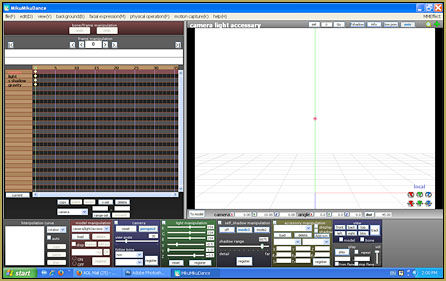
MikuMikuDance Unbridled Creativity can be squahed by the empty, blank GUI.

You have an inspiration, you can “see” the project in your mind’s eye … you sit down and double-click the MMD icon … and then you are faced with the reality of “a blank piece of paper”. “Hmm … Uhhh … Gee … I wonder what’s on TV?”

For my newest video …

My inspiration was this image that I found while cruising through images on DeviantArt.com,
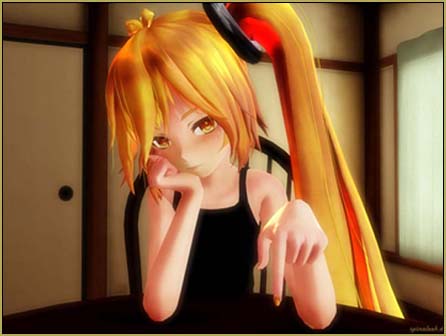
My latest video was inspired by dA's spinaleek's beautiful Neru image.

… an image created by dA’s spinaleek … of a sultry,  bored Neru … just waiting for something, anything, to happen.

I wanted to see if I could recreate a similar scene using Miku … and animate a few minutes of boredom. “:o).An image of the infamous "blank" window ...

I opened-up MikuMikuDance and was faced with that blank screen.

–
I decided to push-ahead and start with finding a “room” to “set-up” in. I looked through my earliest attempts at creating stage-sets using Google Sketchup and I found that I had one that was just the right colors for the sombre mood that I wanted.

… and I had a table and chair, also from Sketchup. I loaded the various pieces and then had my project looking like this …
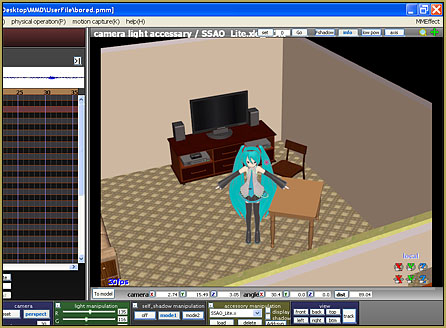
I had collected together the various "bits" that I needed ...

I decided to add a table-lamp as a way to add some interest to the scene … so I went into Sketchup’s 3D-Warehouse and found a model that I could modify to become the lamp that I was looking for. I imported that existing model and made a few changes … and “repainted” the shade with a nice fabric texture …
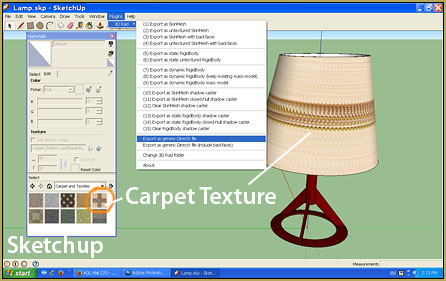
Google Sketchup is great for quickly generating custom MMD accessories!

… I painted the lamp-base a deep red color … converted the Sketchup model into a DirectX model … and I had all of the pieces that I needed for my scene.

The Empty GUI gave way to my completed scene!

I just love success!

It was actually thrilling to watch the setting develop into the scene that I had envisioned.

After loading Miku and the various accessories … I adjusted the brightness and color of the ambient light … moving the overhead lights so as to create the shadows that I wanted to see. I added the SSAO_lite effect to enrichen the colors and add depth to the shadows. I spent quite a while positioning Miku “just so” … the elbows, the sleeves, the slant of the shoulders, the eyes, the eye-lids, the eye-brows, the “mouse” (mouth) settings, the tilt of the head, the curl of the fingers (one-by-one), the rotation of the arms and wrists … all the while keeping an eye on my Neru-inspiration picture.

The final set-up was perfect …
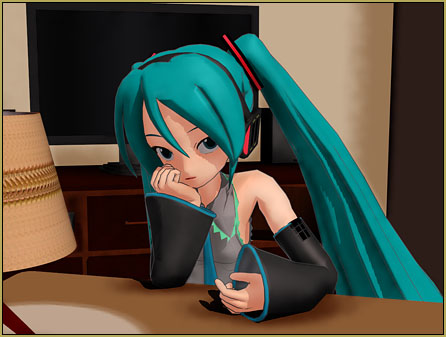
Came out great ... CLICK to watch the video on YouTube!

… I got just exactly the “look” that I had envisioned.

inspiration

I am afraid that my Miku doesn’t have “the fire” evident in spinaleek’s Neru image … but I feel that the setting and the attitude is just right.

Why the “basic” Miku model??

Models available for MikuMikuDance have come a long way Happy Singing Miku in MikuMikuDance 7.39from those, like my Miku (Animasa’s ver. 2), which are included in the basic MMD download. I mean, just LOOK at her … the simple coloring and those faceted “curves” … but, for me, the original models ARE MikuMikuDance. I have newer models … but the look, the feel, the challenge of MMD revolves, for me, around those original models. My association with LearnMMD.com calls for me to use the older Miku model “just because” she is the model included in everyone’s original MMD folder. As I envision a new scene … it’s the old models that I see.

 MikuMikuDance Unbridled Creativity Starts with an Empty GUI …

… and it’s great fun to see what develops as you put your mind to the test!

Watch the video I created … “Bored.”


– SEE BELOW for MORE MMD TUTORIALS…


— — —


– _ — –


Visit the LearnMMD.com Homepage! Plenty of Mikumikudance instruction and info!

More MMD Tutorials...

Starting-out Using MMD Reader discovers missing elements.

A reader commented: Is it against any rules to sell an All-in-1 software pack in different ...read more

Different MMD models react differently to pose and motion data

My MMD motion data doesn't work! My MMD models react differently to pose and motion ...read more

Scrambled first frame of video must be Voodoo!

Why is the first frame of my new video scrambled? What causes that first frame ...read more

Written Credits aid YouTube MMDer search results

Why should I have written credits in my MMD video's description? ... I have them ...read more

Making amazing complicated MMD video requires circle of learning

How do I make a complicated MMD video with AVI backgrounds and scene fades? How ...read more

MMD Theater Seats Don't Have to Sit on the Floor

When setting the stage for your animation... You have to "do" what you have to do! MMD ...read more

MMD Basics, Random Thoughts & Visions, Reggie Dentmore

Post navigation

Previous Post: Import models from Source engine based games (HL2, Portal, TF2 etc.)
Next Post: Painted Table Accessory Download Available Now

Related Posts

  • Kaito Sees Rotating Stars Thanks to the Accessory Manipulation Panel.
    More on Accessory Manipulation in MikuMikuDance Accessory Manipulation/Adjust
  • Scrambled first frame of video must be Voodoo! MMD Basics
  • Download the beautiful LUKA MEGURINE HIPSTERBLACK by PS-2002
    Download the beautiful LUKA MEGURINE HIPSTERBLACK by PS-2002 "the making of" my video
  • MMD Smooth Criminal video project download "the making of" my video
  • The UT Video Codec Suite works well with Render to AVI in MMD.
    UT Video Codec Suite v22.2.0 creates simple AVI video for MMD background AVI Reggie Dentmore
  • dull-VS-alive-animation-environment
    MMD animation environment… MORE than just a model on a stage! "the making of" my video

More Related Articles

New Interpolation Curve Video was fun to make! "the making of" my video
MMD Batokin Island stage is MORE than a beach MMD Basics
MMD Model Adoration Slideshow features your model! MMD Model Adoration Slideshow video, a new type of MMD video! "the making of" my video
Use the Half-Lambert Shader effect for point-source lighting. MME Half-Lambert Shader Point-Source Lighting Effects Half-Lambert Shader
Animation Styles: Park and Bark vs. Choreography Creating Motions
Cry Baby Motion DL featured image Free MMD Cry Baby Motion DL from DA’s Smol-Hooman "the making of" my video

Comments (2) on “MikuMikuDance Unbridled Creativity Starts with an Empty GUI”

  1. BleCat says:
    March 10, 2016 at 3:36 pm

    It’s usually music that inspires me :D Mostly dubsteps or something really bwoop bwop wap wap
    I believe when the idea comes to you, they’ll come as brutally as a storm. Let them naturally flow into you and you’ll be even more amazed at what you might be able to make.
    Thanks for the great article! It really inspires me!

    Reply
    1. Reggie says:
      March 11, 2016 at 10:12 am

      Thank you for that! … the “human creativity” MikuMikuDance brings to the surface is a big part of my enjoyment of MMD… the videos, the art, the fandom… awesome!

      Reply

Leave a Reply Cancel reply

Your email address will not be published. Required fields are marked *

Download the latest version of MikuMikuDance!
See the MMD Step-by-Step instructions page!
Learn how to make your own MMD motions!
LearnMMD.com
  • DropShadow_dual Creates Two DropShadow Effects at Once! Chestnutscoop
  • MMD has an EXPAND function that lets you adjust a motion's speed.
    EXPAND function modifies MMD motion tempo EXPAND a motion
  • Easily Transfer an Accessory to a Dummy Bone from Model’s Hand in MMD Accessory Manipulation/Adjust
  • Keep the Center-Bone when adding Mother-Bone to an older model MMD Tutorials
  • KiraKira-sparkleV2 beautiful colored sparkles.
    KiraKira-sparkleV2 MME Effect adds COLOR to KiraKira! KiraKira-SparkleV2
  • Use PMXEditor INFOfile to optimize MMD models
    PMXEditor PMXInfo Analyzing Optimizing MMD Models Fixing Broken Models
  • Making good MMD lip-syncs! Creating Motions
  • Beamman's WEater Effect can be very realistic.
    BeamMan’s Water Effects really look wet! Beamman's Water v5

Copyright © 2022 Learn MikuMikuDance – MMD Tutorials – Free 3D Animation Software and Instructions..

Powered by PressBook Premium theme

Go to mobile version