Skip to content
Learn MikuMikuDance – MMD Tutorials – Free 3D Animation Software

Learn MikuMikuDance – MMD Tutorials – Free 3D Animation Software

Download Free Animation Software – Let's Learn How to Do Everything!

  • Step-by-Step MMD instructions
  • DOWNLOADS
  • Troubleshoot, Fix MMD
  • Site Contents
  • Reggie Replies Q&A
  • Homework!
  • What IS MMD?
    • Download MikuMikuDance Newest Latest Version of MMD
  • “HOW TO”
    • Raycast RAY-MMD Effect Tutorials
  • BONUS PAGES
    • Why convert PMD models to PMX?
  • HALL of CHAMPIONS
  • Tutorial Categories
  • About
    • Privacy Policy
  • Toggle search form
  • LearnMMD.com: The Instruction Sheet you've been searching for!
    Use Google SketchUp to make DirectX Accessories in MMD Dummy Bones
  • MMD CameraSmoother Tool smooths camera motions! CameraSmoother Tool
  • You might name this model's folde "Short_Kimono_Teto_by_Nanami".
    Organize Your MMD Model Collection, Track Your Sources ARIZONA
  • MME Quartz Effect Refracts Reflections All Around! MMD Tutorials
  • Click to see FULL SIZE my original model setup for my "Dueling Banjos".
    Planning a MikuMikuDance 7.39 Dueling Banjos Animation Google SketchUp and MMD
  • MMDers Audacity Tutorial Video is on YouTube! Making Soundtracks
  • New MMD Video Taught Awareness of Camera Angles and Motion Quirks! "the making of" my video
  • Add Shadows to MMD .X Accessories Tutorial MMD Basics

Removing Double Vertices to Create Continuous UV Maps

Posted on December 8, 2017April 9, 2018 By Mae Blythe No Comments on Removing Double Vertices to Create Continuous UV Maps

A featured article by LearnMMD's Mae Blythe!What’s the point of removing double vertices in Blender? How do I remove double vertices? Why isn’t my UV map continuous?

Why are there double vertices?

Double vertices happen when there are two identical vertices in the same exact spot. If you made your own model in Blender and took care to make sure there were none… you would likely be surprised when you import your PMX model into Blender and find a whole bunch of them. I can’t tell you why exporting to PMX suddenly adds a ton of random extra vertices… But I can tell you what those random vertices do to your workflow.

While there are likely many effects from the added vertices, I’ve only found one problem that truly necessitates removing double vertices to fix. That problem is UV maps.

In my latest train wreck, all I wanted to do was give Camila a nice hair texture. The problem, however, was that even after removing all of the seams… This was the UV map I got:
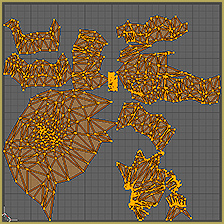
UV Map Before Removing Double Vertices

Ouch! For sure, that isn’t what I want. For her hair texture to work out, I want the braid’s UV map to be one continuous piece. How do we fix this?

Removing Double Vertices

To remove double vertices in Blender, select what you want to UV map in Edit Mode and press “W”. When the menu pops up, choose “Remove Doubles”. For Camila’s braid, there were 321 double vertices removed! I didn’t put them there… And I have no idea why PMX models randomly insert them. However, after removing them… This is what I have:
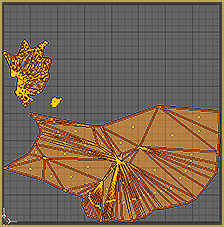
UV Map after Removing Double Vertices

Sadly, there are some issues that were in the original model. I really struggled with the area surrounding the bow… and it shows! Another problem is simply that by removing seams… I ended up with something extremely hard to use! So let’s add back some seams to make it easier for Blender to unwrap. After adding one seam on the underside of the braid…We have this:
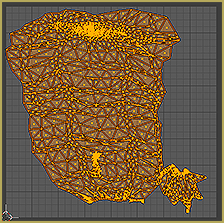
UV Map After Adding Seam

Hurray! It’s not perfect, but it’s mostly in one piece. That just leaves one last step…

Test the model!

While I’ve used “Remove Double” plenty of times with no ill effect… It only takes one really bad experience to make you paranoid. I was so proud of my texture for one dress, but somehow just removing doubles destroyed the physics. If removing doubles messes up the physics, hopefully all it can be fixed by weighting the vertices again.

As far as Camila goes…
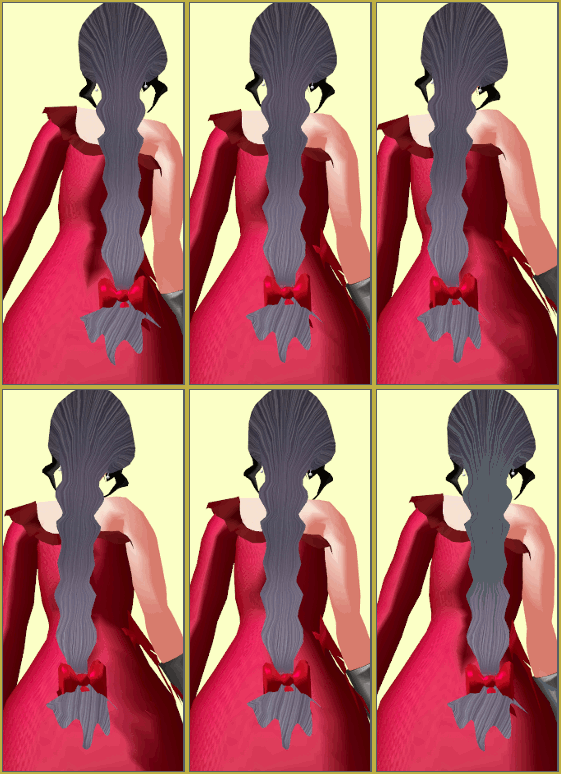
Camila's Finished Hair

She’s rocking her new hair texture!


– SEE BELOW for MORE MMD TUTORIALS…


— — —


– _ — –


Visit the LearnMMD.com Homepage! Plenty of Mikumikudance instruction and info!

More MMD Tutorials...

Enjoy the "camera Angles WEIRD in Anime" meme...

Enjoy the "camera Angles WEIRD in Anime" meme... This image is from The Slayers - NEXT, ...read more

Reader asks how to create MMD artwork... stuff like posing, camerawork?

A reader asks... Is there a tutorial on how to create MMD artwork, like those you ...read more

Learn MikuMikuDance in Small Steps! New LearnMMD Video Series

Learn MikuMikuDance in Small Steps. Where can I find easy-to-follow MMD instructions on YouTube? How ...read more

Apply Multiple Effects on an Entire MMD Model Using M4Layer Effect

How can I apply multiple effects to an MMD model? Can I use more than ...read more

MMD Plugin Manager... I Found a Treasure!

What sorts of MMD Plugins are there? MMD Plugin Manager? MMD Plugins. Plugin MMD. More ...read more

2025: Hatsune Miku is 18... but she is designed to be always 16 Years old, by design and in reality!

Finally, in 2023, Hatsune Miku is 16 years old! but in August of 2025, she ...read more

Mae Blythe, Making Models, MMD Tutorials

Post navigation

Previous Post: Making MMD Models Complicated Task with much to know!
Next Post: How to subtitle MMD videos

Related Posts

  • VOCALOID 3 Tutorial – The whole interface on a basic level Kazuki Matsuoka
  • UV Unwrapping MMD Models in Blender with MMD Tools Bandages
  • Enjoy the “camera Angles WEIRD in Anime” meme… Animation Shortcuts
  • Ray-MMD environment controls create MMD dreamscape MMD Tutorials
  • An MMD town stage: Making Kerorin Town Great Again – Part 2 MMD Stages
  • Free Download MikuMikuDance MMD
    Download MikuMikuDance Easily make YouTube MMD Music Videos MMD Basics

More Related Articles

Anticipation is the Second Principle of Animation. Anticipation
create credible characters for your projects How to create credible characters for your projects. MMD Tutorials
MikuMikuDance Links and Resources MMD Tutorials
Free AVIUTL Video Editing software adds animated titles to MMD Videos! Animated Titles
ShapeMosaic effect distorts naughty bits and faces. MME ShapeMosaic effect counters Wardrobe-malfunctions and more! MMD Tutorials
Hitogata Brings Face Tracking to MMD Animation Resource

Leave a Reply Cancel reply

Your email address will not be published. Required fields are marked *

Download the latest version of MikuMikuDance!
See the MMD Step-by-Step instructions page!
Learn how to make your own MMD motions!
LearnMMD.com
  • Using Beamman Particle-styled MME effects Beamman's AuraParticle
  • MikuMikuDance Links and Resources MMD Tutorials
  • Are you running the Latest Version of MMM? MMM Tutorials
  • LearnMMD.com's Video Dojo Expo FIVE
    Video Dojo Expo Five Entries… The VOTING is Done! Video Dojo Competition
  • MMD CameraSmoother Tool smooths camera motions! CameraSmoother Tool
  • Uploading MikuMikuDance YouTube Videos MMD Making Videos - Rendering to AVI
  • Download MMD 9.32 MikuMikuDance latest version Download MikuMikuDance
  • Why MMD Does not run on Apple Computers Kazuki Matsuoka

Copyright © 2022 Learn MikuMikuDance – MMD Tutorials – Free 3D Animation Software and Instructions..

Powered by PressBook Premium theme

Go to mobile version