
Skip to content
Learn MikuMikuDance – MMD Tutorials – Free 3D Animation Software

Learn MikuMikuDance – MMD Tutorials – Free 3D Animation Software

Download Free Animation Software – Let's Learn How to Do Everything!

  • Step-by-Step MMD instructions
  • DOWNLOADS
  • Troubleshoot, Fix MMD
  • Site Contents
  • Reggie Replies Q&A
  • Homework!
  • What IS MMD?
    • Download MikuMikuDance Newest Latest Version of MMD
  • “HOW TO”
    • Raycast RAY-MMD Effect Tutorials
  • BONUS PAGES
    • Why convert PMD models to PMX?
  • HALL of CHAMPIONS
  • Tutorial Categories
  • About
    • Privacy Policy
  • Toggle search form
  • NCH VideoPad Video Editor
    VideoPad Video Editor Free Download from NCH Software "the making of" my video
  • Using BeamMan’s fluid2D Creates Fabulous MMD Under Water Scenes BeamMan's fluid2D
  • “Behind the Scenes” of My Miku Likes Cheese Video! "the making of" my video
  • Different Eye Textures in one model using PMXE JuneTarzan
  • MMD First Steps Make your own motions from scratch Making Smooth Motions
  • Hand Clap free download MMD motion file
    ureshiiiiii “HAND CLAP” Free Motion & WAV Download – Awesome! "the making of" my video
  • Sexiest MMD Model Dance Motion you can Download "the making of" my video
  • MME PowerShader effect rivals Ray-MMD Raycast image enhancements MMD Tutorials
The Croquis Effect.

How to Use the Croquis Effect in MikuMikuDance

Posted on January 23, 2014July 2, 2024 By Arizona 10 Comments on How to Use the Croquis Effect in MikuMikuDance

What is the Croquis Effect in MMD? How do you use the Croquis Effect in A Feature Article by contributor ARIZONA on LearnMMD.comMikuMikuDance? Where do you download the Croquis Effect for MikuMikuEffects?

How to Use the Croquis Effect in MikuMikuDance.

The Croquis Effect (Pronounced “Croh Kee”) can be used whenever you want to give your animation a hastily hand-drawn appearance. This makes sense, because that’s exactly what a croquis is. This French art term is normally associated with fashion illustration. Most haute couture fashion illustrations are called croquis.

The Croquis Effect.

Before you download any effect, make sure you have MMEffects properly installed (Please see Noko2’s article to do this; it is here. ) To download this effect you will need to visit the VPVP MME page; here’s the link: www6.atwiki.jp/vpvpwiki/pages/272.html.

You will find it in the section labelled エッジ(輪郭)  this means Edge (outline) using Google Translate.

The Sketchy Details.

Once you have placed it in your “Effects” folder (I trust that you have put all your effects in one folder). Load up a model, stage and some motion data. Make sure your Model Manipulation Panel (MMP) reads camera/light/accessory. You should now see the Accessory Manipulation Panel (AMP). Click the Load  button and find your Croquis Effect folder. There you’ll find Croquis and CroquisLite both of these are X-type files. You can choose whichever one you want to use, I will leave you to explore the differences.

The Croquis Effect is controlled by using the Tr numeric field in the AMP. If you are one of the two other people who had read my article on using the AMP, (https://learnmmd.com/http:/learnmmd.com/use-accessory-manipulation-fields-to-positionadjust-accessories/ ) then you know that a value of 1 is the highest you can effectively register in the Tr field. At 1.00, everything on your screen looks like a page from a coloring book. If you enter 0, then the Croquis Effect is temporarily removed.

I made video showcasing this effect on our YouTube channel it’s here:


– SEE BELOW for MORE MMD TUTORIALS…


— — —


– _ — –


Visit the LearnMMD.com Homepage! Plenty of Mikumikudance instruction and info!

More MMD Tutorials...

966_ Otogibanashi Toon "Fairy Tale" shader effect recolors your models

What is the 966_ Otogibanashi Toon shader? How can I recolor my models without using ...read more

ALMorphMaker Adds AutoLuminous Morphs to your Model!

What is the ALMorphMaker plugin? How can I put AutoLuminous morphs on a model? How can ...read more

DropShadow_dual Creates Two DropShadow Effects at Once!

Why can I only load one DropShadow effect at the same time? How does the ...read more

Editing Effect Textures Creates Brand New Effects!

Can editing effect textures change the look of my MME effects? What is an effect ...read more

Making JRPG style scenes using MMD

Making JRPG style scenes using MMD Specifically here in this article we are referencing the JRPG/VN ...read more

LAT Model Shaders Create Stunning Scenes in MMD

Are there any LAT model shaders? How can I use shaders with LAT models? Do ...read more

ARIZONA, Croquis Effect, MMD Comics, MME Effects Tutorials

Post navigation

Previous Post: Create Motion Data – So you think you can’t dance?
Next Post: Announcing The Momi Cup 4!

Related Posts

  • Use The Background AVI to Make Realistic Animations in MMD ARIZONA
  • New Reggie’s Evil Eye demo video posted to YouTube "the making of" my video
  • Applause for Miku!
    MikuMikuDance turns Six. ARIZONA
  • Tesagure! Bukatsu-mono Animated
    Tesagure! Bukatsu-mono. An anime associated with MikuMikuDance. ARIZONA
  • Using Beamman’s SoftSmoke Effect Beamman's Soft Smoke
  • LearnMMD.com _ MikuMikuDance MMD Tutorials
    Almost Photo-realistic renders in MMD using Shaders and Effects Advanced Shader Technique

More Related Articles

o_ShaderCustomSet_v0_3 effect applies gentle color modification MMD Tutorials
Subset-Extracts make for some interesting effects! Using the Subset-Extract in MikuMikuEffects. ARIZONA
Making MikuMikuDance Pictures Render to Picture File Tutorial Camera Motion
Use PMDE to Switch On the MME AutoLuminous effect in MMD AutoLuminous MME / PMDE
Beamman’s BeamCharge MME Effect Beamman's BeamCharge
AsciiArt Miku. AsciiArt for MikuMikuDance. ARIZONA

Comments (10) on “How to Use the Croquis Effect in MikuMikuDance”

  1. Matthew D Benton says:
    December 26, 2018 at 9:11 pm

    I’m Having the same problem.

    ALL of my other effects are working (even RayCast and AutoLunimous) but Croquis is the only effect that does not work on MMD, my MME was installed properly, and i’m using both 64-bit MMD and MME

    Reply
    1. Trackdancer says:
      December 26, 2018 at 10:51 pm

      Same here and my PC set up seems similar to yours. The effect dates back to 2012 and some of the coding is probably obsolete.

      Reply
    2. KillerBeer says:
      December 26, 2018 at 11:08 pm

      Try to download 32-bit versions of MMD/MME into a separate folder and launch Croquis from there – will it work?

      Reply
  2. Kairi A Olivarez says:
    December 24, 2017 at 12:40 am

    I still am confused about to how to make it work. I read both articles a bunch of times but I still dont get it.

    Reply
    1. KillerBeer says:
      December 24, 2017 at 4:18 am

      Load Croquis.x into Accessory Manipulation Panel.
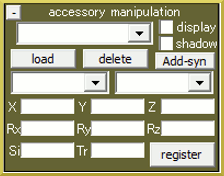
      Use Tr setting to adjust effect’s intensity.

      Reply
      1. Ghostie says:
        February 14, 2018 at 12:48 am

        I’m having issues with this effect as well. I’ve done exactly that but nothing has changed on my screen. The effect simply doesn’t do anything for me.

        Reply
        1. KillerBeer says:
          February 14, 2018 at 2:46 am

          Do you *only* have problems with this particular effect or other effects do not to their job properly as well?

          Reply
          1. LeoIvanov says:
            December 25, 2018 at 12:42 pm

            Not the person in question but I have the same problem. Adding croquis.x or croquislite.x or any other alternative from other sources as accessory wields no results when changing accessory parameters (X/Y/Z/Tr/Rx/Ry/Rz/Si). Tried to register after each, no result either.

            All other effects work in MME when applied through the “Set Effect” though, so the problem seems exclusive for Croquis effect.

            Reply
            1. KillerBeer says:
              December 26, 2018 at 5:26 am

              Except Tr, none of parameters are supposed to do anything. Do you see *any* reaction when you load Crocuis.x?

              Reply
            2. bandages says:
              January 5, 2019 at 10:17 am

              There are probably 2 issues going on.

              First, Croquis, by default, extracts to a folder named with a non-standard character set. Depending on localization settings, this could be leading to problems with MMD reading the effect. It did for me when I tried to troubleshoot this. Rename the folder containing Croquis.x to something plain like Croq.

              Second, it seems that the effect has been updated since this article was written. On the version that I just downloaded, the effect is designed to use a lot of accessory fields for control. In particular, you need to set X, Y, and Z fields to 1, then register, for the effect to work. This is communicated in the author’s readme packaged with the effect.

              Reply

Leave a Reply Cancel reply

Your email address will not be published. Required fields are marked *

Download the latest version of MikuMikuDance!
See the MMD Step-by-Step instructions page!
Learn how to make your own MMD motions!
LearnMMD.com
  • How To Make Global Lighting Work with Game-Rips Fixing Broken Models
  • Japanese MMD mod allows Automatic Breathing action in MMD models MMD Tutorials
  • Sweet MMD Meme “Hello_How Are You” MMD Memes
  • Using the right codec when Rendering to AVI in MMD HD Videos in MMD
  • Animation Fade helps MMD scene transitions Animation Shortcuts
  • Recommended Software Library for MMDers Animation Shortcuts
  • Keyboard Shortcuts and Easy Moves Keyboard Shortcuts
  • MMD Fill Lights Part 2 – (Ray-MMD) MMD Tutorials

Copyright © 2022 Learn MikuMikuDance – MMD Tutorials – Free 3D Animation Software and Instructions..

Powered by PressBook Premium theme

Go to mobile version