

Skip to content
Learn MikuMikuDance – MMD Tutorials – Free 3D Animation Software

Learn MikuMikuDance – MMD Tutorials – Free 3D Animation Software

Download Free Animation Software – Let's Learn How to Do Everything!

  • Step-by-Step MMD instructions
  • DOWNLOADS
  • Troubleshoot, Fix MMD
  • Site Contents
  • Reggie Replies Q&A
  • Homework!
  • What IS MMD?
    • Download MikuMikuDance Newest Latest Version of MMD
  • “HOW TO”
    • Raycast RAY-MMD Effect Tutorials
  • BONUS PAGES
    • Why convert PMD models to PMX?
  • HALL of CHAMPIONS
  • Tutorial Categories
  • About
    • Privacy Policy
  • Toggle search form
  • MME Effects Tutorials on LearnMMD.com MMD 7.39 MME Effects Tutorials
  • The New LearnMMD Stage "in action"!
    LearnMMD Auditorium Stage Announced Ready for Download Downloading New Models
  • .spa VS .sph sphere texture file types in PMDE / MikuMikuDance MMD.
    PMD Editor Basics: .SPH and .SPA Files Add Sparkle! PMDE/PMXE tutorials
  • Make Smooth Motions using Multiple Keyframes Animation Shortcuts
  • Build your own stage for MMD using Blender 2.69 Blender
  • Download Reggie's collection of Rocking Chair Accessory for MMD7.39
    New MMD Rocking Chair Accessory Ready to Download Make your own Accessories
  • Make Chibi Models for MikuMikuDance! Adjust PMD Model Size
  • MMD animation from Scratch “The Wind-up and the Pitch!” "the making of" my video

Using Beamman’s SoftSmoke Effect

Posted on August 24, 2016August 29, 2018 By KillerBeer 9 Comments on Using Beamman’s SoftSmoke Effect

A feature article by KillerBeer ... an Author on LearnMMD.com!How do I use Beamman’s SoftSmoke? I loaded the effect, but it’s just a black blob! How do I control it?

Make use of Beamman’s SoftSmoke
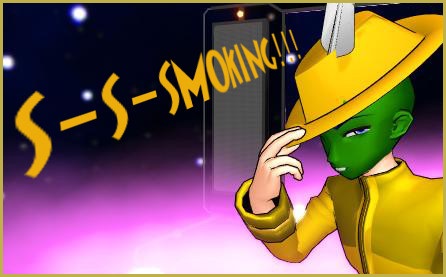
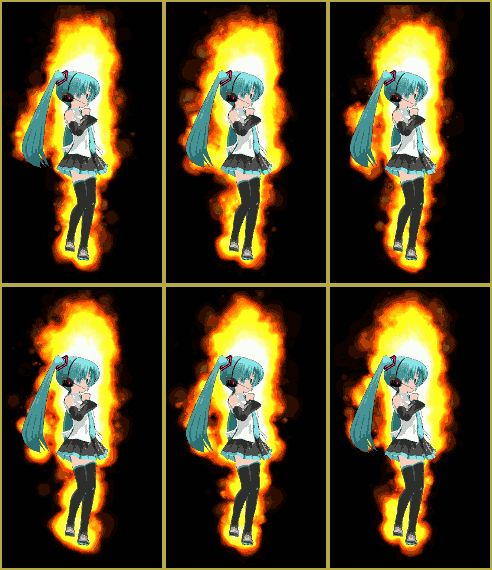
Beamman's SoftSmoke MME effect can be of any color or density you desire

Beamman’s SoftSmoke is another example of an effect controlled by a .pmd/.pmx model. To use the effect, you load both SoftSmoke_SP.x and SS_Controller_0.pmx into MMD. The former controls effect’s position in the world, the latter – everything else. The controller model is Japanese only though, so you better translate it to English before using.

The command name list to insert into Name Repair panel would be more or less like this (the translation is mine and rather sketchy; you can replace it with more suitable to your taste):

Moving speed
Density
Grow X
Grow Y
Grow Z
Shrink X
Shrink Y
Shrink Z
Puff speed
Hue
Saturation
Lightness
Transparency
Puff size
Puff dynamic

.PMX control sliders to modify Beamman's SoftSmokeAfter loading the .pmx controller into MMD, you get multiple ways of modifying your blob of smoke. Shrink/Grow/X/Y/Z sliders allow to change its size (the effect can be rather taxing on weaker video systems, so I’d recommend you to minimize it first and then decide what size should it be). Hue/Saturation/Lightness/Transparency group governs smoke’s color-related properties. Density and Puff size changes the amount and thickness of individual “puffs”. Moving speed and Puff dynamic determine how fast puffs raise and traverse respectively, and Puff speed is about their “life cycle” from conception to dispersing (you must be in play mode to see effects of those).

Happy smoking!


“The Mask” model used in the illustration is composed of recolored Animasa’s Kaito and Pimp Hat by Swiftcat-Mooshi. Also Trackdancer’s LearnMMD Stage was (under)used.


– SEE BELOW for MORE MMD TUTORIALS…


— — —


– _ — –


Visit the LearnMMD.com Homepage! Plenty of Mikumikudance instruction and info!

More MMD Tutorials...

966_ Otogibanashi Toon "Fairy Tale" shader effect recolors your models

What is the 966_ Otogibanashi Toon shader? How can I recolor my models without using ...read more

ALMorphMaker Adds AutoLuminous Morphs to your Model!

What is the ALMorphMaker plugin? How can I put AutoLuminous morphs on a model? How can ...read more

DropShadow_dual Creates Two DropShadow Effects at Once!

Why can I only load one DropShadow effect at the same time? How does the ...read more

Editing Effect Textures Creates Brand New Effects!

Can editing effect textures change the look of my MME effects? What is an effect ...read more

LAT Model Shaders Create Stunning Scenes in MMD

Are there any LAT model shaders? How can I use shaders with LAT models? Do ...read more

MME PowerShader effect rivals Ray-MMD Raycast image enhancements

There is a MME shader available that can do some of the things that Ray-MMD ...read more

Beamman's Soft Smoke, KillerBeer, MME Effects Tutorials

Post navigation

Previous Post: ColorShift Effect Dances using VMDSpectrum Analyzer
Next Post: GaussianVariable MME Effect Blurs your entire scene!

Related Posts

  • RAY-MMD: Haku’s crazy light show [PART 1] MME Effects Tutorials
  • Making POV Camera Shots in MikuMikuDance 8.03+ Camera Motion
  • Learn to translate models from Japanese with LearnMMD.com!
    Translate Japanese Models to English in PMDE… with Excel! Fixing Broken Models
  • MME Collapse Effect requires PMDE model edit Collapse Effect
  • Using the MME ColorShift Effect in MikuMikuDance ARIZONA
  • Beamman’s Water v5 Effect needs Editing before you can use it! Beamman's Water v5

More Related Articles

Beamman’s BeamCharge MME Effect Beamman's BeamCharge
Half-Lambert Shader. How to Use the Half-Lambert Shader in MMD Half-Lambert Shader
LearnMMD.com _ MikuMikuDance MMD Tutorials Almost Photo-realistic renders in MMD using Shaders and Effects Advanced Shader Technique
Use the Silhouette Effect to create White Silhouettes! Creating White Silhouette Models in MikuMikuEffects ARIZONA
Download and Configure the OldTV MME Effect for MikuMikuDance Customize MME effects
Assemble your stages from .x type components Accessory Manipulation/Adjust

Comments (9) on “Using Beamman’s SoftSmoke Effect”

  1. Kylie0203 says:
    March 6, 2020 at 8:30 am

    Is It very heavy to bad pcs?

    Reply
    1. Reggie_Dentmore says:
      March 6, 2020 at 8:57 am

      Beamman’s particle effects DO require some computer power… but not excessive.

      Reply
  2. Genbento says:
    April 13, 2019 at 6:38 pm

    I tried downloading this but, it won’t load up even if it’s in my accessory box…
    (O . o) It’s just….blank. No black blob even…
    (. – .)

    Reply
    1. KillerBeer says:
      April 13, 2019 at 11:19 pm

      What happens when you load other effects? Do they work?

      Reply
      1. Genbento says:
        April 14, 2019 at 8:01 am

        They work but, I found out it was an older version of the effect. There’s a 2nd one on the DL’s site and it….somewhat works now. Thing is, a problem still occurs….
        It keeps crashing MMD with an error saying, “Cannot reset MME” and a Windows box shows up saying that the “Application has been blocked from accessing Graphics hardware.”
        I tried searching and trying different ways of fixing this by using videos on Youtube and an Intel site to download drivers but, this STILL happens.
        (Well…saying that in advance because I haven’t tried resetting the computer yet. I just have a feeling it still won’t work…but, I’ll let you know if it does!)

        Reply
      2. Genbento says:
        April 14, 2019 at 12:13 pm

        Update:
        It works now but, it lags MMD SO MUCH! ;w;

        Reply
        1. KillerBeer says:
          April 14, 2019 at 7:59 pm

          What is your video card, for that matter?

          Reply
          1. Genbento says:
            April 15, 2019 at 12:48 pm

            Hmmm….
            How do I check that?
            If the computer guy I got my lap top from told me, I may have forgot. X’D

            Reply
            1. KillerBeer says:
              April 15, 2019 at 10:36 pm

              https://www.howtogeek.com/167094/how-to-use-the-windows-device-manager-for-troubleshooting/

              Reply

Leave a Reply Cancel reply

Your email address will not be published. Required fields are marked *

Download the latest version of MikuMikuDance!
See the MMD Step-by-Step instructions page!
Learn how to make your own MMD motions!
LearnMMD.com
  • Sexiest MMD Model Dance Motion you can Download "the making of" my video
  • Older MME Shaders rival Ray-MMD Raycast results and are easy to use! Material Shader
  • Darkening the stage lighting makes the floorlight look very bright! MMD 7.39, LearnMMD.com
    MMD Camera Motions: The Camera’s Gotta Keep Moving! Camera Motion
  • The MMD Circles Halloween animation is fun to make! Free Download
    MMD Circles haunts Halloween Visions download links "the making of" my video
  • Knock-out the Background as you Render to Picture in MMD Add Background Pictures and AVI
  • MMD Cell Phone Screen Video
    MMD Cell Phone Screen Video Creation… just for that vertical screen! Cell-Phone Video
  • MMD Boobs too Big gives us a funny Really Really Bad Boys video!
    MMD Boobs too Big yields Too Funny Really Bad Boy video! "the making of" my video
  • How to make AutoLuminous work on a PMX Model AutoLuminous MME / PMDE

Copyright © 2022 Learn MikuMikuDance – MMD Tutorials – Free 3D Animation Software and Instructions..

Powered by PressBook Premium theme

Go to mobile version