

Skip to content
Learn MikuMikuDance – MMD Tutorials – Free 3D Animation Software

Learn MikuMikuDance – MMD Tutorials – Free 3D Animation Software

Download Free Animation Software – Let's Learn How to Do Everything!

  • Step-by-Step MMD instructions
  • DOWNLOADS
  • Troubleshoot, Fix MMD
  • Site Contents
  • Reggie Replies Q&A
  • Homework!
  • What IS MMD?
    • Download MikuMikuDance Newest Latest Version of MMD
  • “HOW TO”
    • Raycast RAY-MMD Effect Tutorials
  • BONUS PAGES
    • Why convert PMD models to PMX?
  • HALL of CHAMPIONS
  • Tutorial Categories
  • About
    • Privacy Policy
  • Toggle search form
  • Video Dojo Expo 2 – Holiday Song “Diva Performance”! CONTESTS
  • MMD Credit Helper and PMMLookupper File Management / Organization
  • Luka Loves the Rainbow Ring
    Use MME Rainbow Ring Effect in MikuMikuDance ARIZONA
  • Learnmmd.com hosts MMD Panel at San Japan 8 bit. ARIZONA
  • Blackout Effect offers Fade-to-Black and fade-to-white!
    MME Blackout Effect offers Fade-to-Black and Fade-to-White Blackout Effect
  • MMD Camera Work makes motions fit the song.
    MMD Camera Work made the motion fit the song! "the making of" my video
  • Post Effect cannot be specified
    Fix the “Post Effect cannot be specified” error Chris no Akumu
  • Dummy Bones allow you to customize your accessory manipulations!
    Using The Dummy Bone for MikuMikuDance Accessory Manipulation/Adjust

Intersecting Physics Bodies Cause Glitchy MMD Models

Posted on November 9, 2017November 10, 2017 By Mae Blythe 1 Comment on Intersecting Physics Bodies Cause Glitchy MMD Models

A featured article by LearnMMD's Mae Blythe!What are intersecting physics bodies? Why don’t my physics work? How do I fix my physics?

Glitched Physics?
It’s Probably Intersecting Physics Bodies.
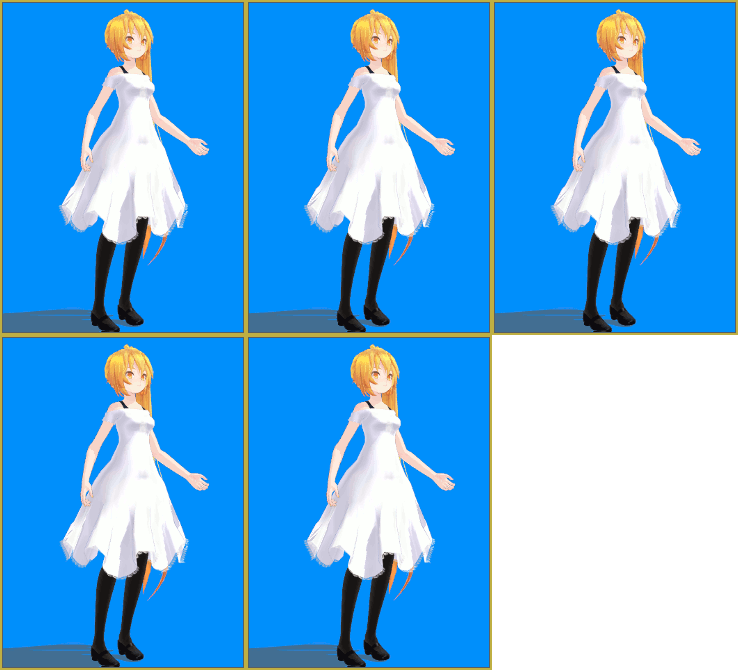
Neru Model with Glitched Physics

MMD has bad physics.

There. I said it.

If you’ve watched a cloth modifier tutorial for Blender, you will most likely know what I’m going to point out. In Blender, you create bodies by telling Blender to make an object a body. You don’t have to sit around and fiddle with random balls and cubes… You just tell Blender to make something a body and it happens.

In Blender, you tell a dress to act like a dress by telling it to act like a dress. In PMX Editor, you make a dress act like a dress by creating a cage of physic boxes that cannot intersect with the model’s body in any way. Of course, there is a plugin to automate the process. The problem with it is that you need to model the skirt around the concept of physics in MMD. In Blender, a simple, one sided plane is enough to make stunning physics… Not in MMD.

Seriously, I’ve had a few breakdowns over this very subject. Two videos that helped me through were this hair tutorial and this basic physics tutorial.

What Are Intersecting Physics Bodies?

So, here’s something to chew on. You need a lot of your physics bodies to be intersecting physics bodies. Really, the majority of them will have to intersect with another one.

Let’s use the physics of this skirt for an example.
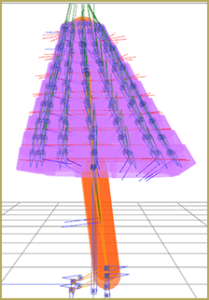
Skirt with Good Intersecting Physics Bodies

As you can see from the areas of darker purple, this skirt has physics bodies that overlap each other. This is so that the legs have no place to poke through. These bodies are all set so that they all have the same “non-collision groups”. Because of that, they do not interact with each other.

However, the body physics are not one of the dress’s non-collision groups. That means that if you move the leg and it brushes against the dress, the dress will move.

If different physics body groups are intersecting without being mutual non-collision groups, you’ll likely end up with something close to this:
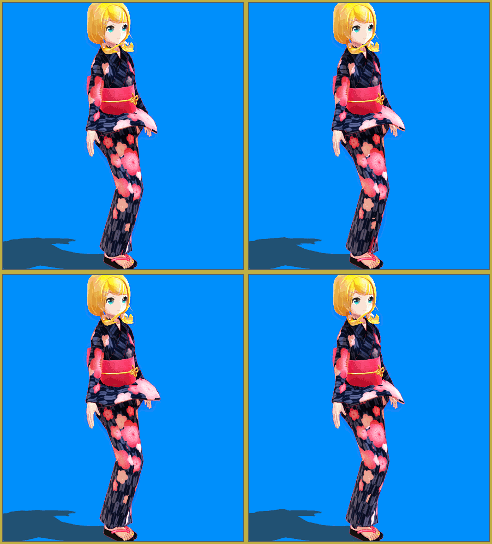
Model with Intersecting Physics Bodies
Edited Model with Parts from YYB and 金子卵黄


If the sleeve touches another body, it freaks out because the bodies intersect. Therefore, a ton of jiggling ensues. The pigtails are flying away because the pigtail body intersects with the upper body body. The skirt gets twitchy because the leg bodies are just too close. 

As an interesting note, just because bodies are intersecting in PMX Editor doesn’t mean they’ll glitch out automatically in MMD. Due to the simulated gravity in MMD, the parts intersecting in PMXE may not even touch in the default MMD pose. This model is one of those cases. However, in the GIF above you can see that once the bodies are near each other, glitches ensue.

How Do I Fix Intersecting Physics Bodies?

The solution to this problem depends on a multitude of factors. If the mesh was amazingly made but the person who made it was fuzzy on physics, you may just need to adjust the bodies… or redo the physics entirely.

In the case that the mesh was made in a way that makes it extremely difficult to accommodate physics bodies, then either you need to live without physics as my poor Camila’s skirt lives or edit the mesh.

If you don’t understand physics and you don’t know how to edit meshes… Then you either need to turn off physics or find different parts. The easiest way to turn off physics is in MMD itself. Under “Physical Operation”, choose “No Calculation”.
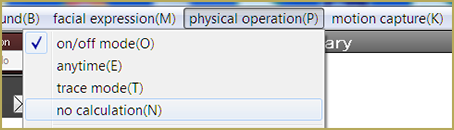
No Calculation Option in MMD

Physics in MMD are extremely difficult to get right. Don’t feel bad if you spend months yelling at the skirt plugin to just work already! Learning how to make models, or even just how to edit models, can be a really difficult path. But hopefully, someone read this and realized that it just took a few adjustments for their models to stop twitching!


– SEE BELOW for MORE MMD TUTORIALS…


— — —


– _ — –


Visit the LearnMMD.com Homepage! Plenty of Mikumikudance instruction and info!

More MMD Tutorials...

Enjoy the "camera Angles WEIRD in Anime" meme...

Enjoy the "camera Angles WEIRD in Anime" meme... This image is from The Slayers - NEXT, ...read more

Reader asks how to create MMD artwork... stuff like posing, camerawork?

A reader asks... Is there a tutorial on how to create MMD artwork, like those you ...read more

Learn MikuMikuDance in Small Steps! New LearnMMD Video Series

Learn MikuMikuDance in Small Steps. Where can I find easy-to-follow MMD instructions on YouTube? How ...read more

Apply Multiple Effects on an Entire MMD Model Using M4Layer Effect

How can I apply multiple effects to an MMD model? Can I use more than ...read more

MMD Plugin Manager... I Found a Treasure!

What sorts of MMD Plugins are there? MMD Plugin Manager? MMD Plugins. Plugin MMD. More ...read more

2025: Hatsune Miku is 18... but she is designed to be always 16 Years. Old by design and in reality!

Finally, in 2023, Hatsune Miku is 16 years old! but in August of 2025, she ...read more

Mae Blythe, MMD Tutorials, Physics Engine

Post navigation

Previous Post: Position stage near MMD coordinate axis center-line
Next Post: Download Reggie’s Cafeteria Table and Chair accessory!

Related Posts

  • Use M4Layer Effect to add multiple effects onto your MMD model.
    Apply Multiple Effects on an Entire MMD Model Using M4Layer Effect M4Layer Effect
  • Reggie's Adoration of FIVE MMD Models
    Reggie’s ADORATION of FIVE MMD Models -Downloads and Instructions "the making of" my video
  • Beamman’s Water v5 Effect needs Editing before you can use it! Beamman's Water v5
  • Weight Painting MMD models in Blender with MMD Tools Bandages
  • Half-Lambert Shader.
    How to Use the Half-Lambert Shader in MMD Half-Lambert Shader
  • Create 450-Frame MMD Animation from scratch!
    Create 450-Frame MMD animation from scratch! "the making of" my video

More Related Articles

Easily Make Realistic Hair Texture for MMD Models Mae Blythe
MMD Animation without Animating the model. Create MMD Animations WITHOUT Animating a Model Animation Shortcuts
Set up Kinect 360 motion capture for MMD! Kazuki Matsuoka
Behind the Scenes insights into my newest video "the making of" my video
MMD Model Hair Textures Made With . . . IMVU Tutorials?! Mae Blythe
Locomotion – MMD Trains: how to setup and move a train MMD Tutorials

Comment (1) on “Intersecting Physics Bodies Cause Glitchy MMD Models”

  1. J says:
    October 25, 2021 at 2:50 am

    Can someone help me? I don’t know where to ask for help but I have a problem with the physics interacting with an MME :( when I turn the MME off (which is ikBokeh) the physics is stable but when the MME is on the physics glitch like crazy T^T idk what to do, its also glitchs with Object luminous.. D:
    here’s a video to show the problem https://youtu.be/WzHPIeUiTI8 (the one with black bg has ikbokeh on)

    Reply

Leave a Reply Cancel reply

Your email address will not be published. Required fields are marked *

Download the latest version of MikuMikuDance!
See the MMD Step-by-Step instructions page!
Learn how to make your own MMD motions!
LearnMMD.com
  • Miku Short Film Featured
    Anime Shorts – Five minutes worth of animation, maybe three! Animation Shortcuts
  • Video Dojo Expo 2 CHAMPIONS are chosen! CONTESTS
  • MMD Project Source YouTube’s Baster037 provides links! Animation Resource
  • PMD Editor Basics, now in English – Modify Your MMD Models! Nuts & Bolts
  • MMD Outside Parent Setting Enables Bone Connecting Animation Shortcuts
  • Enable Physics in MMD 7.96 MMD Basics
  • Creating Hand IK Bones with the IKMakerX PMXE plugin Bones
  • Import models from Source engine based games (HL2, Portal, TF2 etc.) Blender

Copyright © 2022 Learn MikuMikuDance – MMD Tutorials – Free 3D Animation Software and Instructions..

Powered by PressBook Premium theme

Go to mobile version