
Skip to content
Learn MikuMikuDance – MMD Tutorials – Free 3D Animation Software

Learn MikuMikuDance – MMD Tutorials – Free 3D Animation Software

Download Free Animation Software – Let's Learn How to Do Everything!

  • Step-by-Step MMD instructions
  • DOWNLOADS
  • Troubleshoot, Fix MMD
  • Site Contents
  • Reggie Replies Q&A
  • Homework!
  • What IS MMD?
    • Download MikuMikuDance Newest Latest Version of MMD
  • “HOW TO”
    • Raycast RAY-MMD Effect Tutorials
  • BONUS PAGES
    • Why convert PMD models to PMX?
  • HALL of CHAMPIONS
  • Tutorial Categories
  • About
    • Privacy Policy
  • Toggle search form
  • Animation Inspiration: Motion Trace but Do your own thing! MMD Tutorials
  • Create and save a sexy, natural pose for your MikuMikuDance 7.39 models.
    Create, Save a Natural, Sexy Pose you can load in MikuMikuDance Functions-Copy-Paste-Expand
  • Top-10 Best “motion-maker” MMDers on YouTube Intro to MikuMikuDance
  • Change the Edge Line Color and Shadowing of your Models KibaSan
  • Teto replies!
    Fixing white models and accessories that don’t follow in PMXE Bandages
  • MMD First Steps Make your own motions from scratch Making Smooth Motions
  • Reggie's Adoration of FIVE MMD Models
    Reggie’s ADORATION of FIVE MMD Models -Downloads and Instructions "the making of" my video
  • Download Reggie’s Cafeteria Table and Chair accessory! New Stage Accessory

Sometimes you need a “motion scratchpad” while animating in MMD

Posted on June 6, 2020August 11, 2020 By Reggie_Dentmore No Comments on Sometimes you need a “motion scratchpad” while animating in MMD

I have created several MMD animations from scratch over the last few months and I have discovered this little trick:

Sometimes you need
a “motion scratchpad”
while animating in MMD

A Feature Article by Reggie Dentmore on LearnMMD.comI would be working along, trying to make an arm move just right as I also twisted the model’s body… and it “looks pretty good”… but I wonder how it would be if I did “THIS”, instead… ? … but I don’t want to lose the nice motion that I already have… and I could SAVE and then try my experiment… or I could load another model and copy/paste my existing motion onto THAT model, just to hold it in case I want to USE it again. … Get it?
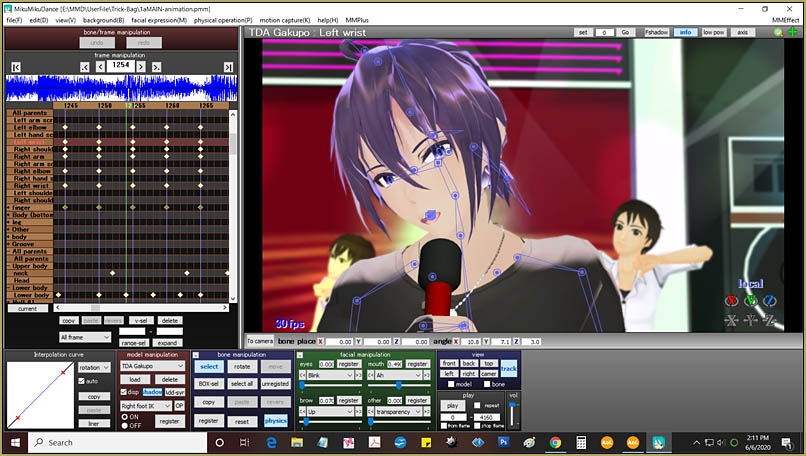
I used and invisible model as a motion scratchpad while animating my "Trick Bag" project.

My “Trick Bag” animation motion for Gakupo was created from scratch. I took my cue from Mahlazer’s “Feel the Sound” animation and created a registered frame every five-frames for Gakupo… and I kind of did in “waves”… I started with his basic “gyration” movement, which I copy/pasted so as to cover the entire 4600 frames… and then I went back in and made tweaks and changes to it for each time I needed to bring the mic up to his face, or each time I needed him to turn or gesture to the audience… and SOMETIMES, I needed to redo or recreate a portion of the motion. It occurred to me that I could copy/paste some of the best bits into an off-stage model… and so have that bit available, again, if I needed it.

Load an invisible model…

So, I loaded another Gakupo model and unchecked his “Display” checkbox. It was, like, a TOTAL FREEDOM having that guy available as a scratchpad. I could paste bits of a motion segment onto him for safe-keeping while I experimented with new ideas… and if I decided the experiment wasn’t working, I could delete those new diamonds, visit my “scratchpad Gakupo” and copy the old diamonds BACK, again.

Same idea with my “Dream Lover” animation…
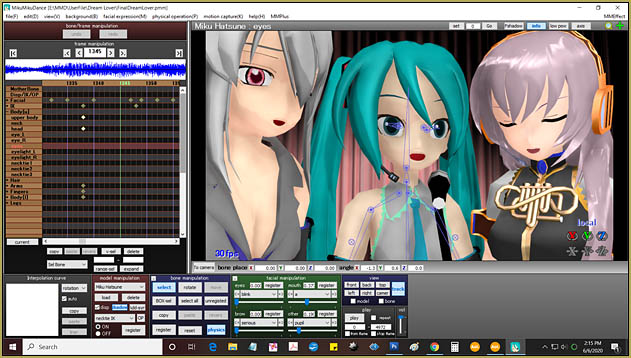
I used and invisible model as a motion scratchpad while animating my "Dream Lover" project.

My “Dream Lover” video was created completely from scratch and, again, I had an invisible “Scratchpad Miku” where I could “jot down” bits of motion that I could always copy/paste, again as I needed them. … With all three of my models being the basic Animasa models, I could copy/paste the same motions back and forth between the three models knowing they’d work properly. … I felt more in-control of my operation as I  used my “scratchpad”.

Not anything more to say…

The scratchpad idea is a simple one… helpful and easy to do.

Have fun with MikuMikuDance!


– SEE BELOW for MORE MMD TUTORIALS…


— — —


– _ — –


Visit the LearnMMD.com Homepage! Plenty of Mikumikudance instruction and info!

More MMD Tutorials...

Enjoy the "camera Angles WEIRD in Anime" meme...

Enjoy the "camera Angles WEIRD in Anime" meme... This image is from The Slayers - NEXT, ...read more

Reader asks how to create MMD artwork... stuff like posing, camerawork?

A reader asks... Is there a tutorial on how to create MMD artwork, like those you ...read more

Introducing MMD model 1052C China Qipao Miku

Where can I download MMD model 1052C dancers? I want the 1052C China Qipao Miku ...read more

Download Jomomonogm's Snow Miku 2019 for MMD, a most unusual model!

Where can I download Jomomonogm's Snow Miku 2019? What is so unusual about this Snow ...read more

MMD animation made-from-scratch Forgotten Vocaloid Mew Rags on Reggie's MMD Videos

How do I make my own MMD animation from scratch? How do I start my ...read more

Rediscover your old MMD Animations: Love them again!

Rediscover your old MMD Animations: Love them again! https://youtu.be/P4b3todZMUI A labor of love... Remember how it was when ...read more

Animation Shortcuts, MMD Basics, Reggie Dentmore

Post navigation

Previous Post: VDE-4 Champion: YamiMori
Next Post: Beach-side Pool-side “Hot August Nights” – Video Dojo Expo FIVE

Related Posts

  • Enjoy the “camera Angles WEIRD in Anime” meme… Animation Shortcuts
  • Crazy Animation Creation yields fun video and good practice! "the making of" my video
  • Fia Phoenix’s Deviantart Spotlight Downloading New Models
  • Knock-out the Background as you Render to Picture in MMD Add Background Pictures and AVI
  • Download the beautiful LUKA MEGURINE HIPSTERBLACK by PS-2002
    Download the beautiful LUKA MEGURINE HIPSTERBLACK by PS-2002 "the making of" my video
  • MMD Camerawork makes your video exciting!
    No more boring MMD Camerawork – Keep it moving! Camera Motion

More Related Articles

Using the AdultShader Effect In MikuMikuDance Adult Shader effect
MME FunyaFunya Effect adds wavy psychedelia to your MMD scene! FunyaFunya Effect
“The making of ” any of my videos starts with these considerations… "the making of" my video
GaussianVariable MME Effect Blurs your entire scene! GaussianVariable
modified MMD effects can yield NEW surprises! Modified MME Effects Files yield NEW Effects for MMD! Customize MME effects
Have FUN with MikuMikuDance! Random Thoughts & Visions

Leave a Reply Cancel reply

Your email address will not be published. Required fields are marked *

Download the latest version of MikuMikuDance!
See the MMD Step-by-Step instructions page!
Learn how to make your own MMD motions!
LearnMMD.com
  • When MMD 7.39 crashes you lose any unsaved changes. Save Often!
    MMD Crashes when Rendering to AVI Making Videos - Rendering to AVI
  • What!
    How to Load Models, Motion, and Music Data into MikuMikuDance ARIZONA
  • Exporting VSQX to VSQ for MMD! Kazuki Matsuoka
  • RAY-MMD: A method to get great results fast and easy!
    RAY-MMD: A method to get great results fast and easy! MMD Tutorials
  • MikuMikuDance Tutorials MMD Tutorials on LearnMMD.com MMD Tutorials
  • Shading China Dresses
    Shading China Dresses Using Advanced Shader Techniques Advanced Shader Technique
  • Adjust downloaded motions to fit your MMD models Animation Shortcuts
  • MMD Theme Video “Let’s Dance NOW!” Describes Why We Love MMD Intro to MikuMikuDance

Copyright © 2022 Learn MikuMikuDance – MMD Tutorials – Free 3D Animation Software and Instructions..

Powered by PressBook Premium theme

Go to mobile version