



Are there keyboard shortcuts in Miku miku Dance? How do I move my view of the stage in MMD? What are the keyboard shortcuts in MikuMikuDance?
MikuMikuDance Keyboard Shortcuts MMD
MikuMikuDance has some keyboard shortcuts that 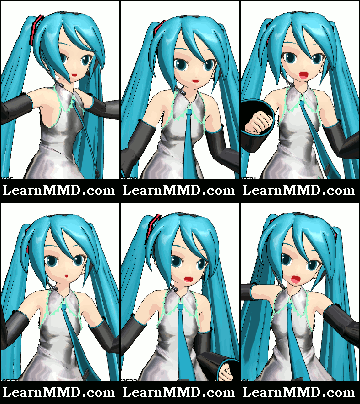 make your animation work less tedious. Instead of flying your mouse/cursor all around the screen, you can often click a key so your cursor can stay on-stage.
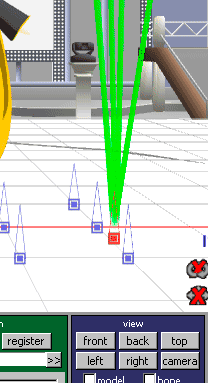
ENTER can be pushed when you want to register a bone position. It is fastest to hover your left hand over the Enter key as you move your model. Push enter to register positions.
LEFT/RIGHT ARROWS can be used to advance or retard the Frame Counter. Leave your cursor on-stage as you advance the frame counter to the next point of interest.
DELETE erases a highlighted diamond, or group of diamonds.
CONTROL Z often will undo the previous action. Experiment with this because it only works in some situations. I have not identified exactly when it will work.
RIGHT CLICK the mouse and drag the cursor while on-stage to rapidly shift your view. While in MODEL Mode this is a handy way to quickly examine all sides of your model. In CAMERA/LIGHTS Mode it is a quick way to shift your camera position. Click REGISTER to save the new camera position.
CENTER CLICK the mouse and drag the cursor for gentle up/down/left/right view changes. Again, In Model Mode you can move across your field of view. In Camera Mode you are moving your camera to a new position which you can Register.
Finally, there are shortcuts to all of the drop-down menus across the 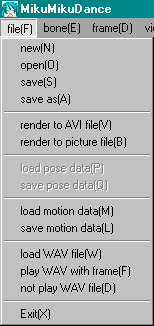 top of the window. Press and hold ALT key while you type the letter next to the menu you want to open. One handy use is to SAVE without moving your cursor away from the action. Just press and hold ALT and push F to open the file dropdown, let go of ALT and F and then push S to save. (Remember to save often as you work “:o).
If you know of more keyboard shortcuts, please leave a comment or email a note to me. Have fun with MMD!
Be sure to read This shortcuts article … Plenty of info!
– SEE BELOW for MORE MMD TUTORIALS…
— — —
– _ — –


Found this: https://www6.atwiki.jp/vpvpwiki/pages/12.html#id_9dd4e9ac
I found some too :
“R” = Multiply of bone position.
“P” = Play.
“G” = Redo.
“V’ = Your model will be transparent.
“B” = Change the background (only white and balck background).
Thank you for that info!
I’ve also found “C” useful. It toggles the select mode. I use it for escaping from rotation or move mode.
Thank you for that note! … and thanks for following us here at LearnMMD.com!
Hi it’s me again. I think I have some keyboard shortcuts that you don’t have already listed. So let’s do this!
1. “A” KEY =lSELECT ALL “this saves lots of trips back and forth with the mouse. To the bone manipulation menu\box. Where the SELECT ALL button is. And your model so you can keep your mouse pointer on your model almost all the time.
2. “S” KEY= UNRGISTED “once again this saves lots of mouse time between your model and the bone manipulation. menu/box. I’ve never used UNRGISTED. And I don’t know what really it does. But I’m pretty sure this is the shortcut to it”
3. “Z” KEY= MOVE “this one’s a real timesaver! Once again it keeps your mouse on your work and not in the bone manipulation menu\box. When you select an IK bone. Just press the “Z.” KEY. And then left click and
drag with your mouse and move the IK bone without ever leaving it”.
4. “X” KEY=ROTATE this is another super timesaver keeping your mouse on you work. And once again not in the bone manipulation box/menu.. this makes that circle thing. That rotates and moves only certain bones I called non-IK bones. Which I guess are all the other bones besides the IK bones. So you can move those non-bones without moving your pointer very far. (PS there’s a perspective thing to this. that helps a lots but I can’t explain it right now. It’s not complicated to do it’s just hard to find the words to describe it so I’ll get back to you on this part later) :)
5. “D” KEY= APPLIED CENTER POSITION. I know it’s in the frame drop-down menu. I don’t know much about this one it’s just a shortcut.
6. “TAB” KEY= “I think is one of the most awesome timesavers! It instantly moves you through all your different models on the screen. And into your camera/light/assessor menus.And any models you have load into your model manipulation menu/box. For example say you’re working with Rin Haku and you have Rin wave hello to Haku. So instead of going down to your model manipulation menu/box. and selecting Haku. Just press the “TAB” KEY and Haku will be selected. And then you work with Haku instantly”
“I’ve got some more but I’m tired of typing right now so goodnight”
Hi it’s me checking to see your keyboard shortcuts have the shortcuts I know it doesn’t seem to have them I will Look some more just to be sure. “I don’t want to step on anybody’s toes you know” :)