





We get questions …
… and we answer them!
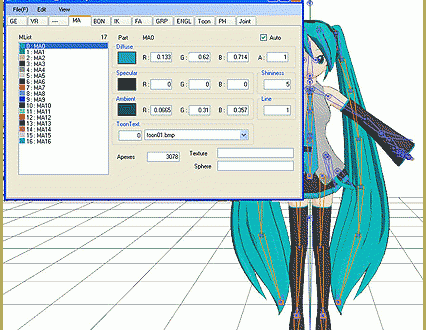
Adding a skirt to a model using PMD Editor
Is there a way to select only bones for the clothes and not the body?
A reader emails:
—–Original Message—–
From: Reader
To: reggiedentmore
Sent: Mon, Feb 16, 2015 5:09 pm
Subject: PMX Editor and clothes
Hello! so i saw you welcomed questions, and i have one that’s put a stop to my experiments.
so i’ve fairly learned my way around the editor(english version), and am getting rather good at making up the base model…changing hair,clothes, skin, etc. but my issue is now when i import a file of clothes, it overlaps the model, and the models bones.
so if i want to move say a skirt and its bones to fit the model i’m using, i’m unable to just select the skirt bones, and can’t keep it with the skirt the way it should be. is there a way to select only bones for the clothes and not the body?
thank you very much for your time and any help you can offer!
 I replied …
From: reggiedentmore
To: Reader
Sent: Monday, February 16, 2015 7:13 PM
Thanks for your question … Thanks for reading LearnMMD.com!
I am no PMDE guy … but a few of us are! … I will forward your question and get you an answer!
— Reggie
I forwarded the note to a few of our teammates whom I know to be active PMDE users…
 … and KyokiDoesMMD was the first to respond:
From: KyokiDoesMMD
To: Reggie Dentmore
Sent: Mon, Feb 16, 2015 8:26 pm
Subject: Re: PMX Editor and clothes
Unlike mesh, bones can’t have certain “layers” where you can select them separately. When merging models, the bones are also merged with the model’s main skeleton. However, this doesn’t mean that you can’t select them separately. You can select like usual, then hold down the ctrl key while doing so to deselect the unwanted bones. Holding down shift does the opposite (i.e. adding another part to the selection). This also works on other elements like mesh, physics and joints.
Another solution is to go to the bones tab on the other window and select the bones you want, while holding down the shift key to add more to the selection. (This doesn’t work if PMXE is on PMD mode)
Hope this helps!
 … followed by an answer from our KillerBeer:
From: KillerBeer
To: reggiedentmore
Sent: Tue, Feb 17, 2015 3:38 am
Subject: Re: Fwd: PMX Editor and clothes
When adding a skirt model to a make sure you have “Merge with the same name bone” option checked in the “addition selection” panel. As Kyoki said, skirt’s bones have to be *merged* with body’s ones, so rather than have two “lower body” bones in a merged model, parts of a mesh being added would be mechanically reassigned to the bone already present. Of course, proportions of these two models may not match more often than not, so the skirt has to be adjusted.
In the PMDView window’s toolbar, press a Vert/mat button to open a respective panel. Select “Materia[ls]” option there, and check only newly added materials in the list (after you save and load the merged model, they will be automatically renamed into a common pattern, but right after merging, they are easy to spot). Then, in the PMDView, select everything (Ctrl-A) and you’ll see that instead of selecting every part of a model, only those of a skirt will be highlighted. Use the “astrolabe tool” to drag and resize the skirt to match the body.
Sometimes even after what looks like proper resizing, some body parts of the original model may protrude through clothes. Then you’ll have to fine-tune it either by pulling pieces of cloth farther from the skin, or, vice versa, collapse parts of the skin inside the model. The second approach has the advantage that even if you mangle the bodypart completely, turning thighs into sticks, it won’t be noticeable from outside. If you choose it, deselect skirt’s materials and instead select only those that are responsible for a body under it. By selecting “Surface recording synchronization” button in the Vert/mat panel and turning unselected parts invisible, you can easily figure which is which.
Now you can select parts of the model and move them easily. I’d recommend to switch PMDView’s mode selector (below) to “Wire+(P)” and the selection mode (upper toolbar “Range” into facets selection (the triangle) instead of vertices selection – for this particular task it gives you better perspective on what you’re doing.
You can read more about it in “Rig a model” and “Editing model materials” articles on LearnMMD. Hopefully, you’ll find there some new information to consider.
From: reggiedentmore
To: Reader
Sent: Tuesday, 17 February 2015, 5:50
Subject: Fwd: PMX Editor and clothes
Reader … I have these answers …
Reader had Her OWN Easy Answer…
… and … it worked!
From: KillerBeer
To: reggiedentmore
Sent: Tue, Feb 17, 2015 10:22 pm
Subject: Fw: Fwd: PMX Editor and clothes
I’m forwarding to you reader’s answer. While she did things the opposite way from proposed, her way works too and may be added to the article as an easier to understand solution to some of readers. As a Chinese proverb used to say, “No matter if it is a white cat or a black cat, as long as it can catch mice” :D.
From: Reader
To: KillerBeer
Sent: Tuesday, 17 February 2015, 18:40
Subject: Re: Fwd: PMX Editor and clothes
thank you very much for the answers! i just want to say unfortunately they didn’t help. i was able to figure out a solution though!
just for future reference for anyone who might have the same problem, what i did was open my model in PMXE, and delete all of the body bones for the model. then i imported the dress, and did what i had to to make it fit on the model. then i deleted the materials for the model, and saved the file with just the dress and bones.
then i imported the new file on the model with bones, and it fits perfectly.^^
Wow … a good question … and detailed answers …
LearnMMD is here to help!
– SEE BELOW for MORE MMD TUTORIALS…
— — —
– _ — –




I have PMD and PMX but for PMD I keep geting a Direct3dx9 error stating I don’t have it on my laptop when I do.
it could be the edge of some other missing DLL files, as well. Try the Update DirectX 9c link on the LearnMMD Downloads page. Your system may say you already have a newer version installed… but OK the update to get some old DLLs that MMD needs.
Ok I tried doing that and still doesn’t work……
how do i make a model?
Make a model? complicated subject… Search Deviant Art for some clues… http://www.deviantart.com/
is there going to be five nights at freddy`s mmd?
Plenty. Search YouTube or deviantArt for it.