Skip to content
Learn MikuMikuDance – MMD Tutorials – Free 3D Animation Software

Learn MikuMikuDance – MMD Tutorials – Free 3D Animation Software

Download Free Animation Software – Let's Learn How to Do Everything!

  • Step-by-Step MMD instructions
  • DOWNLOADS
  • Troubleshoot, Fix MMD
  • Site Contents
  • Reggie Replies Q&A
  • Homework!
  • What IS MMD?
    • Download MikuMikuDance Newest Latest Version of MMD
  • “HOW TO”
    • Raycast RAY-MMD Effect Tutorials
  • BONUS PAGES
    • Why convert PMD models to PMX?
  • HALL of CHAMPIONS
  • Tutorial Categories
  • About
    • Privacy Policy
  • Toggle search form
  • MME: Less is More… Select only those that you need. Cook Torrence effect
  • MMD Keyboard Shortcuts Make MikuMikuDance Easier Keyboard Shortcuts
  • Download VMDSpectrum Analyzer to create VMD files MMD Tutorials
  • You can enlarge or reduce and Accessory by adjusting the Si value in MikuMikuDance.
    Use Accessory Manipulation fields to position/adjust Accessories Accessory Manipulation/Adjust
  • Making POV Camera Shots in MikuMikuDance ARIZONA
  • KiraKira-sparkleV2 beautiful colored sparkles.
    KiraKira-sparkleV2 MME Effect adds COLOR to KiraKira! KiraKira-SparkleV2
  • Learn to Edit MMD Effects by Editing Raycast Materials Bandages
  • Video Dojo Expo 4 CHAMPIONS are CHOSEN! Video Dojo Competition

My Top 6 Favorite Miku Models!

Posted on February 25, 2017August 14, 2018 By GloriaTheAnimator No Comments on My Top 6 Favorite Miku Models!

A feature article by GloriaTheAnimator!This is a list of my own personal favorite Miku models. I hope you like them, too.

My Top 6 Favorite Miku Models

I have ranked these models by their qualities; like Rig, Facials, Textures, and etc.

Raycast

If you want to know which Shader is used in these pictures… it’s Raycast!

First we have  by Rummy DmikuV3 (PokkapokaP)

I really like this model cuz it’s cute and it has alot of spheres (spa files) and those spa on the model look amazing!

My Rating:

  • modeling 8
  • physics 6
  • textures 7

NUMBER 2

Appearance Miku by Mamama
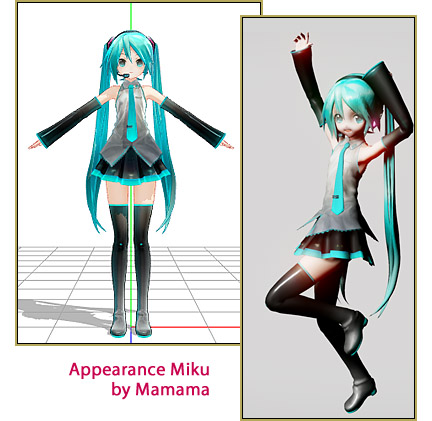
It’s a really cute model. I like it. It is really popular for pvs and mvs too… one of the more well known models in the MMD Community.

My Rating:

  • modeling 7
  • physics 8
  • textures 7

NUMBER 3

TDA Miku by TDA (Kanekoranou edit)
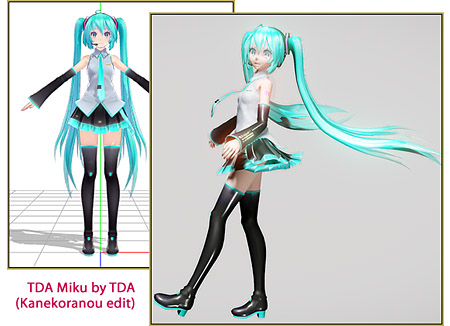
It is the most popular type models in the whole MMD Community and, in my opinion, it is kinda over-used. It is pretty and some of them are high quality they are not bad, but remember that there are allways other pretty models.

My Rating:

  • modeling 7
  • physics 7
  • textures 8

NUMBER 4

PDX Snow Miku 2017 by ???
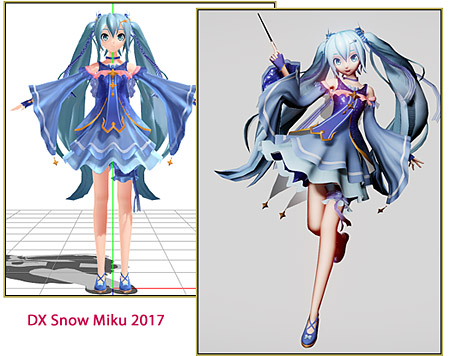
I really like PDA models. they are really nice and of OK quality… and i really like the designs of them. Go project diva!…  make more pretty models.

My Rating:

  • modeling 8
  • physics 8
  • textures 7

NUMBER 5

yyb miku

It is original, not over-used, beautiful, and high quality. I just really love yyb models; they are so quality!

My Rating:

  • modeling 8
  • physics 8
  • textures 8

AND MY FAV ONE…

NUMBER 6

MikuV4X by Digitrevx
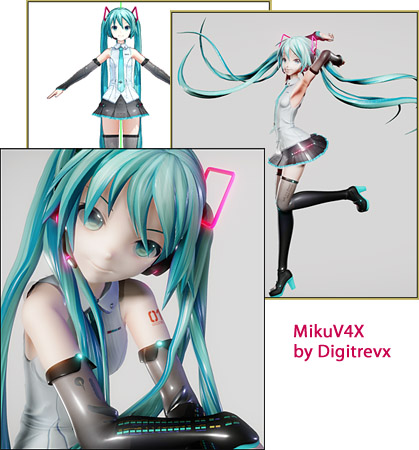
This is one of my favorite MMD models of all time!

It has amazing physics, amazing textures, and I love how accurate it is to the original illustration… and it is really pretty… it is perfect! Keep on making more amazing models Digitrevx!

My Rating:

  • modeling 10
  • physics 10
  • textures 10

Well, that’s all for now!

Next article of mine will be about ray cast. Bai bai, fellas!

Have fun with MikuMikuDance!


– SEE BELOW for MORE MMD TUTORIALS…


— — —


– _ — –


Visit the LearnMMD.com Homepage! Plenty of Mikumikudance instruction and info!

More MMD Tutorials...

Rediscover your old MMD Animations: Love them again!

Rediscover your old MMD Animations: Love them again! https://youtu.be/P4b3todZMUI A labor of love... Remember how it was when ...read more

Create MMD Abstract Art from Low-Res Videos!

This is an idea I have been playing with for the last few months... Create MMD ...read more

Recoloring MMD's Control Panel GUI Interface

Hi and welcome to your personal MMD care and color service, where I give you ...read more

Culling unseen MMD model parts optimises computer assets (PART 2)

How can I make my MMD run faster? What if removing parts using Subset-Extract isn’t ...read more

Optimise computer assets by culling unseen MMD model parts

How can I make my MMD run faster? How can I optimise computer assets as ...read more

Good MMD videos require Inspiration, Vision, Planning: The Lament of Okada's Ghost

The Lament of Okada's Ghost... The secret to making good MMD videos All MMD videos have three ...read more

GloriaTheAnimator, My Favorite Models, Random Thoughts & Visions Tags:learnmmd, mikumikudance, new to MMD

Post navigation

Previous Post: Posing MMD Models Using Reference Images
Next Post: How to make 360 degree MMD videos on YouTube.

Related Posts

  • Toon Shader modifies shadows and highlights! GloriaTheAnimator
  • MME Balloon Effect (And what I found out) Balloon Effect
  • The Art of Moe and the genre’s backstory. Random Thoughts & Visions
  • Recommended Software Library for MMDers Animation Shortcuts
  • Inspired by MMD, Draw Miku blending 2D and 3D Art! MMD Fine Art
  • Hatsune Miku “LIVE” on David Letterman’s ‘The Late Show’ Random Thoughts & Visions

More Related Articles

LearnMMD.com _ MikuMikuDance MMD Tutorials No need to “re-download” again and again… Random Thoughts & Visions
Miku Expo 2014 New York – learnmmd.com coverage NeKo MANiac aMMDy
LearnMMD.com _ MikuMikuDance MMD Tutorials Trouble Keeping MMD Faith When Those Around You Don’t Keep the Faith-MMD Credits/Sharing
Create MMD Abstract Art from Low-Res Videos! MMD Tutorials
Making it Personal MMD MMD Basics
What kind of laptop should I buy for running MMD? Random Thoughts & Visions

Leave a Reply Cancel reply

Your email address will not be published. Required fields are marked *

Download the latest version of MikuMikuDance!
See the MMD Step-by-Step instructions page!
Learn how to make your own MMD motions!
LearnMMD.com
  • Audacity® 2.0 Audio Editor easily converts mp3 to WAV files for MMD Music and WAV Files
  • MMD animation from Scratch “The Wind-up and the Pitch!” "the making of" my video
  • Adjust downloaded motions to fit your MMD models Animation Shortcuts
  • Gakupo sings "Trick Bag" - VDE-3 Entry!
    Step 1: VDE-3 “Gotta Sing… Gotta Dance!” Entry Creation… YouTube Music Approval CONTESTS
  • MMD First Steps Make your own motions from scratch Making Smooth Motions
  • Troubleshooting MMD errors and setting up d3dx9_32.dll error
  • Soboro's MotionBlur3 effect tutorial
    MotionBlur3 Effect adds visual reality to your MMD videos and stills! Reggie Dentmore
  • Delete Miku and Learn About the Sample Dance Stage Lights Dummy Bones

Copyright © 2022 Learn MikuMikuDance – MMD Tutorials – Free 3D Animation Software and Instructions..

Powered by PressBook Premium theme

Go to mobile version