

Skip to content
Learn MikuMikuDance – MMD Tutorials – Free 3D Animation Software

Learn MikuMikuDance – MMD Tutorials – Free 3D Animation Software

Download Free Animation Software – Let's Learn How to Do Everything!

  • Step-by-Step MMD instructions
  • DOWNLOADS
  • Troubleshoot, Fix MMD
  • Site Contents
  • Reggie Replies Q&A
  • Homework!
  • What IS MMD?
    • Download MikuMikuDance Newest Latest Version of MMD
  • “HOW TO”
    • Raycast RAY-MMD Effect Tutorials
  • BONUS PAGES
    • Why convert PMD models to PMX?
  • HALL of CHAMPIONS
  • Tutorial Categories
  • About
    • Privacy Policy
  • Toggle search form
  • VDE-3 Champion: Katherine Duncan Video Dojo Champions
  • Strong Soundtrack Offers 3-D Animation Shortcuts! "the making of" my video
  • New MMD animation finished except for the animation! "the making of" my video
  • o_ShaderCustomSet_v0_3 effect applies gentle color modification MMD Tutorials
  • MMD Camerawork makes your video exciting!
    No more boring MMD Camerawork – Keep it moving! Camera Motion
  • Best Way to Run MMD on a Mac Kazumi
  • Download Jomomonogm's Snow Miku 2019
    Download Jomomonogm’s Snow Miku 2019 for MMD, a most unusual model! "the making of" my video
  • Go to my DOWNLOADS PAGE to get your free Cropping/Transition Panel!
    New Cropping-Transition Panel Ready to Download! Transition Panel (it's not an effect)
LearnMMD.com _ MikuMikuDance MMD Tutorials

No need to “re-download” again and again…

Posted on April 26, 2019May 23, 2019 By Reggie_Dentmore 1 Comment on No need to “re-download” again and again…

No need to “re-download” again and again…

A Feature Article by Reggie Dentmore on LearnMMD.comI downloaded an effect and it doesn’t work. Should I re-download it? I redownloaded my model and it still doesn’t work. I have reloaded MMD THREE times and I still get the missing DLL error, should I download it, again??

Download, again? … No.

One of the common comments we receive is “I downloaded it 8 times and it still doesn’t work!” Please don’t drive yourself crazy doing that. Know that if you successfully download a ZIP or RAR folder, you have it… that’s it: you have it.

The very “process” of downloading double-checks itself during the download to be sure that the transferred data is complete and accurate. If you see “download failed” or “download incomplete”, then, yes: try to re-download the folder. If you have a successful download without an error statement on your computer: You have it… it is complete. An attempt to re-download will give you the same folder, again.

You will need to extract (unzip) that ZIP or RAR folder. We recommend you download and use Bandizip to unzip those folders. Bandizip keeps Japanese unicode intact.

If the contents of the zip do not work for you, do not redownload the ZIP… the ZIP is fine. Instead, Sometimes you need to UNBLOCK a new zip folder.look for “why” the program or model didn’t open for you.
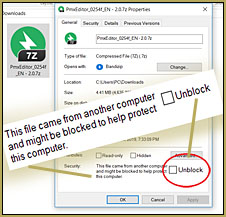
SOMETIMES a ZIP folder is “Blocked” which keeps it from unzipping for you. RIGHT-CLICK that zip folder and click to see Properties… and in that pop-up menu, Check that UNBLOCK check-box. NOW unzip, EXTRACT the zip and see if it works for you.

“I got an error message.”

That is another often-seen comment: “I keep getting error messages.” … Well… So?… What do those messages say? I cannot help you without knowing what the error messages say.

Often, your computer or the program you are running will give you an error message. Don’t just close the error message. That message is an IMPORTANT clue as to what is happening. Write down that message or click the “Print Screen” key on your keyboard to make a screen capture of the error statement… and then open PAINT and Paste to see that screen capture… SAVE it to your desktop so you can reference that image as you attempt to solve your system’s problem.

Best of luck with MikuMikuDance!

Leave comments to ask questions. We read ’em all and hope to help you.


– SEE BELOW for MORE MMD TUTORIALS…


— — —


– _ — –


Visit the LearnMMD.com Homepage! Plenty of Mikumikudance instruction and info!

More MMD Tutorials...

Rediscover your old MMD Animations: Love them again!

Rediscover your old MMD Animations: Love them again! https://youtu.be/P4b3todZMUI A labor of love... Remember how it was when ...read more

Create MMD Abstract Art from Low-Res Videos!

This is an idea I have been playing with for the last few months... Create MMD ...read more

Starting-out Using MMD Reader discovers missing elements.

A reader commented: Is it against any rules to sell an All-in-1 software pack in different ...read more

Total Success Running MMD on Win 10 64-bit! MikuMikuDance

I ordered a "gamers" 64-bit Windows 10 PC from a refurbisher on eBay. It arrived ...read more

MikuMikuDance FREE Animation Software & Instructions

MikuMikuDance FREE Animation Software & Instructions MikuMikuDance Free Animation Software is available for free download from ...read more

Zero-to-450.com: REALLY Learn MikuMikuDance!

• How much "story-telling" can you DO in only 15-seconds? • How much animation can you ...read more

Random Thoughts & Visions, Reggie Dentmore

Post navigation

Previous Post: RAY-MMD: Creating your own custom sky box
Next Post: Quick-Start Basics of MMD to get you started!

Related Posts

  • Customized Skydome replace stages, enhance MMD animations MMD Tutorials
  • Barbarians disregarding creative rights destroy MMD for all of us. Keep the Faith-MMD Credits/Sharing
  • Show the Love: Melanie’s “Ring Around the Moon” CONTESTS
  • LearnMMD.com _ MikuMikuDance MMD Tutorials
    Trouble Keeping MMD Faith When Those Around You Don’t Keep the Faith-MMD Credits/Sharing
  • create easy dance motions in MikuMikuDance... beginner tutorial
    Create MMD Dance Motion from Scratch – a beginners guide Creating Motions
  • Smooth camera moves and soft focus make for smooth scene transitions in MMD 7.39 . LearnMMD.com
    Smooth Scene Transitions featured in new MMD Departures video "the making of" my video

More Related Articles

With some practice, Rin can dance the sample dance as well as Miku! There Can Be Frame Data Ghosts remaining after Deletion Making Smooth Motions
Bandizip® keeps Japanese file names intact when Extracting ZIP folders Bandizip
MMD MME Beamman Nameplate Effect MMD Tutorials
Miku Love Featured image Making of my new Looked at Love – Both Sides Now animation "the making of" my video
MikuMikuDance Home Page VPVP is worth a visit! Intro to MikuMikuDance
MMD Camera Work makes motions fit the song. MMD Camera Work made the motion fit the song! "the making of" my video

Comment (1) on “No need to “re-download” again and again…”

  1. KillerBeer says:
    May 6, 2019 at 5:13 am

    Insanity: doing the same thing over and over again and expecting different results.
    — Albert Einstein

    (…of course, the same definition goes for “exercise” :P)

    Reply

Leave a Reply Cancel reply

Your email address will not be published. Required fields are marked *

Download the latest version of MikuMikuDance!
See the MMD Step-by-Step instructions page!
Learn how to make your own MMD motions!
LearnMMD.com
  • Continuation of previous article's dispute!
    Beamman GSW Gauge for Game-like HP Health Points Display Beamman's GSW Gauge
  • Toon Shader modifies shadows and highlights! GloriaTheAnimator
  • Save to the Desktop with ALL FILES selected.
    Opening Japanese Models in MikuMikuDance – Sometimes they don’t work! Applocale / 7-Zip
  • Export Import MMD Models Using Blender and PMXE Blender
  • I don't have an Alice model... but at least Neru seems to like it!"
    Create Simple Accessories Using PMD Editor KyokiDoesMMD
  • FeaturedImage-Franken-reference
    Making Your First Model Part 1 – Franken-Reference Blender
  • New MMD animation finished except for the animation! "the making of" my video
  • Animation Fade helps MMD scene transitions Animation Shortcuts

Copyright © 2022 Learn MikuMikuDance – MMD Tutorials – Free 3D Animation Software and Instructions..

Powered by PressBook Premium theme

Go to mobile version