
Skip to content
Learn MikuMikuDance – MMD Tutorials – Free 3D Animation Software

Learn MikuMikuDance – MMD Tutorials – Free 3D Animation Software

Download Free Animation Software – Let's Learn How to Do Everything!

  • Step-by-Step MMD instructions
  • DOWNLOADS
  • Troubleshoot, Fix MMD
  • Site Contents
  • Reggie Replies Q&A
  • Homework!
  • What IS MMD?
    • Download MikuMikuDance Newest Latest Version of MMD
  • “HOW TO”
    • Raycast RAY-MMD Effect Tutorials
  • BONUS PAGES
    • Why convert PMD models to PMX?
  • HALL of CHAMPIONS
  • Tutorial Categories
  • About
    • Privacy Policy
  • Toggle search form
  • Quick-Start Basics of MMD to get you started! GloriaTheAnimator
  • MME effect Kamitachi – Night breeze silhouette shader of Kama Kamitachi - Silhouette
  • Typical MikuMikuDance MMD Download Project: Lucky! "the making of" my video
  • Making it Personal MMD MMD Basics
  • Beamman’s BeamCharge MME Effect Beamman's BeamCharge
  • Ray-MMD environment controls create MMD dreamscape MMD Tutorials
  • Pose characters in PMX Editor and export as OBJs for Poser .OBJ Object Files
  • Editing Effect Textures Creates Brand New Effects! Chestnutscoop
You might name this model's folde "Short_Kimono_Teto_by_Nanami".

Organize Your MMD Model Collection, Track Your Sources

Posted on May 31, 2012August 1, 2015 By Arizona 2 Comments on Organize Your MMD Model Collection, Track Your Sources

How do I organize my MMD models? Where do I put stages in MikuMikuDance? Where do MMD effects go? What goes in the Miku Miku Dance Accessory folder?A Feature Article by contributor ARIZONA on LearnMMD.com

Collecting is fun – Organization is a must!

There’s a world of MMD items out there … ready to download! When you begin do so, it is not long before you find yourself knee-deep in files and Name This model's folder: Teto_by_Tda to remember the designer's name. (stage: Shirakawa Village by SachiShirakawa)folders of all kinds. You need to create a “system” that lets you sort and find your inventory of items. The old adage “A place for everything and everything in its place” certainly applies to your MikuMikuDance collection.
The User File has 7 subfolders (Accessory, Background, Model, Motion, Pose, Vsq, and Wave) plus 2 samples. You place your downloads in their individual folders. Putting your stuff into their folders like this also makes backing up your files a more streamlined process.  You shouldn’t co-mingle your models with your stages and effects; this could lead to frustration, angst, and tears (unless you’re especially Emo, then by all means knock yourself out).

You can list your models by:

Name: All of your Miku models in one Miku folder. Teto models in a Teto folder and so forth.

MMoDler: Lat, Nanami, Planty-P, Nakao, Tda, would have unique folders.

Association: Touhou, Idol master, Utau, Hetalia models would have their own folders.

Effects, stages and props can be You might name this model's folde "Short_Kimono_Teto_by_Nanami". (stage: Shirakawa Village by SachiShirakawa)placed in sub folders in the Accessory folder (These can be further divided into: Furniture, Microphones, Vehicles, Weapons, Suppositories etc).
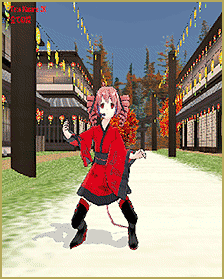
If you aren’t sure where to place stuff like effects, you could probably find out by looking at the Read Me file contained in a lot of downloads. A good rule of thumb is that unless it is a Model, Motion, Pose, Vsq, or Wave then you can put it in the Accessory file. This is by no means a hard and fast rule but it works out.
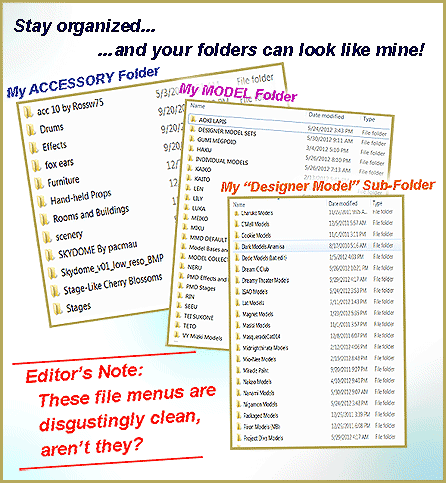
The author's data Folders show a good deal of organization.

On a related side note, In my User File, I recently added a folder called “New Downloads” and I throw all my new downloads there. This way I canThis is Chimera_Teto_by_Animasa shown using the Manga Shader Effect. (stage: Shirakawa Village by SachiShirakawa) test drive the data before I organize it or toss it, without having to go all around my system (I’m just lazy that way). I can also rename the file to an English name and notate who made the data. Example: Pinky Cutie-pie Mr. Face Ver. 1.1 by Ri-DiK-You-Lus.
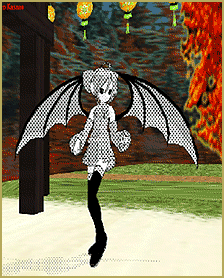
Another habit I’ve recently started is taking a screen shot of models, stages and accessories. Unless you have a photographic memory, the only way you can know what a particular file looks like, is to actually open it up in MMD. I’m starting to do this with my older files, it is a migraine-and-a-half but worth it in the end.

How you organize your collection is purely up to you, as long as it works. If you have to spend 2 to 10 minutes looking for something, then you should re-think your methodology.

Remember MMD is fun! Looking for stuff is not.

Have fun with this.


– SEE BELOW for MORE MMD TUTORIALS…


— — —


– _ — –


Visit the LearnMMD.com Homepage! Plenty of Mikumikudance instruction and info!

More MMD Tutorials...

Delete Miku and Learn About the Sample Dance Stage Lights

How do I use the stage lights. Use Dummy Bones to move the stage lights. ...read more

Collecting MMD Models, Music and Accessories for Beginners

How do you download MikuMikuDance models? How do you download music for MMD? How do ...read more

Load Camera Motion Data VMD files using the File Menu in MMD

How do I load camera motion data in MMD?  How do I make MMD camera ...read more

Add Interest: Place Multiple Models Onstage Using Mother Bones

What's a Mother Bone in MikuMikuDance? How do you use a mother bone in MMD? ...read more

MMD Mother Bones Allow Easy Dancer Model Movement From Stage Center

What are MMD Mother Bones in MikuMikuDance? Where is the Mother Bone in my MMD ...read more

Miku Miku Dance: Life Changing!

I am keeping my eyes open, now, more than ever. Just watch the world around ...read more

ARIZONA, File Management / Organization, Random Thoughts & Visions Tags:beginner, learnmmd, mikumikudance

Post navigation

Previous Post: Read Japanese READ ME Text Files with Notepad++, Google Translate
Next Post: Use Accessory Manipulation fields to position/adjust Accessories

Related Posts

  • You cannot use Box-Sel to select a portion of a model. You must selectthe entire MMD model.
    BOX-sel lets you select an entire model in MikuMikuDance ARIZONA
  • Dummy Bones allow you to customize your accessory manipulations!
    Using The Dummy Bone for MikuMikuDance Accessory Manipulation/Adjust
  • No MikuMikuDance MMD in India… can it be? Random Thoughts & Visions
  • Using Subset-Extract to Customize Your Models. ARIZONA
  • A girl named Miku Hatsune… Random Thoughts & Visions
  • Customize the MMD interface: Change the colors of the GUI Fia Phoenix

More Related Articles

My new MMD Action Video was fun to make! "the making of" my video
No MikuMikuDance MMD in India… can it be? Random Thoughts & Visions
7 Reasons Why We Don’t Do These Things Fia Phoenix
Using The Floor Light Art Effect in MMD. ARIZONA
Yukari's Gap Portal Style. The In’s and Out’s of Yukari’s Gap for MikuMikuDance. ARIZONA
Leonardo meets Higuchi in a culture clash! Yu Higuchi’s Anatomy: A Lesson on MMD Bones ARIZONA

Comments (2) on “Organize Your MMD Model Collection, Track Your Sources”

  1. Rainer Wetenkamp says:
    May 25, 2021 at 11:06 pm

    Dear MMD community,

    I bought a new computer, because the old one didn’t have enough performance. Now I wanted to finish projects I made on the old computer on the new one. For this I copied all files, stages models etc. exactly the same places as on the old computer.Although the relative paths have exactly the same path as on the old computer I still have to reassign all files by hand. Is there a way to set relative paths in MMD?

    Would be pleased about an answer many greetings

    Rainer

    Reply
  2. MMDAlyCat says:
    April 23, 2018 at 8:20 am

    This helped so much. Thank you!

    Reply

Leave a Reply Cancel reply

Your email address will not be published. Required fields are marked *

Download the latest version of MikuMikuDance!
See the MMD Step-by-Step instructions page!
Learn how to make your own MMD motions!
LearnMMD.com
  • MMDers Audacity Tutorial Video is on YouTube! Making Soundtracks
  • VDE-3 Champion: CyanKuriboh Video Dojo Champions
  • Codec Problems!
    Updating the Codecs for MikuMikuDance’s Latest Versions ARIZONA
  • Add a Motherbone for Easy Model Manipulation in MMD 7.39 Mother Bones
  • REM Hatsune Miku 10th model links on LearnMMD.com
    Reintroducing cute REM Hatsune Miku 10th in Hello, how are you? "the making of" my video
  • Download MMD 9.32 MikuMikuDance latest version Download MikuMikuDance
  • Use the PMXE Transform Window to edit your MMD models! Accessory Manipulation/Adjust
  • MME Effects Tutorials on LearnMMD.com MMD 7.39 MME Effects Tutorials

Copyright © 2022 Learn MikuMikuDance – MMD Tutorials – Free 3D Animation Software and Instructions..

Powered by PressBook Premium theme

Go to mobile version