
Skip to content
Learn MikuMikuDance – MMD Tutorials – Free 3D Animation Software

Learn MikuMikuDance – MMD Tutorials – Free 3D Animation Software

Download Free Animation Software – Let's Learn How to Do Everything!

  • Step-by-Step MMD instructions
  • DOWNLOADS
  • Troubleshoot, Fix MMD
  • Site Contents
  • Reggie Replies Q&A
  • Homework!
  • What IS MMD?
    • Download MikuMikuDance Newest Latest Version of MMD
  • “HOW TO”
    • Raycast RAY-MMD Effect Tutorials
  • BONUS PAGES
    • Why convert PMD models to PMX?
  • HALL of CHAMPIONS
  • Tutorial Categories
  • About
    • Privacy Policy
  • Toggle search form
  • Next Level in MMD Video Evolution
    Post-Production Editing Yields Next Step in MMD Video Quality Making Videos - Rendering to AVI
  • What kind of laptop should I buy for running MMD? Random Thoughts & Visions
  • Windows 11 S Mode can be swicthed off.
    Windows 11 S Mode: The app you’re trying to install isn’t a Microsoft verified app. Troubleshooting MMD
  • ReSize SketchUp Models for MikuMikuDance Google SketchUp and MMD
  • Import Daz models with Bones using Blender, Noesis, Xnalara Blender
  • New Reggie’s Evil Eye demo video posted to YouTube "the making of" my video
  • How to sign up and Upload to Piapro! HollyLawliet
  • Raycast / Ray-MMD First Steps MMD Tutorials
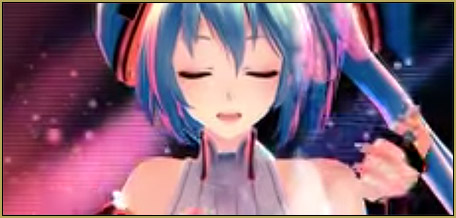
The MME Otome effect adds a fantasy cloud of bubbles and sparkles.

Otome effect yields bubble and sparkle psychedelia

Posted on June 3, 2021July 9, 2024 By Reggie_Dentmore 2 Comments on Otome effect yields bubble and sparkle psychedelia

A Feature Article by Reggie Dentmore on LearnMMD.comHow do I use the Otome effect? How can I get floating bubbles and sparkles into my MMD scene? How can I make my models seem to be “under the influence”? How can I add the look of a Fantasy Party to my MMD video? LearnMMD.com is now hosting the HariganeP Otome MME effect. Download the Otome Effect from LearnMMD.com
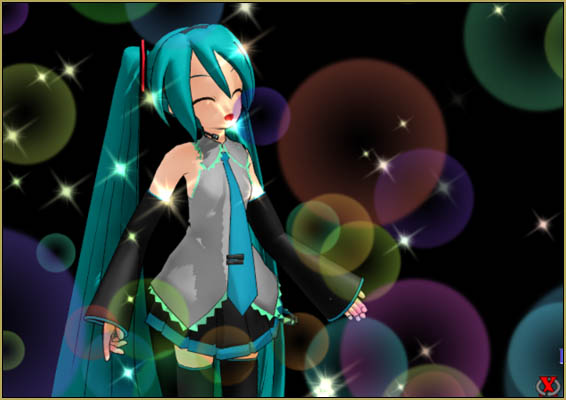
Otome effect yields bubble and sparkle psychedelia to your MMD scene!

This effect is like Magic and Fantasy all rolled into one. It looks best against a darker background. but… you will just have to try it out to see what you like.

DOWNLOAD the Otome Effect… zip folder from LearnMMD.com

There are several ways to apply the effect… the README file (written in a less politically-correct era) says it all…

Maiden filter ver0.0.4

It is a girly effect that appears in the animation production of polka dots and glitter. For the time being, it is for drama production.
It may not be suitable for use like turning the camera around …
We have prepared a case to hang around a specific object (Otome.fx) and an entire screen (Screen_Otome.fx, Post_Otome.fx: camera fixed).
It was created by modifying Mr. P’s laughing_man.fx and FireParticleSystem.fx.

How to use Otome.fx
(1) Load Otome.x into MMD.
(2) Make the drawing order after the target model.
(3) Change the first parameter of the fx file if necessary.
(4) Set the position, size, and transparency by changing the normal accessory parameters of MMD.

How to use Screen_Otome.fx
(1) Load Screen_Otome.x into MMD.
(2) Set the drawing order to the back as much as possible.
(3) Change the first parameter of the fx file if necessary.
(4) Only Tr (transparency) can be used as the accessory parameter of MMD.

How to use Post_Otome.fx
Load Post_Otome.x into MMD. Usage is the same as Screen_Otome.fx.
This works as a post effect. The effect of other post effects such as DOF
You can draw without receiving it.
Be sure to place the drawing order after other post effects.

About MikuMikuMoving
This effect is also compatible with MikuMikuMoving.
Please load Otome.fx, Screen_Otome.fx, Post_Otome.fx directly into MikuMikuMoving and use it.

Please use the included Back.bmp with background BMP or ScreenTex.fx.

This fx file will not work properly unless it is MME ver0.24 or later.


Otome… Maiden…

The Maiden Effect, Otome, as mentioned in the ReadMe, “… may not be suitable for use like turning the camera around.” It hangs in the air and is unaffected by camera motions… the stage and model will move as your camera moves, but the bubble and sparkles just float where they are. … Again, try it out and see what happens as you work with it.

In the .x applications, you can use Si size and Tr transparency to adjust the look of the effect… and you can click into accessory mode to move the position on-stage. …

Dummy bone? … Yes.

I don’t know how you’d USE it, but you can attach the Otome effect to a dummy-bone and so animate the position of the bubbles. I guess you could attach the effect to a dummy-bone, set the Si size to be small, and then move the bone across the scene while you let the effect Si size get larger and larger… who knows?

This is kind of a psychedelic effect…

I created a crazy image featuring the FunyaFunya effect, SSAO-Lite, and that FireLight Effect to yield a really warped little image:
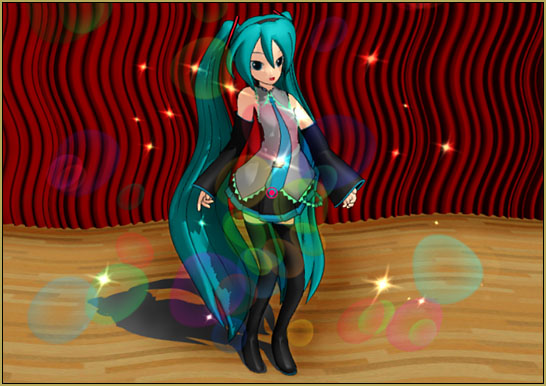
The Otome effect along with SSAO-Lite and the FunyaFunya effect and the FireLight effect.

I could note “share” this animation with a simple GIF… I had to make it into a short video!

The Otome effect along with SSAO-Lite and the FunyaFunya effect and the FireLight effect.

There you go… The Otome effect…

Have fun with MikuMikuDance!


– SEE BELOW for MORE MMD TUTORIALS…


— — —


– _ — –


Visit the LearnMMD.com Homepage! Plenty of Mikumikudance instruction and info!

More MMD Tutorials...

Introducing MMD model 1052C China Qipao Miku

Where can I download MMD model 1052C dancers? I want the 1052C China Qipao Miku ...read more

Download Jomomonogm's Snow Miku 2019 for MMD, a most unusual model!

Where can I download Jomomonogm's Snow Miku 2019? What is so unusual about this Snow ...read more

MMD animation made-from-scratch Forgotten Vocaloid Mew Rags on Reggie's MMD Videos

How do I make my own MMD animation from scratch? How do I start my ...read more

Rediscover your old MMD Animations: Love them again!

Rediscover your old MMD Animations: Love them again! https://youtu.be/P4b3todZMUI A labor of love... Remember how it was when ...read more

MMD Boobs too Big yields Too Funny Really Bad Boy video!

Can MMD boobs too big get in the way of a downloaded motion file? What ...read more

Download Hatsune Miku type N models from 2010... a set of 6!

Can I still download Hatsune Miku type N models? Where can I download a few ...read more

Otome, Reggie Dentmore

Post navigation

Previous Post: ALMorphMaker Adds AutoLuminous Morphs to your Model!
Next Post: Download new Rio Carnival models by shiro-nekovocaloid, Miku, Haku and Luka!

Related Posts

  • See my new YouTube MMD video “She’s So Hot!” Making Soundtracks
  • Lexasio's Steampunk Teto & Miku star in "Kiss me" MMD video!
    Lexasio’s Steampunk Teto & Miku star in MMD “Kiss Me” animation "the making of" my video
  • MME effect Kamitachi – Night breeze silhouette shader of Kama Kamitachi - Silhouette
  • GaussianVariable MME Effect Blurs your entire scene! GaussianVariable
  • MikuMikuDance FREE Animation Software & Instructions MMD Tutorials
  • 966_DigitalRipple Effect splashes lots of color into your MMD video! 966_DigitalRipple

More Related Articles

MMD EVERGLOW – Adios【Motion by Ureshiiiiii】- Free Download Motion and WAV "the making of" my video
Translate Romaji for better English translations Navigating Japanese Pages
MMD Smooth Criminal video project download "the making of" my video
Open MikuMikuDance and enjoy it for the fun of it! Open MikuMikuDance… just for the fun of it! MMD Basics
Tips for how to create complicated MMD dance motions. Making more complicated MMD dance motions – Some new notes… Making Smooth Motions
dull-VS-alive-animation-environment MMD animation environment… MORE than just a model on a stage! "the making of" my video

Comments (2) on “Otome effect yields bubble and sparkle psychedelia”

  1. Random Reader says:
    August 31, 2024 at 5:03 pm

    So I was trying to help someone find some of HariganeP’s effects and it looks like the website they used to be on is now gone? Is there anywhere else to find HariganeP’s stuff or is it gone forever?

    Reply
    1. Reggie_Dentmore says:
      September 1, 2024 at 8:46 pm

      Hello! I do not know the answer to that question. I do not know the situation. … BUT, I am hosting the ones that I have copies of.
      From the effects README:

      “Disclaimer
      You are free to use, modify, and distribute it secondarily. No need to contact.
      However, please do all these actions at your own risk.”

      Please let me know the ones you are looking for, I may have it for you. OTOME: https://learnmmd.com/Otome_v004_en.zip

      — Reggie

      Reply

Leave a Reply Cancel reply

Your email address will not be published. Required fields are marked *

Download the latest version of MikuMikuDance!
See the MMD Step-by-Step instructions page!
Learn how to make your own MMD motions!
LearnMMD.com
  • Dramatically Decrease AVI File size before uploading YouTube videos MMD Tutorials
  • Barbarians disregarding creative rights destroy MMD for all of us. Keep the Faith-MMD Credits/Sharing
  • The MMD 7.39 BONE MENU Options MENU Option Descriptions
  • Making MMD Models Complicated Task with much to know! Making Models
  • Post Effect cannot be specified
    Fix the “Post Effect cannot be specified” error Chris no Akumu
  • Import Daz models with Bones using Blender, Noesis, Xnalara Blender
  • Save to the Desktop with ALL FILES selected.
    Opening Japanese Models in MikuMikuDance – Sometimes they don’t work! Applocale / 7-Zip
  • IrfanView captures single-frame images from Video AVI files! Irfanview Media Viewer

Copyright © 2022 Learn MikuMikuDance – MMD Tutorials – Free 3D Animation Software and Instructions..

Powered by PressBook Premium theme

Go to mobile version