Skip to content
Learn MikuMikuDance – MMD Tutorials – Free 3D Animation Software

Learn MikuMikuDance – MMD Tutorials – Free 3D Animation Software

Download Free Animation Software – Let's Learn How to Do Everything!

  • Step-by-Step MMD instructions
  • DOWNLOADS
  • Troubleshoot, Fix MMD
  • Site Contents
  • Reggie Replies Q&A
  • Homework!
  • What IS MMD?
    • Download MikuMikuDance Newest Latest Version of MMD
  • “HOW TO”
    • Raycast RAY-MMD Effect Tutorials
  • BONUS PAGES
    • Why convert PMD models to PMX?
  • HALL of CHAMPIONS
  • Tutorial Categories
  • About
    • Privacy Policy
  • Toggle search form
  • How to make a Portal in MMD: blast a hole in the wall! Customize MME effects
  • MMD Banjo_RD by Reggie Dentmore for MikuMikuDance 7.39
    LearnMMD’s Dueling Banjos Banjo is avilable for Download! Google SketchUp and MMD
  • Zooming Out of MMD City Stage.
    Working with Large Stages In MikuMikuDance ARIZONA
  • Be a responsible MMDer … “Keep the Faith!” Welcome to LearnMMD.Com!
  • Download MME v037 in English 32-Bit or 64-Bit from LearnMMD.com Download MME MikuMikuEffects
  • LearnMMD's Video Dojo EXPO Champions!
    WINNERS of Video Dojo 1 – The FIRST Champions! CONTESTS
  • Make an effect start at a certain frame Kazuki Matsuoka
  • Beamman’s BeamCharge MME Effect Beamman's BeamCharge

Using the MME ColorShift Effect in MikuMikuDance

Posted on May 3, 2013August 9, 2016 By Arizona 7 Comments on Using the MME ColorShift Effect in MikuMikuDance

How do you use the ColorShift effect in MMD? How do I make 3D videos with MikuMikuDance? A Feature Article by contributor ARIZONA on LearnMMD.comLearnMMD MME Tutorials. Where do you get the ColorShift Effect? Is there a tutorial for the ColorShift Effect in MME?

Using the ColorShift Effect in MME.

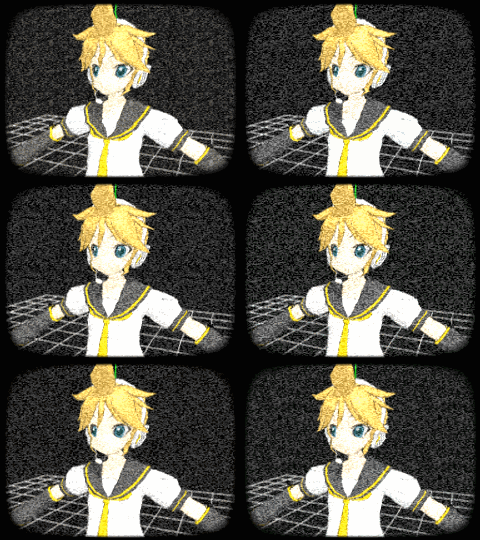
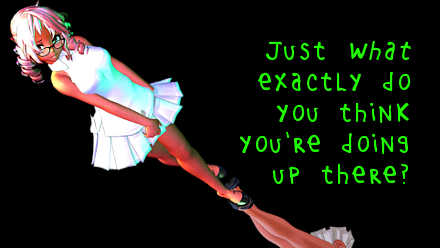
The Momi Cup was a really inspiring event for me. I got to see how people used standard effects in different ways. One of those effects used in a nontraditional way was the ColorShift effect. The Colorshift effect was originally designed to create a passive 3D effect for MikuMikuDance. When 3D movies first came out the audience had to wear cardboard (anaglyphic) glasses with red and blue gel lenses in them. The film was created so that the red/blue/green layers were slightly off centered and the audience optically filled in the effect. The ColorShift effect recreates this off centering. So, if you load the ColorShift effect and watch your video with 3D glasses, you have a 3D movie.
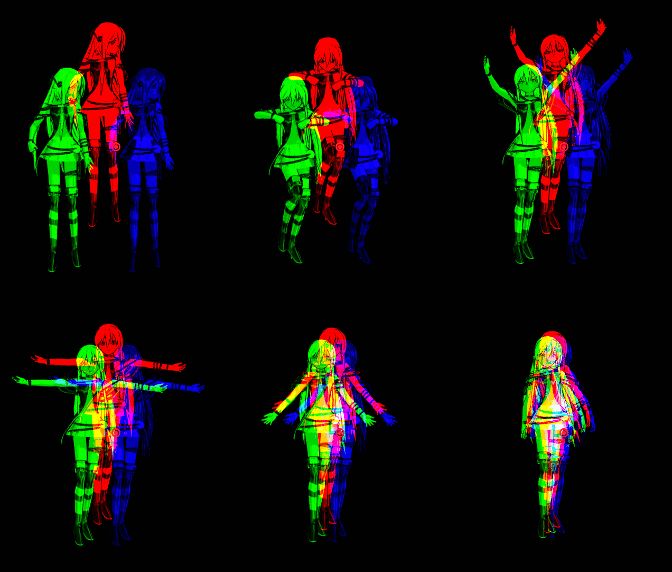
Lily is in 3D! Getting new life out of the old MME Color Shift Effect in MikuMikuDance MMDThe biggest problem with this effect is that it requires the viewer to have 3D glasses! Trying to watch an entire video without these glasses could give you a raging headache. That’s why the ColorShift effect is something of a problem child as far as effects are concerned and rarely used. I’m glad to see it somewhat rehabilitated.

Three Dimensional Thinking.

Before you can use effects, make sure that you have MMEffects properly installed in your MMD program. If you don’t, then let me refer you to Noko2’s excellent article: https://learnmmd.com/http:/learnmmd.com/download-mme-install-mikimikueffects-add-effects-mmd-7-39/ .  You can download the ColorShift effect from 00psy on Deviant Art:

http://00psy.deviantart.com/art/MMD-MME-ColorShift-DL-280645727

Make sure you have loaded all your models and other related data. Now click load in the Accessory Manipulation Panel (AMP). Select the ColorShift effect. Your Display Panel will change and everything will look like a 3D movie.

Like most effects, you can manipulate the size and transparency of the effect by using the AMP’s Si and Tr fields. MotionMakerDiva used these adjustments quite effectively in the Momi Cup 3 Announcement video. Whenever a model was hit, their bodily reaction was enhanced by the ColorShift effect. There are all kinds of possibilities for this effect so let your imagination explore them.

Have fun with this.

Model: Lily by Shadow Isis


– SEE BELOW for MORE MMD TUTORIALS…


— — —


– _ — –


Visit the LearnMMD.com Homepage! Plenty of Mikumikudance instruction and info!

More MMD Tutorials...

966_ Otogibanashi Toon "Fairy Tale" shader effect recolors your models

What is the 966_ Otogibanashi Toon shader? How can I recolor my models without using ...read more

ALMorphMaker Adds AutoLuminous Morphs to your Model!

What is the ALMorphMaker plugin? How can I put AutoLuminous morphs on a model? How can ...read more

DropShadow_dual Creates Two DropShadow Effects at Once!

Why can I only load one DropShadow effect at the same time? How does the ...read more

Editing Effect Textures Creates Brand New Effects!

Can editing effect textures change the look of my MME effects? What is an effect ...read more

MMD Fill Lights Part 1 (Half-Lambert Shader)

MMD and the use of Fill Lights ... Part 1 (Half-Lambert Shader) Fill lights are an important ...read more

LAT Model Shaders Create Stunning Scenes in MMD

Are there any LAT model shaders? How can I use shaders with LAT models? Do ...read more

ARIZONA, ColorShift 3D Effect, MME Effects Tutorials, Special Effects

Post navigation

Previous Post: New MMD Video Taught Awareness of Camera Angles and Motion Quirks!
Next Post: LearnMMDClub is OPEN on Deviant Art!

Related Posts

  • Kaito Sees Rotating Stars Thanks to the Accessory Manipulation Panel.
    More on Accessory Manipulation in MikuMikuDance Accessory Manipulation/Adjust
  • How to Switch Models and Stages in MikuMikuDance Accessory Manipulation/Adjust
  • Download MME v037 in English 32-Bit or 64-Bit from LearnMMD.com Download MME MikuMikuEffects
  • Customize MME Effects by Editing .fx Files Customize MME effects
  • o_ShaderCustomSet_v0_3 effect applies gentle color modification MMD Tutorials
  • Understanding MME Render Targets for Miku Miku Dance Effects Adult Shader effect

More Related Articles

Using Subset-Extract to Customize Your Models. ARIZONA
Staging and the 12 Principles of Animation. Accessory Manipulation/Adjust
Squash and Stretch Ball The 12 Principles of Animation for MikuMikuDance. ARIZONA
LearnMMD.com _ MikuMikuDance MMD Tutorials Almost Photo-realistic renders in MMD using Shaders and Effects Advanced Shader Technique
Using the AdultShader Effect In MikuMikuDance Adult Shader effect
AsciiArt Miku. AsciiArt for MikuMikuDance. ARIZONA

Comments (7) on “Using the MME ColorShift Effect in MikuMikuDance”

  1. janita says:
    August 14, 2016 at 2:55 pm

    oh sorry the message just didn’t show of properly so –> do you know the name of this effect? i’m so bad at explaining things but i will try:D .. this effect like exploses glass screen to pieces or something? i’m i making any sense here. it’s such a great effect but i don’t just seem to find it :( thank you ^^

    Reply
    1. bandages says:
      August 14, 2016 at 6:25 pm

      Are you thinking of https://learnmmd.com/http:/learnmmd.com/mme-collapse-effect/ ?

      Reply
      1. janita says:
        August 15, 2016 at 4:18 am

        i don’t know if that one is the effect :o .. here is an example of it —> 2:57 http://www.nicovideo.jp/watch/sm28312596

        (Oh! and i have been looking for this effect too! the effect in 3:31)

        Reply
  2. NTA65bz says:
    June 29, 2015 at 5:24 am

    I’m sorry…,
    Si and Tr fields ??

    Reply
    1. Reggie_Dentmore says:
      June 29, 2015 at 9:29 am

      In the Accessory Manipulation Panel (the AMP) in the lower right of your MMD screen… Si is Size and Tr is Transparency of the selected accessory. … Yes?

      Reply
  3. Toy Rebecca says:
    June 2, 2015 at 8:37 am

    The skydrive link is broken.

    Reply
    1. Reggie_Dentmore says:
      June 2, 2015 at 12:32 pm

      Thanks!… until we find a new one, please Google it or maybe search deviantArt.com

      Reply

Leave a Reply Cancel reply

Your email address will not be published. Required fields are marked *

Download the latest version of MikuMikuDance!
See the MMD Step-by-Step instructions page!
Learn how to make your own MMD motions!
LearnMMD.com
  • The UT Video Codec Suite works well with Render to AVI in MMD.
    UT Video Codec Suite v22.2.0 creates simple AVI video for MMD background AVI Reggie Dentmore
  • Fixed the MMD 8.05 Configuration Error Failed to Start MikuMikudance Reggie Dentmore
  • Cycles materials for textures model and nodes
    Cycles Materials For Textures in Blender: Nice Textures for MMD Fast! Blender
  • Raycast / Ray-MMD First Steps MMD Tutorials
  • You might name this model's folde "Short_Kimono_Teto_by_Nanami".
    Organize Your MMD Model Collection, Track Your Sources ARIZONA
  • Play games within MMD using MMD as a Game Engine! Creating Motions
  • New MMD ACCESSORY MODE allows Easy Object Positioning Accessory Manipulation/Adjust
  • Create MMD Abstract Art from Low-Res Videos! MMD Tutorials

Copyright © 2022 Learn MikuMikuDance – MMD Tutorials – Free 3D Animation Software and Instructions..

Powered by PressBook Premium theme

Go to mobile version